Parts list
| Part | Qty | Approx. | Buy |
|---|---|---|---|
| NodeMCU ESP8266 (CP2102 or CH340) | 1 | ₹280 | Buy NodeMCU ESP8266 (CP2102 or CH340) |
| L298N dual motor driver | 1 | ₹150 | Buy L298N dual motor driver |
| 2WD robot chassis kit with 2 BO gear motors and wheels | 1 | ₹450 | Buy 2WD robot chassis kit with 2 BO gear motors and wheels |
| 2× 18650 Li-ion cells + holder with switch (7.4 V) | 1 | ₹350 | Buy 2× 18650 Li-ion cells + holder with switch (7.4 V) |
| Jumper wires (male–female) | 10 | ₹40 | Buy Jumper wires (male–female) |
| Total | ₹1,270 |
Affiliate disclosure: “Buy” links may earn FlashReady a small commission at no extra cost to you. Prices are indicative.
Wiring
| NodeMCU ESP8266 | L298N dual H-bridge motor driver | Wire | Notes |
|---|---|---|---|
| — | OUT1 | — | To Left motor (+) (not drawn) |
| — | OUT2 | — | To Left motor (−) (not drawn) |
| — | OUT3 | — | To Right motor (+) (not drawn) |
| — | OUT4 | — | To Right motor (−) (not drawn) |
| D1 | ENA | orange | GPIO5, PWM speed of the left motor (remove the ENA jumper) |
| D2 | IN1 | yellow | GPIO4 |
| D5 | IN2 | green | GPIO14 |
| D6 | ENB | purple | GPIO12, PWM speed of the right motor (remove the ENB jumper) |
| D7 | IN3 | blue | GPIO13 |
| D0 | IN4 | cyan | GPIO16 — no PWM needed on a direction pin |
| VIN | 5V | red | The L298N’s regulator (5V-EN jumper on) feeds the NodeMCU’s VIN |
| GND | GND | black | Common ground: battery −, L298N and NodeMCU |
| 2× 18650 Li-ion pack (7.4 V) with switch · + | 12V | red | Through the holder’s switch. The L298N drops about 2 V, so the motors see ~5.4 V |
| 2× 18650 Li-ion pack (7.4 V) with switch · - | GND | black |
Board quirks: The L298N’s inputs see anything above about 2.3 V as HIGH, so the NodeMCU’s 3.3 V outputs drive it directly — no level shifter. Pins are chosen to stay clear of the ESP8266’s boot pins: D3 (GPIO0), D4 (GPIO2) and D8 (GPIO15) must be at fixed levels at power-on, and a driver input could upset that. Change the car’s Wi-Fi password (the flasher asks, or edit <code>AP_PASS</code>) — the default is printed on this page for everyone to read. Li-ion 18650 cells can catch fire if shorted or over-discharged: use a holder with a switch, protected cells, a proper Li-ion charger, and never leave the car charging unattended.
Code
// Wi-Fi robot car — NodeMCU ESP8266 + L298N + 2WD chassis, driven from a phone browser
// L298N: ENA D1 (GPIO5), IN1 D2 (GPIO4), IN2 D5 (GPIO14), ENB D6 (GPIO12), IN3 D7 (GPIO13),
// IN4 D0 (GPIO16). The L298N's 5V output feeds the NodeMCU's VIN; battery to the 12V terminal.
// The car makes its own Wi-Fi network ("FR-Car"). Join it on your phone, open 192.168.4.1 and
// hold the arrow buttons. No app, no internet, no router. If the phone stops sending for
// 0.5 s (out of range, screen locked), the car stops by itself.
#include <ESP8266WiFi.h>
#include <ESP8266WebServer.h>
#include "fr_settings.h"
const char* AP_PASS = "flashready"; // at least 8 characters
// Filled in from the FlashReady flasher over USB (kept on the board), or type the value above.
FrSetting SETTINGS[] = {{"ap_pass", &AP_PASS, false}};
constexpr uint8_t ENA = D1, IN1 = D2, IN2 = D5; // left motor
constexpr uint8_t ENB = D6, IN3 = D7, IN4 = D0; // right motor
constexpr unsigned long FAILSAFE_MS = 500;
ESP8266WebServer server(80);
unsigned long lastCommand = 0;
int speed = 200; // 0–255
char current = 'S';
const char PAGE[] PROGMEM = R"HTML(<!doctype html><html><head><meta name="viewport" content="width=device-width,initial-scale=1,user-scalable=no">
<title>FR Car</title><style>body{font-family:sans-serif;text-align:center;background:#111;color:#eee;user-select:none;-webkit-user-select:none}
.g{display:grid;grid-template-columns:repeat(3,90px);gap:12px;justify-content:center;margin:24px auto}
button{height:90px;font-size:32px;border-radius:16px;border:0;background:#2563eb;color:#fff;touch-action:none}
button.s{background:#dc2626}input{width:260px}</style></head><body><h2>FlashReady car</h2>
<div class="g"><span></span><button data-d="F">▲</button><span></span>
<button data-d="L">◀</button><button class="s" data-d="S">■</button><button data-d="R">▶</button>
<span></span><button data-d="B">▼</button><span></span></div>
<p>Speed <input id="v" type="range" min="80" max="255" value="200"></p>
<script>let d='S',t;const send=()=>fetch('/go?d='+d+'&v='+document.getElementById('v').value).catch(()=>{});
document.querySelectorAll('button').forEach(b=>{const on=e=>{e.preventDefault();d=b.dataset.d;send();clearInterval(t);if(d!='S')t=setInterval(send,150)};
const off=e=>{e.preventDefault();d='S';clearInterval(t);send()};b.addEventListener('pointerdown',on);b.addEventListener('pointerup',off);b.addEventListener('pointerleave',off)});
</script></body></html>)HTML";
void motor(uint8_t en, uint8_t a, uint8_t b, int s) {
digitalWrite(a, s > 0 ? HIGH : LOW);
digitalWrite(b, s < 0 ? HIGH : LOW);
analogWrite(en, abs(s));
}
void drive(char d) {
int l = 0, r = 0;
switch (d) {
case 'F': l = r = speed; break;
case 'B': l = r = -speed; break;
case 'L': l = -speed * 7 / 10, r = speed * 7 / 10; break; // spin in place, a little gentler
case 'R': l = speed * 7 / 10, r = -speed * 7 / 10; break;
default: d = 'S';
}
motor(ENA, IN1, IN2, l);
motor(ENB, IN3, IN4, r);
if (d != current) Serial.printf("drive %c speed %d\n", d, speed);
current = d;
}
void setup() {
Serial.begin(115200);
frSettingsBegin(SETTINGS);
const uint8_t outs[] = {ENA, IN1, IN2, ENB, IN3, IN4};
for (uint8_t p : outs) pinMode(p, OUTPUT);
analogWriteRange(255);
analogWriteFreq(1000);
drive('S');
const char* pass = strlen(AP_PASS) >= 8 ? AP_PASS : "flashready";
WiFi.mode(WIFI_AP);
WiFi.softAP("FR-Car", pass);
Serial.printf("Join Wi-Fi \"FR-Car\" (password %s) and open http://%s\n", pass, WiFi.softAPIP().toString().c_str());
server.on("/", [] { server.send_P(200, "text/html", PAGE); });
server.on("/go", [] {
if (server.hasArg("v")) speed = constrain(server.arg("v").toInt(), 0, 255);
String d = server.arg("d");
lastCommand = millis();
drive(d.length() ? d[0] : 'S');
server.send(200, "text/plain", "ok");
});
server.begin();
}
void loop() {
server.handleClient();
if (current != 'S' && millis() - lastCommand > FAILSAFE_MS) {
drive('S');
Serial.println("fail-safe stop (no command for 0.5 s)");
}
}// Wi-Fi robot car — NodeMCU ESP8266 + L298N + 2WD chassis, driven from a phone browser
// L298N: ENA D1 (GPIO5), IN1 D2 (GPIO4), IN2 D5 (GPIO14), ENB D6 (GPIO12), IN3 D7 (GPIO13),
// IN4 D0 (GPIO16). The L298N's 5V output feeds the NodeMCU's VIN; battery to the 12V terminal.
// The car makes its own Wi-Fi network ("FR-Car"). Join it on your phone, open 192.168.4.1 and
// hold the arrow buttons. No app, no internet, no router. If the phone stops sending for
// 0.5 s (out of range, screen locked), the car stops by itself.
#include <ESP8266WiFi.h>
#include <ESP8266WebServer.h>
#include "fr_settings.h"
const char* AP_PASS = "flashready"; // at least 8 characters
// Filled in from the FlashReady flasher over USB (kept on the board), or type the value above.
FrSetting SETTINGS[] = {{"ap_pass", &AP_PASS, false}};
constexpr uint8_t ENA = D1, IN1 = D2, IN2 = D5; // left motor
constexpr uint8_t ENB = D6, IN3 = D7, IN4 = D0; // right motor
constexpr unsigned long FAILSAFE_MS = 500;
ESP8266WebServer server(80);
unsigned long lastCommand = 0;
int speed = 200; // 0–255
char current = 'S';
const char PAGE[] PROGMEM = R"HTML(<!doctype html><html><head><meta name="viewport" content="width=device-width,initial-scale=1,user-scalable=no">
<title>FR Car</title><style>body{font-family:sans-serif;text-align:center;background:#111;color:#eee;user-select:none;-webkit-user-select:none}
.g{display:grid;grid-template-columns:repeat(3,90px);gap:12px;justify-content:center;margin:24px auto}
button{height:90px;font-size:32px;border-radius:16px;border:0;background:#2563eb;color:#fff;touch-action:none}
button.s{background:#dc2626}input{width:260px}</style></head><body><h2>FlashReady car</h2>
<div class="g"><span></span><button data-d="F">▲</button><span></span>
<button data-d="L">◀</button><button class="s" data-d="S">■</button><button data-d="R">▶</button>
<span></span><button data-d="B">▼</button><span></span></div>
<p>Speed <input id="v" type="range" min="80" max="255" value="200"></p>
<script>let d='S',t;const send=()=>fetch('/go?d='+d+'&v='+document.getElementById('v').value).catch(()=>{});
document.querySelectorAll('button').forEach(b=>{const on=e=>{e.preventDefault();d=b.dataset.d;send();clearInterval(t);if(d!='S')t=setInterval(send,150)};
const off=e=>{e.preventDefault();d='S';clearInterval(t);send()};b.addEventListener('pointerdown',on);b.addEventListener('pointerup',off);b.addEventListener('pointerleave',off)});
</script></body></html>)HTML";
void motor(uint8_t en, uint8_t a, uint8_t b, int s) {
digitalWrite(a, s > 0 ? HIGH : LOW);
digitalWrite(b, s < 0 ? HIGH : LOW);
analogWrite(en, abs(s));
}
void drive(char d) {
int l = 0, r = 0;
switch (d) {
case 'F': l = r = speed; break;
case 'B': l = r = -speed; break;
case 'L': l = -speed * 7 / 10, r = speed * 7 / 10; break; // spin in place, a little gentler
case 'R': l = speed * 7 / 10, r = -speed * 7 / 10; break;
default: d = 'S';
}
motor(ENA, IN1, IN2, l);
motor(ENB, IN3, IN4, r);
if (d != current) Serial.printf("drive %c speed %d\n", d, speed);
current = d;
}
void setup() {
Serial.begin(115200);
frSettingsBegin(SETTINGS);
const uint8_t outs[] = {ENA, IN1, IN2, ENB, IN3, IN4};
for (uint8_t p : outs) pinMode(p, OUTPUT);
analogWriteRange(255);
analogWriteFreq(1000);
drive('S');
const char* pass = strlen(AP_PASS) >= 8 ? AP_PASS : "flashready";
WiFi.mode(WIFI_AP);
WiFi.softAP("FR-Car", pass);
Serial.printf("Join Wi-Fi \"FR-Car\" (password %s) and open http://%s\n", pass, WiFi.softAPIP().toString().c_str());
server.on("/", [] { server.send_P(200, "text/html", PAGE); });
server.on("/go", [] {
if (server.hasArg("v")) speed = constrain(server.arg("v").toInt(), 0, 255);
String d = server.arg("d");
lastCommand = millis();
drive(d.length() ? d[0] : 'S');
server.send(200, "text/plain", "ok");
});
server.begin();
}
void loop() {
server.handleClient();
if (current != 'S' && millis() - lastCommand > FAILSAFE_MS) {
drive('S');
Serial.println("fail-safe stop (no command for 0.5 s)");
}
}Arduino IDE: keep fr_settings.h in the same folder as the .ino (tab menu → New Tab, same name). Flashing from this page doesn’t need it.
// fr_settings.h — FlashReady on-board settings (Wi-Fi name, phone number, ...) over USB.
//
// Why: the pre-built file on flashready.in is the same for everyone, so your own settings
// can't be inside it. Instead the board asks for them over USB serial and keeps them in
// its EEPROM. If you use Arduino IDE you can still type them into the constants in the
// sketch — this file then changes nothing except a 2-second pause at start-up.
//
// The protocol, in plain words (one text line each way, ending in \n, at 115200 baud):
//  1. Right after Serial.begin(115200) the board prints
//       FR?SETTINGS v1 keys=wifi_ssid,wifi_pass missing=wifi_pass
//     "missing" lists the required settings that still have no real value.
//  2. If nothing is missing it listens for 2 seconds and then carries on. If something is
//     missing it keeps listening, printing the line again every 2 seconds, for up to
//     30 seconds; then it carries on anyway and the sketch skips whatever needs the
//     missing value (an alarm still sounds, it just can't send the SMS).
//  3. The flasher answers   FR!SET wifi_ssid=My%20Home&wifi_pass=secret
//     (values URL-encoded). The board stores them and answers FR!OK, then carries on with
//     the new values. Errors: FR!ERR unknown <key>, FR!ERR long <key> (nothing is stored).
//     A key that is left out keeps its stored value; "key=" (empty) removes it.
//     "FR!SET" with nothing after it means "carry on now": FR!OK, nothing is stored.
//  4. FR!CLEAR wipes everything that was stored, answers FR!OK and keeps listening.
//  Other lines are ignored.
//
// A stored value wins over the constant in the sketch. A constant that is still a
// placeholder ("YOUR_SSID", "your-wifi", "+91XXXXXXXXXX") or empty counts as not set.
//
// EEPROM block at FR_SETTINGS_ADDR: 'F' 'R' 0x01, length (uint16, low byte first), then
// "key=value\n" lines. Uses FR_SETTINGS_SIZE bytes; move FR_SETTINGS_ADDR with a #define
// before the #include if your sketch uses EEPROM for something else.
//
// Use in a sketch:
//   const char* WIFI_SSID = "YOUR_SSID";
//   FrSetting SETTINGS[] = { {"wifi_ssid", &WIFI_SSID, true} };   // key, constant, required
//   void setup() { Serial.begin(115200); frSettingsBegin(SETTINGS); ... WiFi.begin(WIFI_SSID, ...); }
// After frSettingsBegin() each constant points at the value to use ("" if none is set).
#pragma once
#include <Arduino.h>
#include <EEPROM.h>
#include <string.h>

#ifndef FR_SETTINGS_ADDR
#define FR_SETTINGS_ADDR 0
#endif
#ifndef FR_SETTINGS_SIZE
#if defined(__AVR__)
#define FR_SETTINGS_SIZE 96  // 2 KB of RAM on an Uno: a phone number fits easily
#else
#define FR_SETTINGS_SIZE 512
#endif
#endif
#ifndef FR_LINE_MAX
#if defined(__AVR__)
#define FR_LINE_MAX 128
#else
#define FR_LINE_MAX 1024
#endif
#endif
#define FR_MAX_KEYS 8
#define FR_WAIT_MAX_MS 30000UL  // never wait longer than this for missing settings
#define FR_DATA_MAX (FR_SETTINGS_SIZE - 5)

struct FrSetting {
  const char* key;     // [a-z0-9_], as in settings.json
  const char** value;  // the sketch's constant; replaced by the value to use
  bool required;
};

// Stored settings in RAM as "key=value\0key=value\0" (only non-empty values).
static char frData[FR_DATA_MAX + 1];
static uint16_t frLen = 0;

static inline void frEepromBegin() {
#if defined(ESP32) || defined(ESP8266)
  static bool started = false;
  if (!started) EEPROM.begin(FR_SETTINGS_ADDR + FR_SETTINGS_SIZE);
  started = true;
#endif
}

static inline void frLoad() {
  frEepromBegin();
  frLen = 0;
  frData[0] = 0;
  if (EEPROM.read(FR_SETTINGS_ADDR) != 'F' || EEPROM.read(FR_SETTINGS_ADDR + 1) != 'R' || EEPROM.read(FR_SETTINGS_ADDR + 2) != 1) return;
  uint16_t n = EEPROM.read(FR_SETTINGS_ADDR + 3) | (EEPROM.read(FR_SETTINGS_ADDR + 4) << 8);
  if (n > FR_DATA_MAX) return;
  for (uint16_t i = 0; i < n; i++) {
    char c = EEPROM.read(FR_SETTINGS_ADDR + 5 + i);
    frData[i] = c == '\n' ? '\0' : c;
  }
  frData[n] = 0;
  frLen = n;
}

static inline void frPut(int addr, uint8_t b) {
#if defined(__AVR__)
  EEPROM.update(addr, b);
#else
  EEPROM.write(addr, b);
#endif
}

static inline void frSave() {
  frEepromBegin();
  frPut(FR_SETTINGS_ADDR, 'F');
  frPut(FR_SETTINGS_ADDR + 1, 'R');
  frPut(FR_SETTINGS_ADDR + 2, 1);
  frPut(FR_SETTINGS_ADDR + 3, frLen & 0xFF);
  frPut(FR_SETTINGS_ADDR + 4, frLen >> 8);
  for (uint16_t i = 0; i < frLen; i++) frPut(FR_SETTINGS_ADDR + 5 + i, frData[i] ? frData[i] : '\n');
#if defined(ESP32) || defined(ESP8266)
  EEPROM.commit();
#endif
}

// The stored value for key, or nullptr.
static inline const char* frStored(const char* key) {
  size_t kl = strlen(key);
  for (uint16_t i = 0; i < frLen; i += strlen(frData + i) + 1) {
    if (strncmp(frData + i, key, kl) == 0 && frData[i + kl] == '=') return frData + i + kl + 1;
  }
  return nullptr;
}

// Empty, "your_…" / "YOUR-…" / "your …", or a "+91XXXX…" phone number.
static inline bool frIsPlaceholder(const char* v) {
  if (!v || !*v) return true;
  if (strncasecmp(v, "your", 4) == 0 && (v[4] == '_' || v[4] == '-' || v[4] == ' ')) return true;
  return v[0] == '+' && strstr(v, "XXXX") != nullptr;
}

// The stored value for key, else the fallback constant; "" if that is a placeholder.
static inline const char* frSettingsGet(const char* key, const char* fallback) {
  const char* v = frStored(key);
  if (!v) v = fallback;
  return frIsPlaceholder(v) ? "" : v;
}

static inline bool frIsMissing(const FrSetting& s) {
  return s.required && !*frSettingsGet(s.key, *s.value);
}

static inline void frRequest(FrSetting* s, uint8_t n) {
  Serial.print(F("FR?SETTINGS v1 keys="));
  for (uint8_t i = 0; i < n; i++) {
    if (i) Serial.print(',');
    Serial.print(s[i].key);
  }
  Serial.print(F(" missing="));
  bool first = true;
  for (uint8_t i = 0; i < n; i++) {
    if (!frIsMissing(s[i])) continue;
    if (!first) Serial.print(',');
    Serial.print(s[i].key);
    first = false;
  }
  Serial.print('\n');
}

static inline void frReply(const __FlashStringHelper* what, const char* key) {
  Serial.print(what);
  Serial.print(key);
  Serial.print('\n');
}

static inline int8_t frHex(char c) {
  if (c >= '0' && c <= '9') return c - '0';
  c |= 0x20;
  return (c >= 'a' && c <= 'f') ? c - 'a' + 10 : -1;
}

// Percent-decodes in place. Drops NUL, CR and LF: they can't be stored.
static inline void frDecode(char* s) {
  char* o = s;
  for (; *s; s++) {
    char c = *s;
    if (c == '%' && frHex(s[1]) >= 0 && frHex(s[2]) >= 0) {
      c = (char)(frHex(s[1]) << 4 | frHex(s[2]));
      s += 2;
    }
    if (c != '\0' && c != '\n' && c != '\r') *o++ = c;
  }
  *o = 0;
}

// "k1=v1&k2=v2" (cut short if the line overflowed). Saves and returns true, or replies with an error.
static inline bool frSet(FrSetting* s, uint8_t n, char* p, bool overflow) {
  const char* upd[FR_MAX_KEYS] = {};
  while (*p) {
    char* amp = strchr(p, '&');
    bool last = !amp;
    if (amp) *amp = 0;
    char* eq = strchr(p, '=');
    if (eq) *eq = 0;
    if (*p) {
      if (last && overflow) {
        frReply(F("FR!ERR long "), p);
        return false;
      }
      uint8_t i = 0;
      while (i < n && strcmp(s[i].key, p) != 0) i++;
      if (i == n) {
        frReply(F("FR!ERR unknown "), p);
        return false;
      }
      char* v = eq ? eq + 1 : p + strlen(p);  // "key" alone = "key="
      frDecode(v);
      upd[i] = v;
    }
    if (last) break;
    p = amp + 1;
  }
  // Build the new block: for each key, the new value or the one already stored.
  char next[FR_DATA_MAX + 1];
  uint16_t len = 0;
  for (uint8_t i = 0; i < n; i++) {
    const char* v = upd[i] ? upd[i] : frStored(s[i].key);
    if (!v || !*v) continue;
    size_t kl = strlen(s[i].key), vl = strlen(v);
    if (len + kl + vl + 2 > FR_DATA_MAX) {
      frReply(F("FR!ERR long "), s[i].key);
      return false;
    }
    memcpy(next + len, s[i].key, kl);
    next[len + kl] = '=';
    memcpy(next + len + kl + 1, v, vl + 1);
    len += kl + vl + 2;
  }
  memcpy(frData, next, len);
  frData[len] = 0;
  frLen = len;
  frSave();
  return true;
}

// Handles one received line. Returns true once settings were saved (boot carries on).
static inline bool frCommand(FrSetting* s, uint8_t n, char* line, bool overflow) {
  if (strcmp(line, "FR!CLEAR") == 0) {
    frLen = 0;
    frData[0] = 0;
    frSave();
    Serial.print(F("FR!OK\n"));
    return false;
  }
  if (strncmp(line, "FR!SET", 6) != 0 || (line[6] != ' ' && line[6] != 0)) return false;  // not for us
  char* p = line + 6;
  while (*p == ' ') p++;
  if (*p && !frSet(s, n, p, overflow)) return false;  // empty FR!SET = carry on, store nothing
  Serial.print(F("FR!OK\n"));
  return true;
}

// Call right after Serial.begin(115200). Prints the request, waits as described at the top
// (30 s at most), then points every constant in the list at the value to use ("" = not set).
static inline void frSettingsBegin(FrSetting* s, uint8_t n) {
  frLoad();
  char line[FR_LINE_MAX];
  uint16_t len = 0;
  bool overflow = false;
  frRequest(s, n);
  unsigned long start = millis(), quietSince = start;
  while (millis() - start < FR_WAIT_MAX_MS) {
    int c = Serial.read();
    if (c >= 0) {
      quietSince = millis();
      if (c == '\r') continue;
      if (c != '\n') {
        if (len < FR_LINE_MAX - 1) line[len++] = (char)c;
        else overflow = true;
        continue;
      }
      line[len] = 0;
      bool saved = frCommand(s, n, line, overflow);
      len = 0;
      overflow = false;
      if (saved) break;
      continue;
    }
    if (millis() - quietSince < 2000) {
      delay(1);  // also keeps the ESP8266 watchdog fed
      continue;
    }
    len = 0;  // drop half a line
    overflow = false;
    bool missing = false;
    for (uint8_t i = 0; i < n; i++) missing |= frIsMissing(s[i]);
    if (!missing) break;
    frRequest(s, n);
    quietSince = millis();
  }
  for (uint8_t i = 0; i < n; i++) *s[i].value = frSettingsGet(s[i].key, *s[i].value);
}

template <size_t N>
static inline void frSettingsBegin(FrSetting (&s)[N]) {
  static_assert(N <= FR_MAX_KEYS, "fr_settings.h: at most FR_MAX_KEYS settings");
  frSettingsBegin(s, (uint8_t)N);
}
// fr_settings.h — FlashReady on-board settings (Wi-Fi name, phone number, ...) over USB.
//
// Why: the pre-built file on flashready.in is the same for everyone, so your own settings
// can't be inside it. Instead the board asks for them over USB serial and keeps them in
// its EEPROM. If you use Arduino IDE you can still type them into the constants in the
// sketch — this file then changes nothing except a 2-second pause at start-up.
//
// The protocol, in plain words (one text line each way, ending in \n, at 115200 baud):
// 1. Right after Serial.begin(115200) the board prints
// FR?SETTINGS v1 keys=wifi_ssid,wifi_pass missing=wifi_pass
// "missing" lists the required settings that still have no real value.
// 2. If nothing is missing it listens for 2 seconds and then carries on. If something is
// missing it keeps listening, printing the line again every 2 seconds, for up to
// 30 seconds; then it carries on anyway and the sketch skips whatever needs the
// missing value (an alarm still sounds, it just can't send the SMS).
// 3. The flasher answers FR!SET wifi_ssid=My%20Home&wifi_pass=secret
// (values URL-encoded). The board stores them and answers FR!OK, then carries on with
// the new values. Errors: FR!ERR unknown <key>, FR!ERR long <key> (nothing is stored).
// A key that is left out keeps its stored value; "key=" (empty) removes it.
// "FR!SET" with nothing after it means "carry on now": FR!OK, nothing is stored.
// 4. FR!CLEAR wipes everything that was stored, answers FR!OK and keeps listening.
// Other lines are ignored.
//
// A stored value wins over the constant in the sketch. A constant that is still a
// placeholder ("YOUR_SSID", "your-wifi", "+91XXXXXXXXXX") or empty counts as not set.
//
// EEPROM block at FR_SETTINGS_ADDR: 'F' 'R' 0x01, length (uint16, low byte first), then
// "key=value\n" lines. Uses FR_SETTINGS_SIZE bytes; move FR_SETTINGS_ADDR with a #define
// before the #include if your sketch uses EEPROM for something else.
//
// Use in a sketch:
// const char* WIFI_SSID = "YOUR_SSID";
// FrSetting SETTINGS[] = { {"wifi_ssid", &WIFI_SSID, true} }; // key, constant, required
// void setup() { Serial.begin(115200); frSettingsBegin(SETTINGS); ... WiFi.begin(WIFI_SSID, ...); }
// After frSettingsBegin() each constant points at the value to use ("" if none is set).
#pragma once
#include <Arduino.h>
#include <EEPROM.h>
#include <string.h>
#ifndef FR_SETTINGS_ADDR
#define FR_SETTINGS_ADDR 0
#endif
#ifndef FR_SETTINGS_SIZE
#if defined(__AVR__)
#define FR_SETTINGS_SIZE 96 // 2 KB of RAM on an Uno: a phone number fits easily
#else
#define FR_SETTINGS_SIZE 512
#endif
#endif
#ifndef FR_LINE_MAX
#if defined(__AVR__)
#define FR_LINE_MAX 128
#else
#define FR_LINE_MAX 1024
#endif
#endif
#define FR_MAX_KEYS 8
#define FR_WAIT_MAX_MS 30000UL // never wait longer than this for missing settings
#define FR_DATA_MAX (FR_SETTINGS_SIZE - 5)
struct FrSetting {
const char* key; // [a-z0-9_], as in settings.json
const char** value; // the sketch's constant; replaced by the value to use
bool required;
};
// Stored settings in RAM as "key=value\0key=value\0" (only non-empty values).
static char frData[FR_DATA_MAX + 1];
static uint16_t frLen = 0;
static inline void frEepromBegin() {
#if defined(ESP32) || defined(ESP8266)
static bool started = false;
if (!started) EEPROM.begin(FR_SETTINGS_ADDR + FR_SETTINGS_SIZE);
started = true;
#endif
}
static inline void frLoad() {
frEepromBegin();
frLen = 0;
frData[0] = 0;
if (EEPROM.read(FR_SETTINGS_ADDR) != 'F' || EEPROM.read(FR_SETTINGS_ADDR + 1) != 'R' || EEPROM.read(FR_SETTINGS_ADDR + 2) != 1) return;
uint16_t n = EEPROM.read(FR_SETTINGS_ADDR + 3) | (EEPROM.read(FR_SETTINGS_ADDR + 4) << 8);
if (n > FR_DATA_MAX) return;
for (uint16_t i = 0; i < n; i++) {
char c = EEPROM.read(FR_SETTINGS_ADDR + 5 + i);
frData[i] = c == '\n' ? '\0' : c;
}
frData[n] = 0;
frLen = n;
}
static inline void frPut(int addr, uint8_t b) {
#if defined(__AVR__)
EEPROM.update(addr, b);
#else
EEPROM.write(addr, b);
#endif
}
static inline void frSave() {
frEepromBegin();
frPut(FR_SETTINGS_ADDR, 'F');
frPut(FR_SETTINGS_ADDR + 1, 'R');
frPut(FR_SETTINGS_ADDR + 2, 1);
frPut(FR_SETTINGS_ADDR + 3, frLen & 0xFF);
frPut(FR_SETTINGS_ADDR + 4, frLen >> 8);
for (uint16_t i = 0; i < frLen; i++) frPut(FR_SETTINGS_ADDR + 5 + i, frData[i] ? frData[i] : '\n');
#if defined(ESP32) || defined(ESP8266)
EEPROM.commit();
#endif
}
// The stored value for key, or nullptr.
static inline const char* frStored(const char* key) {
size_t kl = strlen(key);
for (uint16_t i = 0; i < frLen; i += strlen(frData + i) + 1) {
if (strncmp(frData + i, key, kl) == 0 && frData[i + kl] == '=') return frData + i + kl + 1;
}
return nullptr;
}
// Empty, "your_…" / "YOUR-…" / "your …", or a "+91XXXX…" phone number.
static inline bool frIsPlaceholder(const char* v) {
if (!v || !*v) return true;
if (strncasecmp(v, "your", 4) == 0 && (v[4] == '_' || v[4] == '-' || v[4] == ' ')) return true;
return v[0] == '+' && strstr(v, "XXXX") != nullptr;
}
// The stored value for key, else the fallback constant; "" if that is a placeholder.
static inline const char* frSettingsGet(const char* key, const char* fallback) {
const char* v = frStored(key);
if (!v) v = fallback;
return frIsPlaceholder(v) ? "" : v;
}
static inline bool frIsMissing(const FrSetting& s) {
return s.required && !*frSettingsGet(s.key, *s.value);
}
static inline void frRequest(FrSetting* s, uint8_t n) {
Serial.print(F("FR?SETTINGS v1 keys="));
for (uint8_t i = 0; i < n; i++) {
if (i) Serial.print(',');
Serial.print(s[i].key);
}
Serial.print(F(" missing="));
bool first = true;
for (uint8_t i = 0; i < n; i++) {
if (!frIsMissing(s[i])) continue;
if (!first) Serial.print(',');
Serial.print(s[i].key);
first = false;
}
Serial.print('\n');
}
static inline void frReply(const __FlashStringHelper* what, const char* key) {
Serial.print(what);
Serial.print(key);
Serial.print('\n');
}
static inline int8_t frHex(char c) {
if (c >= '0' && c <= '9') return c - '0';
c |= 0x20;
return (c >= 'a' && c <= 'f') ? c - 'a' + 10 : -1;
}
// Percent-decodes in place. Drops NUL, CR and LF: they can't be stored.
static inline void frDecode(char* s) {
char* o = s;
for (; *s; s++) {
char c = *s;
if (c == '%' && frHex(s[1]) >= 0 && frHex(s[2]) >= 0) {
c = (char)(frHex(s[1]) << 4 | frHex(s[2]));
s += 2;
}
if (c != '\0' && c != '\n' && c != '\r') *o++ = c;
}
*o = 0;
}
// "k1=v1&k2=v2" (cut short if the line overflowed). Saves and returns true, or replies with an error.
static inline bool frSet(FrSetting* s, uint8_t n, char* p, bool overflow) {
const char* upd[FR_MAX_KEYS] = {};
while (*p) {
char* amp = strchr(p, '&');
bool last = !amp;
if (amp) *amp = 0;
char* eq = strchr(p, '=');
if (eq) *eq = 0;
if (*p) {
if (last && overflow) {
frReply(F("FR!ERR long "), p);
return false;
}
uint8_t i = 0;
while (i < n && strcmp(s[i].key, p) != 0) i++;
if (i == n) {
frReply(F("FR!ERR unknown "), p);
return false;
}
char* v = eq ? eq + 1 : p + strlen(p); // "key" alone = "key="
frDecode(v);
upd[i] = v;
}
if (last) break;
p = amp + 1;
}
// Build the new block: for each key, the new value or the one already stored.
char next[FR_DATA_MAX + 1];
uint16_t len = 0;
for (uint8_t i = 0; i < n; i++) {
const char* v = upd[i] ? upd[i] : frStored(s[i].key);
if (!v || !*v) continue;
size_t kl = strlen(s[i].key), vl = strlen(v);
if (len + kl + vl + 2 > FR_DATA_MAX) {
frReply(F("FR!ERR long "), s[i].key);
return false;
}
memcpy(next + len, s[i].key, kl);
next[len + kl] = '=';
memcpy(next + len + kl + 1, v, vl + 1);
len += kl + vl + 2;
}
memcpy(frData, next, len);
frData[len] = 0;
frLen = len;
frSave();
return true;
}
// Handles one received line. Returns true once settings were saved (boot carries on).
static inline bool frCommand(FrSetting* s, uint8_t n, char* line, bool overflow) {
if (strcmp(line, "FR!CLEAR") == 0) {
frLen = 0;
frData[0] = 0;
frSave();
Serial.print(F("FR!OK\n"));
return false;
}
if (strncmp(line, "FR!SET", 6) != 0 || (line[6] != ' ' && line[6] != 0)) return false; // not for us
char* p = line + 6;
while (*p == ' ') p++;
if (*p && !frSet(s, n, p, overflow)) return false; // empty FR!SET = carry on, store nothing
Serial.print(F("FR!OK\n"));
return true;
}
// Call right after Serial.begin(115200). Prints the request, waits as described at the top
// (30 s at most), then points every constant in the list at the value to use ("" = not set).
static inline void frSettingsBegin(FrSetting* s, uint8_t n) {
frLoad();
char line[FR_LINE_MAX];
uint16_t len = 0;
bool overflow = false;
frRequest(s, n);
unsigned long start = millis(), quietSince = start;
while (millis() - start < FR_WAIT_MAX_MS) {
int c = Serial.read();
if (c >= 0) {
quietSince = millis();
if (c == '\r') continue;
if (c != '\n') {
if (len < FR_LINE_MAX - 1) line[len++] = (char)c;
else overflow = true;
continue;
}
line[len] = 0;
bool saved = frCommand(s, n, line, overflow);
len = 0;
overflow = false;
if (saved) break;
continue;
}
if (millis() - quietSince < 2000) {
delay(1); // also keeps the ESP8266 watchdog fed
continue;
}
len = 0; // drop half a line
overflow = false;
bool missing = false;
for (uint8_t i = 0; i < n; i++) missing |= frIsMissing(s[i]);
if (!missing) break;
frRequest(s, n);
quietSince = millis();
}
for (uint8_t i = 0; i < n; i++) *s[i].value = frSettingsGet(s[i].key, *s[i].value);
}
template <size_t N>
static inline void frSettingsBegin(FrSetting (&s)[N]) {
static_assert(N <= FR_MAX_KEYS, "fr_settings.h: at most FR_MAX_KEYS settings");
frSettingsBegin(s, (uint8_t)N);
}Compiled for nodemcu on esp8266 3.1.2 · 3 Nov 2026
How it works
Most Bluetooth robot cars need an Android app that may not exist next year and doesn’t run on iPhones. This car serves its own control page: any phone with a browser can drive it, and nothing needs installing or signing up.
How it works
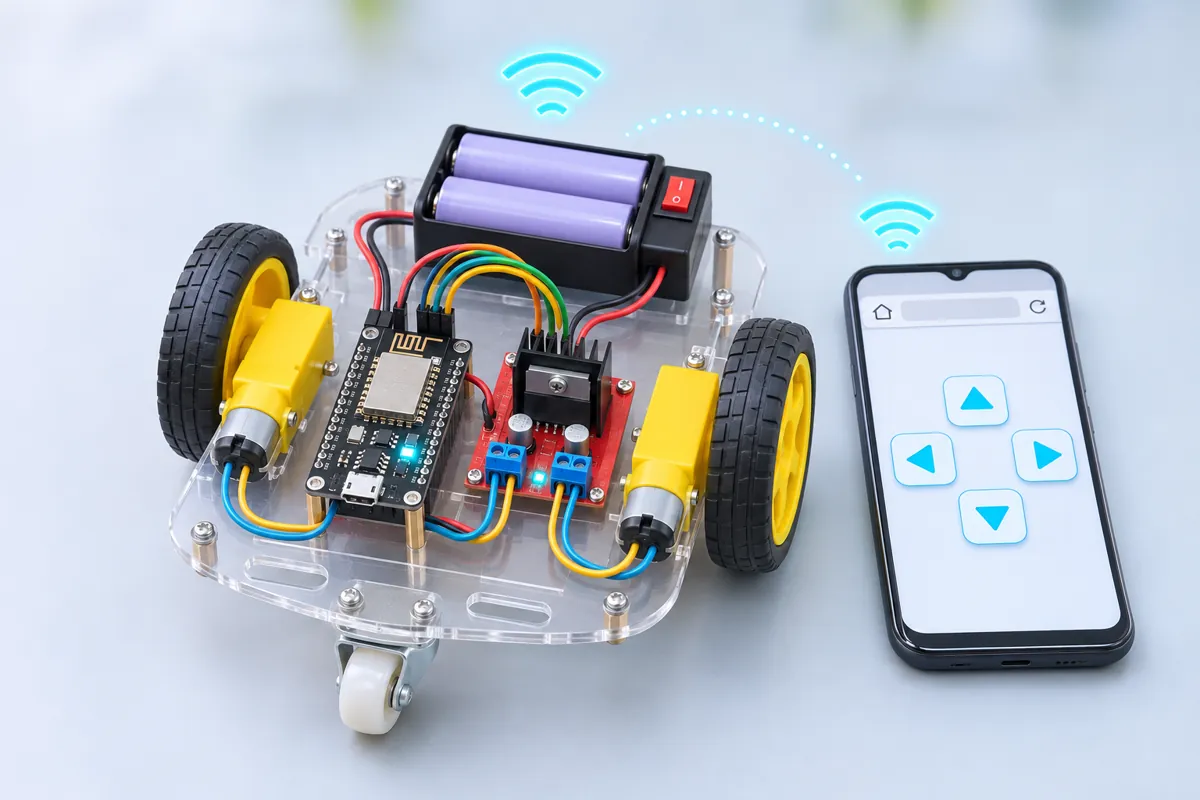
At power-on the NodeMCU starts a Wi-Fi access point called FR-Car. Join it on your phone, open http://192.168.4.1, and you get five big buttons and a speed slider. While you hold an arrow, the page sends a tiny request every 150 ms (/go?d=F&v=200); letting go sends a stop. The ESP8266’s web server reads the direction and speed and sets the L298N:
| Button | Left motor | Right motor |
|---|---|---|
| ▲ forward | forward | forward |
| ▼ back | back | back |
| ◀ left | back (70 %) | forward (70 %) |
| ▶ right | forward (70 %) | back (70 %) |
Left and right spin the car in place at 70 % of the set speed, which is easier to control on tiles.
The fail-safe
If no request arrives for 0.5 s — the phone’s screen locked, you walked out of range, a notification took over the browser — the car stops by itself. Combined with the access point’s range (20–40 m in the open, less through walls), that keeps it from driving off the terrace.
Wiring notes
The L298N takes the 7.4 V pack on its 12V terminal. With the 5V-EN jumper fitted, its on-board regulator makes 5 V, which feeds the NodeMCU’s VIN pin — so one battery runs everything. Remove the ENA and ENB jumpers and wire them to D1 and D6 for PWM speed control. The ESP8266 core’s analogWrite is set to 0–255 at 1 kHz.
The page is plain HTML and JavaScript stored in the sketch, using pointer events so it works with fingers and a mouse. Edit PAGE to add buttons — a horn, lights, a second speed.
Troubleshooting
My phone joins “FR-Car” but the page doesn’t open
Phones drop a Wi-Fi with no internet and use mobile data instead. Tap “Stay connected” when the phone asks, or switch mobile data off while driving.
One wheel turns backwards
Swap that motor’s two wires on the L298N screw terminal.
The NodeMCU resets when the car starts
The motors’ start-up surge dips the supply. Use charged cells, keep the 5V-EN jumper on, and add a 470 µF capacitor across the L298N’s 5V and GND.
The car keeps going after I let go
It shouldn’t for more than half a second — the fail-safe stops it. If it does, the page is stale: reload it.
Upgrades
- Add an HC-SR04 and refuse to drive forward when something is within 15 cm.
- Show the battery voltage on the page (divider into A0).
- Join your home Wi-Fi instead and drive it from anywhere in the house.