Parts list
| Part | Qty | Approx. | Buy |
|---|---|---|---|
| NodeMCU ESP8266 (CP2102 or CH340) | 1 | ₹280 | Buy NodeMCU ESP8266 (CP2102 or CH340) |
| YF-S201 ½" Hall flow sensor (YF-B5 brass for hot sun / higher pressure) | 1 | ₹250 | Buy YF-S201 ½" Hall flow sensor (YF-B5 brass for hot sun / higher pressure) |
| 0.96" SSD1306 I2C OLED (4-pin) | 1 | ₹220 | Buy 0.96" SSD1306 I2C OLED (4-pin) |
| Tactile push button | 1 | ₹10 | Buy Tactile push button |
| Resistors 10 kΩ + 20 kΩ (signal divider) | 1 | ₹5 | Buy Resistors 10 kΩ + 20 kΩ (signal divider) |
| ½" PVC/CPVC adapters + Teflon tape | 1 | ₹80 | Buy ½" PVC/CPVC adapters + Teflon tape |
| 3-core cable to the terrace (sensor), 10 m | 1 | ₹150 | Buy 3-core cable to the terrace (sensor), 10 m |
| 5 V 1 A USB adapter + cable | 1 | ₹120 | Buy 5 V 1 A USB adapter + cable |
| Total | ₹1,115 |
Affiliate disclosure: “Buy” links may earn FlashReady a small commission at no extra cost to you. Prices are indicative.
Wiring
| NodeMCU ESP8266 | Part · pin | Wire | Notes |
|---|---|---|---|
| VIN | YF-S201 water flow sensor (½″) · VCC | red | 5 V from USB |
| GND | YF-S201 water flow sensor (½″) · GND | black | |
| D5 | YF-S201 water flow sensor (½″) · SIG | yellow | Via 10 kΩ / 20 kΩ divider — GPIO14 — pulses up to 5 V divided to 3.3 V |
| D2 | SSD1306 OLED 0.96″ (128×64, I2C) · SDA | blue | GPIO4 |
| D1 | SSD1306 OLED 0.96″ (128×64, I2C) · SCL | yellow | GPIO5 |
| 3V3 | SSD1306 OLED 0.96″ (128×64, I2C) · VCC | red | |
| GND | SSD1306 OLED 0.96″ (128×64, I2C) · GND | black | |
| D6 | Push button (6 mm tactile switch) · 1 | purple | GPIO12, INPUT_PULLUP — hold 3 s to reset the trip |
| GND | Push button (6 mm tactile switch) · 2 | black |
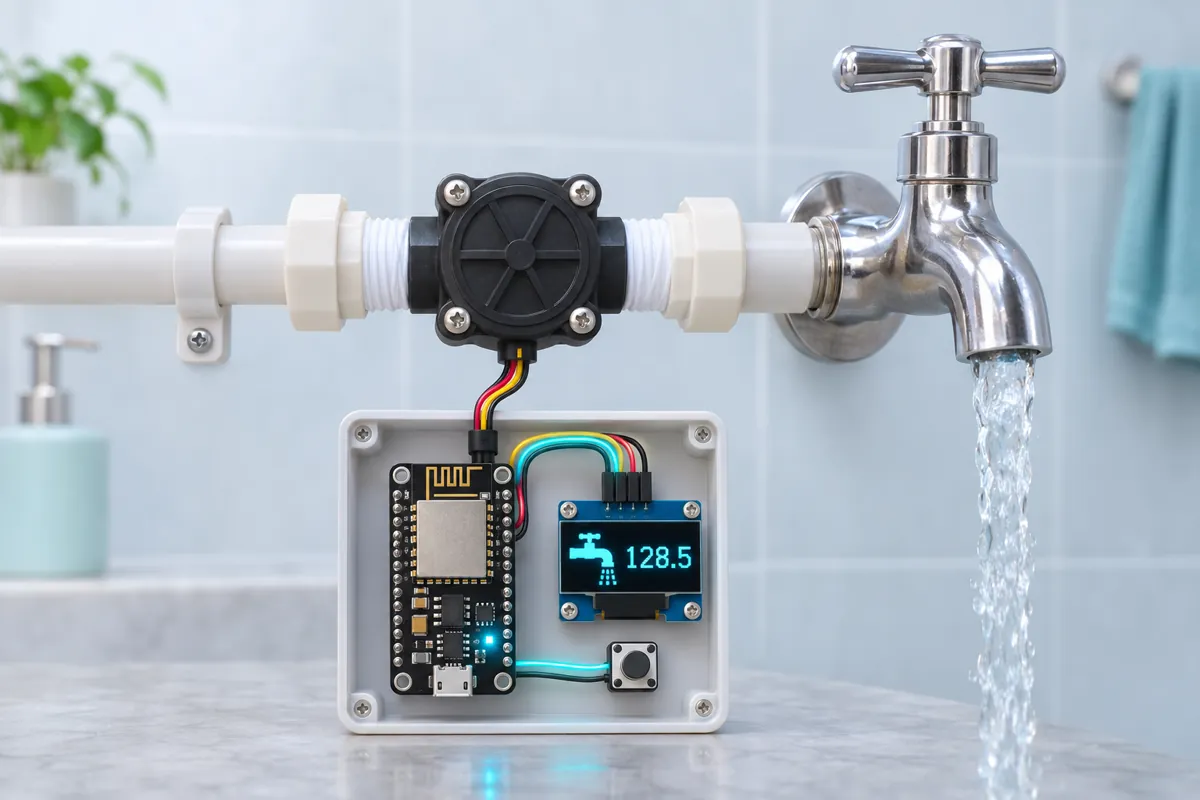
Board quirks: Fit the sensor in the main outlet pipe from the overhead tank (the line that feeds the house), arrow along the flow. A YF-S201 is ½" and reads about 1–30 L/min — right for one bathroom or kitchen line. For a ¾" or 1" main use a sensor of that size and set PULSES_PER_LITRE from a bucket test. Gravity-fed lines have low pressure; a turbine sensor adds a little restriction. If the top-floor shower gets weak, use a bigger sensor than the pipe needs. The total is saved to the ESP8266’s flash every 10 litres — at most one write per 10 L, so a power cut loses less than 10 L of count and the flash lasts for years.
Code
// Household water usage meter — NodeMCU ESP8266 + YF-S201 flow sensor + 0.96" OLED
// Flow sensor on the overhead tank's outlet pipe: VCC VIN (5 V), SIG -> 10k/20k divider -> D5 (GPIO14).
// OLED: SDA D2 (GPIO4), SCL D1 (GPIO5). Push button D6 (GPIO12) to GND: hold 3 s = reset the trip counter.
// The total survives power cuts: it is saved to flash every 10 litres.
#include <Wire.h>
#include <EEPROM.h>
#include <Adafruit_GFX.h>
#include <Adafruit_SSD1306.h>

constexpr uint8_t FLOW_PIN = D5;
constexpr uint8_t BUTTON_PIN = D6;
constexpr float PULSES_PER_LITRE = 450.0;          // YF-S201: f = 7.5 x L/min. Check with a bucket.
constexpr uint32_t LEAK_MS = 30UL * 60UL * 1000UL;  // water running non-stop for 30 min

struct Saved { uint32_t magic; double total; double trip; };
Saved saved = {0x57415452, 0, 0};  // "WATR"
Adafruit_SSD1306 oled(128, 64, &Wire, -1);
volatile uint32_t pulses = 0;
uint32_t lastPulses = 0, lastTick = 0, flowingSince = 0;
double lastSavedTotal = 0;
float lpm = 0;

void IRAM_ATTR onPulse() { pulses++; }

void save() {
  EEPROM.put(0, saved);
  EEPROM.commit();
  lastSavedTotal = saved.total;
}

void setup() {
  Serial.begin(115200);
  pinMode(FLOW_PIN, INPUT);
  pinMode(BUTTON_PIN, INPUT_PULLUP);
  attachInterrupt(digitalPinToInterrupt(FLOW_PIN), onPulse, FALLING);
  EEPROM.begin(sizeof(Saved));
  Saved s;
  EEPROM.get(0, s);
  if (s.magic == saved.magic) saved = s;  // otherwise first start: begin at zero
  lastSavedTotal = saved.total;
  Wire.begin(D2, D1);
  if (!oled.begin(SSD1306_SWITCHCAPVCC, 0x3C)) Serial.println("OLED not found at 0x3C");
  oled.setTextColor(SSD1306_WHITE);
  Serial.printf("Water meter: total %.1f L, trip %.1f L\n", saved.total, saved.trip);
}

void loop() {
  uint32_t now = millis();

  if (digitalRead(BUTTON_PIN) == LOW) {
    uint32_t t0 = now;
    while (digitalRead(BUTTON_PIN) == LOW && millis() - t0 < 3000) delay(10);
    if (millis() - t0 >= 3000) {
      saved.trip = 0;
      save();
      Serial.println("Trip reset");
    }
    while (digitalRead(BUTTON_PIN) == LOW) delay(10);
  }

  if (now - lastTick < 1000) return;
  lastTick = now;
  noInterrupts();
  uint32_t p = pulses;
  interrupts();
  uint32_t n = p - lastPulses;
  lastPulses = p;
  lpm = n * 60.0f / PULSES_PER_LITRE;
  saved.total += n / PULSES_PER_LITRE;
  saved.trip += n / PULSES_PER_LITRE;
  if (saved.total - lastSavedTotal >= 10.0) save();  // ~10 L per flash write keeps wear low

  if (lpm > 0.5) {
    if (!flowingSince) flowingSince = now;
  } else {
    flowingSince = 0;
  }
  bool leak = flowingSince && now - flowingSince > LEAK_MS;

  oled.clearDisplay();
  oled.setCursor(0, 0);
  oled.setTextSize(1);
  oled.printf("Flow %.1f L/min\n", lpm);
  oled.setTextSize(2);
  oled.printf("%.0f L\n", saved.trip);
  oled.setTextSize(1);
  oled.println("since reset (hold btn)");
  oled.printf("Total %.0f L\n", saved.total);
  if (leak) oled.printf("RUNNING %lu min - TAP OPEN?", (now - flowingSince) / 60000UL);
  oled.display();

  Serial.printf("flow=%.1f L/min trip=%.1f L total=%.1f L%s\n", lpm, saved.trip, saved.total, leak ? " LEAK?" : "");
}
// Household water usage meter — NodeMCU ESP8266 + YF-S201 flow sensor + 0.96" OLED
// Flow sensor on the overhead tank's outlet pipe: VCC VIN (5 V), SIG -> 10k/20k divider -> D5 (GPIO14).
// OLED: SDA D2 (GPIO4), SCL D1 (GPIO5). Push button D6 (GPIO12) to GND: hold 3 s = reset the trip counter.
// The total survives power cuts: it is saved to flash every 10 litres.
#include <Wire.h>
#include <EEPROM.h>
#include <Adafruit_GFX.h>
#include <Adafruit_SSD1306.h>
constexpr uint8_t FLOW_PIN = D5;
constexpr uint8_t BUTTON_PIN = D6;
constexpr float PULSES_PER_LITRE = 450.0; // YF-S201: f = 7.5 x L/min. Check with a bucket.
constexpr uint32_t LEAK_MS = 30UL * 60UL * 1000UL; // water running non-stop for 30 min
struct Saved { uint32_t magic; double total; double trip; };
Saved saved = {0x57415452, 0, 0}; // "WATR"
Adafruit_SSD1306 oled(128, 64, &Wire, -1);
volatile uint32_t pulses = 0;
uint32_t lastPulses = 0, lastTick = 0, flowingSince = 0;
double lastSavedTotal = 0;
float lpm = 0;
void IRAM_ATTR onPulse() { pulses++; }
void save() {
EEPROM.put(0, saved);
EEPROM.commit();
lastSavedTotal = saved.total;
}
void setup() {
Serial.begin(115200);
pinMode(FLOW_PIN, INPUT);
pinMode(BUTTON_PIN, INPUT_PULLUP);
attachInterrupt(digitalPinToInterrupt(FLOW_PIN), onPulse, FALLING);
EEPROM.begin(sizeof(Saved));
Saved s;
EEPROM.get(0, s);
if (s.magic == saved.magic) saved = s; // otherwise first start: begin at zero
lastSavedTotal = saved.total;
Wire.begin(D2, D1);
if (!oled.begin(SSD1306_SWITCHCAPVCC, 0x3C)) Serial.println("OLED not found at 0x3C");
oled.setTextColor(SSD1306_WHITE);
Serial.printf("Water meter: total %.1f L, trip %.1f L\n", saved.total, saved.trip);
}
void loop() {
uint32_t now = millis();
if (digitalRead(BUTTON_PIN) == LOW) {
uint32_t t0 = now;
while (digitalRead(BUTTON_PIN) == LOW && millis() - t0 < 3000) delay(10);
if (millis() - t0 >= 3000) {
saved.trip = 0;
save();
Serial.println("Trip reset");
}
while (digitalRead(BUTTON_PIN) == LOW) delay(10);
}
if (now - lastTick < 1000) return;
lastTick = now;
noInterrupts();
uint32_t p = pulses;
interrupts();
uint32_t n = p - lastPulses;
lastPulses = p;
lpm = n * 60.0f / PULSES_PER_LITRE;
saved.total += n / PULSES_PER_LITRE;
saved.trip += n / PULSES_PER_LITRE;
if (saved.total - lastSavedTotal >= 10.0) save(); // ~10 L per flash write keeps wear low
if (lpm > 0.5) {
if (!flowingSince) flowingSince = now;
} else {
flowingSince = 0;
}
bool leak = flowingSince && now - flowingSince > LEAK_MS;
oled.clearDisplay();
oled.setCursor(0, 0);
oled.setTextSize(1);
oled.printf("Flow %.1f L/min\n", lpm);
oled.setTextSize(2);
oled.printf("%.0f L\n", saved.trip);
oled.setTextSize(1);
oled.println("since reset (hold btn)");
oled.printf("Total %.0f L\n", saved.total);
if (leak) oled.printf("RUNNING %lu min - TAP OPEN?", (now - flowingSince) / 60000UL);
oled.display();
Serial.printf("flow=%.1f L/min trip=%.1f L total=%.1f L%s\n", lpm, saved.trip, saved.total, leak ? " LEAK?" : "");
}Compiled for nodemcu on esp8266 3.1.2 with Adafruit SSD1306 2.5.17 · 3 Nov 2026
How it works
Water in most Indian cities comes for an hour or two a day into a sump, gets pumped to the overhead tank, and then runs down to the taps. Nobody knows how many litres the family actually uses — until the tanker bill arrives in summer. This meter sits in the tank’s outlet pipe and counts every litre.
How it works
The YF-S201 has a turbine with a magnet. Water spins it; each turn passes a Hall sensor that pulls the output low. About 450 pulses = 1 litre. An interrupt on GPIO14 counts pulses, and once a second the sketch works out:
- Flow in litres per minute (pulses in the last second × 60 ÷ 450),
- a trip counter, which you reset by holding the button for 3 seconds (reset it every morning, or on the 1st of the month),
- a total that is never reset.
Both counters are stored in the ESP8266’s flash (its emulated EEPROM) every 10 litres, so a power cut doesn’t lose them. If water runs without a break for 30 minutes, the OLED shows RUNNING … min – TAP OPEN? — a tap left on, a leaking flush valve, or a burst pipe.
Why these parts
- A turbine flow sensor is the cheapest way to count litres electronically, and in a gravity-fed line it’s accurate to a few percent once calibrated.
- The 10 kΩ / 20 kΩ divider — the sensor runs on 5 V and its pulses can reach 5 V; the NodeMCU is 3.3 V only.
- NodeMCU for its flash storage and the option to add Wi-Fi reports later; the meter itself needs no network.
Calibration
Open a tap on that line into a 20 L bucket. Compare the litres shown with 20 and correct PULSES_PER_LITRE. Repeat at a low and a high flow if you can; use the average.
India notes
CPVC hot lines from a solar heater can reach 70 °C — use a brass YF-B5 type on hot lines. In hard-water areas the turbine gathers scale; flush the sensor once a year.
Troubleshooting
Flow reads 0 with water running
Check the arrow direction and the divider: with the sensor on VIN (5 V), SIG pulses must reach D5 through the 10 kΩ / 20 kΩ pair. Blow gently through the sensor while watching the Serial Monitor — the count should move.
The litres are 20 % off
Fill a 20 L bucket from a tap on that line and compare. New PULSES_PER_LITRE = 450 × litres shown ÷ 20. Low-flow taps read worst; that’s a limit of turbine sensors.
“TAP OPEN?” appears while the tank is filling
The sensor is on the inlet, not the outlet. Move it to the line from the tank to the house — the inlet runs for long stretches on purpose.
Upgrades
- Add Wi-Fi and NTP time to show litres per day and per month, and push a daily total to your phone.
- Put a second sensor on the RO purifier’s feed line and remind yourself to change the pre-filters every 3000 L.
- Close a solenoid valve (via a relay) when water runs non-stop for an hour — a burst pipe at night.