Parts list
| Part | Qty | Approx. | Buy |
|---|---|---|---|
| Arduino Uno R3 (CH340 clone) | 1 | ₹450 | Buy Arduino Uno R3 (CH340 clone) |
| 4-DOF acrylic robot arm kit (for SG90/MG90S) | 1 | ₹650 | Buy 4-DOF acrylic robot arm kit (for SG90/MG90S) |
| SG90 micro servo (MG90S metal gear recommended for the shoulder) | 4 | ₹480 | Buy SG90 micro servo (MG90S metal gear recommended for the shoulder) |
| 10 kΩ rotary potentiometer (B10K) + knob | 4 | ₹80 | Buy 10 kΩ rotary potentiometer (B10K) + knob |
| 12 mm push button | 2 | ₹20 | Buy 12 mm push button |
| 5 V 3 A adapter + DC jack breakout (servo supply) | 1 | ₹250 | Buy 5 V 3 A adapter + DC jack breakout (servo supply) |
| 1000 µF 10 V capacitor | 1 | ₹10 | Buy 1000 µF 10 V capacitor |
| Breadboard + jumper wires | 1 | ₹120 | Buy Breadboard + jumper wires |
| Total | ₹2,060 |
Affiliate disclosure: “Buy” links may earn FlashReady a small commission at no extra cost to you. Prices are indicative.
Wiring
| Arduino Uno R3 | Part · pin | Wire | Notes |
|---|---|---|---|
| D3 | SG90 micro servo (9 g) · SIG | orange | Base |
| 5 V 3 A adapter (servos) · +5V | SG90 micro servo (9 g) · VCC | red | |
| 5 V 3 A adapter (servos) · GND | SG90 micro servo (9 g) · GND | black | Adapter GND also joins the Uno’s GND (next wire) |
| GND | SG90 micro servo (9 g) · GND | black | |
| D5 | SG90 micro servo (9 g) #2 · SIG | yellow | Shoulder |
| 5 V 3 A adapter (servos) · +5V | SG90 micro servo (9 g) #2 · VCC | red | |
| 5 V 3 A adapter (servos) · GND | SG90 micro servo (9 g) #2 · GND | black | |
| D6 | SG90 micro servo (9 g) #3 · SIG | green | Elbow |
| 5 V 3 A adapter (servos) · +5V | SG90 micro servo (9 g) #3 · VCC | red | |
| 5 V 3 A adapter (servos) · GND | SG90 micro servo (9 g) #3 · GND | black | |
| D9 | SG90 micro servo (9 g) #4 · SIG | blue | Gripper |
| 5 V 3 A adapter (servos) · +5V | SG90 micro servo (9 g) #4 · VCC | red | 1000 µF capacitor across the servo supply rail |
| 5 V 3 A adapter (servos) · GND | SG90 micro servo (9 g) #4 · GND | black | |
| 5V | Rotary potentiometer (10 kΩ, B10K) · Pin 1 | red | |
| A0 | Rotary potentiometer (10 kΩ, B10K) · Wiper | orange | Base knob |
| GND | Rotary potentiometer (10 kΩ, B10K) · Pin 3 | black | |
| 5V | Rotary potentiometer (10 kΩ, B10K) #2 · Pin 1 | red | |
| A1 | Rotary potentiometer (10 kΩ, B10K) #2 · Wiper | yellow | Shoulder knob |
| GND | Rotary potentiometer (10 kΩ, B10K) #2 · Pin 3 | black | |
| 5V | Rotary potentiometer (10 kΩ, B10K) #3 · Pin 1 | red | |
| A2 | Rotary potentiometer (10 kΩ, B10K) #3 · Wiper | green | Elbow knob |
| GND | Rotary potentiometer (10 kΩ, B10K) #3 · Pin 3 | black | |
| 5V | Rotary potentiometer (10 kΩ, B10K) #4 · Pin 1 | red | |
| A3 | Rotary potentiometer (10 kΩ, B10K) #4 · Wiper | blue | Gripper knob |
| GND | Rotary potentiometer (10 kΩ, B10K) #4 · Pin 3 | black | |
| D7 | Push button (6 mm tactile switch) · 1 | purple | RECORD (internal pull-up) |
| GND | Push button (6 mm tactile switch) · 2 | black | |
| D8 | Push button (6 mm tactile switch) #2 · 1 | white | PLAY / STOP (internal pull-up) |
| GND | Push button (6 mm tactile switch) #2 · 2 | black |
Board quirks: Four servos moving at once can pull 2 A or more. They get their own 5 V 3 A adapter; never run them from the Uno’s 5V pin. Join the adapter’s GND to the Uno’s GND. Set <code>MIN_DEG</code>/<code>MAX_DEG</code> for each joint so the knob’s range never drives a servo into the arm’s end stops — a stalled SG90 heats up and strips its gears within minutes. Poses are stored in EEPROM (4 bytes each, up to 40). EEPROM wears out after about 100,000 writes per byte; the sketch uses <code>EEPROM.update</code>, which only writes bytes that changed. The Servo library uses Timer1, so analogWrite doesn’t work on D9/D10 — not needed here; D3, D5, D6 and D9 are all fine for servos.
Code
// Teach-and-repeat robot arm — Arduino Uno + 4 servos + 4 potentiometers + 2 buttons
// Servos: base D3, shoulder D5, elbow D6, gripper D9 — all powered from a separate 5 V 3 A supply.
// Pots (wipers) → A0–A3, outer legs to 5V and GND. RECORD button D7 → GND, PLAY button D8 → GND.
// Turn the knobs to pose the arm, press RECORD to save the pose (up to 40, kept in EEPROM).
// Press PLAY to repeat them smoothly in a loop; press PLAY again to stop. Hold RECORD 2 s to erase.
#include <Servo.h>
#include <EEPROM.h>

constexpr uint8_t SERVO_PINS[4] = {3, 5, 6, 9};
constexpr uint8_t POT_PINS[4] = {A0, A1, A2, A3};
constexpr uint8_t RECORD_BTN = 7, PLAY_BTN = 8;
constexpr uint8_t MIN_DEG[4] = {0, 15, 0, 20};      // keep each joint off its end stops
constexpr uint8_t MAX_DEG[4] = {180, 165, 180, 110}; // gripper: open..closed for a typical acrylic claw
constexpr uint8_t MAX_POSES = 40;
constexpr int EE_COUNT = 0, EE_POSES = 1;            // EEPROM: count byte, then 4 bytes per pose
constexpr uint8_t STEP_MS = 15;                      // playback speed: one degree per 15 ms

Servo joints[4];
uint8_t pos[4];
uint8_t poseCount = 0;
bool playing = false;

uint8_t knob(uint8_t i) {
  long v = 0;
  for (uint8_t k = 0; k < 4; k++) v += analogRead(POT_PINS[i]);  // average out pot noise
  return map(v / 4, 0, 1023, MIN_DEG[i], MAX_DEG[i]);
}

bool pressed(uint8_t pin) {
  if (digitalRead(pin) == HIGH) return false;
  delay(25);  // debounce
  return digitalRead(pin) == LOW;
}

void moveSmoothly(const uint8_t* target) {
  bool moving = true;
  while (moving) {
    moving = false;
    for (uint8_t i = 0; i < 4; i++) {
      if (pos[i] == target[i]) continue;
      pos[i] += pos[i] < target[i] ? 1 : -1;
      joints[i].write(pos[i]);
      moving = true;
    }
    delay(STEP_MS);
    if (digitalRead(PLAY_BTN) == LOW) return;  // let a press interrupt playback
  }
}

void printPose(const __FlashStringHelper* what, uint8_t n, const uint8_t* p) {
  Serial.print(what);
  Serial.print(n);
  for (uint8_t i = 0; i < 4; i++) {
    Serial.print(i ? ',' : ' ');
    Serial.print(p[i]);
  }
  Serial.println();
}

void setup() {
  Serial.begin(115200);
  pinMode(RECORD_BTN, INPUT_PULLUP);
  pinMode(PLAY_BTN, INPUT_PULLUP);
  poseCount = EEPROM.read(EE_COUNT);
  if (poseCount > MAX_POSES) poseCount = 0;  // blank EEPROM reads 255
  for (uint8_t i = 0; i < 4; i++) {
    pos[i] = knob(i);
    joints[i].attach(SERVO_PINS[i]);
    joints[i].write(pos[i]);
  }
  Serial.print(F("Teach-and-repeat arm ready, "));
  Serial.print(poseCount);
  Serial.println(F(" pose(s) saved"));
}

void loop() {
  if (pressed(PLAY_BTN)) {
    while (digitalRead(PLAY_BTN) == LOW) delay(10);
    playing = !playing && poseCount > 0;
    Serial.println(playing ? F("PLAY") : poseCount ? F("STOP") : F("Nothing recorded yet"));
  }

  if (playing) {
    for (uint8_t n = 0; n < poseCount && playing; n++) {
      uint8_t target[4];
      for (uint8_t i = 0; i < 4; i++) target[i] = EEPROM.read(EE_POSES + n * 4 + i);
      printPose(F("-> pose "), n + 1, target);
      moveSmoothly(target);
      unsigned long t = millis();
      while (millis() - t < 400 && digitalRead(PLAY_BTN) == HIGH) delay(5);  // short pause at each pose
      if (digitalRead(PLAY_BTN) == LOW) {
        while (digitalRead(PLAY_BTN) == LOW) delay(10);
        playing = false;
        Serial.println(F("STOP"));
      }
    }
    return;
  }

  // Teach mode: the arm follows the knobs.
  for (uint8_t i = 0; i < 4; i++) {
    pos[i] = knob(i);
    joints[i].write(pos[i]);
  }

  if (pressed(RECORD_BTN)) {
    unsigned long t = millis();
    while (digitalRead(RECORD_BTN) == LOW && millis() - t < 2000) delay(10);
    if (millis() - t >= 2000) {
      poseCount = 0;
      EEPROM.update(EE_COUNT, 0);
      Serial.println(F("All poses erased"));
    } else if (poseCount < MAX_POSES) {
      for (uint8_t i = 0; i < 4; i++) EEPROM.update(EE_POSES + poseCount * 4 + i, pos[i]);
      poseCount++;
      EEPROM.update(EE_COUNT, poseCount);
      printPose(F("Saved pose "), poseCount, pos);
    } else {
      Serial.println(F("Memory full (40 poses)"));
    }
    while (digitalRead(RECORD_BTN) == LOW) delay(10);
  }
  delay(20);
}
// Teach-and-repeat robot arm — Arduino Uno + 4 servos + 4 potentiometers + 2 buttons
// Servos: base D3, shoulder D5, elbow D6, gripper D9 — all powered from a separate 5 V 3 A supply.
// Pots (wipers) → A0–A3, outer legs to 5V and GND. RECORD button D7 → GND, PLAY button D8 → GND.
// Turn the knobs to pose the arm, press RECORD to save the pose (up to 40, kept in EEPROM).
// Press PLAY to repeat them smoothly in a loop; press PLAY again to stop. Hold RECORD 2 s to erase.
#include <Servo.h>
#include <EEPROM.h>
constexpr uint8_t SERVO_PINS[4] = {3, 5, 6, 9};
constexpr uint8_t POT_PINS[4] = {A0, A1, A2, A3};
constexpr uint8_t RECORD_BTN = 7, PLAY_BTN = 8;
constexpr uint8_t MIN_DEG[4] = {0, 15, 0, 20}; // keep each joint off its end stops
constexpr uint8_t MAX_DEG[4] = {180, 165, 180, 110}; // gripper: open..closed for a typical acrylic claw
constexpr uint8_t MAX_POSES = 40;
constexpr int EE_COUNT = 0, EE_POSES = 1; // EEPROM: count byte, then 4 bytes per pose
constexpr uint8_t STEP_MS = 15; // playback speed: one degree per 15 ms
Servo joints[4];
uint8_t pos[4];
uint8_t poseCount = 0;
bool playing = false;
uint8_t knob(uint8_t i) {
long v = 0;
for (uint8_t k = 0; k < 4; k++) v += analogRead(POT_PINS[i]); // average out pot noise
return map(v / 4, 0, 1023, MIN_DEG[i], MAX_DEG[i]);
}
bool pressed(uint8_t pin) {
if (digitalRead(pin) == HIGH) return false;
delay(25); // debounce
return digitalRead(pin) == LOW;
}
void moveSmoothly(const uint8_t* target) {
bool moving = true;
while (moving) {
moving = false;
for (uint8_t i = 0; i < 4; i++) {
if (pos[i] == target[i]) continue;
pos[i] += pos[i] < target[i] ? 1 : -1;
joints[i].write(pos[i]);
moving = true;
}
delay(STEP_MS);
if (digitalRead(PLAY_BTN) == LOW) return; // let a press interrupt playback
}
}
void printPose(const __FlashStringHelper* what, uint8_t n, const uint8_t* p) {
Serial.print(what);
Serial.print(n);
for (uint8_t i = 0; i < 4; i++) {
Serial.print(i ? ',' : ' ');
Serial.print(p[i]);
}
Serial.println();
}
void setup() {
Serial.begin(115200);
pinMode(RECORD_BTN, INPUT_PULLUP);
pinMode(PLAY_BTN, INPUT_PULLUP);
poseCount = EEPROM.read(EE_COUNT);
if (poseCount > MAX_POSES) poseCount = 0; // blank EEPROM reads 255
for (uint8_t i = 0; i < 4; i++) {
pos[i] = knob(i);
joints[i].attach(SERVO_PINS[i]);
joints[i].write(pos[i]);
}
Serial.print(F("Teach-and-repeat arm ready, "));
Serial.print(poseCount);
Serial.println(F(" pose(s) saved"));
}
void loop() {
if (pressed(PLAY_BTN)) {
while (digitalRead(PLAY_BTN) == LOW) delay(10);
playing = !playing && poseCount > 0;
Serial.println(playing ? F("PLAY") : poseCount ? F("STOP") : F("Nothing recorded yet"));
}
if (playing) {
for (uint8_t n = 0; n < poseCount && playing; n++) {
uint8_t target[4];
for (uint8_t i = 0; i < 4; i++) target[i] = EEPROM.read(EE_POSES + n * 4 + i);
printPose(F("-> pose "), n + 1, target);
moveSmoothly(target);
unsigned long t = millis();
while (millis() - t < 400 && digitalRead(PLAY_BTN) == HIGH) delay(5); // short pause at each pose
if (digitalRead(PLAY_BTN) == LOW) {
while (digitalRead(PLAY_BTN) == LOW) delay(10);
playing = false;
Serial.println(F("STOP"));
}
}
return;
}
// Teach mode: the arm follows the knobs.
for (uint8_t i = 0; i < 4; i++) {
pos[i] = knob(i);
joints[i].write(pos[i]);
}
if (pressed(RECORD_BTN)) {
unsigned long t = millis();
while (digitalRead(RECORD_BTN) == LOW && millis() - t < 2000) delay(10);
if (millis() - t >= 2000) {
poseCount = 0;
EEPROM.update(EE_COUNT, 0);
Serial.println(F("All poses erased"));
} else if (poseCount < MAX_POSES) {
for (uint8_t i = 0; i < 4; i++) EEPROM.update(EE_POSES + poseCount * 4 + i, pos[i]);
poseCount++;
EEPROM.update(EE_COUNT, poseCount);
printPose(F("Saved pose "), poseCount, pos);
} else {
Serial.println(F("Memory full (40 poses)"));
}
while (digitalRead(RECORD_BTN) == LOW) delay(10);
}
delay(20);
}Compiled for uno on avr 1.8.8 with Servo 1.3.0 · 3 Nov 2026
How it works
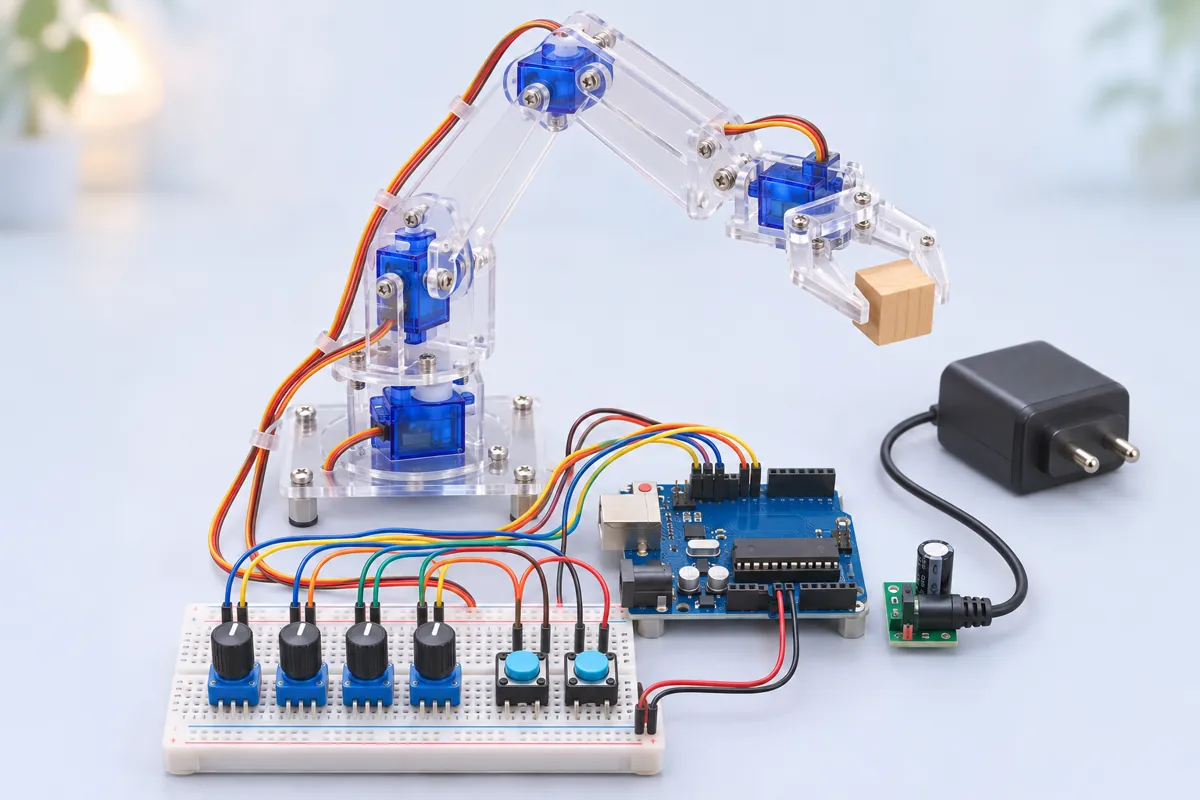
Industrial robots are often programmed by teaching: an operator moves the arm through a task, stores each position, and the robot repeats it all shift. This project does the same with a ₹650 acrylic arm, four knobs and two buttons — and is a good way to see why real robots move joint by joint, smoothly, rather than jumping between positions.
Teach mode
At power-on the arm follows the four potentiometers: base, shoulder, elbow and gripper. Each knob’s wiper goes to an analog pin (A0–A3); the Uno averages four readings and maps 0–1023 to that joint’s safe angle range. Pose the arm for the first step — say, open gripper above a bottle cap — and press RECORD (D7). Move to the next pose — gripper closed on the cap — and press again. Up to 40 poses. Each is printed to Serial.
Hold RECORD for 2 seconds to erase all poses and start again.
Repeat mode
Press PLAY (D8). The arm goes through the stored poses in order, in a loop. Between poses it doesn’t jump: every 15 ms each joint moves one degree towards its target, so all four joints arrive together-ish and the motion is gentle on the gears and on whatever it’s carrying. It pauses 0.4 s at each pose. Press PLAY again to stop and return to teach mode.
Poses live in the Uno’s EEPROM — the first byte holds the count, then four bytes per pose — so a routine survives a power cut.
Wiring notes
- Servos on D3, D5, D6 and D9, powered from the separate 5 V 3 A adapter, with a 1000 µF capacitor across that rail. Only the signal wires and a ground wire go to the Uno.
- Pots: outer legs (Pin 1 / Pin 3) to the Uno’s 5V and GND, wiper to A0–A3. Using the Uno’s 5 V as the reference means the reading never exceeds the ADC range.
- Buttons between D7/D8 and GND, using the internal pull-ups.
Why these parts
SG90s keep the arm cheap and light; put a metal-gear MG90S on the shoulder, which carries the most load. Potentiometers are the most intuitive way to pose four joints at once — each knob is one joint, which also teaches what each servo does.
Troubleshooting
The arm twitches when I’m not touching the knobs
Pot noise. Check the pots’ outer legs go firmly to 5V and GND; the sketch already averages four readings per knob. A 100 nF capacitor from each wiper to GND helps further.
PLAY says “Nothing recorded yet”
Press RECORD briefly (under 2 seconds) at each pose — holding it for 2 s erases everything.
A joint moves the wrong way compared with its knob
Swap that pot’s two outer wires (Pin 1 and Pin 3).
Upgrades
- Replace the knobs with a joystick pair, or record from the joystick robot arm.
- Add speed control: a fifth knob for <code>STEP_MS</code> during playback.
- Upload and download pose lists over Serial to share routines.