Parts list
| Part | Qty | Approx. | Buy |
|---|---|---|---|
| Arduino Uno R3 (CH340 clone) | 1 | ₹450 | Buy Arduino Uno R3 (CH340 clone) |
| HC-SR04 ultrasonic sensor | 1 | ₹90 | Buy HC-SR04 ultrasonic sensor |
| 16x2 LCD with I2C backpack (PCF8574) | 1 | ₹180 | Buy 16x2 LCD with I2C backpack (PCF8574) |
| 10 kΩ potentiometer (linear, B10K) | 1 | ₹10 | Buy 10 kΩ potentiometer (linear, B10K) |
| Tactile push button | 1 | ₹3 | Buy Tactile push button |
| Breadboard + jumper wires | 1 | ₹80 | Buy Breadboard + jumper wires |
| Metre scale and a flat board or hardbound book as the wall | 1 | ₹40 | Buy Metre scale and a flat board or hardbound book as the wall |
| Total | ₹853 |
Affiliate disclosure: “Buy” links may earn FlashReady a small commission at no extra cost to you. Prices are indicative.
Wiring
| Arduino Uno R3 | Part · pin | Wire | Notes |
|---|---|---|---|
| D9 | HC-SR04 ultrasonic sensor · Trig | purple | |
| D10 | HC-SR04 ultrasonic sensor · Echo | green | 5 V echo is fine on a 5 V Uno |
| 5V | HC-SR04 ultrasonic sensor · VCC | red | |
| GND | HC-SR04 ultrasonic sensor · GND | black | |
| A4 | 16×2 LCD + I2C backpack · SDA | blue | |
| A5 | 16×2 LCD + I2C backpack · SCL | yellow | |
| 5V | 16×2 LCD + I2C backpack · VCC | red | |
| GND | 16×2 LCD + I2C backpack · GND | black | |
| GND | Rotary potentiometer (10 kΩ, B10K) · Pin 1 | black | |
| A0 | Rotary potentiometer (10 kΩ, B10K) · Wiper | orange | Sets the known distance, 10–100 cm |
| 5V | Rotary potentiometer (10 kΩ, B10K) · Pin 3 | red | |
| D2 | Push button (6 mm tactile switch) · 1 | orange | Measure (hold 2 s to clear) — internal pull-up |
| GND | Push button (6 mm tactile switch) · 2 | black |
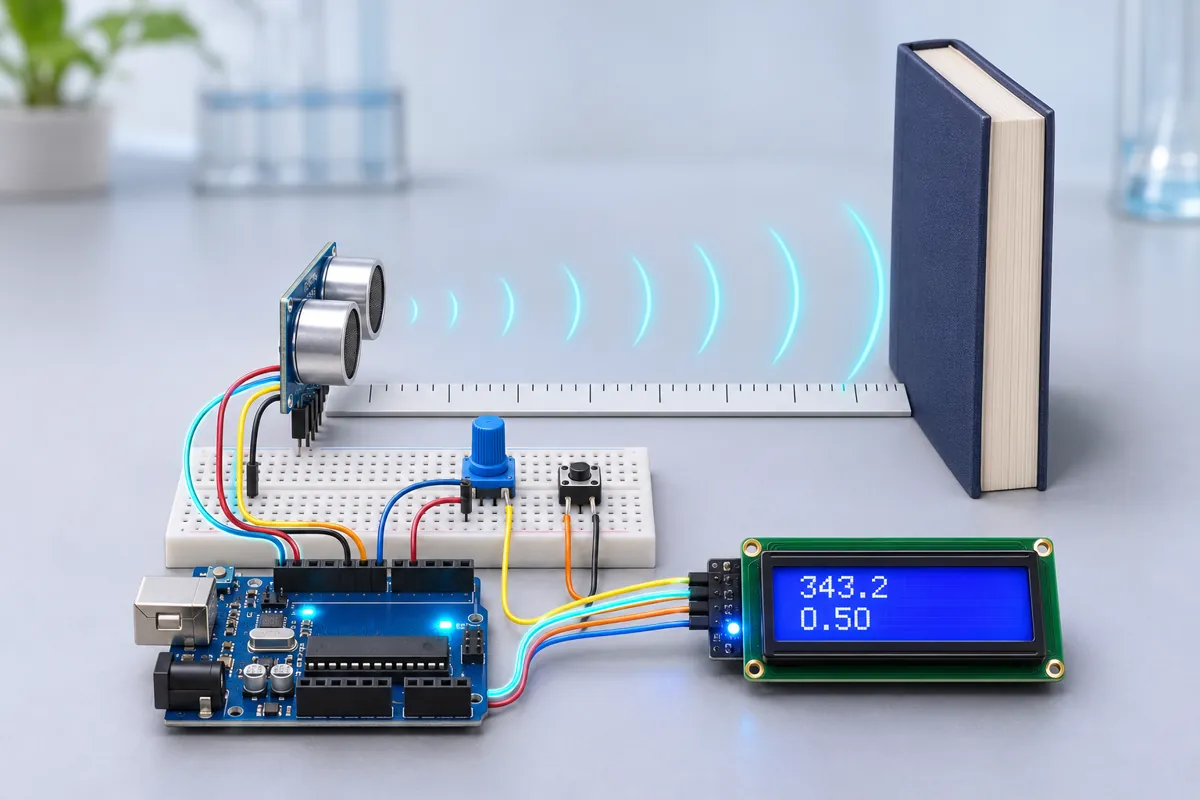
Board quirks: Measure the distance from the front of the sensor’s silver cans to the wall with a metre scale, then turn the knob until the LCD shows the same number. The knob is just a convenient way to type the distance in. Type your room temperature into ROOM_TEMP_C. Sound is faster in warm air — about 0.6 m/s per °C — so a summer classroom at 35 °C gives about 352 m/s, a winter morning at 15 °C about 340 m/s. Use a hard, flat surface held square to the sensor. Curtains, cushions and angled surfaces scatter the ultrasound and give no echo or a late echo from something else. Every HC-SR04 adds a small fixed delay between the sound arriving and the echo pulse ending. A single measurement includes it; the straight-line fit over several distances cancels it, which is why the fitted value is usually closer to theory.
Code
// Speed of sound experiment — Arduino Uno + HC-SR04 + 16x2 I2C LCD + potentiometer + push button.
// Put a wall (a book or a board) at a distance you measured with a ruler and set the same
// distance with the knob (10–100 cm). Press the button: the Uno averages 20 echo times and
// works out v = 2d / t. Take points at several distances and it also fits a straight line
// t = a + d·(2/v), whose slope gives v without the sensor's fixed delay.
// HC-SR04 Trig D9, Echo D10. Pot wiper A0. Button D2 (to GND; hold 2 s to clear points).
// LCD on I2C (SDA A4, SCL A5, address 0x27).
#include <Wire.h>
#include <LiquidCrystal_I2C.h>

constexpr uint8_t TRIG = 9, ECHO = 10, BUTTON = 2, KNOB = A0;
constexpr float ROOM_TEMP_C = 30.0;  // read a thermometer and type the room temperature here
constexpr uint8_t SAMPLES = 20, MAX_POINTS = 10;

LiquidCrystal_I2C lcd(0x27, 16, 2);
float pointD[MAX_POINTS], pointT[MAX_POINTS];  // metres, microseconds
uint8_t points = 0;
unsigned long lastLive = 0, resultUntil = 0;

// One echo time in microseconds (0 = no echo within 30 ms, i.e. beyond about 5 m).
unsigned long echoUs() {
  digitalWrite(TRIG, LOW);
  delayMicroseconds(2);
  digitalWrite(TRIG, HIGH);
  delayMicroseconds(10);
  digitalWrite(TRIG, LOW);
  return pulseIn(ECHO, HIGH, 30000UL);
}

int knobCm() { return 10 + (long)analogRead(KNOB) * 90 / 1023; }

float theory() { return 331.3 + 0.606 * ROOM_TEMP_C; }

// Least-squares slope of t (µs) against d (m); v = 2 / slope.
float fitSpeed(float& offsetUs) {
  float sd = 0, st = 0, sdd = 0, sdt = 0;
  for (uint8_t i = 0; i < points; i++) {
    sd += pointD[i];
    st += pointT[i];
    sdd += pointD[i] * pointD[i];
    sdt += pointD[i] * pointT[i];
  }
  float den = points * sdd - sd * sd;
  if (points < 2 || den <= 0) return 0;
  float slope = (points * sdt - sd * st) / den;  // µs per metre
  offsetUs = (st - slope * sd) / points;
  return slope > 0 ? 2e6 / slope : 0;
}

void measure() {
  int cm = knobCm();
  unsigned long sum = 0;
  uint8_t good = 0;
  lcd.clear();
  lcd.print(F("Measuring "));
  lcd.print(cm);
  lcd.print(F("cm"));
  for (uint8_t i = 0; i < SAMPLES; i++) {
    unsigned long t = echoUs();
    if (t) {
      sum += t;
      good++;
    }
    delay(60);  // let the last echo die away
  }
  lcd.clear();
  if (good < SAMPLES / 2) {
    lcd.print(F("No echo! Aim at"));
    lcd.setCursor(0, 1);
    lcd.print(F("a flat hard wall"));
    Serial.println(F("Too few echoes — aim the sensor squarely at a flat, hard surface"));
    resultUntil = millis() + 3000;
    return;
  }
  float t = (float)sum / good;
  float d = cm / 100.0;
  float v = 2 * d / (t * 1e-6);
  if (points < MAX_POINTS) {
    pointD[points] = d;
    pointT[points] = t;
    points++;
  }
  float offset = 0;
  float vFit = fitSpeed(offset);
  Serial.print(points);
  Serial.print(F(","));
  Serial.print(cm);
  Serial.print(F(","));
  Serial.print(t, 1);
  Serial.print(F(","));
  Serial.print(v, 1);
  Serial.print(F(","));
  if (vFit > 0) {
    Serial.print(vFit, 1);
    Serial.print(F(","));
    Serial.print(offset, 1);
  } else Serial.print(F(","));
  Serial.print(F(","));
  Serial.println(theory(), 1);

  lcd.print(F("v="));
  lcd.print(v, 1);
  lcd.print(F(" th="));
  lcd.print(theory(), 0);
  lcd.setCursor(0, 1);
  if (vFit > 0) {
    lcd.print(F("fit="));
    lcd.print(vFit, 1);
    lcd.print(F(" n="));
    lcd.print(points);
  } else {
    lcd.print(F("err "));
    lcd.print((v - theory()) / theory() * 100, 1);
    lcd.print(F("% n=1"));
  }
  resultUntil = millis() + 6000;
}

void setup() {
  pinMode(TRIG, OUTPUT);
  pinMode(ECHO, INPUT);
  pinMode(BUTTON, INPUT_PULLUP);
  Serial.begin(115200);
  Serial.println(F("Speed of sound experiment starting"));
  lcd.init();
  lcd.backlight();
  lcd.print(F("Speed of sound"));
  lcd.setCursor(0, 1);
  lcd.print(F("Theory "));
  lcd.print(theory(), 1);
  lcd.print(F("m/s"));
  Serial.print(F("Speed of sound experiment. Room "));
  Serial.print(ROOM_TEMP_C, 1);
  Serial.print(F(" C, theory 331.3 + 0.606*T = "));
  Serial.print(theory(), 1);
  Serial.println(F(" m/s"));
  Serial.println(F("point,d_cm,t_avg_us,v_single,v_fit,offset_us,v_theory"));
  delay(1500);
}

void loop() {
  if (digitalRead(BUTTON) == LOW) {
    unsigned long down = millis();
    while (digitalRead(BUTTON) == LOW && millis() - down < 2000) delay(5);
    if (millis() - down >= 2000) {
      points = 0;
      lcd.clear();
      lcd.print(F("Points cleared"));
      Serial.println(F("Points cleared"));
      while (digitalRead(BUTTON) == LOW) delay(5);
      resultUntil = millis() + 1500;
    } else measure();
  }

  // Live view between measurements: knob distance, one echo, single-shot speed.
  if (millis() > resultUntil && millis() - lastLive >= 300) {
    lastLive = millis();
    int cm = knobCm();
    unsigned long t = echoUs();
    lcd.setCursor(0, 0);
    lcd.print(F("d="));
    lcd.print(cm);
    lcd.print(F("cm t="));
    if (t) {
      lcd.print(t);
      lcd.print(F("us"));
    } else lcd.print(F("--"));
    lcd.print(F("      "));
    lcd.setCursor(0, 1);
    if (t) {
      lcd.print(F("v="));
      lcd.print(2.0 * cm / 100.0 / (t * 1e-6), 0);
      lcd.print(F("m/s"));
    } else lcd.print(F("no echo"));
    lcd.print(F(" pts:"));
    lcd.print(points);
    lcd.print(F("    "));
  }
}
// Speed of sound experiment — Arduino Uno + HC-SR04 + 16x2 I2C LCD + potentiometer + push button.
// Put a wall (a book or a board) at a distance you measured with a ruler and set the same
// distance with the knob (10–100 cm). Press the button: the Uno averages 20 echo times and
// works out v = 2d / t. Take points at several distances and it also fits a straight line
// t = a + d·(2/v), whose slope gives v without the sensor's fixed delay.
// HC-SR04 Trig D9, Echo D10. Pot wiper A0. Button D2 (to GND; hold 2 s to clear points).
// LCD on I2C (SDA A4, SCL A5, address 0x27).
#include <Wire.h>
#include <LiquidCrystal_I2C.h>
constexpr uint8_t TRIG = 9, ECHO = 10, BUTTON = 2, KNOB = A0;
constexpr float ROOM_TEMP_C = 30.0; // read a thermometer and type the room temperature here
constexpr uint8_t SAMPLES = 20, MAX_POINTS = 10;
LiquidCrystal_I2C lcd(0x27, 16, 2);
float pointD[MAX_POINTS], pointT[MAX_POINTS]; // metres, microseconds
uint8_t points = 0;
unsigned long lastLive = 0, resultUntil = 0;
// One echo time in microseconds (0 = no echo within 30 ms, i.e. beyond about 5 m).
unsigned long echoUs() {
digitalWrite(TRIG, LOW);
delayMicroseconds(2);
digitalWrite(TRIG, HIGH);
delayMicroseconds(10);
digitalWrite(TRIG, LOW);
return pulseIn(ECHO, HIGH, 30000UL);
}
int knobCm() { return 10 + (long)analogRead(KNOB) * 90 / 1023; }
float theory() { return 331.3 + 0.606 * ROOM_TEMP_C; }
// Least-squares slope of t (µs) against d (m); v = 2 / slope.
float fitSpeed(float& offsetUs) {
float sd = 0, st = 0, sdd = 0, sdt = 0;
for (uint8_t i = 0; i < points; i++) {
sd += pointD[i];
st += pointT[i];
sdd += pointD[i] * pointD[i];
sdt += pointD[i] * pointT[i];
}
float den = points * sdd - sd * sd;
if (points < 2 || den <= 0) return 0;
float slope = (points * sdt - sd * st) / den; // µs per metre
offsetUs = (st - slope * sd) / points;
return slope > 0 ? 2e6 / slope : 0;
}
void measure() {
int cm = knobCm();
unsigned long sum = 0;
uint8_t good = 0;
lcd.clear();
lcd.print(F("Measuring "));
lcd.print(cm);
lcd.print(F("cm"));
for (uint8_t i = 0; i < SAMPLES; i++) {
unsigned long t = echoUs();
if (t) {
sum += t;
good++;
}
delay(60); // let the last echo die away
}
lcd.clear();
if (good < SAMPLES / 2) {
lcd.print(F("No echo! Aim at"));
lcd.setCursor(0, 1);
lcd.print(F("a flat hard wall"));
Serial.println(F("Too few echoes — aim the sensor squarely at a flat, hard surface"));
resultUntil = millis() + 3000;
return;
}
float t = (float)sum / good;
float d = cm / 100.0;
float v = 2 * d / (t * 1e-6);
if (points < MAX_POINTS) {
pointD[points] = d;
pointT[points] = t;
points++;
}
float offset = 0;
float vFit = fitSpeed(offset);
Serial.print(points);
Serial.print(F(","));
Serial.print(cm);
Serial.print(F(","));
Serial.print(t, 1);
Serial.print(F(","));
Serial.print(v, 1);
Serial.print(F(","));
if (vFit > 0) {
Serial.print(vFit, 1);
Serial.print(F(","));
Serial.print(offset, 1);
} else Serial.print(F(","));
Serial.print(F(","));
Serial.println(theory(), 1);
lcd.print(F("v="));
lcd.print(v, 1);
lcd.print(F(" th="));
lcd.print(theory(), 0);
lcd.setCursor(0, 1);
if (vFit > 0) {
lcd.print(F("fit="));
lcd.print(vFit, 1);
lcd.print(F(" n="));
lcd.print(points);
} else {
lcd.print(F("err "));
lcd.print((v - theory()) / theory() * 100, 1);
lcd.print(F("% n=1"));
}
resultUntil = millis() + 6000;
}
void setup() {
pinMode(TRIG, OUTPUT);
pinMode(ECHO, INPUT);
pinMode(BUTTON, INPUT_PULLUP);
Serial.begin(115200);
Serial.println(F("Speed of sound experiment starting"));
lcd.init();
lcd.backlight();
lcd.print(F("Speed of sound"));
lcd.setCursor(0, 1);
lcd.print(F("Theory "));
lcd.print(theory(), 1);
lcd.print(F("m/s"));
Serial.print(F("Speed of sound experiment. Room "));
Serial.print(ROOM_TEMP_C, 1);
Serial.print(F(" C, theory 331.3 + 0.606*T = "));
Serial.print(theory(), 1);
Serial.println(F(" m/s"));
Serial.println(F("point,d_cm,t_avg_us,v_single,v_fit,offset_us,v_theory"));
delay(1500);
}
void loop() {
if (digitalRead(BUTTON) == LOW) {
unsigned long down = millis();
while (digitalRead(BUTTON) == LOW && millis() - down < 2000) delay(5);
if (millis() - down >= 2000) {
points = 0;
lcd.clear();
lcd.print(F("Points cleared"));
Serial.println(F("Points cleared"));
while (digitalRead(BUTTON) == LOW) delay(5);
resultUntil = millis() + 1500;
} else measure();
}
// Live view between measurements: knob distance, one echo, single-shot speed.
if (millis() > resultUntil && millis() - lastLive >= 300) {
lastLive = millis();
int cm = knobCm();
unsigned long t = echoUs();
lcd.setCursor(0, 0);
lcd.print(F("d="));
lcd.print(cm);
lcd.print(F("cm t="));
if (t) {
lcd.print(t);
lcd.print(F("us"));
} else lcd.print(F("--"));
lcd.print(F(" "));
lcd.setCursor(0, 1);
if (t) {
lcd.print(F("v="));
lcd.print(2.0 * cm / 100.0 / (t * 1e-6), 0);
lcd.print(F("m/s"));
} else lcd.print(F("no echo"));
lcd.print(F(" pts:"));
lcd.print(points);
lcd.print(F(" "));
}
}Compiled for uno on avr 1.8.8 with LiquidCrystal I2C 1.1.2 · 3 Nov 2026
How it works
Every physics textbook gives the speed of sound in air as about 340 m/s. This experiment measures it with ₹90 of hardware — and, done carefully, gets within 1–2 % of the textbook value.
How it works
The HC-SR04 sends a short burst of 40 kHz ultrasound when the Uno pulses Trig (D9). It then holds Echo (D10) HIGH until the reflection comes back. pulseIn() measures that time in microseconds.
The sound goes to the wall and back, so it travels 2d in time t:
v = 2d / t
You set the known distance d with the knob (10–100 cm) after measuring it with a scale, and press the button. The Uno takes 20 echoes, averages them, prints the result and stores the point.
With two or more points at different distances, it also fits a straight line t = a + (2/v)·d by least squares. The slope gives the speed; the intercept a is the sensor’s own fixed delay, which a single measurement can’t separate. Hold the button for 2 seconds to clear the points.
The theoretical value at room temperature T (°C) is v ≈ 331.3 + 0.606·T m/s. At 30 °C that is 349.5 m/s.
What to show at the exhibition
Stand a hardbound book on the bench, take points at 20, 40, 60 and 80 cm, and show the Serial Monitor table. Plot t against d on graph paper or in a spreadsheet: it is a straight line that doesn’t quite pass through zero — and that small offset is the sensor’s delay. Comparing the single-point and fitted values makes a strong practical-file conclusion.
Questions the examiner may ask
- Why 2d and not d? The sound travels to the wall and back.
- Why does temperature matter? Sound travels faster when air molecules move faster; in warmer air they do. Humidity has a much smaller effect.
- What is ultrasound? Sound above 20 kHz, beyond human hearing. The HC-SR04 uses 40 kHz.
- Why fit a line instead of averaging single results? A constant error (the sensor’s delay) shifts every point equally. It changes the intercept of the line, not its slope.
- Sources of error? Distance measured to the wrong point of the sensor, the wall not square, air currents, the 1 µs resolution of
pulseIn, and the guessed temperature.
Cost in India
About ₹850 including the Uno; under ₹400 if the lab already has a board. The HC-SR04 and the I2C LCD are stocked by every electronics shop that sells Arduino parts.
Troubleshooting
The LCD shows “no echo”
Nothing within 5 m reflected the sound, or Trig and Echo are swapped. Point the sensor at a wall 30 cm away first.
The speed is far too high or too low
The knob distance doesn’t match the real distance. Re-measure with the scale. Also make sure there is no closer object (the table edge, your hand) in the sensor’s 15° cone.
The LCD is blank but lit
Turn the contrast potentiometer on the I2C backpack. If the backlight is off too, check SDA on A4 and SCL on A5; some backpacks use address 0x3F instead of 0x27.
Readings jump around
Fans and ACs move air and make small changes; that is why each point averages 20 echoes. Switch off the ceiling fan during the experiment.
Upgrades
- Add a DS18B20 and use the measured temperature instead of typing it — then plot speed against temperature using a hair dryer (carefully).
- Log the points to the Serial Plotter or Excel and draw the t–d graph by hand for the practical file.
- Repeat with a second HC-SR04 as a separate receiver to measure one-way travel time.