Mains voltage (230 V) — can kill. The low-voltage side (board, sensors, display, relay module) is safe to build yourself. The mains side must be wired by a licensed electrician, and tested with the circuit switched off at the MCB.
- Never switch a motor with a relay module. Motors pull several times their running current at start-up; hobby relay contacts weld or overheat. The relay only drives a contactor’s coil (or your pump starter’s coil input).
- Contactor rated for motors (AC-3) at or above the load’s nameplate current.
- Protect and earth: MCB on live, RCCB/ELCB on the circuit, metal bodies earthed. Switch live only — never neutral or earth.
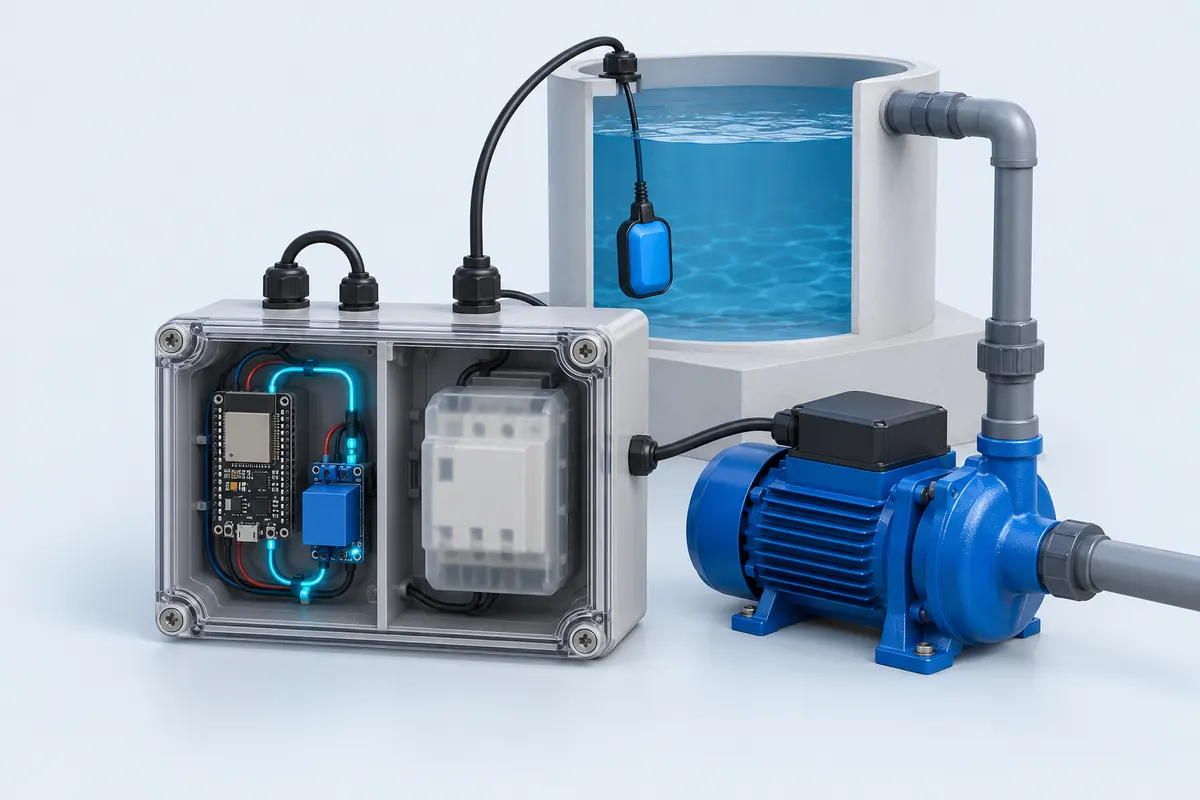
- Keep the two worlds apart: mains and low-voltage wiring in separate compartments of a closed, non-metallic enclosure; no bare 230 V terminals.
- Fail safe: the code switches the load off when a sensor stops answering. Still fit a manual override at the starter.
Parts list
| Part | Qty | Approx. | Buy |
|---|---|---|---|
| ESP32 DevKit V1 (30-pin) | 1 | ₹380 | Buy ESP32 DevKit V1 (30-pin) |
| 1-channel relay module, 5 V coil, 3.3 V-trigger (active-LOW) | 1 | ₹70 | Buy 1-channel relay module, 5 V coil, 3.3 V-trigger (active-LOW) |
| Float switch (vertical reed type, for the overhead tank) | 1 | ₹120 | Buy Float switch (vertical reed type, for the overhead tank) |
| Contactor, 230 V AC coil, AC-3 rated ≥ pump current (e.g. 9 A) | 1 | ₹450 | Buy Contactor, 230 V AC coil, AC-3 rated ≥ pump current (e.g. 9 A) |
| 2-core cable for the float switch (to the tank) | 1 | ₹120 | Buy 2-core cable for the float switch (to the tank) |
| 5 V 1 A USB adapter + cable | 1 | ₹120 | Buy 5 V 1 A USB adapter + cable |
| IP65 enclosure with separate mains and low-voltage sections | 1 | ₹250 | Buy IP65 enclosure with separate mains and low-voltage sections |
| Total | ₹1,510 |
Affiliate disclosure: “Buy” links may earn FlashReady a small commission at no extra cost to you. Prices are indicative.
Wiring
| ESP32 DevKit V1 | Part · pin | Wire | Notes |
|---|---|---|---|
| D26 | 1-channel relay module (5 V coil) · IN | orange | Relay COM/NO switch the contactor coil (A1) on the 230 V side — never the pump |
| VIN | 1-channel relay module (5 V coil) · DC+ | red | 5 V coil supply from the USB/VIN rail |
| GND | 1-channel relay module (5 V coil) · DC− | black | |
| Contactor coil circuit, 230 V (electrician) · L | 1-channel relay module (5 V coil) · COM | brown | Live from the MCB to COM — 230 V, wired by an electrician |
| Contactor coil circuit, 230 V (electrician) · A1 | 1-channel relay module (5 V coil) · NO | brown | NO to the contactor coil A1; coil A2 goes to neutral |
| D27 | Float switch (reed, vertical) · WIRE 1 | blue | INPUT_PULLUP — no resistor needed |
| GND | Float switch (reed, vertical) · WIRE 2 | black | Closed when the float rises (tank full) |
Board quirks: The relay module only switches the contactor’s 230 V coil (a few watts). The contactor’s main contacts carry the pump current — a hobby relay welds shut on motor inrush. D27 uses the ESP32’s internal pull-up, so the float switch needs no resistor. Run the float cable away from mains cables; long parallel runs pick up noise. Flash it from this page and the flasher asks for your Wi-Fi name and password (they’re stored on the board, not sent to us) — or type them into WIFI_SSID / WIFI_PASS if you use Arduino IDE. The phone page is only reachable on your own Wi-Fi — it has no password, so don’t port-forward it.
Code
// Smart pump controller — ESP32 DevKit V1
// Float switch (closes when the tank is full) on D27, relay module IN on D26.
// The relay module only switches a CONTACTOR coil (or your pump starter's coil input) —
// never the pump motor itself. Start/stop from a phone browser on your Wi-Fi.
#include <WiFi.h>
#include <WebServer.h>
#include "fr_settings.h"

const char* WIFI_SSID = "YOUR_SSID";
const char* WIFI_PASS = "YOUR_PASSWORD";
// Filled in from the FlashReady flasher over USB (kept on the board), or type the values above.
FrSetting SETTINGS[] = {{"wifi_ssid", &WIFI_SSID, true}, {"wifi_pass", &WIFI_PASS, true}};

constexpr uint8_t FLOAT_PIN = 27;          // float switch to GND, closed = tank full
constexpr uint8_t RELAY_PIN = 26;          // relay module IN
constexpr bool RELAY_ACTIVE_LOW = true;    // most blue relay modules
constexpr unsigned long MAX_RUN_MS = 30UL * 60UL * 1000UL;  // hard limit per run

WebServer server(80);
bool pumpOn = false;
unsigned long startedAt = 0;
String lastStop = "-";

bool tankFull() {
  // Read three times 5 ms apart so a wave on the float doesn't count.
  int full = 0;
  for (int i = 0; i < 3; i++) {
    if (digitalRead(FLOAT_PIN) == LOW) full++;
    delay(5);
  }
  return full >= 2;
}

void setPump(bool on, const char* reason) {
  pumpOn = on;
  digitalWrite(RELAY_PIN, (on != RELAY_ACTIVE_LOW) ? HIGH : LOW);
  if (on) startedAt = millis();
  else lastStop = reason;
  Serial.printf("Pump %s (%s)\n", on ? "ON" : "OFF", reason);
}

void redirectHome() {
  server.sendHeader("Location", "/");
  server.send(303);
}

void handleRoot() {
  String html = F("<!doctype html><meta name=viewport content='width=device-width'><title>Pump</title><h1>Smart pump</h1>");
  html += "<p>Tank: " + String(tankFull() ? "FULL" : "not full") + "</p>";
  html += "<p>Pump: " + String(pumpOn ? "ON" : "OFF") + "</p>";
  html += "<p>Last stop: " + lastStop + "</p>";
  html += F("<form action=/on method=post><button>Start</button></form>");
  html += F("<form action=/off method=post><button>Stop</button></form>");
  server.send(200, "text/html", html);
}

void setup() {
  // Set the relay to OFF before the pin becomes an output, so the pump never blips at boot.
  digitalWrite(RELAY_PIN, RELAY_ACTIVE_LOW ? HIGH : LOW);
  pinMode(RELAY_PIN, OUTPUT);
  pinMode(FLOAT_PIN, INPUT_PULLUP);
  Serial.begin(115200);
  frSettingsBegin(SETTINGS);

  if (*WIFI_SSID) WiFi.begin(WIFI_SSID, WIFI_PASS);
  else Serial.println("Wi-Fi off — no Wi-Fi name set. Flash from flashready.in or type it into the code.");
  server.on("/", handleRoot);
  server.on("/on", HTTP_POST, []() {
    if (!tankFull()) setPump(true, "started from phone");
    redirectHome();
  });
  server.on("/off", HTTP_POST, []() {
    setPump(false, "stopped from phone");
    redirectHome();
  });
  server.begin();
}

void loop() {
  server.handleClient();
  if (pumpOn && tankFull()) setPump(false, "tank full");
  if (pumpOn && millis() - startedAt > MAX_RUN_MS) setPump(false, "30-minute safety limit");

  static unsigned long lastLog = 0;
  if (millis() - lastLog > 10000) {
    lastLog = millis();
    if (WiFi.status() == WL_CONNECTED) Serial.printf("Open http://%s\n", WiFi.localIP().toString().c_str());
    else Serial.println("Wi-Fi not connected yet");
  }
}
// Smart pump controller — ESP32 DevKit V1
// Float switch (closes when the tank is full) on D27, relay module IN on D26.
// The relay module only switches a CONTACTOR coil (or your pump starter's coil input) —
// never the pump motor itself. Start/stop from a phone browser on your Wi-Fi.
#include <WiFi.h>
#include <WebServer.h>
#include "fr_settings.h"
const char* WIFI_SSID = "YOUR_SSID";
const char* WIFI_PASS = "YOUR_PASSWORD";
// Filled in from the FlashReady flasher over USB (kept on the board), or type the values above.
FrSetting SETTINGS[] = {{"wifi_ssid", &WIFI_SSID, true}, {"wifi_pass", &WIFI_PASS, true}};
constexpr uint8_t FLOAT_PIN = 27; // float switch to GND, closed = tank full
constexpr uint8_t RELAY_PIN = 26; // relay module IN
constexpr bool RELAY_ACTIVE_LOW = true; // most blue relay modules
constexpr unsigned long MAX_RUN_MS = 30UL * 60UL * 1000UL; // hard limit per run
WebServer server(80);
bool pumpOn = false;
unsigned long startedAt = 0;
String lastStop = "-";
bool tankFull() {
// Read three times 5 ms apart so a wave on the float doesn't count.
int full = 0;
for (int i = 0; i < 3; i++) {
if (digitalRead(FLOAT_PIN) == LOW) full++;
delay(5);
}
return full >= 2;
}
void setPump(bool on, const char* reason) {
pumpOn = on;
digitalWrite(RELAY_PIN, (on != RELAY_ACTIVE_LOW) ? HIGH : LOW);
if (on) startedAt = millis();
else lastStop = reason;
Serial.printf("Pump %s (%s)\n", on ? "ON" : "OFF", reason);
}
void redirectHome() {
server.sendHeader("Location", "/");
server.send(303);
}
void handleRoot() {
String html = F("<!doctype html><meta name=viewport content='width=device-width'><title>Pump</title><h1>Smart pump</h1>");
html += "<p>Tank: " + String(tankFull() ? "FULL" : "not full") + "</p>";
html += "<p>Pump: " + String(pumpOn ? "ON" : "OFF") + "</p>";
html += "<p>Last stop: " + lastStop + "</p>";
html += F("<form action=/on method=post><button>Start</button></form>");
html += F("<form action=/off method=post><button>Stop</button></form>");
server.send(200, "text/html", html);
}
void setup() {
// Set the relay to OFF before the pin becomes an output, so the pump never blips at boot.
digitalWrite(RELAY_PIN, RELAY_ACTIVE_LOW ? HIGH : LOW);
pinMode(RELAY_PIN, OUTPUT);
pinMode(FLOAT_PIN, INPUT_PULLUP);
Serial.begin(115200);
frSettingsBegin(SETTINGS);
if (*WIFI_SSID) WiFi.begin(WIFI_SSID, WIFI_PASS);
else Serial.println("Wi-Fi off — no Wi-Fi name set. Flash from flashready.in or type it into the code.");
server.on("/", handleRoot);
server.on("/on", HTTP_POST, []() {
if (!tankFull()) setPump(true, "started from phone");
redirectHome();
});
server.on("/off", HTTP_POST, []() {
setPump(false, "stopped from phone");
redirectHome();
});
server.begin();
}
void loop() {
server.handleClient();
if (pumpOn && tankFull()) setPump(false, "tank full");
if (pumpOn && millis() - startedAt > MAX_RUN_MS) setPump(false, "30-minute safety limit");
static unsigned long lastLog = 0;
if (millis() - lastLog > 10000) {
lastLog = millis();
if (WiFi.status() == WL_CONNECTED) Serial.printf("Open http://%s\n", WiFi.localIP().toString().c_str());
else Serial.println("Wi-Fi not connected yet");
}
}Arduino IDE: keep fr_settings.h in the same folder as the .ino (tab menu → New Tab, same name). Flashing from this page doesn’t need it.
// fr_settings.h — FlashReady on-board settings (Wi-Fi name, phone number, ...) over USB.
//
// Why: the pre-built file on flashready.in is the same for everyone, so your own settings
// can't be inside it. Instead the board asks for them over USB serial and keeps them in
// its EEPROM. If you use Arduino IDE you can still type them into the constants in the
// sketch — this file then changes nothing except a 2-second pause at start-up.
//
// The protocol, in plain words (one text line each way, ending in \n, at 115200 baud):
//  1. Right after Serial.begin(115200) the board prints
//       FR?SETTINGS v1 keys=wifi_ssid,wifi_pass missing=wifi_pass
//     "missing" lists the required settings that still have no real value.
//  2. If nothing is missing it listens for 2 seconds and then carries on. If something is
//     missing it keeps listening, printing the line again every 2 seconds, for up to
//     30 seconds; then it carries on anyway and the sketch skips whatever needs the
//     missing value (an alarm still sounds, it just can't send the SMS).
//  3. The flasher answers   FR!SET wifi_ssid=My%20Home&wifi_pass=secret
//     (values URL-encoded). The board stores them and answers FR!OK, then carries on with
//     the new values. Errors: FR!ERR unknown <key>, FR!ERR long <key> (nothing is stored).
//     A key that is left out keeps its stored value; "key=" (empty) removes it.
//     "FR!SET" with nothing after it means "carry on now": FR!OK, nothing is stored.
//  4. FR!CLEAR wipes everything that was stored, answers FR!OK and keeps listening.
//  Other lines are ignored.
//
// A stored value wins over the constant in the sketch. A constant that is still a
// placeholder ("YOUR_SSID", "your-wifi", "+91XXXXXXXXXX") or empty counts as not set.
//
// EEPROM block at FR_SETTINGS_ADDR: 'F' 'R' 0x01, length (uint16, low byte first), then
// "key=value\n" lines. Uses FR_SETTINGS_SIZE bytes; move FR_SETTINGS_ADDR with a #define
// before the #include if your sketch uses EEPROM for something else.
//
// Use in a sketch:
//   const char* WIFI_SSID = "YOUR_SSID";
//   FrSetting SETTINGS[] = { {"wifi_ssid", &WIFI_SSID, true} };   // key, constant, required
//   void setup() { Serial.begin(115200); frSettingsBegin(SETTINGS); ... WiFi.begin(WIFI_SSID, ...); }
// After frSettingsBegin() each constant points at the value to use ("" if none is set).
#pragma once
#include <Arduino.h>
#include <EEPROM.h>
#include <string.h>

#ifndef FR_SETTINGS_ADDR
#define FR_SETTINGS_ADDR 0
#endif
#ifndef FR_SETTINGS_SIZE
#if defined(__AVR__)
#define FR_SETTINGS_SIZE 96  // 2 KB of RAM on an Uno: a phone number fits easily
#else
#define FR_SETTINGS_SIZE 512
#endif
#endif
#ifndef FR_LINE_MAX
#if defined(__AVR__)
#define FR_LINE_MAX 128
#else
#define FR_LINE_MAX 1024
#endif
#endif
#define FR_MAX_KEYS 8
#define FR_WAIT_MAX_MS 30000UL  // never wait longer than this for missing settings
#define FR_DATA_MAX (FR_SETTINGS_SIZE - 5)

struct FrSetting {
  const char* key;     // [a-z0-9_], as in settings.json
  const char** value;  // the sketch's constant; replaced by the value to use
  bool required;
};

// Stored settings in RAM as "key=value\0key=value\0" (only non-empty values).
static char frData[FR_DATA_MAX + 1];
static uint16_t frLen = 0;

static inline void frEepromBegin() {
#if defined(ESP32) || defined(ESP8266)
  static bool started = false;
  if (!started) EEPROM.begin(FR_SETTINGS_ADDR + FR_SETTINGS_SIZE);
  started = true;
#endif
}

static inline void frLoad() {
  frEepromBegin();
  frLen = 0;
  frData[0] = 0;
  if (EEPROM.read(FR_SETTINGS_ADDR) != 'F' || EEPROM.read(FR_SETTINGS_ADDR + 1) != 'R' || EEPROM.read(FR_SETTINGS_ADDR + 2) != 1) return;
  uint16_t n = EEPROM.read(FR_SETTINGS_ADDR + 3) | (EEPROM.read(FR_SETTINGS_ADDR + 4) << 8);
  if (n > FR_DATA_MAX) return;
  for (uint16_t i = 0; i < n; i++) {
    char c = EEPROM.read(FR_SETTINGS_ADDR + 5 + i);
    frData[i] = c == '\n' ? '\0' : c;
  }
  frData[n] = 0;
  frLen = n;
}

static inline void frPut(int addr, uint8_t b) {
#if defined(__AVR__)
  EEPROM.update(addr, b);
#else
  EEPROM.write(addr, b);
#endif
}

static inline void frSave() {
  frEepromBegin();
  frPut(FR_SETTINGS_ADDR, 'F');
  frPut(FR_SETTINGS_ADDR + 1, 'R');
  frPut(FR_SETTINGS_ADDR + 2, 1);
  frPut(FR_SETTINGS_ADDR + 3, frLen & 0xFF);
  frPut(FR_SETTINGS_ADDR + 4, frLen >> 8);
  for (uint16_t i = 0; i < frLen; i++) frPut(FR_SETTINGS_ADDR + 5 + i, frData[i] ? frData[i] : '\n');
#if defined(ESP32) || defined(ESP8266)
  EEPROM.commit();
#endif
}

// The stored value for key, or nullptr.
static inline const char* frStored(const char* key) {
  size_t kl = strlen(key);
  for (uint16_t i = 0; i < frLen; i += strlen(frData + i) + 1) {
    if (strncmp(frData + i, key, kl) == 0 && frData[i + kl] == '=') return frData + i + kl + 1;
  }
  return nullptr;
}

// Empty, "your_…" / "YOUR-…" / "your …", or a "+91XXXX…" phone number.
static inline bool frIsPlaceholder(const char* v) {
  if (!v || !*v) return true;
  if (strncasecmp(v, "your", 4) == 0 && (v[4] == '_' || v[4] == '-' || v[4] == ' ')) return true;
  return v[0] == '+' && strstr(v, "XXXX") != nullptr;
}

// The stored value for key, else the fallback constant; "" if that is a placeholder.
static inline const char* frSettingsGet(const char* key, const char* fallback) {
  const char* v = frStored(key);
  if (!v) v = fallback;
  return frIsPlaceholder(v) ? "" : v;
}

static inline bool frIsMissing(const FrSetting& s) {
  return s.required && !*frSettingsGet(s.key, *s.value);
}

static inline void frRequest(FrSetting* s, uint8_t n) {
  Serial.print(F("FR?SETTINGS v1 keys="));
  for (uint8_t i = 0; i < n; i++) {
    if (i) Serial.print(',');
    Serial.print(s[i].key);
  }
  Serial.print(F(" missing="));
  bool first = true;
  for (uint8_t i = 0; i < n; i++) {
    if (!frIsMissing(s[i])) continue;
    if (!first) Serial.print(',');
    Serial.print(s[i].key);
    first = false;
  }
  Serial.print('\n');
}

static inline void frReply(const __FlashStringHelper* what, const char* key) {
  Serial.print(what);
  Serial.print(key);
  Serial.print('\n');
}

static inline int8_t frHex(char c) {
  if (c >= '0' && c <= '9') return c - '0';
  c |= 0x20;
  return (c >= 'a' && c <= 'f') ? c - 'a' + 10 : -1;
}

// Percent-decodes in place. Drops NUL, CR and LF: they can't be stored.
static inline void frDecode(char* s) {
  char* o = s;
  for (; *s; s++) {
    char c = *s;
    if (c == '%' && frHex(s[1]) >= 0 && frHex(s[2]) >= 0) {
      c = (char)(frHex(s[1]) << 4 | frHex(s[2]));
      s += 2;
    }
    if (c != '\0' && c != '\n' && c != '\r') *o++ = c;
  }
  *o = 0;
}

// "k1=v1&k2=v2" (cut short if the line overflowed). Saves and returns true, or replies with an error.
static inline bool frSet(FrSetting* s, uint8_t n, char* p, bool overflow) {
  const char* upd[FR_MAX_KEYS] = {};
  while (*p) {
    char* amp = strchr(p, '&');
    bool last = !amp;
    if (amp) *amp = 0;
    char* eq = strchr(p, '=');
    if (eq) *eq = 0;
    if (*p) {
      if (last && overflow) {
        frReply(F("FR!ERR long "), p);
        return false;
      }
      uint8_t i = 0;
      while (i < n && strcmp(s[i].key, p) != 0) i++;
      if (i == n) {
        frReply(F("FR!ERR unknown "), p);
        return false;
      }
      char* v = eq ? eq + 1 : p + strlen(p);  // "key" alone = "key="
      frDecode(v);
      upd[i] = v;
    }
    if (last) break;
    p = amp + 1;
  }
  // Build the new block: for each key, the new value or the one already stored.
  char next[FR_DATA_MAX + 1];
  uint16_t len = 0;
  for (uint8_t i = 0; i < n; i++) {
    const char* v = upd[i] ? upd[i] : frStored(s[i].key);
    if (!v || !*v) continue;
    size_t kl = strlen(s[i].key), vl = strlen(v);
    if (len + kl + vl + 2 > FR_DATA_MAX) {
      frReply(F("FR!ERR long "), s[i].key);
      return false;
    }
    memcpy(next + len, s[i].key, kl);
    next[len + kl] = '=';
    memcpy(next + len + kl + 1, v, vl + 1);
    len += kl + vl + 2;
  }
  memcpy(frData, next, len);
  frData[len] = 0;
  frLen = len;
  frSave();
  return true;
}

// Handles one received line. Returns true once settings were saved (boot carries on).
static inline bool frCommand(FrSetting* s, uint8_t n, char* line, bool overflow) {
  if (strcmp(line, "FR!CLEAR") == 0) {
    frLen = 0;
    frData[0] = 0;
    frSave();
    Serial.print(F("FR!OK\n"));
    return false;
  }
  if (strncmp(line, "FR!SET", 6) != 0 || (line[6] != ' ' && line[6] != 0)) return false;  // not for us
  char* p = line + 6;
  while (*p == ' ') p++;
  if (*p && !frSet(s, n, p, overflow)) return false;  // empty FR!SET = carry on, store nothing
  Serial.print(F("FR!OK\n"));
  return true;
}

// Call right after Serial.begin(115200). Prints the request, waits as described at the top
// (30 s at most), then points every constant in the list at the value to use ("" = not set).
static inline void frSettingsBegin(FrSetting* s, uint8_t n) {
  frLoad();
  char line[FR_LINE_MAX];
  uint16_t len = 0;
  bool overflow = false;
  frRequest(s, n);
  unsigned long start = millis(), quietSince = start;
  while (millis() - start < FR_WAIT_MAX_MS) {
    int c = Serial.read();
    if (c >= 0) {
      quietSince = millis();
      if (c == '\r') continue;
      if (c != '\n') {
        if (len < FR_LINE_MAX - 1) line[len++] = (char)c;
        else overflow = true;
        continue;
      }
      line[len] = 0;
      bool saved = frCommand(s, n, line, overflow);
      len = 0;
      overflow = false;
      if (saved) break;
      continue;
    }
    if (millis() - quietSince < 2000) {
      delay(1);  // also keeps the ESP8266 watchdog fed
      continue;
    }
    len = 0;  // drop half a line
    overflow = false;
    bool missing = false;
    for (uint8_t i = 0; i < n; i++) missing |= frIsMissing(s[i]);
    if (!missing) break;
    frRequest(s, n);
    quietSince = millis();
  }
  for (uint8_t i = 0; i < n; i++) *s[i].value = frSettingsGet(s[i].key, *s[i].value);
}

template <size_t N>
static inline void frSettingsBegin(FrSetting (&s)[N]) {
  static_assert(N <= FR_MAX_KEYS, "fr_settings.h: at most FR_MAX_KEYS settings");
  frSettingsBegin(s, (uint8_t)N);
}
// fr_settings.h — FlashReady on-board settings (Wi-Fi name, phone number, ...) over USB.
//
// Why: the pre-built file on flashready.in is the same for everyone, so your own settings
// can't be inside it. Instead the board asks for them over USB serial and keeps them in
// its EEPROM. If you use Arduino IDE you can still type them into the constants in the
// sketch — this file then changes nothing except a 2-second pause at start-up.
//
// The protocol, in plain words (one text line each way, ending in \n, at 115200 baud):
// 1. Right after Serial.begin(115200) the board prints
// FR?SETTINGS v1 keys=wifi_ssid,wifi_pass missing=wifi_pass
// "missing" lists the required settings that still have no real value.
// 2. If nothing is missing it listens for 2 seconds and then carries on. If something is
// missing it keeps listening, printing the line again every 2 seconds, for up to
// 30 seconds; then it carries on anyway and the sketch skips whatever needs the
// missing value (an alarm still sounds, it just can't send the SMS).
// 3. The flasher answers FR!SET wifi_ssid=My%20Home&wifi_pass=secret
// (values URL-encoded). The board stores them and answers FR!OK, then carries on with
// the new values. Errors: FR!ERR unknown <key>, FR!ERR long <key> (nothing is stored).
// A key that is left out keeps its stored value; "key=" (empty) removes it.
// "FR!SET" with nothing after it means "carry on now": FR!OK, nothing is stored.
// 4. FR!CLEAR wipes everything that was stored, answers FR!OK and keeps listening.
// Other lines are ignored.
//
// A stored value wins over the constant in the sketch. A constant that is still a
// placeholder ("YOUR_SSID", "your-wifi", "+91XXXXXXXXXX") or empty counts as not set.
//
// EEPROM block at FR_SETTINGS_ADDR: 'F' 'R' 0x01, length (uint16, low byte first), then
// "key=value\n" lines. Uses FR_SETTINGS_SIZE bytes; move FR_SETTINGS_ADDR with a #define
// before the #include if your sketch uses EEPROM for something else.
//
// Use in a sketch:
// const char* WIFI_SSID = "YOUR_SSID";
// FrSetting SETTINGS[] = { {"wifi_ssid", &WIFI_SSID, true} }; // key, constant, required
// void setup() { Serial.begin(115200); frSettingsBegin(SETTINGS); ... WiFi.begin(WIFI_SSID, ...); }
// After frSettingsBegin() each constant points at the value to use ("" if none is set).
#pragma once
#include <Arduino.h>
#include <EEPROM.h>
#include <string.h>
#ifndef FR_SETTINGS_ADDR
#define FR_SETTINGS_ADDR 0
#endif
#ifndef FR_SETTINGS_SIZE
#if defined(__AVR__)
#define FR_SETTINGS_SIZE 96 // 2 KB of RAM on an Uno: a phone number fits easily
#else
#define FR_SETTINGS_SIZE 512
#endif
#endif
#ifndef FR_LINE_MAX
#if defined(__AVR__)
#define FR_LINE_MAX 128
#else
#define FR_LINE_MAX 1024
#endif
#endif
#define FR_MAX_KEYS 8
#define FR_WAIT_MAX_MS 30000UL // never wait longer than this for missing settings
#define FR_DATA_MAX (FR_SETTINGS_SIZE - 5)
struct FrSetting {
const char* key; // [a-z0-9_], as in settings.json
const char** value; // the sketch's constant; replaced by the value to use
bool required;
};
// Stored settings in RAM as "key=value\0key=value\0" (only non-empty values).
static char frData[FR_DATA_MAX + 1];
static uint16_t frLen = 0;
static inline void frEepromBegin() {
#if defined(ESP32) || defined(ESP8266)
static bool started = false;
if (!started) EEPROM.begin(FR_SETTINGS_ADDR + FR_SETTINGS_SIZE);
started = true;
#endif
}
static inline void frLoad() {
frEepromBegin();
frLen = 0;
frData[0] = 0;
if (EEPROM.read(FR_SETTINGS_ADDR) != 'F' || EEPROM.read(FR_SETTINGS_ADDR + 1) != 'R' || EEPROM.read(FR_SETTINGS_ADDR + 2) != 1) return;
uint16_t n = EEPROM.read(FR_SETTINGS_ADDR + 3) | (EEPROM.read(FR_SETTINGS_ADDR + 4) << 8);
if (n > FR_DATA_MAX) return;
for (uint16_t i = 0; i < n; i++) {
char c = EEPROM.read(FR_SETTINGS_ADDR + 5 + i);
frData[i] = c == '\n' ? '\0' : c;
}
frData[n] = 0;
frLen = n;
}
static inline void frPut(int addr, uint8_t b) {
#if defined(__AVR__)
EEPROM.update(addr, b);
#else
EEPROM.write(addr, b);
#endif
}
static inline void frSave() {
frEepromBegin();
frPut(FR_SETTINGS_ADDR, 'F');
frPut(FR_SETTINGS_ADDR + 1, 'R');
frPut(FR_SETTINGS_ADDR + 2, 1);
frPut(FR_SETTINGS_ADDR + 3, frLen & 0xFF);
frPut(FR_SETTINGS_ADDR + 4, frLen >> 8);
for (uint16_t i = 0; i < frLen; i++) frPut(FR_SETTINGS_ADDR + 5 + i, frData[i] ? frData[i] : '\n');
#if defined(ESP32) || defined(ESP8266)
EEPROM.commit();
#endif
}
// The stored value for key, or nullptr.
static inline const char* frStored(const char* key) {
size_t kl = strlen(key);
for (uint16_t i = 0; i < frLen; i += strlen(frData + i) + 1) {
if (strncmp(frData + i, key, kl) == 0 && frData[i + kl] == '=') return frData + i + kl + 1;
}
return nullptr;
}
// Empty, "your_…" / "YOUR-…" / "your …", or a "+91XXXX…" phone number.
static inline bool frIsPlaceholder(const char* v) {
if (!v || !*v) return true;
if (strncasecmp(v, "your", 4) == 0 && (v[4] == '_' || v[4] == '-' || v[4] == ' ')) return true;
return v[0] == '+' && strstr(v, "XXXX") != nullptr;
}
// The stored value for key, else the fallback constant; "" if that is a placeholder.
static inline const char* frSettingsGet(const char* key, const char* fallback) {
const char* v = frStored(key);
if (!v) v = fallback;
return frIsPlaceholder(v) ? "" : v;
}
static inline bool frIsMissing(const FrSetting& s) {
return s.required && !*frSettingsGet(s.key, *s.value);
}
static inline void frRequest(FrSetting* s, uint8_t n) {
Serial.print(F("FR?SETTINGS v1 keys="));
for (uint8_t i = 0; i < n; i++) {
if (i) Serial.print(',');
Serial.print(s[i].key);
}
Serial.print(F(" missing="));
bool first = true;
for (uint8_t i = 0; i < n; i++) {
if (!frIsMissing(s[i])) continue;
if (!first) Serial.print(',');
Serial.print(s[i].key);
first = false;
}
Serial.print('\n');
}
static inline void frReply(const __FlashStringHelper* what, const char* key) {
Serial.print(what);
Serial.print(key);
Serial.print('\n');
}
static inline int8_t frHex(char c) {
if (c >= '0' && c <= '9') return c - '0';
c |= 0x20;
return (c >= 'a' && c <= 'f') ? c - 'a' + 10 : -1;
}
// Percent-decodes in place. Drops NUL, CR and LF: they can't be stored.
static inline void frDecode(char* s) {
char* o = s;
for (; *s; s++) {
char c = *s;
if (c == '%' && frHex(s[1]) >= 0 && frHex(s[2]) >= 0) {
c = (char)(frHex(s[1]) << 4 | frHex(s[2]));
s += 2;
}
if (c != '\0' && c != '\n' && c != '\r') *o++ = c;
}
*o = 0;
}
// "k1=v1&k2=v2" (cut short if the line overflowed). Saves and returns true, or replies with an error.
static inline bool frSet(FrSetting* s, uint8_t n, char* p, bool overflow) {
const char* upd[FR_MAX_KEYS] = {};
while (*p) {
char* amp = strchr(p, '&');
bool last = !amp;
if (amp) *amp = 0;
char* eq = strchr(p, '=');
if (eq) *eq = 0;
if (*p) {
if (last && overflow) {
frReply(F("FR!ERR long "), p);
return false;
}
uint8_t i = 0;
while (i < n && strcmp(s[i].key, p) != 0) i++;
if (i == n) {
frReply(F("FR!ERR unknown "), p);
return false;
}
char* v = eq ? eq + 1 : p + strlen(p); // "key" alone = "key="
frDecode(v);
upd[i] = v;
}
if (last) break;
p = amp + 1;
}
// Build the new block: for each key, the new value or the one already stored.
char next[FR_DATA_MAX + 1];
uint16_t len = 0;
for (uint8_t i = 0; i < n; i++) {
const char* v = upd[i] ? upd[i] : frStored(s[i].key);
if (!v || !*v) continue;
size_t kl = strlen(s[i].key), vl = strlen(v);
if (len + kl + vl + 2 > FR_DATA_MAX) {
frReply(F("FR!ERR long "), s[i].key);
return false;
}
memcpy(next + len, s[i].key, kl);
next[len + kl] = '=';
memcpy(next + len + kl + 1, v, vl + 1);
len += kl + vl + 2;
}
memcpy(frData, next, len);
frData[len] = 0;
frLen = len;
frSave();
return true;
}
// Handles one received line. Returns true once settings were saved (boot carries on).
static inline bool frCommand(FrSetting* s, uint8_t n, char* line, bool overflow) {
if (strcmp(line, "FR!CLEAR") == 0) {
frLen = 0;
frData[0] = 0;
frSave();
Serial.print(F("FR!OK\n"));
return false;
}
if (strncmp(line, "FR!SET", 6) != 0 || (line[6] != ' ' && line[6] != 0)) return false; // not for us
char* p = line + 6;
while (*p == ' ') p++;
if (*p && !frSet(s, n, p, overflow)) return false; // empty FR!SET = carry on, store nothing
Serial.print(F("FR!OK\n"));
return true;
}
// Call right after Serial.begin(115200). Prints the request, waits as described at the top
// (30 s at most), then points every constant in the list at the value to use ("" = not set).
static inline void frSettingsBegin(FrSetting* s, uint8_t n) {
frLoad();
char line[FR_LINE_MAX];
uint16_t len = 0;
bool overflow = false;
frRequest(s, n);
unsigned long start = millis(), quietSince = start;
while (millis() - start < FR_WAIT_MAX_MS) {
int c = Serial.read();
if (c >= 0) {
quietSince = millis();
if (c == '\r') continue;
if (c != '\n') {
if (len < FR_LINE_MAX - 1) line[len++] = (char)c;
else overflow = true;
continue;
}
line[len] = 0;
bool saved = frCommand(s, n, line, overflow);
len = 0;
overflow = false;
if (saved) break;
continue;
}
if (millis() - quietSince < 2000) {
delay(1); // also keeps the ESP8266 watchdog fed
continue;
}
len = 0; // drop half a line
overflow = false;
bool missing = false;
for (uint8_t i = 0; i < n; i++) missing |= frIsMissing(s[i]);
if (!missing) break;
frRequest(s, n);
quietSince = millis();
}
for (uint8_t i = 0; i < n; i++) *s[i].value = frSettingsGet(s[i].key, *s[i].value);
}
template <size_t N>
static inline void frSettingsBegin(FrSetting (&s)[N]) {
static_assert(N <= FR_MAX_KEYS, "fr_settings.h: at most FR_MAX_KEYS settings");
frSettingsBegin(s, (uint8_t)N);
}Compiled for esp32 on esp32 3.3.12 · 3 Nov 2026
How it works
Most homes in India fill the overhead tank by switching the pump on and walking up to the terrace to check. This controller lets you start the pump from a phone browser on your home Wi-Fi and stops it by itself the moment a float switch in the tank lifts.
The ESP32 reads the float switch on D27 with its internal pull-up: open means “not full”, closed means “full”. Each reading is taken three times, 5 ms apart, so a ripple on the water surface doesn’t count. While the pump runs, the loop checks the float constantly and also enforces a 30-minute limit — if the float never lifts (a stuck float, a dry sump, a burst pipe), the pump still stops.
The relay module on D26 is wired so its contact switches the coil of a contactor, and the contactor switches the pump. That is how a pump starter works. Before the relay pin becomes an output, the sketch writes it HIGH so the relay stays off during boot, and the pump never blips when the board restarts.
The phone page is deliberately simple: the tank state, the pump state, why it last stopped, and Start/Stop buttons. Start is refused while the tank reads full.
Troubleshooting
The pump never starts from the phone
The page refuses to start while the float reads "FULL". Check the float hangs freely; if it shows FULL with an empty tank, your switch is normally-closed — swap the comparison in tankFull() or rotate the float body.
The page doesn’t open
Open the Serial Monitor at 115200 — the sketch prints the board’s IP every 10 s. Your phone must be on the same Wi-Fi.
The contactor chatters when the pump starts
The coil supply sags. Feed the contactor coil from the same MCB-protected supply as the pump, and keep its wiring short. Fit an RC snubber across the coil.
The pump stopped after 30 minutes with the tank not full
That’s the safety limit doing its job — usually a stuck float or a dry sump. Find the cause before raising MAX_RUN_MS.
Upgrades
- Add a dry-run guard: a second float in the sump that blocks starting when it’s empty.
- Show the pump status on a 0.96" OLED next to the starter.
- Log run times to estimate your monthly pump electricity use.