Parts list
| Part | Qty | Approx. | Buy |
|---|---|---|---|
| Arduino Uno R3 (compatible) | 1 | ₹450 | Buy Arduino Uno R3 (compatible) |
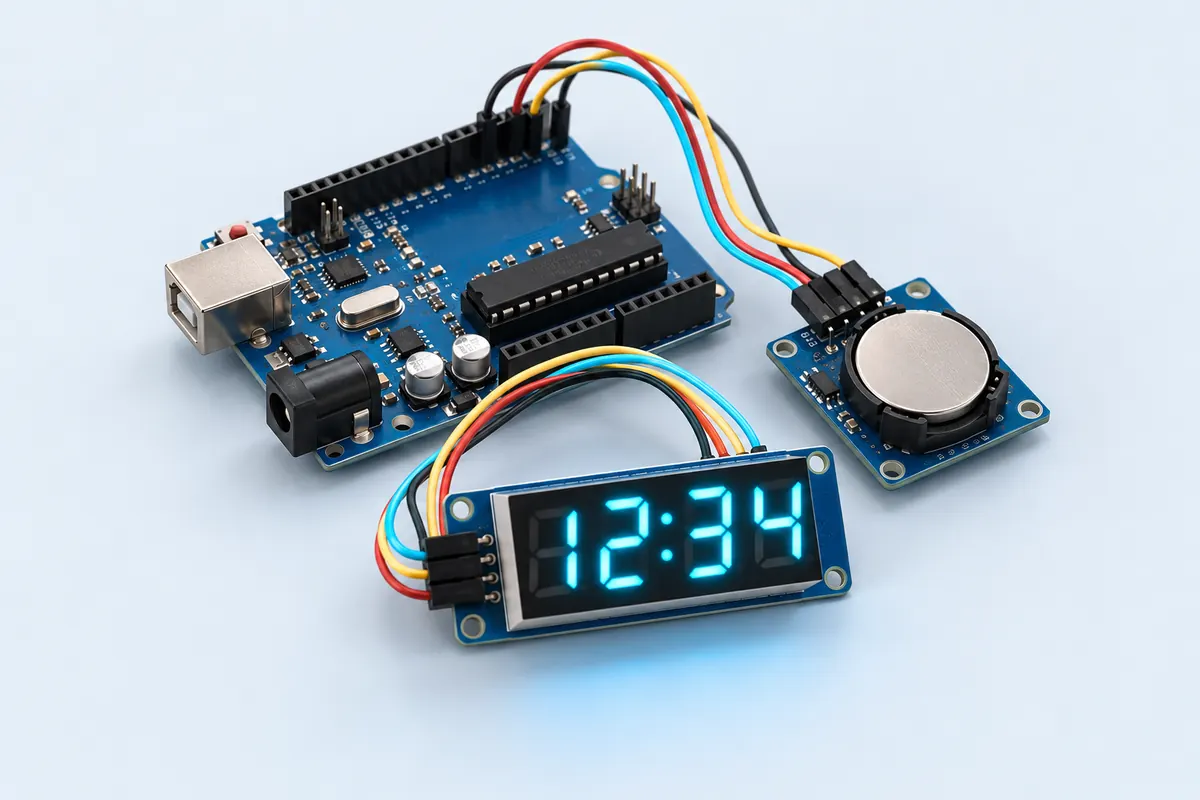
| DS3231 RTC module + CR2032 cell | 1 | ₹150 | Buy DS3231 RTC module + CR2032 cell |
| TM1637 4-digit display module | 1 | ₹60 | Buy TM1637 4-digit display module |
| Jumper wires | 1 | ₹30 | Buy Jumper wires |
| Total | ₹690 |
Affiliate disclosure: “Buy” links may earn FlashReady a small commission at no extra cost to you. Prices are indicative.
Wiring
| Arduino Uno R3 | Part · pin | Wire | Notes |
|---|---|---|---|
| 5V | DS3231 real-time clock (RTC) module · VCC | red | |
| GND | DS3231 real-time clock (RTC) module · GND | black | |
| SDA | DS3231 real-time clock (RTC) module · SDA | blue | |
| SCL | DS3231 real-time clock (RTC) module · SCL | yellow | |
| D2 | TM1637 4-digit 7-segment display · CLK | orange | |
| D3 | TM1637 4-digit 7-segment display · DIO | green | |
| 5V | TM1637 4-digit 7-segment display · VCC | red | |
| GND | TM1637 4-digit 7-segment display · GND | black |
Board quirks: On first power-up the clock is set to the time the sketch was compiled — upload right after compiling for the best start. Many DS3231 modules have a charging circuit meant for a rechargeable LIR2032. With a normal CR2032, remove the charging diode or resistor as the module’s documentation describes.
Code
// RTC digital clock — Arduino Uno + DS3231 real-time clock + TM1637 4-digit display.
// Keeps time through power cuts on the DS3231's coin cell; the colon blinks every second.
// DS3231 on I2C (SDA/SCL, 0x68). TM1637 CLK → D2, DIO → D3.
#include <Wire.h>
#include <RTClib.h>
#include <TM1637Display.h>

RTC_DS3231 rtc;
TM1637Display display(2, 3);

void setup() {
  Serial.begin(9600);
  display.setBrightness(4);
  if (!rtc.begin()) {
    Serial.println(F("DS3231 not found"));
    for (;;) delay(1000);
  }
  if (rtc.lostPower()) {
    // First power-up (or a flat coin cell): set the clock to the time this sketch was compiled.
    rtc.adjust(DateTime(F(__DATE__), F(__TIME__)));
    Serial.println(F("Clock set from compile time"));
  }
}

void loop() {
  DateTime now = rtc.now();
  bool colon = now.second() % 2 == 0;
  display.showNumberDecEx(now.hour() * 100 + now.minute(), colon ? 0b01000000 : 0, true);
  static uint8_t lastSecond = 99;
  if (now.second() != lastSecond) {
    lastSecond = now.second();
    Serial.print(now.timestamp(DateTime::TIMESTAMP_TIME));
    Serial.print(F("  chip temp "));
    Serial.println(rtc.getTemperature(), 2);
  }
  delay(100);
}
// RTC digital clock — Arduino Uno + DS3231 real-time clock + TM1637 4-digit display.
// Keeps time through power cuts on the DS3231's coin cell; the colon blinks every second.
// DS3231 on I2C (SDA/SCL, 0x68). TM1637 CLK → D2, DIO → D3.
#include <Wire.h>
#include <RTClib.h>
#include <TM1637Display.h>
RTC_DS3231 rtc;
TM1637Display display(2, 3);
void setup() {
Serial.begin(9600);
display.setBrightness(4);
if (!rtc.begin()) {
Serial.println(F("DS3231 not found"));
for (;;) delay(1000);
}
if (rtc.lostPower()) {
// First power-up (or a flat coin cell): set the clock to the time this sketch was compiled.
rtc.adjust(DateTime(F(__DATE__), F(__TIME__)));
Serial.println(F("Clock set from compile time"));
}
}
void loop() {
DateTime now = rtc.now();
bool colon = now.second() % 2 == 0;
display.showNumberDecEx(now.hour() * 100 + now.minute(), colon ? 0b01000000 : 0, true);
static uint8_t lastSecond = 99;
if (now.second() != lastSecond) {
lastSecond = now.second();
Serial.print(now.timestamp(DateTime::TIMESTAMP_TIME));
Serial.print(F(" chip temp "));
Serial.println(rtc.getTemperature(), 2);
}
delay(100);
}Compiled for uno on avr 1.8.8 with RTClib 2.1.4 · 3 Nov 2026
How it works
The DS3231 is a real-time clock with a temperature-compensated crystal inside the chip — accurate to about a minute a year. A coin cell on the module keeps it running when the main power is off, which is what makes it survive power cuts.
On start-up the sketch asks whether the clock lost power. If it did (first use, or a dead coin cell), it sets the time from the moment the sketch was compiled using the __DATE__ and __TIME__ macros. After that, the DS3231 keeps time on its own.
Every 100 ms the Uno reads the time and shows hours and minutes on the TM1637 display, with the colon on during even seconds — the familiar blink. The chip’s built-in temperature sensor is printed to the Serial Monitor, too.
The RTClib library handles the I2C registers and BCD encoding, and the TM1637 library drives the display over two wires.
Troubleshooting
The time resets after a power cut
The coin cell is flat or missing. Fit a fresh CR2032 and re-upload to set the time once.
It shows the wrong hour
The clock is set from your computer’s time at compile time. Re-upload, or add a serial command to set it.
“DS3231 not found”
Check SDA/SCL and run the I2C scanner; the DS3231 answers at 0x68 (and the module’s EEPROM at 0x57).
Upgrades
- Add an alarm with a buzzer using the DS3231’s alarm registers.
- Show temperature (the DS3231 has a sensor inside) every few seconds.
- Dim the display at night.