Parts list
| Part | Qty | Approx. | Buy |
|---|---|---|---|
| ESP32 DevKit V1 (30-pin) | 1 | ₹380 | Buy ESP32 DevKit V1 (30-pin) |
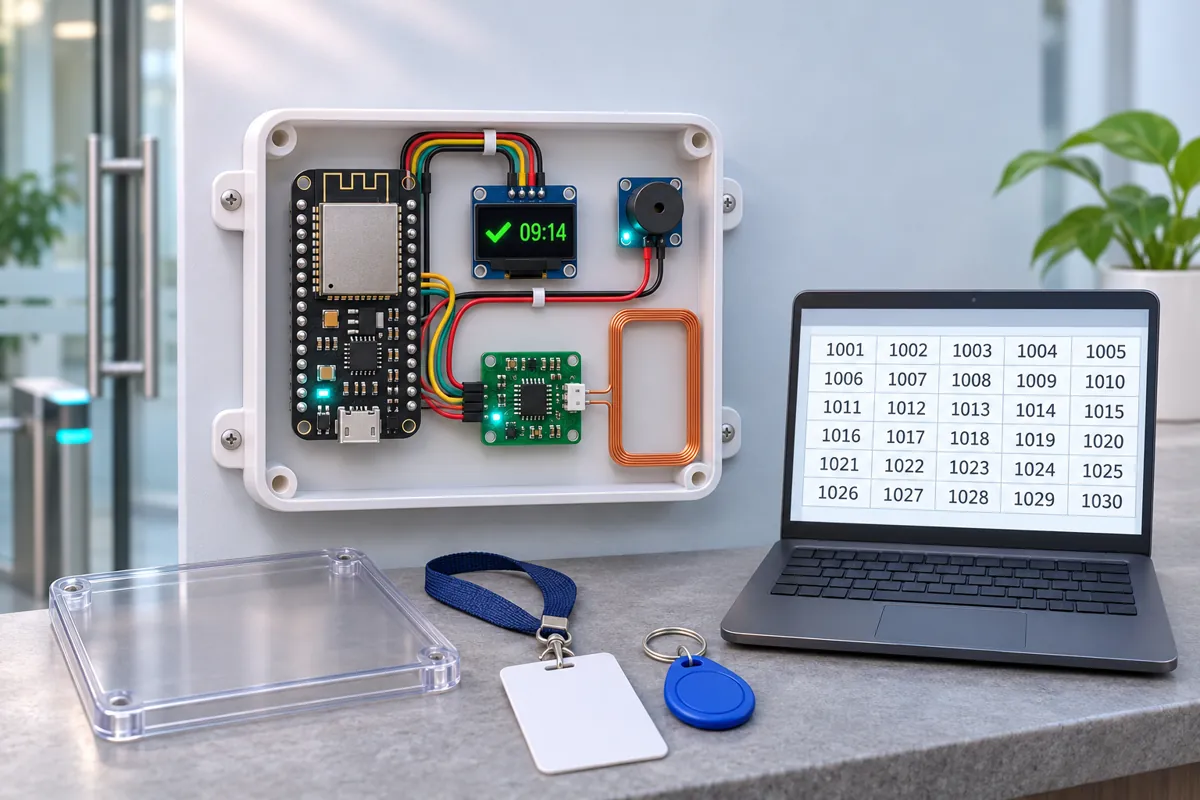
| RDM6300 125 kHz RFID reader + antenna coil | 1 | ₹250 | Buy RDM6300 125 kHz RFID reader + antenna coil |
| 125 kHz EM4100 cards or key fobs (if you don’t have ID cards) | 10 | ₹1,500 | Buy 125 kHz EM4100 cards or key fobs (if you don’t have ID cards) |
| 0.96" SSD1306 I2C OLED (4-pin) | 1 | ₹220 | Buy 0.96" SSD1306 I2C OLED (4-pin) |
| Active buzzer module | 1 | ₹25 | Buy Active buzzer module |
| Resistors 1 kΩ + 2 kΩ (TX divider) | 1 | ₹5 | Buy Resistors 1 kΩ + 2 kΩ (TX divider) |
| 5 V 1 A USB adapter + cable | 1 | ₹120 | Buy 5 V 1 A USB adapter + cable |
| Wall-mount plastic box (antenna behind the front panel) | 1 | ₹150 | Buy Wall-mount plastic box (antenna behind the front panel) |
| Total | ₹2,650 |
Affiliate disclosure: “Buy” links may earn FlashReady a small commission at no extra cost to you. Prices are indicative.
Wiring
| ESP32 DevKit V1 | Part · pin | Wire | Notes |
|---|---|---|---|
| VIN | RDM6300 125 kHz RFID reader (EM4100) · +5V | red | The reader needs 5 V (USB 5 V on VIN) |
| GND | RDM6300 125 kHz RFID reader (EM4100) · GND | black | |
| RX2 | RDM6300 125 kHz RFID reader (EM4100) · TX | green | Via 1 kΩ / 2 kΩ divider — RDM6300 TX is 5 V — the divider brings it to 3.3 V for GPIO16 |
| Antenna coil (comes with the RDM6300) · Lead 1 | RDM6300 125 kHz RFID reader (EM4100) · ANT1 | white | |
| Antenna coil (comes with the RDM6300) · Lead 2 | RDM6300 125 kHz RFID reader (EM4100) · ANT2 | white | |
| D21 | SSD1306 OLED 0.96″ (128×64, I2C) · SDA | blue | |
| D22 | SSD1306 OLED 0.96″ (128×64, I2C) · SCL | yellow | |
| 3V3 | SSD1306 OLED 0.96″ (128×64, I2C) · VCC | red | |
| GND | SSD1306 OLED 0.96″ (128×64, I2C) · GND | black | |
| D25 | Active buzzer module (high-level trigger) · I/O | orange | |
| 3V3 | Active buzzer module (high-level trigger) · VCC | red | |
| GND | Active buzzer module (high-level trigger) · GND | black |
Board quirks: Many Indian offices, colleges and housing societies hand out <strong>125 kHz EM4100</strong> proximity cards (plain white cards, often with a 10-digit number printed on them). The RDM6300 reads exactly these. It can’t read 13.56 MHz MIFARE cards or bank cards — use the RC522 attendance project for those. The 10-digit number printed on most cards is the card’s 32-bit ID in decimal, which is what the sketch shows. Some cards print it as “123,45678” (facility + card number) instead; tap the card once and copy the number the OLED shows into the <code>PEOPLE</code> list. Mount the antenna coil flat behind a plastic front panel, away from metal and from the ESP32’s antenna. Cards read from about 3–5 cm. Taps made while Wi-Fi or the internet is down are kept in a queue (up to 20) and sent later with their real time — but the queue is lost if the power goes too. Put the reader and router on the inverter.
Code
// 125 kHz ID-card attendance to Google Sheets — ESP32 DevKit V1 + RDM6300 + OLED + buzzer
// RDM6300 TX -> 1k/2k divider -> RX2 (GPIO16); +5V from VIN. OLED on D21/D22. Buzzer module on D25.
// Each tap toggles IN / OUT for that card (reset at midnight IST) and is sent to a Google Apps
// Script web app, which adds a row to your sheet. Taps made while Wi-Fi is down are queued.
#include <WiFi.h>
#include <WiFiClientSecure.h>
#include <HTTPClient.h>
#include <Wire.h>
#include <Adafruit_GFX.h>
#include <Adafruit_SSD1306.h>
#include <time.h>
#include "fr_settings.h"
const char* WIFI_SSID = "YOUR_SSID";
const char* WIFI_PASS = "YOUR_PASSWORD";
const char* SCRIPT_URL = "YOUR_SCRIPT_URL"; // https://script.google.com/macros/s/.../exec
// Filled in from the FlashReady flasher over USB (kept on the board), or type the values above.
FrSetting SETTINGS[] = {
{"wifi_ssid", &WIFI_SSID, true},
{"wifi_pass", &WIFI_PASS, true},
{"script_url", &SCRIPT_URL, true},
};
constexpr uint8_t RFID_RX = 16;
constexpr uint8_t BUZZER_PIN = 25;
// The 10-digit number printed on each card (EM4100 cards print it like "0012345678").
struct Person { uint32_t card; const char* name; };
const Person PEOPLE[] = {
{12345678UL, "Asha"},
{87654321UL, "Ravi"},
};
constexpr uint8_t N_PEOPLE = sizeof(PEOPLE) / sizeof(PEOPLE[0]);
struct Tap { uint32_t card; time_t when; bool in; };
Tap queue[20];
uint8_t queued = 0;
bool isIn[N_PEOPLE];
int today = -1;
uint32_t lastCard = 0, lastCardAt = 0;
Adafruit_SSD1306 oled(128, 64, &Wire, -1);
void beep(int times, int ms) {
for (int i = 0; i < times; i++) {
digitalWrite(BUZZER_PIN, HIGH);
delay(ms);
digitalWrite(BUZZER_PIN, LOW);
delay(80);
}
}
void show(const char* l1, const char* l2, const char* l3) {
oled.clearDisplay();
oled.setCursor(0, 0);
oled.setTextSize(1);
oled.println(l1);
oled.setTextSize(2);
oled.println(l2);
oled.setTextSize(1);
oled.println(l3);
oled.display();
}
int hexVal(char c) { return c <= '9' ? c - '0' : (c | 0x20) - 'a' + 10; }
// Frame: 0x02, 10 hex chars (version + 32-bit card), 2 hex chars checksum (XOR), 0x03.
bool readCard(uint32_t& card) {
static char buf[12];
static int n = -1;
while (Serial2.available()) {
int c = Serial2.read();
if (c == 0x02) { n = 0; continue; }
if (n < 0) continue;
if (c == 0x03) {
bool ok = n == 12;
n = -1;
if (!ok) return false;
uint8_t sum = 0;
for (int i = 0; i < 10; i += 2) sum ^= hexVal(buf[i]) * 16 + hexVal(buf[i + 1]);
if (sum != hexVal(buf[10]) * 16 + hexVal(buf[11])) return false;
card = 0;
for (int i = 2; i < 10; i++) card = card * 16 + hexVal(buf[i]);
return true;
}
if (n < 12) buf[n++] = c;
else n = -1;
}
return false;
}
int personOf(uint32_t card) {
for (int i = 0; i < N_PEOPLE; i++)
if (PEOPLE[i].card == card) return i;
return -1;
}
bool send(const Tap& t) {
if (!*SCRIPT_URL || WiFi.status() != WL_CONNECTED) return false;
int p = personOf(t.card);
String name = p >= 0 ? PEOPLE[p].name : "unknown";
name.replace(" ", "%20");
char id[11];
snprintf(id, sizeof id, "%010lu", (unsigned long)t.card);
String url = String(SCRIPT_URL) + "?id=" + id + "&name=" + name + "&dir=" + (t.in ? "IN" : "OUT") + "&t=" + (long)t.when;
WiFiClientSecure client;
client.setInsecure(); // Google's certificate changes; the URL itself is the secret here
HTTPClient http;
http.setFollowRedirects(HTTPC_STRICT_FOLLOW_REDIRECTS); // Apps Script answers with a redirect
http.begin(client, url);
int code = http.GET();
http.end();
Serial.printf("sheet -> %d\n", code);
return code == 200;
}
void flush() {
while (queued && send(queue[0])) {
memmove(queue, queue + 1, (queued - 1) * sizeof(Tap));
queued--;
}
}
void setup() {
Serial.begin(115200);
frSettingsBegin(SETTINGS);
pinMode(BUZZER_PIN, OUTPUT);
Serial2.begin(9600, SERIAL_8N1, RFID_RX, 17);
Wire.begin(21, 22);
if (!oled.begin(SSD1306_SWITCHCAPVCC, 0x3C)) Serial.println("OLED not found at 0x3C");
oled.setTextColor(SSD1306_WHITE);
if (*WIFI_SSID && *SCRIPT_URL) {
WiFi.begin(WIFI_SSID, WIFI_PASS);
configTime(19800, 0, "pool.ntp.org", "time.google.com"); // IST = UTC + 5:30
} else {
Serial.println("Sheet logging off — no Wi-Fi name or script URL set. Flash from flashready.in or type them into the code.");
}
show("Attendance", "Tap card", "");
}
void loop() {
uint32_t card;
time_t now = time(nullptr);
struct tm lt;
localtime_r(&now, <);
bool timeOk = now > 1700000000; // set by NTP
if (timeOk && lt.tm_yday != today) { // a new day: everyone starts OUT
today = lt.tm_yday;
memset(isIn, 0, sizeof isIn);
}
if (readCard(card)) {
if (card == lastCard && millis() - lastCardAt < 5000) return; // the reader repeats while the card is near
lastCard = card;
lastCardAt = millis();
int p = personOf(card);
char id[11], when[17];
snprintf(id, sizeof id, "%010lu", (unsigned long)card);
if (timeOk) strftime(when, sizeof when, "%H:%M", <);
else strcpy(when, "--:--");
if (p < 0) {
Serial.printf("unknown card %s\n", id);
show("Unknown card", id, "Add it to PEOPLE");
beep(3, 60);
return;
}
isIn[p] = !isIn[p];
Serial.printf("%s,%s,%s,%s\n", when, id, PEOPLE[p].name, isIn[p] ? "IN" : "OUT");
char l3[24];
snprintf(l3, sizeof l3, "%s %s", isIn[p] ? "IN " : "OUT", when);
show(isIn[p] ? "Welcome" : "Goodbye", PEOPLE[p].name, l3);
beep(1, 120);
Tap t = {card, now, isIn[p]};
if (queued == 20) memmove(queue, queue + 1, 19 * sizeof(Tap)), queued = 19; // full: drop the oldest
queue[queued++] = t;
flush();
}
static uint32_t lastTry = 0;
if (queued && millis() - lastTry > 30000) {
lastTry = millis();
flush();
}
}// 125 kHz ID-card attendance to Google Sheets — ESP32 DevKit V1 + RDM6300 + OLED + buzzer
// RDM6300 TX -> 1k/2k divider -> RX2 (GPIO16); +5V from VIN. OLED on D21/D22. Buzzer module on D25.
// Each tap toggles IN / OUT for that card (reset at midnight IST) and is sent to a Google Apps
// Script web app, which adds a row to your sheet. Taps made while Wi-Fi is down are queued.
#include <WiFi.h>
#include <WiFiClientSecure.h>
#include <HTTPClient.h>
#include <Wire.h>
#include <Adafruit_GFX.h>
#include <Adafruit_SSD1306.h>
#include <time.h>
#include "fr_settings.h"
const char* WIFI_SSID = "YOUR_SSID";
const char* WIFI_PASS = "YOUR_PASSWORD";
const char* SCRIPT_URL = "YOUR_SCRIPT_URL"; // https://script.google.com/macros/s/.../exec
// Filled in from the FlashReady flasher over USB (kept on the board), or type the values above.
FrSetting SETTINGS[] = {
{"wifi_ssid", &WIFI_SSID, true},
{"wifi_pass", &WIFI_PASS, true},
{"script_url", &SCRIPT_URL, true},
};
constexpr uint8_t RFID_RX = 16;
constexpr uint8_t BUZZER_PIN = 25;
// The 10-digit number printed on each card (EM4100 cards print it like "0012345678").
struct Person { uint32_t card; const char* name; };
const Person PEOPLE[] = {
{12345678UL, "Asha"},
{87654321UL, "Ravi"},
};
constexpr uint8_t N_PEOPLE = sizeof(PEOPLE) / sizeof(PEOPLE[0]);
struct Tap { uint32_t card; time_t when; bool in; };
Tap queue[20];
uint8_t queued = 0;
bool isIn[N_PEOPLE];
int today = -1;
uint32_t lastCard = 0, lastCardAt = 0;
Adafruit_SSD1306 oled(128, 64, &Wire, -1);
void beep(int times, int ms) {
for (int i = 0; i < times; i++) {
digitalWrite(BUZZER_PIN, HIGH);
delay(ms);
digitalWrite(BUZZER_PIN, LOW);
delay(80);
}
}
void show(const char* l1, const char* l2, const char* l3) {
oled.clearDisplay();
oled.setCursor(0, 0);
oled.setTextSize(1);
oled.println(l1);
oled.setTextSize(2);
oled.println(l2);
oled.setTextSize(1);
oled.println(l3);
oled.display();
}
int hexVal(char c) { return c <= '9' ? c - '0' : (c | 0x20) - 'a' + 10; }
// Frame: 0x02, 10 hex chars (version + 32-bit card), 2 hex chars checksum (XOR), 0x03.
bool readCard(uint32_t& card) {
static char buf[12];
static int n = -1;
while (Serial2.available()) {
int c = Serial2.read();
if (c == 0x02) { n = 0; continue; }
if (n < 0) continue;
if (c == 0x03) {
bool ok = n == 12;
n = -1;
if (!ok) return false;
uint8_t sum = 0;
for (int i = 0; i < 10; i += 2) sum ^= hexVal(buf[i]) * 16 + hexVal(buf[i + 1]);
if (sum != hexVal(buf[10]) * 16 + hexVal(buf[11])) return false;
card = 0;
for (int i = 2; i < 10; i++) card = card * 16 + hexVal(buf[i]);
return true;
}
if (n < 12) buf[n++] = c;
else n = -1;
}
return false;
}
int personOf(uint32_t card) {
for (int i = 0; i < N_PEOPLE; i++)
if (PEOPLE[i].card == card) return i;
return -1;
}
bool send(const Tap& t) {
if (!*SCRIPT_URL || WiFi.status() != WL_CONNECTED) return false;
int p = personOf(t.card);
String name = p >= 0 ? PEOPLE[p].name : "unknown";
name.replace(" ", "%20");
char id[11];
snprintf(id, sizeof id, "%010lu", (unsigned long)t.card);
String url = String(SCRIPT_URL) + "?id=" + id + "&name=" + name + "&dir=" + (t.in ? "IN" : "OUT") + "&t=" + (long)t.when;
WiFiClientSecure client;
client.setInsecure(); // Google's certificate changes; the URL itself is the secret here
HTTPClient http;
http.setFollowRedirects(HTTPC_STRICT_FOLLOW_REDIRECTS); // Apps Script answers with a redirect
http.begin(client, url);
int code = http.GET();
http.end();
Serial.printf("sheet -> %d\n", code);
return code == 200;
}
void flush() {
while (queued && send(queue[0])) {
memmove(queue, queue + 1, (queued - 1) * sizeof(Tap));
queued--;
}
}
void setup() {
Serial.begin(115200);
frSettingsBegin(SETTINGS);
pinMode(BUZZER_PIN, OUTPUT);
Serial2.begin(9600, SERIAL_8N1, RFID_RX, 17);
Wire.begin(21, 22);
if (!oled.begin(SSD1306_SWITCHCAPVCC, 0x3C)) Serial.println("OLED not found at 0x3C");
oled.setTextColor(SSD1306_WHITE);
if (*WIFI_SSID && *SCRIPT_URL) {
WiFi.begin(WIFI_SSID, WIFI_PASS);
configTime(19800, 0, "pool.ntp.org", "time.google.com"); // IST = UTC + 5:30
} else {
Serial.println("Sheet logging off — no Wi-Fi name or script URL set. Flash from flashready.in or type them into the code.");
}
show("Attendance", "Tap card", "");
}
void loop() {
uint32_t card;
time_t now = time(nullptr);
struct tm lt;
localtime_r(&now, <);
bool timeOk = now > 1700000000; // set by NTP
if (timeOk && lt.tm_yday != today) { // a new day: everyone starts OUT
today = lt.tm_yday;
memset(isIn, 0, sizeof isIn);
}
if (readCard(card)) {
if (card == lastCard && millis() - lastCardAt < 5000) return; // the reader repeats while the card is near
lastCard = card;
lastCardAt = millis();
int p = personOf(card);
char id[11], when[17];
snprintf(id, sizeof id, "%010lu", (unsigned long)card);
if (timeOk) strftime(when, sizeof when, "%H:%M", <);
else strcpy(when, "--:--");
if (p < 0) {
Serial.printf("unknown card %s\n", id);
show("Unknown card", id, "Add it to PEOPLE");
beep(3, 60);
return;
}
isIn[p] = !isIn[p];
Serial.printf("%s,%s,%s,%s\n", when, id, PEOPLE[p].name, isIn[p] ? "IN" : "OUT");
char l3[24];
snprintf(l3, sizeof l3, "%s %s", isIn[p] ? "IN " : "OUT", when);
show(isIn[p] ? "Welcome" : "Goodbye", PEOPLE[p].name, l3);
beep(1, 120);
Tap t = {card, now, isIn[p]};
if (queued == 20) memmove(queue, queue + 1, 19 * sizeof(Tap)), queued = 19; // full: drop the oldest
queue[queued++] = t;
flush();
}
static uint32_t lastTry = 0;
if (queued && millis() - lastTry > 30000) {
lastTry = millis();
flush();
}
}Arduino IDE: keep fr_settings.h in the same folder as the .ino (tab menu → New Tab, same name). Flashing from this page doesn’t need it.
// fr_settings.h — FlashReady on-board settings (Wi-Fi name, phone number, ...) over USB.
//
// Why: the pre-built file on flashready.in is the same for everyone, so your own settings
// can't be inside it. Instead the board asks for them over USB serial and keeps them in
// its EEPROM. If you use Arduino IDE you can still type them into the constants in the
// sketch — this file then changes nothing except a 2-second pause at start-up.
//
// The protocol, in plain words (one text line each way, ending in \n, at 115200 baud):
//  1. Right after Serial.begin(115200) the board prints
//       FR?SETTINGS v1 keys=wifi_ssid,wifi_pass missing=wifi_pass
//     "missing" lists the required settings that still have no real value.
//  2. If nothing is missing it listens for 2 seconds and then carries on. If something is
//     missing it keeps listening, printing the line again every 2 seconds, for up to
//     30 seconds; then it carries on anyway and the sketch skips whatever needs the
//     missing value (an alarm still sounds, it just can't send the SMS).
//  3. The flasher answers   FR!SET wifi_ssid=My%20Home&wifi_pass=secret
//     (values URL-encoded). The board stores them and answers FR!OK, then carries on with
//     the new values. Errors: FR!ERR unknown <key>, FR!ERR long <key> (nothing is stored).
//     A key that is left out keeps its stored value; "key=" (empty) removes it.
//     "FR!SET" with nothing after it means "carry on now": FR!OK, nothing is stored.
//  4. FR!CLEAR wipes everything that was stored, answers FR!OK and keeps listening.
//  Other lines are ignored.
//
// A stored value wins over the constant in the sketch. A constant that is still a
// placeholder ("YOUR_SSID", "your-wifi", "+91XXXXXXXXXX") or empty counts as not set.
//
// EEPROM block at FR_SETTINGS_ADDR: 'F' 'R' 0x01, length (uint16, low byte first), then
// "key=value\n" lines. Uses FR_SETTINGS_SIZE bytes; move FR_SETTINGS_ADDR with a #define
// before the #include if your sketch uses EEPROM for something else.
//
// Use in a sketch:
//   const char* WIFI_SSID = "YOUR_SSID";
//   FrSetting SETTINGS[] = { {"wifi_ssid", &WIFI_SSID, true} };   // key, constant, required
//   void setup() { Serial.begin(115200); frSettingsBegin(SETTINGS); ... WiFi.begin(WIFI_SSID, ...); }
// After frSettingsBegin() each constant points at the value to use ("" if none is set).
#pragma once
#include <Arduino.h>
#include <EEPROM.h>
#include <string.h>

#ifndef FR_SETTINGS_ADDR
#define FR_SETTINGS_ADDR 0
#endif
#ifndef FR_SETTINGS_SIZE
#if defined(__AVR__)
#define FR_SETTINGS_SIZE 96  // 2 KB of RAM on an Uno: a phone number fits easily
#else
#define FR_SETTINGS_SIZE 512
#endif
#endif
#ifndef FR_LINE_MAX
#if defined(__AVR__)
#define FR_LINE_MAX 128
#else
#define FR_LINE_MAX 1024
#endif
#endif
#define FR_MAX_KEYS 8
#define FR_WAIT_MAX_MS 30000UL  // never wait longer than this for missing settings
#define FR_DATA_MAX (FR_SETTINGS_SIZE - 5)

struct FrSetting {
  const char* key;     // [a-z0-9_], as in settings.json
  const char** value;  // the sketch's constant; replaced by the value to use
  bool required;
};

// Stored settings in RAM as "key=value\0key=value\0" (only non-empty values).
static char frData[FR_DATA_MAX + 1];
static uint16_t frLen = 0;

static inline void frEepromBegin() {
#if defined(ESP32) || defined(ESP8266)
  static bool started = false;
  if (!started) EEPROM.begin(FR_SETTINGS_ADDR + FR_SETTINGS_SIZE);
  started = true;
#endif
}

static inline void frLoad() {
  frEepromBegin();
  frLen = 0;
  frData[0] = 0;
  if (EEPROM.read(FR_SETTINGS_ADDR) != 'F' || EEPROM.read(FR_SETTINGS_ADDR + 1) != 'R' || EEPROM.read(FR_SETTINGS_ADDR + 2) != 1) return;
  uint16_t n = EEPROM.read(FR_SETTINGS_ADDR + 3) | (EEPROM.read(FR_SETTINGS_ADDR + 4) << 8);
  if (n > FR_DATA_MAX) return;
  for (uint16_t i = 0; i < n; i++) {
    char c = EEPROM.read(FR_SETTINGS_ADDR + 5 + i);
    frData[i] = c == '\n' ? '\0' : c;
  }
  frData[n] = 0;
  frLen = n;
}

static inline void frPut(int addr, uint8_t b) {
#if defined(__AVR__)
  EEPROM.update(addr, b);
#else
  EEPROM.write(addr, b);
#endif
}

static inline void frSave() {
  frEepromBegin();
  frPut(FR_SETTINGS_ADDR, 'F');
  frPut(FR_SETTINGS_ADDR + 1, 'R');
  frPut(FR_SETTINGS_ADDR + 2, 1);
  frPut(FR_SETTINGS_ADDR + 3, frLen & 0xFF);
  frPut(FR_SETTINGS_ADDR + 4, frLen >> 8);
  for (uint16_t i = 0; i < frLen; i++) frPut(FR_SETTINGS_ADDR + 5 + i, frData[i] ? frData[i] : '\n');
#if defined(ESP32) || defined(ESP8266)
  EEPROM.commit();
#endif
}

// The stored value for key, or nullptr.
static inline const char* frStored(const char* key) {
  size_t kl = strlen(key);
  for (uint16_t i = 0; i < frLen; i += strlen(frData + i) + 1) {
    if (strncmp(frData + i, key, kl) == 0 && frData[i + kl] == '=') return frData + i + kl + 1;
  }
  return nullptr;
}

// Empty, "your_…" / "YOUR-…" / "your …", or a "+91XXXX…" phone number.
static inline bool frIsPlaceholder(const char* v) {
  if (!v || !*v) return true;
  if (strncasecmp(v, "your", 4) == 0 && (v[4] == '_' || v[4] == '-' || v[4] == ' ')) return true;
  return v[0] == '+' && strstr(v, "XXXX") != nullptr;
}

// The stored value for key, else the fallback constant; "" if that is a placeholder.
static inline const char* frSettingsGet(const char* key, const char* fallback) {
  const char* v = frStored(key);
  if (!v) v = fallback;
  return frIsPlaceholder(v) ? "" : v;
}

static inline bool frIsMissing(const FrSetting& s) {
  return s.required && !*frSettingsGet(s.key, *s.value);
}

static inline void frRequest(FrSetting* s, uint8_t n) {
  Serial.print(F("FR?SETTINGS v1 keys="));
  for (uint8_t i = 0; i < n; i++) {
    if (i) Serial.print(',');
    Serial.print(s[i].key);
  }
  Serial.print(F(" missing="));
  bool first = true;
  for (uint8_t i = 0; i < n; i++) {
    if (!frIsMissing(s[i])) continue;
    if (!first) Serial.print(',');
    Serial.print(s[i].key);
    first = false;
  }
  Serial.print('\n');
}

static inline void frReply(const __FlashStringHelper* what, const char* key) {
  Serial.print(what);
  Serial.print(key);
  Serial.print('\n');
}

static inline int8_t frHex(char c) {
  if (c >= '0' && c <= '9') return c - '0';
  c |= 0x20;
  return (c >= 'a' && c <= 'f') ? c - 'a' + 10 : -1;
}

// Percent-decodes in place. Drops NUL, CR and LF: they can't be stored.
static inline void frDecode(char* s) {
  char* o = s;
  for (; *s; s++) {
    char c = *s;
    if (c == '%' && frHex(s[1]) >= 0 && frHex(s[2]) >= 0) {
      c = (char)(frHex(s[1]) << 4 | frHex(s[2]));
      s += 2;
    }
    if (c != '\0' && c != '\n' && c != '\r') *o++ = c;
  }
  *o = 0;
}

// "k1=v1&k2=v2" (cut short if the line overflowed). Saves and returns true, or replies with an error.
static inline bool frSet(FrSetting* s, uint8_t n, char* p, bool overflow) {
  const char* upd[FR_MAX_KEYS] = {};
  while (*p) {
    char* amp = strchr(p, '&');
    bool last = !amp;
    if (amp) *amp = 0;
    char* eq = strchr(p, '=');
    if (eq) *eq = 0;
    if (*p) {
      if (last && overflow) {
        frReply(F("FR!ERR long "), p);
        return false;
      }
      uint8_t i = 0;
      while (i < n && strcmp(s[i].key, p) != 0) i++;
      if (i == n) {
        frReply(F("FR!ERR unknown "), p);
        return false;
      }
      char* v = eq ? eq + 1 : p + strlen(p);  // "key" alone = "key="
      frDecode(v);
      upd[i] = v;
    }
    if (last) break;
    p = amp + 1;
  }
  // Build the new block: for each key, the new value or the one already stored.
  char next[FR_DATA_MAX + 1];
  uint16_t len = 0;
  for (uint8_t i = 0; i < n; i++) {
    const char* v = upd[i] ? upd[i] : frStored(s[i].key);
    if (!v || !*v) continue;
    size_t kl = strlen(s[i].key), vl = strlen(v);
    if (len + kl + vl + 2 > FR_DATA_MAX) {
      frReply(F("FR!ERR long "), s[i].key);
      return false;
    }
    memcpy(next + len, s[i].key, kl);
    next[len + kl] = '=';
    memcpy(next + len + kl + 1, v, vl + 1);
    len += kl + vl + 2;
  }
  memcpy(frData, next, len);
  frData[len] = 0;
  frLen = len;
  frSave();
  return true;
}

// Handles one received line. Returns true once settings were saved (boot carries on).
static inline bool frCommand(FrSetting* s, uint8_t n, char* line, bool overflow) {
  if (strcmp(line, "FR!CLEAR") == 0) {
    frLen = 0;
    frData[0] = 0;
    frSave();
    Serial.print(F("FR!OK\n"));
    return false;
  }
  if (strncmp(line, "FR!SET", 6) != 0 || (line[6] != ' ' && line[6] != 0)) return false;  // not for us
  char* p = line + 6;
  while (*p == ' ') p++;
  if (*p && !frSet(s, n, p, overflow)) return false;  // empty FR!SET = carry on, store nothing
  Serial.print(F("FR!OK\n"));
  return true;
}

// Call right after Serial.begin(115200). Prints the request, waits as described at the top
// (30 s at most), then points every constant in the list at the value to use ("" = not set).
static inline void frSettingsBegin(FrSetting* s, uint8_t n) {
  frLoad();
  char line[FR_LINE_MAX];
  uint16_t len = 0;
  bool overflow = false;
  frRequest(s, n);
  unsigned long start = millis(), quietSince = start;
  while (millis() - start < FR_WAIT_MAX_MS) {
    int c = Serial.read();
    if (c >= 0) {
      quietSince = millis();
      if (c == '\r') continue;
      if (c != '\n') {
        if (len < FR_LINE_MAX - 1) line[len++] = (char)c;
        else overflow = true;
        continue;
      }
      line[len] = 0;
      bool saved = frCommand(s, n, line, overflow);
      len = 0;
      overflow = false;
      if (saved) break;
      continue;
    }
    if (millis() - quietSince < 2000) {
      delay(1);  // also keeps the ESP8266 watchdog fed
      continue;
    }
    len = 0;  // drop half a line
    overflow = false;
    bool missing = false;
    for (uint8_t i = 0; i < n; i++) missing |= frIsMissing(s[i]);
    if (!missing) break;
    frRequest(s, n);
    quietSince = millis();
  }
  for (uint8_t i = 0; i < n; i++) *s[i].value = frSettingsGet(s[i].key, *s[i].value);
}

template <size_t N>
static inline void frSettingsBegin(FrSetting (&s)[N]) {
  static_assert(N <= FR_MAX_KEYS, "fr_settings.h: at most FR_MAX_KEYS settings");
  frSettingsBegin(s, (uint8_t)N);
}
// fr_settings.h — FlashReady on-board settings (Wi-Fi name, phone number, ...) over USB.
//
// Why: the pre-built file on flashready.in is the same for everyone, so your own settings
// can't be inside it. Instead the board asks for them over USB serial and keeps them in
// its EEPROM. If you use Arduino IDE you can still type them into the constants in the
// sketch — this file then changes nothing except a 2-second pause at start-up.
//
// The protocol, in plain words (one text line each way, ending in \n, at 115200 baud):
// 1. Right after Serial.begin(115200) the board prints
// FR?SETTINGS v1 keys=wifi_ssid,wifi_pass missing=wifi_pass
// "missing" lists the required settings that still have no real value.
// 2. If nothing is missing it listens for 2 seconds and then carries on. If something is
// missing it keeps listening, printing the line again every 2 seconds, for up to
// 30 seconds; then it carries on anyway and the sketch skips whatever needs the
// missing value (an alarm still sounds, it just can't send the SMS).
// 3. The flasher answers FR!SET wifi_ssid=My%20Home&wifi_pass=secret
// (values URL-encoded). The board stores them and answers FR!OK, then carries on with
// the new values. Errors: FR!ERR unknown <key>, FR!ERR long <key> (nothing is stored).
// A key that is left out keeps its stored value; "key=" (empty) removes it.
// "FR!SET" with nothing after it means "carry on now": FR!OK, nothing is stored.
// 4. FR!CLEAR wipes everything that was stored, answers FR!OK and keeps listening.
// Other lines are ignored.
//
// A stored value wins over the constant in the sketch. A constant that is still a
// placeholder ("YOUR_SSID", "your-wifi", "+91XXXXXXXXXX") or empty counts as not set.
//
// EEPROM block at FR_SETTINGS_ADDR: 'F' 'R' 0x01, length (uint16, low byte first), then
// "key=value\n" lines. Uses FR_SETTINGS_SIZE bytes; move FR_SETTINGS_ADDR with a #define
// before the #include if your sketch uses EEPROM for something else.
//
// Use in a sketch:
// const char* WIFI_SSID = "YOUR_SSID";
// FrSetting SETTINGS[] = { {"wifi_ssid", &WIFI_SSID, true} }; // key, constant, required
// void setup() { Serial.begin(115200); frSettingsBegin(SETTINGS); ... WiFi.begin(WIFI_SSID, ...); }
// After frSettingsBegin() each constant points at the value to use ("" if none is set).
#pragma once
#include <Arduino.h>
#include <EEPROM.h>
#include <string.h>
#ifndef FR_SETTINGS_ADDR
#define FR_SETTINGS_ADDR 0
#endif
#ifndef FR_SETTINGS_SIZE
#if defined(__AVR__)
#define FR_SETTINGS_SIZE 96 // 2 KB of RAM on an Uno: a phone number fits easily
#else
#define FR_SETTINGS_SIZE 512
#endif
#endif
#ifndef FR_LINE_MAX
#if defined(__AVR__)
#define FR_LINE_MAX 128
#else
#define FR_LINE_MAX 1024
#endif
#endif
#define FR_MAX_KEYS 8
#define FR_WAIT_MAX_MS 30000UL // never wait longer than this for missing settings
#define FR_DATA_MAX (FR_SETTINGS_SIZE - 5)
struct FrSetting {
const char* key; // [a-z0-9_], as in settings.json
const char** value; // the sketch's constant; replaced by the value to use
bool required;
};
// Stored settings in RAM as "key=value\0key=value\0" (only non-empty values).
static char frData[FR_DATA_MAX + 1];
static uint16_t frLen = 0;
static inline void frEepromBegin() {
#if defined(ESP32) || defined(ESP8266)
static bool started = false;
if (!started) EEPROM.begin(FR_SETTINGS_ADDR + FR_SETTINGS_SIZE);
started = true;
#endif
}
static inline void frLoad() {
frEepromBegin();
frLen = 0;
frData[0] = 0;
if (EEPROM.read(FR_SETTINGS_ADDR) != 'F' || EEPROM.read(FR_SETTINGS_ADDR + 1) != 'R' || EEPROM.read(FR_SETTINGS_ADDR + 2) != 1) return;
uint16_t n = EEPROM.read(FR_SETTINGS_ADDR + 3) | (EEPROM.read(FR_SETTINGS_ADDR + 4) << 8);
if (n > FR_DATA_MAX) return;
for (uint16_t i = 0; i < n; i++) {
char c = EEPROM.read(FR_SETTINGS_ADDR + 5 + i);
frData[i] = c == '\n' ? '\0' : c;
}
frData[n] = 0;
frLen = n;
}
static inline void frPut(int addr, uint8_t b) {
#if defined(__AVR__)
EEPROM.update(addr, b);
#else
EEPROM.write(addr, b);
#endif
}
static inline void frSave() {
frEepromBegin();
frPut(FR_SETTINGS_ADDR, 'F');
frPut(FR_SETTINGS_ADDR + 1, 'R');
frPut(FR_SETTINGS_ADDR + 2, 1);
frPut(FR_SETTINGS_ADDR + 3, frLen & 0xFF);
frPut(FR_SETTINGS_ADDR + 4, frLen >> 8);
for (uint16_t i = 0; i < frLen; i++) frPut(FR_SETTINGS_ADDR + 5 + i, frData[i] ? frData[i] : '\n');
#if defined(ESP32) || defined(ESP8266)
EEPROM.commit();
#endif
}
// The stored value for key, or nullptr.
static inline const char* frStored(const char* key) {
size_t kl = strlen(key);
for (uint16_t i = 0; i < frLen; i += strlen(frData + i) + 1) {
if (strncmp(frData + i, key, kl) == 0 && frData[i + kl] == '=') return frData + i + kl + 1;
}
return nullptr;
}
// Empty, "your_…" / "YOUR-…" / "your …", or a "+91XXXX…" phone number.
static inline bool frIsPlaceholder(const char* v) {
if (!v || !*v) return true;
if (strncasecmp(v, "your", 4) == 0 && (v[4] == '_' || v[4] == '-' || v[4] == ' ')) return true;
return v[0] == '+' && strstr(v, "XXXX") != nullptr;
}
// The stored value for key, else the fallback constant; "" if that is a placeholder.
static inline const char* frSettingsGet(const char* key, const char* fallback) {
const char* v = frStored(key);
if (!v) v = fallback;
return frIsPlaceholder(v) ? "" : v;
}
static inline bool frIsMissing(const FrSetting& s) {
return s.required && !*frSettingsGet(s.key, *s.value);
}
static inline void frRequest(FrSetting* s, uint8_t n) {
Serial.print(F("FR?SETTINGS v1 keys="));
for (uint8_t i = 0; i < n; i++) {
if (i) Serial.print(',');
Serial.print(s[i].key);
}
Serial.print(F(" missing="));
bool first = true;
for (uint8_t i = 0; i < n; i++) {
if (!frIsMissing(s[i])) continue;
if (!first) Serial.print(',');
Serial.print(s[i].key);
first = false;
}
Serial.print('\n');
}
static inline void frReply(const __FlashStringHelper* what, const char* key) {
Serial.print(what);
Serial.print(key);
Serial.print('\n');
}
static inline int8_t frHex(char c) {
if (c >= '0' && c <= '9') return c - '0';
c |= 0x20;
return (c >= 'a' && c <= 'f') ? c - 'a' + 10 : -1;
}
// Percent-decodes in place. Drops NUL, CR and LF: they can't be stored.
static inline void frDecode(char* s) {
char* o = s;
for (; *s; s++) {
char c = *s;
if (c == '%' && frHex(s[1]) >= 0 && frHex(s[2]) >= 0) {
c = (char)(frHex(s[1]) << 4 | frHex(s[2]));
s += 2;
}
if (c != '\0' && c != '\n' && c != '\r') *o++ = c;
}
*o = 0;
}
// "k1=v1&k2=v2" (cut short if the line overflowed). Saves and returns true, or replies with an error.
static inline bool frSet(FrSetting* s, uint8_t n, char* p, bool overflow) {
const char* upd[FR_MAX_KEYS] = {};
while (*p) {
char* amp = strchr(p, '&');
bool last = !amp;
if (amp) *amp = 0;
char* eq = strchr(p, '=');
if (eq) *eq = 0;
if (*p) {
if (last && overflow) {
frReply(F("FR!ERR long "), p);
return false;
}
uint8_t i = 0;
while (i < n && strcmp(s[i].key, p) != 0) i++;
if (i == n) {
frReply(F("FR!ERR unknown "), p);
return false;
}
char* v = eq ? eq + 1 : p + strlen(p); // "key" alone = "key="
frDecode(v);
upd[i] = v;
}
if (last) break;
p = amp + 1;
}
// Build the new block: for each key, the new value or the one already stored.
char next[FR_DATA_MAX + 1];
uint16_t len = 0;
for (uint8_t i = 0; i < n; i++) {
const char* v = upd[i] ? upd[i] : frStored(s[i].key);
if (!v || !*v) continue;
size_t kl = strlen(s[i].key), vl = strlen(v);
if (len + kl + vl + 2 > FR_DATA_MAX) {
frReply(F("FR!ERR long "), s[i].key);
return false;
}
memcpy(next + len, s[i].key, kl);
next[len + kl] = '=';
memcpy(next + len + kl + 1, v, vl + 1);
len += kl + vl + 2;
}
memcpy(frData, next, len);
frData[len] = 0;
frLen = len;
frSave();
return true;
}
// Handles one received line. Returns true once settings were saved (boot carries on).
static inline bool frCommand(FrSetting* s, uint8_t n, char* line, bool overflow) {
if (strcmp(line, "FR!CLEAR") == 0) {
frLen = 0;
frData[0] = 0;
frSave();
Serial.print(F("FR!OK\n"));
return false;
}
if (strncmp(line, "FR!SET", 6) != 0 || (line[6] != ' ' && line[6] != 0)) return false; // not for us
char* p = line + 6;
while (*p == ' ') p++;
if (*p && !frSet(s, n, p, overflow)) return false; // empty FR!SET = carry on, store nothing
Serial.print(F("FR!OK\n"));
return true;
}
// Call right after Serial.begin(115200). Prints the request, waits as described at the top
// (30 s at most), then points every constant in the list at the value to use ("" = not set).
static inline void frSettingsBegin(FrSetting* s, uint8_t n) {
frLoad();
char line[FR_LINE_MAX];
uint16_t len = 0;
bool overflow = false;
frRequest(s, n);
unsigned long start = millis(), quietSince = start;
while (millis() - start < FR_WAIT_MAX_MS) {
int c = Serial.read();
if (c >= 0) {
quietSince = millis();
if (c == '\r') continue;
if (c != '\n') {
if (len < FR_LINE_MAX - 1) line[len++] = (char)c;
else overflow = true;
continue;
}
line[len] = 0;
bool saved = frCommand(s, n, line, overflow);
len = 0;
overflow = false;
if (saved) break;
continue;
}
if (millis() - quietSince < 2000) {
delay(1); // also keeps the ESP8266 watchdog fed
continue;
}
len = 0; // drop half a line
overflow = false;
bool missing = false;
for (uint8_t i = 0; i < n; i++) missing |= frIsMissing(s[i]);
if (!missing) break;
frRequest(s, n);
quietSince = millis();
}
for (uint8_t i = 0; i < n; i++) *s[i].value = frSettingsGet(s[i].key, *s[i].value);
}
template <size_t N>
static inline void frSettingsBegin(FrSetting (&s)[N]) {
static_assert(N <= FR_MAX_KEYS, "fr_settings.h: at most FR_MAX_KEYS settings");
frSettingsBegin(s, (uint8_t)N);
}Compiled for esp32 on esp32 3.3.12 with Adafruit SSD1306 2.5.17 · 3 Nov 2026
How it works
Most small offices, coaching centres and college departments in India already gave everyone a 125 kHz proximity card for the door or the library. This project turns those same cards into an attendance system: tap in at the start of the day, tap out when leaving, and every tap appears as a row in a Google Sheet — date, time, card number, name, IN/OUT.
How it works
The RDM6300 powers a small coil at 125 kHz. A card held near it wakes up and sends its ID; the RDM6300 decodes it and sends a 14-byte frame over its 5 V serial TX at 9600 baud: start byte 0x02, ten hex characters (a version byte and the 32-bit card number), a two-character checksum (XOR of the five bytes) and end byte 0x03. The ESP32 reads it on Serial2 (GPIO16) through a 1 kΩ / 2 kΩ divider, checks the checksum, and turns the card number into the 10-digit decimal printed on most cards.
The reader repeats the frame as long as the card is near, so the same card is ignored for 5 seconds. Each accepted tap flips that person between IN and OUT (everyone starts the day OUT; the sketch uses NTP time in IST and resets at midnight), shows a greeting on the OLED and beeps once. Unknown cards beep three times and show their number so you can add them.
Each tap is sent to your Google Apps Script web app as a simple GET request — ?id=0012345678&name=Asha&dir=IN&t=<time> — over HTTPS. If the internet is down, taps wait in a queue and are retried every 30 seconds.
The Google Sheet side
Create a sheet with a tab named Attendance, then Extensions → Apps Script, paste this, and Deploy → New deployment → Web app (execute as: me, access: anyone). Copy the URL that ends in /exec into the flasher’s form.
function doGet(e) {
  const sheet = SpreadsheetApp.getActiveSpreadsheet().getSheetByName('Attendance');
  const t = Number(e.parameter.t) > 0 ? new Date(Number(e.parameter.t) * 1000) : new Date();
  sheet.appendRow([t, e.parameter.id, e.parameter.name, e.parameter.dir]);
  return ContentService.createTextOutput('OK');
}
Anyone who knows that long URL can add rows, so keep it private and don’t paste it in group chats.
Why these parts
- RDM6300 — reads the 125 kHz cards people already have, for ₹250.
- Divider on TX — the RDM6300 is a 5 V module and its TX would push 5 V into the ESP32.
- Google Sheets — free, shareable with the office manager, and easy to turn into a monthly register with a pivot table.
India notes
Attendance records can matter for wages and exams. Keep the paper register as the official record until the system has run reliably for a month, and tell staff what is recorded.
Troubleshooting
Nothing happens when a card is tapped
Check the RDM6300 gets 5 V (its LED, if fitted, blinks on a read) and that TX reaches GPIO16 through the divider. Swap the antenna leads if reads are weak. Make sure the card is 125 kHz — a MIFARE card does nothing.
The Serial Monitor shows the tap but the sheet gets no row
Look for “sheet -> 200”. Anything else: the web app isn’t deployed for “Anyone”, you used the editor URL instead of the /exec URL, or you changed the script without deploying a new version.
The time shows --:--
NTP hasn’t synced yet — the board has no internet. Rows still get the time the Apps Script receives them once the queue is sent, unless t=0.
Upgrades
- Keep the names in a second sheet tab and let the Apps Script look them up, so adding a person needs no re-flash.
- Add a relay and an electric strike so the same card opens the staff door during office hours.
- Mail a daily absent list from the Apps Script with a time-driven trigger.