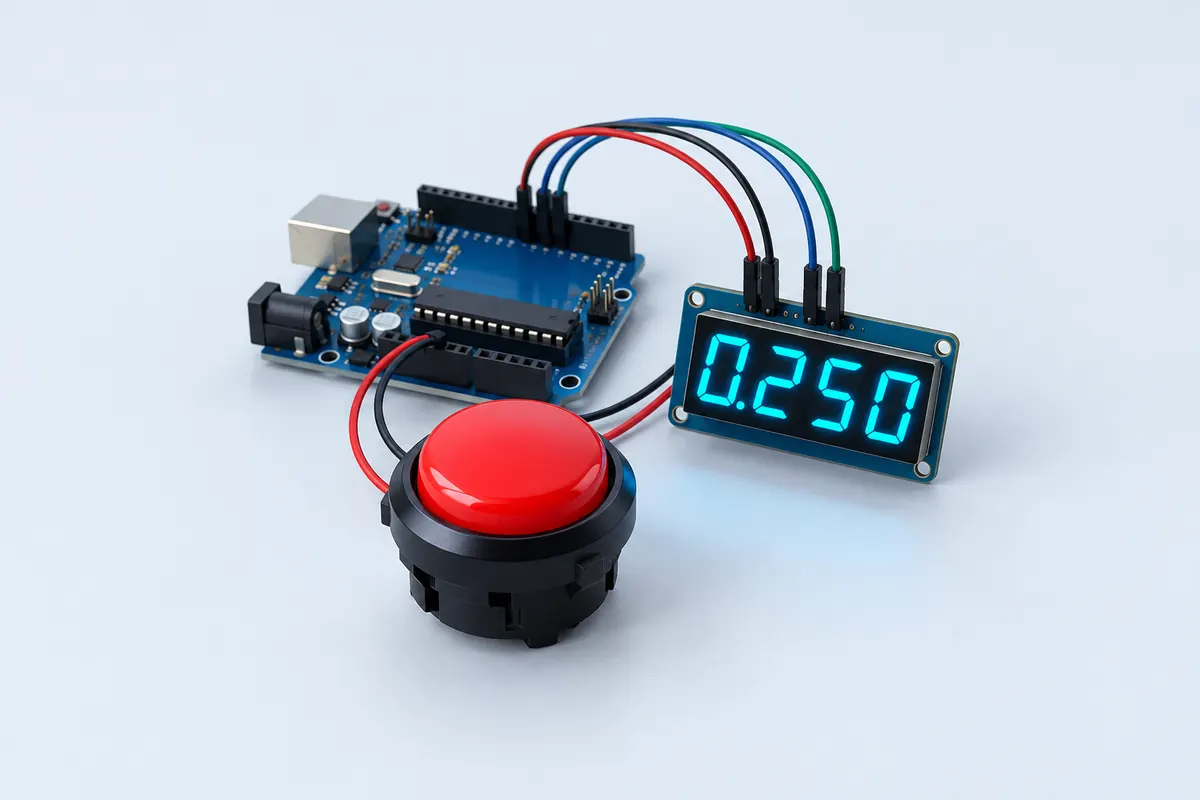
Parts list
| Part | Qty | Approx. | Buy |
|---|---|---|---|
| Arduino Uno R3 (compatible) | 1 | ₹450 | Buy Arduino Uno R3 (compatible) |
| TM1637 4-digit display module | 1 | ₹60 | Buy TM1637 4-digit display module |
| Big arcade push button (or tactile button) | 1 | ₹40 | Buy Big arcade push button (or tactile button) |
| Jumper wires | 1 | ₹30 | Buy Jumper wires |
| Total | ₹580 |
Affiliate disclosure: “Buy” links may earn FlashReady a small commission at no extra cost to you. Prices are indicative.
Wiring
| Arduino Uno R3 | Part · pin | Wire | Notes |
|---|---|---|---|
| D2 | TM1637 4-digit 7-segment display · CLK | yellow | |
| D3 | TM1637 4-digit 7-segment display · DIO | green | |
| 5V | TM1637 4-digit 7-segment display · VCC | red | |
| GND | TM1637 4-digit 7-segment display · GND | black | |
| D4 | Push button (6 mm tactile switch) · 1 | orange | Internal pull-up |
| GND | Push button (6 mm tactile switch) · 2 | black |
Board quirks: The random wait (1.5–4.5 s) stops players from guessing the moment. Typical reaction times are 200–300 ms; under 120 ms is almost certainly a guess.
Code
// Reaction timer game — Arduino Uno + TM1637 4-digit display + push button.
// Wait for "Go", hit the button, and see your reaction time in milliseconds.
// Press too early and you get "Err". TM1637 CLK → D2, DIO → D3. Button → D4 (to GND).
#include <TM1637Display.h>

constexpr uint8_t CLK = 2, DIO = 3, BUTTON = 4;
TM1637Display display(CLK, DIO);

const uint8_t DASHES[] = {SEG_G, SEG_G, SEG_G, SEG_G};
const uint8_t GO[] = {0, SEG_A | SEG_C | SEG_D | SEG_E | SEG_F, SEG_C | SEG_D | SEG_E | SEG_G, 0};
const uint8_t ERR[] = {SEG_A | SEG_D | SEG_E | SEG_F | SEG_G, SEG_E | SEG_G, SEG_E | SEG_G, 0};
unsigned int best = 9999;

bool pressed() { return digitalRead(BUTTON) == LOW; }

void waitForRelease() {
  while (pressed()) delay(5);
  delay(30);
}

void setup() {
  pinMode(BUTTON, INPUT_PULLUP);
  display.setBrightness(5);
  display.setSegments(DASHES);
  randomSeed(analogRead(A0));
  Serial.begin(9600);
}

void loop() {
  display.setSegments(DASHES);
  while (!pressed()) delay(5);                 // press to start a round
  waitForRelease();
  display.clear();

  unsigned long goAt = millis() + random(1500, 4500);
  while (millis() < goAt) {
    if (pressed()) {                           // jumped the gun
      display.setSegments(ERR);
      waitForRelease();
      delay(1500);
      return;
    }
  }
  display.setSegments(GO);
  unsigned long start = millis();
  while (!pressed()) {
    if (millis() - start > 9999) return;
  }
  unsigned int ms = millis() - start;
  if (ms < best) best = ms;
  display.showNumberDec(ms);
  Serial.print(F("Reaction "));
  Serial.print(ms);
  Serial.print(F(" ms, best "));
  Serial.println(best);
  waitForRelease();
  delay(2500);
}
// Reaction timer game — Arduino Uno + TM1637 4-digit display + push button.
// Wait for "Go", hit the button, and see your reaction time in milliseconds.
// Press too early and you get "Err". TM1637 CLK → D2, DIO → D3. Button → D4 (to GND).
#include <TM1637Display.h>
constexpr uint8_t CLK = 2, DIO = 3, BUTTON = 4;
TM1637Display display(CLK, DIO);
const uint8_t DASHES[] = {SEG_G, SEG_G, SEG_G, SEG_G};
const uint8_t GO[] = {0, SEG_A | SEG_C | SEG_D | SEG_E | SEG_F, SEG_C | SEG_D | SEG_E | SEG_G, 0};
const uint8_t ERR[] = {SEG_A | SEG_D | SEG_E | SEG_F | SEG_G, SEG_E | SEG_G, SEG_E | SEG_G, 0};
unsigned int best = 9999;
bool pressed() { return digitalRead(BUTTON) == LOW; }
void waitForRelease() {
while (pressed()) delay(5);
delay(30);
}
void setup() {
pinMode(BUTTON, INPUT_PULLUP);
display.setBrightness(5);
display.setSegments(DASHES);
randomSeed(analogRead(A0));
Serial.begin(9600);
}
void loop() {
display.setSegments(DASHES);
while (!pressed()) delay(5); // press to start a round
waitForRelease();
display.clear();
unsigned long goAt = millis() + random(1500, 4500);
while (millis() < goAt) {
if (pressed()) { // jumped the gun
display.setSegments(ERR);
waitForRelease();
delay(1500);
return;
}
}
display.setSegments(GO);
unsigned long start = millis();
while (!pressed()) {
if (millis() - start > 9999) return;
}
unsigned int ms = millis() - start;
if (ms < best) best = ms;
display.showNumberDec(ms);
Serial.print(F("Reaction "));
Serial.print(ms);
Serial.print(F(" ms, best "));
Serial.println(best);
waitForRelease();
delay(2500);
}Compiled for uno on avr 1.8.8 with TM1637 1.2.0 · 3 Nov 2026
How it works
Press the button to start. The display shows dashes, goes blank and waits a random 1.5–4.5 seconds, then shows “Go”. The sketch notes the time with millis(); when you press again it subtracts and shows your reaction time in milliseconds.
Press before Go appears and you get “Err” — a false start. The random delay is what makes the game fair: with a fixed delay, people learn the rhythm and press in anticipation.
The TM1637 module has its own driver chip, so two wires (CLK and DIO) control all four digits. The TM1637 library turns numbers into segments; “Go” and “Err” are drawn segment by segment using the SEG_A…SEG_G constants.
It’s a great exhibition project: visitors queue up to beat the best score, which the sketch also prints to the Serial Monitor.
Troubleshooting
The display shows nothing
Check CLK and DIO aren’t swapped and VCC is connected. Some modules need brightness set higher than 5.
It says Err even when I wait
The button may be wired to 5 V instead of GND, or bouncing. Wire it between D4 and GND only.
Times look too fast
Hold-and-wait cheats: the sketch requires the button to be released before each round.
Upgrades
- Add a second button and display for a two-player duel.
- Store the best score in EEPROM.
- Add a buzzer and a visual GO with an LED.