Parts list
| Part | Qty | Approx. | Buy |
|---|---|---|---|
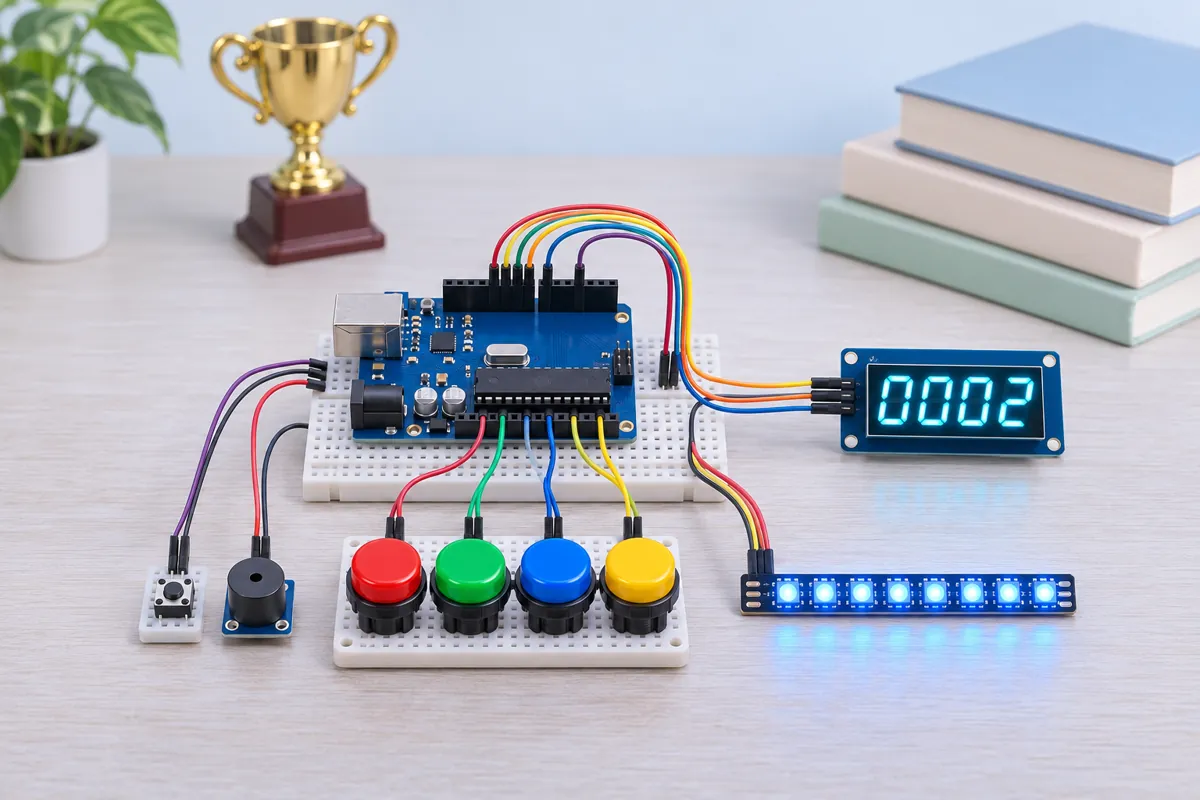
| Arduino Uno R3 (CH340 clone) | 1 | ₹450 | Buy Arduino Uno R3 (CH340 clone) |
| Arcade push button 30 mm (red, green, blue, yellow) | 4 | ₹180 | Buy Arcade push button 30 mm (red, green, blue, yellow) |
| Tactile push button (quizmaster OPEN) | 1 | ₹3 | Buy Tactile push button (quizmaster OPEN) |
| TM1637 4-digit display module (0.56", with colon) | 1 | ₹60 | Buy TM1637 4-digit display module (0.56", with colon) |
| WS2812B 8-LED stick | 1 | ₹120 | Buy WS2812B 8-LED stick |
| Active buzzer module | 1 | ₹25 | Buy Active buzzer module |
| 330 Ω resistor + 1000 µF / 10 V capacitor | 1 | ₹10 | Buy 330 Ω resistor + 1000 µF / 10 V capacitor |
| 2-core wire for the team buttons (about 2 m each) | 4 | ₹120 | Buy 2-core wire for the team buttons (about 2 m each) |
| Jumper wires + small project box | 1 | ₹120 | Buy Jumper wires + small project box |
| Total | ₹1,088 |
Affiliate disclosure: “Buy” links may earn FlashReady a small commission at no extra cost to you. Prices are indicative.
Wiring
| Arduino Uno R3 | Part · pin | Wire | Notes |
|---|---|---|---|
| D2 | Push button (6 mm tactile switch) · 1 | orange | Team 1 (red) — internal pull-up |
| GND | Push button (6 mm tactile switch) · 2 | black | |
| D3 | Push button (6 mm tactile switch) #2 · 1 | orange | Team 2 (green) |
| GND | Push button (6 mm tactile switch) #2 · 2 | black | |
| D4 | Push button (6 mm tactile switch) #3 · 1 | orange | Team 3 (blue) |
| GND | Push button (6 mm tactile switch) #3 · 2 | black | |
| D5 | Push button (6 mm tactile switch) #4 · 1 | orange | Team 4 (yellow) |
| GND | Push button (6 mm tactile switch) #4 · 2 | black | |
| D6 | Push button (6 mm tactile switch) #5 · 1 | purple | Quizmaster’s OPEN button |
| GND | Push button (6 mm tactile switch) #5 · 2 | black | |
| D7 | TM1637 4-digit 7-segment display · CLK | yellow | |
| D8 | TM1637 4-digit 7-segment display · DIO | green | |
| 5V | TM1637 4-digit 7-segment display · VCC | red | |
| GND | TM1637 4-digit 7-segment display · GND | black | |
| D9 | WS2812B addressable RGB LED strip (NeoPixel) · DIN | green | Via 330 Ω — Resistor close to the stick; 470–1000 µF across 5V/GND at the stick |
| 5V | WS2812B addressable RGB LED strip (NeoPixel) · 5V | red | |
| GND | WS2812B addressable RGB LED strip (NeoPixel) · GND | black | |
| D10 | Active buzzer module (high-level trigger) · I/O | blue | |
| 5V | Active buzzer module (high-level trigger) · VCC | red | |
| GND | Active buzzer module (high-level trigger) · GND | black |
Board quirks: All four team buttons are on PORTD (D2–D5), so the sketch reads them in one instruction. Checking them one by one with digitalRead would always favour the team checked first by a few microseconds — tiny, but an examiner will ask, and this way the answer is “none”. A team already pressing when OPEN is pressed is locked out for that question. Without this, a team could hold its button down and “win” every question the instant it opens. Long button cables (2 m or more) pick up noise. The internal pull-ups (about 35 kΩ) are weak; if you see phantom presses, add a 10 kΩ resistor from each team pin to 5V and a 100 nF capacitor across each button. The stick runs at brightness 80 of 255: plenty indoors, and 8 LEDs stay well under 500 mA on USB. Full-white at 255 can reach about 480 mA, close to the limit of a laptop port.
Code
// Quiz buzzer system — Arduino Uno + 4 team buttons + host button + TM1637 + WS2812B stick + buzzer.
// The host presses OPEN to start a question. The first team to press wins: the display shows
// "P  2", that team's two LEDs light in its colour and the buzzer sounds. Later presses are
// listed in order on the Serial Monitor. A team holding its button when the question opens is
// locked out for that question (no early pressing).
// Team buttons D2–D5 (to GND), OPEN button D6 (to GND), TM1637 CLK D7 / DIO D8,
// WS2812B DIN D9 through 330 Ω, active buzzer module I/O D10.
#include <TM1637Display.h>
#include <Adafruit_NeoPixel.h>

constexpr uint8_t HOST_PIN = 6;
constexpr uint8_t CLK = 7, DIO = 8;
constexpr uint8_t LED_PIN = 9;
constexpr uint8_t NUM_LEDS = 8;  // two per team
constexpr uint8_t BUZZER_PIN = 10;

TM1637Display display(CLK, DIO);
Adafruit_NeoPixel strip(NUM_LEDS, LED_PIN, NEO_GRB + NEO_KHZ800);

// Team colours: red, green, blue, yellow (0xRRGGBB, as Adafruit_NeoPixel::Color packs them).
const uint32_t TEAM_COLOR[4] = {0xFF0000, 0x00FF00, 0x0000FF, 0xFFB000};
const uint8_t READY[] = {SEG_E | SEG_G, SEG_A | SEG_D | SEG_E | SEG_F | SEG_G, SEG_B | SEG_C | SEG_D | SEG_E | SEG_G,
                         SEG_B | SEG_C | SEG_D | SEG_F | SEG_G};  // "rEdy"
const uint8_t SEG_P = SEG_A | SEG_B | SEG_E | SEG_F | SEG_G;

enum State : uint8_t { IDLE, ARMED, LOCKED };
State state = IDLE;
unsigned long armedAt = 0, firstMs = 0, buzzOffAt = 0, lastShown = 0;
uint8_t lockedOut = 0;  // bit n = team n+1 was holding its button when the question opened
uint8_t answered = 0;   // bit n = team n+1 has pressed during this question
uint8_t place = 0;
bool hostWasDown = false;

// All four team buttons are on port D (PD2–PD5), so one read of PIND samples them at the
// same instant — no team is favoured by the order the pins are checked in.
uint8_t teamsDown() { return (~PIND >> 2) & 0x0F; }

void beep(unsigned int ms) {
  digitalWrite(BUZZER_PIN, HIGH);
  buzzOffAt = millis() + ms;
}

void lightTeam(uint8_t team, uint32_t color) {
  strip.setPixelColor(team * 2, color);
  strip.setPixelColor(team * 2 + 1, color);
}

void allLeds(uint32_t color) {
  strip.fill(color);
  strip.show();
}

void openQuestion() {
  state = ARMED;
  answered = 0;
  place = 0;
  lockedOut = teamsDown();
  armedAt = millis();
  lastShown = 0xFFFF;
  allLeds(0x101010);  // dim white: question open
  beep(60);
  Serial.println(F("\nQuestion open — buzzers live"));
  for (uint8_t t = 0; t < 4; t++)
    if (lockedOut & (1 << t)) {
      Serial.print(F("Team "));
      Serial.print(t + 1);
      Serial.println(F(" was already pressing — locked out for this question"));
    }
}

void recordPress(uint8_t team, unsigned long ms) {
  answered |= 1 << team;
  place++;
  Serial.print(place);
  Serial.print(F(". Team "));
  Serial.print(team + 1);
  if (place == 1) {
    firstMs = ms;
    Serial.print(F(" first, "));
    Serial.print((ms - armedAt) / 1000.0, 2);
    Serial.println(F(" s after the question opened"));
    state = LOCKED;
    const uint8_t segs[] = {SEG_P, 0, 0, display.encodeDigit(team + 1)};
    display.setSegments(segs);
    strip.clear();
    lightTeam(team, TEAM_COLOR[team]);
    strip.show();
    beep(400);
  } else {
    Serial.print(F(" — "));
    Serial.print((ms - firstMs) / 1000.0, 3);
    Serial.println(F(" s behind"));
  }
}

void setup() {
  for (uint8_t pin = 2; pin <= 5; pin++) pinMode(pin, INPUT_PULLUP);
  pinMode(HOST_PIN, INPUT_PULLUP);
  pinMode(BUZZER_PIN, OUTPUT);
  Serial.begin(115200);
  display.setBrightness(7);
  strip.begin();
  strip.setBrightness(80);  // 8 LEDs at this level stay well inside USB power
  // Colour check at power-up: each team's pair lights in turn.
  for (uint8_t t = 0; t < 4; t++) {
    lightTeam(t, TEAM_COLOR[t]);
    strip.show();
    delay(200);
  }
  display.setSegments(READY);
  allLeds(0x101010);
  Serial.println(F("Quiz buzzer ready. Press OPEN (D6) to start a question."));
  Serial.println(F("Before the show: hold any team button now to test it — its LEDs light up."));
}

void loop() {
  unsigned long now = millis();
  if (buzzOffAt && (long)(now - buzzOffAt) >= 0) {
    digitalWrite(BUZZER_PIN, LOW);
    buzzOffAt = 0;
  }

  // Host button: open the next question on each press (falling edge, debounced).
  bool hostDown = digitalRead(HOST_PIN) == LOW;
  if (hostDown && !hostWasDown) {
    openQuestion();
    delay(30);
  }
  hostWasDown = hostDown;

  uint8_t down = teamsDown();
  if (state == IDLE) {
    // Button test between rounds: a held button lights its team's LEDs.
    static uint8_t lastDown = 0xFF;
    if (down != lastDown) {
      for (uint8_t t = 0; t < 4; t++) lightTeam(t, (down & (1 << t)) ? TEAM_COLOR[t] : 0x101010);
      strip.show();
      lastDown = down;
    }
    return;
  }

  // Locked-out teams count again once they let go and press afresh in the next question only.
  uint8_t fresh = down & ~lockedOut & ~answered & 0x0F;
  if (fresh) {
    // A tie inside one PIND read (a few microseconds) goes to the lower team number.
    for (uint8_t t = 0; t < 4; t++)
      if (fresh & (1 << t)) recordPress(t, now);
  }

  if (state == ARMED) {
    // Elapsed seconds since the question opened: "-  7".
    unsigned int s = (now - armedAt) / 1000;
    if (s != lastShown) {
      lastShown = s;
      const uint8_t dash[] = {SEG_G};
      display.setSegments(dash, 1, 0);
      display.showNumberDec(min(s, 999u), false, 3, 1);
    }
  }
}
// Quiz buzzer system — Arduino Uno + 4 team buttons + host button + TM1637 + WS2812B stick + buzzer.
// The host presses OPEN to start a question. The first team to press wins: the display shows
// "P 2", that team's two LEDs light in its colour and the buzzer sounds. Later presses are
// listed in order on the Serial Monitor. A team holding its button when the question opens is
// locked out for that question (no early pressing).
// Team buttons D2–D5 (to GND), OPEN button D6 (to GND), TM1637 CLK D7 / DIO D8,
// WS2812B DIN D9 through 330 Ω, active buzzer module I/O D10.
#include <TM1637Display.h>
#include <Adafruit_NeoPixel.h>
constexpr uint8_t HOST_PIN = 6;
constexpr uint8_t CLK = 7, DIO = 8;
constexpr uint8_t LED_PIN = 9;
constexpr uint8_t NUM_LEDS = 8; // two per team
constexpr uint8_t BUZZER_PIN = 10;
TM1637Display display(CLK, DIO);
Adafruit_NeoPixel strip(NUM_LEDS, LED_PIN, NEO_GRB + NEO_KHZ800);
// Team colours: red, green, blue, yellow (0xRRGGBB, as Adafruit_NeoPixel::Color packs them).
const uint32_t TEAM_COLOR[4] = {0xFF0000, 0x00FF00, 0x0000FF, 0xFFB000};
const uint8_t READY[] = {SEG_E | SEG_G, SEG_A | SEG_D | SEG_E | SEG_F | SEG_G, SEG_B | SEG_C | SEG_D | SEG_E | SEG_G,
SEG_B | SEG_C | SEG_D | SEG_F | SEG_G}; // "rEdy"
const uint8_t SEG_P = SEG_A | SEG_B | SEG_E | SEG_F | SEG_G;
enum State : uint8_t { IDLE, ARMED, LOCKED };
State state = IDLE;
unsigned long armedAt = 0, firstMs = 0, buzzOffAt = 0, lastShown = 0;
uint8_t lockedOut = 0; // bit n = team n+1 was holding its button when the question opened
uint8_t answered = 0; // bit n = team n+1 has pressed during this question
uint8_t place = 0;
bool hostWasDown = false;
// All four team buttons are on port D (PD2–PD5), so one read of PIND samples them at the
// same instant — no team is favoured by the order the pins are checked in.
uint8_t teamsDown() { return (~PIND >> 2) & 0x0F; }
void beep(unsigned int ms) {
digitalWrite(BUZZER_PIN, HIGH);
buzzOffAt = millis() + ms;
}
void lightTeam(uint8_t team, uint32_t color) {
strip.setPixelColor(team * 2, color);
strip.setPixelColor(team * 2 + 1, color);
}
void allLeds(uint32_t color) {
strip.fill(color);
strip.show();
}
void openQuestion() {
state = ARMED;
answered = 0;
place = 0;
lockedOut = teamsDown();
armedAt = millis();
lastShown = 0xFFFF;
allLeds(0x101010); // dim white: question open
beep(60);
Serial.println(F("\nQuestion open — buzzers live"));
for (uint8_t t = 0; t < 4; t++)
if (lockedOut & (1 << t)) {
Serial.print(F("Team "));
Serial.print(t + 1);
Serial.println(F(" was already pressing — locked out for this question"));
}
}
void recordPress(uint8_t team, unsigned long ms) {
answered |= 1 << team;
place++;
Serial.print(place);
Serial.print(F(". Team "));
Serial.print(team + 1);
if (place == 1) {
firstMs = ms;
Serial.print(F(" first, "));
Serial.print((ms - armedAt) / 1000.0, 2);
Serial.println(F(" s after the question opened"));
state = LOCKED;
const uint8_t segs[] = {SEG_P, 0, 0, display.encodeDigit(team + 1)};
display.setSegments(segs);
strip.clear();
lightTeam(team, TEAM_COLOR[team]);
strip.show();
beep(400);
} else {
Serial.print(F(" — "));
Serial.print((ms - firstMs) / 1000.0, 3);
Serial.println(F(" s behind"));
}
}
void setup() {
for (uint8_t pin = 2; pin <= 5; pin++) pinMode(pin, INPUT_PULLUP);
pinMode(HOST_PIN, INPUT_PULLUP);
pinMode(BUZZER_PIN, OUTPUT);
Serial.begin(115200);
display.setBrightness(7);
strip.begin();
strip.setBrightness(80); // 8 LEDs at this level stay well inside USB power
// Colour check at power-up: each team's pair lights in turn.
for (uint8_t t = 0; t < 4; t++) {
lightTeam(t, TEAM_COLOR[t]);
strip.show();
delay(200);
}
display.setSegments(READY);
allLeds(0x101010);
Serial.println(F("Quiz buzzer ready. Press OPEN (D6) to start a question."));
Serial.println(F("Before the show: hold any team button now to test it — its LEDs light up."));
}
void loop() {
unsigned long now = millis();
if (buzzOffAt && (long)(now - buzzOffAt) >= 0) {
digitalWrite(BUZZER_PIN, LOW);
buzzOffAt = 0;
}
// Host button: open the next question on each press (falling edge, debounced).
bool hostDown = digitalRead(HOST_PIN) == LOW;
if (hostDown && !hostWasDown) {
openQuestion();
delay(30);
}
hostWasDown = hostDown;
uint8_t down = teamsDown();
if (state == IDLE) {
// Button test between rounds: a held button lights its team's LEDs.
static uint8_t lastDown = 0xFF;
if (down != lastDown) {
for (uint8_t t = 0; t < 4; t++) lightTeam(t, (down & (1 << t)) ? TEAM_COLOR[t] : 0x101010);
strip.show();
lastDown = down;
}
return;
}
// Locked-out teams count again once they let go and press afresh in the next question only.
uint8_t fresh = down & ~lockedOut & ~answered & 0x0F;
if (fresh) {
// A tie inside one PIND read (a few microseconds) goes to the lower team number.
for (uint8_t t = 0; t < 4; t++)
if (fresh & (1 << t)) recordPress(t, now);
}
if (state == ARMED) {
// Elapsed seconds since the question opened: "- 7".
unsigned int s = (now - armedAt) / 1000;
if (s != lastShown) {
lastShown = s;
const uint8_t dash[] = {SEG_G};
display.setSegments(dash, 1, 0);
display.showNumberDec(min(s, 999u), false, 3, 1);
}
}
}Compiled for uno on avr 1.8.8 with TM1637 1.2.0 · 3 Nov 2026
How it works
Every school quiz needs a buzzer system, and arguments start the moment two teams press together. This one settles it with numbers: the first press wins, the display and the LEDs show which team it was, and the Serial Monitor lists every press in order with the time behind the winner — to the millisecond.
How it works
The quizmaster presses OPEN to start a question. The display counts the seconds since the question opened (“– 7”) and the LED stick glows dim white.
When a team presses, the Uno records the time with millis(), shows P 2 (player 2) on the TM1637, lights that team’s two LEDs in its colour (red, green, blue or yellow), and beeps for 0.4 s. From then on, other presses don’t change the winner, but each one is printed: 2. Team 4 — 0.183 s behind.
Fairness comes from two details:
- One read for all buttons. The four team buttons sit on D2–D5, which are bits 2–5 of the ATmega328P’s port D.
~PINDreads all of them at the same instant. A tie inside one read (a window of under a microsecond) goes to the lower team number — it essentially never happens. - Lockout. A team that is already holding its button when OPEN is pressed is ignored for that question, so nobody can “camp” on the button.
Between questions, holding a team button lights its LEDs — a quick wiring test before the audience arrives.
What to show at the exhibition
Let visitors play against each other: you be the quizmaster, read a quick question, press OPEN. Keep the laptop’s Serial Monitor visible so people can see how close the presses were — “0.041 s behind” always gets a reaction. Run a round where someone holds the button early to show the lockout.
Questions the examiner may ask
- Why INPUT_PULLUP? The pin is held HIGH by an internal resistor; pressing the button connects it to GND, so pressed reads LOW. No external resistors are needed.
- How do you know who pressed first? The loop runs thousands of times a second and samples all four buttons in one port read; the first read that sees a press decides.
- What is debouncing? A switch contact bounces for a few milliseconds. For the teams only the first edge matters, so bounce can’t change the winner; the OPEN button waits 30 ms after a press.
- Why a resistor in the WS2812B data line? It damps ringing on the wire and protects the first LED’s input.
Cost in India
About ₹1,100 in total. The arcade buttons are the biggest item (₹40–60 each at local electronics shops or online); plain tactile buttons glued into bottle caps work for a classroom version and bring it under ₹700.
Troubleshooting
One team always wins
Its button is stuck or wired to the wrong side of the switch (4-leg tactile buttons have two pairs that are always connected). Hold nothing and press OPEN — if the Serial Monitor says that team was locked out, its input is reading LOW all the time.
The LEDs show wrong colours or flicker
Check the 330 Ω resistor is in the data line and the stick’s GND goes to the Uno’s GND. If red and green are swapped, your stick is RGB order — change NEO_GRB to NEO_RGB.
The display shows nothing
CLK and DIO are swapped, or VCC isn’t connected. The display should read “rEdy” a second after power-up.
The buzzer clicks but doesn’t beep
You have a passive buzzer. An active buzzer module beeps on its own when its I/O pin is HIGH; a passive one needs tone().
Upgrades
- Keep scores: a second quizmaster button adds a point to the winning team and shows the scoreboard on the TM1637.
- Add a 10-second answer timer that starts when a team wins the buzz.
- Use 8 teams with a second WS2812B stick and pins D11, D12, A0–A3 (read port C as one byte too).
- Make the team buttons wireless with nRF24L01 modules for a stage-sized quiz.