Mains voltage (230 V) — can kill. The low-voltage side (board, sensors, display, relay module) is safe to build yourself. The mains side must be wired by a licensed electrician, and tested with the circuit switched off at the MCB.
- Never switch a motor with a relay module. Motors pull several times their running current at start-up; hobby relay contacts weld or overheat. The relay only drives a contactor’s coil (or your pump starter’s coil input).
- Contactor rated for motors (AC-3) at or above the load’s nameplate current.
- Protect and earth: MCB on live, RCCB/ELCB on the circuit, metal bodies earthed. Switch live only — never neutral or earth.
- Keep the two worlds apart: mains and low-voltage wiring in separate compartments of a closed, non-metallic enclosure; no bare 230 V terminals.
- Fail safe: the code switches the load off when a sensor stops answering. Still fit a manual override at the starter.
Parts list
| Part | Qty | Approx. | Buy |
|---|---|---|---|
| ESP32 DevKit V1 (30-pin) | 1 | ₹380 | Buy ESP32 DevKit V1 (30-pin) |
| PZEM-004T v3.0, 100 A version with split-core CT | 1 | ₹1,300 | Buy PZEM-004T v3.0, 100 A version with split-core CT |
| 0.96" SSD1306 I2C OLED (4-pin) | 1 | ₹220 | Buy 0.96" SSD1306 I2C OLED (4-pin) |
| Tactile push button (12 mm) | 1 | ₹10 | Buy Tactile push button (12 mm) |
| Resistors 1 kΩ + 2 kΩ (TX divider) | 1 | ₹5 | Buy Resistors 1 kΩ + 2 kΩ (TX divider) |
| Inline fuse holder + 1 A fuse (PZEM voltage sense) | 1 | ₹60 | Buy Inline fuse holder + 1 A fuse (PZEM voltage sense) |
| Double-insulated enclosure (ABS, IP54) + cable glands | 1 | ₹250 | Buy Double-insulated enclosure (ABS, IP54) + cable glands |
| 5 V 1 A USB adapter + cable | 1 | ₹120 | Buy 5 V 1 A USB adapter + cable |
| Total | ₹2,345 |
Affiliate disclosure: “Buy” links may earn FlashReady a small commission at no extra cost to you. Prices are indicative.
Wiring
| ESP32 DevKit V1 | Part · pin | Wire | Notes |
|---|---|---|---|
| VIN | PZEM-004T v3.0 AC energy meter (100 A with CT) · 5V | red | Powers the opto-isolated TTL side (5 V from USB) |
| GND | PZEM-004T v3.0 AC energy meter (100 A with CT) · GND | black | |
| RX2 | PZEM-004T v3.0 AC energy meter (100 A with CT) · TX | green | Via 1 kΩ / 2 kΩ divider — PZEM TX idles at 5 V — the divider brings it to 3.3 V for GPIO16 |
| TX2 | PZEM-004T v3.0 AC energy meter (100 A with CT) · RX | yellow | GPIO17 → PZEM RX (3.3 V drives its opto input) |
| Mains L / N after a 1 A fuse, 230 V (electrician) · L | PZEM-004T v3.0 AC energy meter (100 A with CT) · L | brown | Live through a 1 A fuse — electrician only |
| Mains L / N after a 1 A fuse, 230 V (electrician) · N | PZEM-004T v3.0 AC energy meter (100 A with CT) · N | blue | Neutral — electrician only |
| CT coil, clamped round the live wire · Lead 1 | PZEM-004T v3.0 AC energy meter (100 A with CT) · CT1 | white | Clamp the CT round the live wire only, never live + neutral together |
| CT coil, clamped round the live wire · Lead 2 | PZEM-004T v3.0 AC energy meter (100 A with CT) · CT2 | white | |
| D21 | SSD1306 OLED 0.96″ (128×64, I2C) · SDA | blue | |
| D22 | SSD1306 OLED 0.96″ (128×64, I2C) · SCL | yellow | |
| 3V3 | SSD1306 OLED 0.96″ (128×64, I2C) · VCC | red | |
| GND | SSD1306 OLED 0.96″ (128×64, I2C) · GND | black | |
| D27 | Push button (6 mm tactile switch) · 1 | purple | INPUT_PULLUP: tap = next page, hold 3 s = reset units |
| GND | Push button (6 mm tactile switch) · 2 | black |
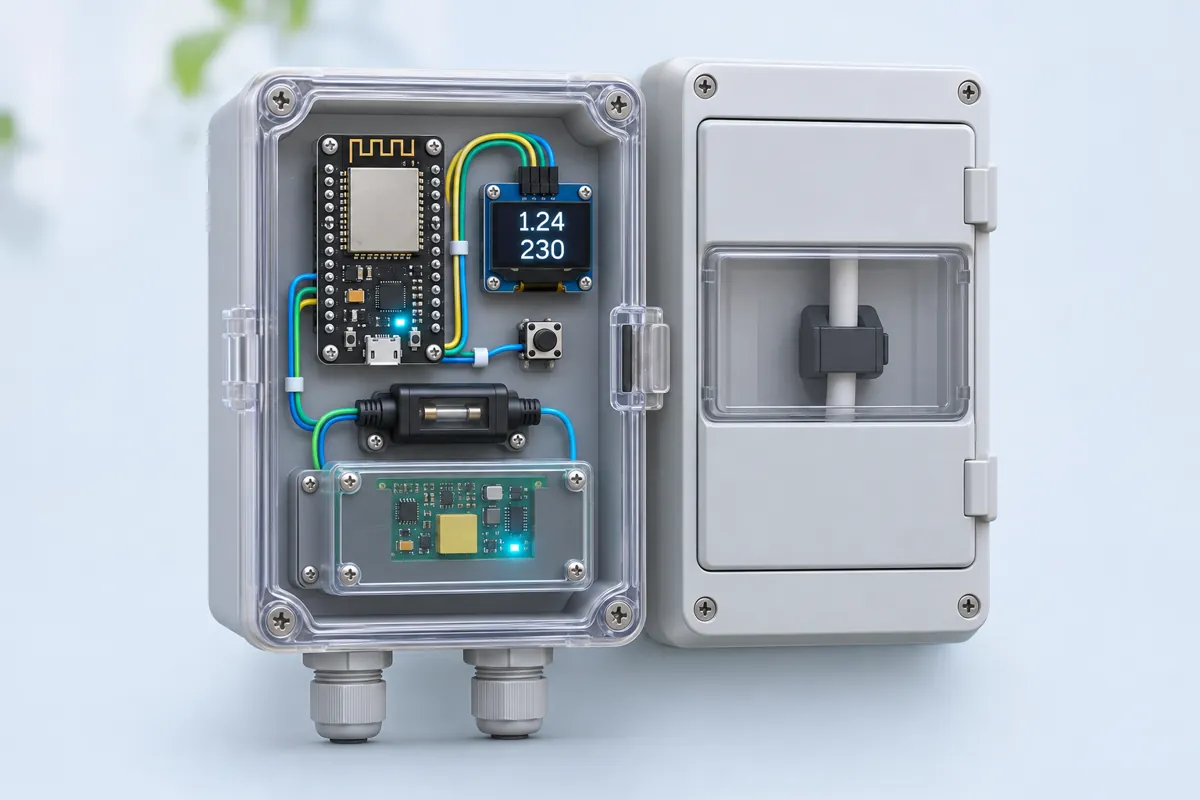
Board quirks: The PZEM is measured on its 230 V side: the L/N terminals take mains through a 1 A fuse and the CT clamps round the live wire. That part goes in a closed, double-insulated box next to the distribution board, fitted by a licensed electrician with the main switch OFF. The TTL side (5V, RX, TX, GND) is opto-isolated from mains and safe to touch — but only while the box is closed and the electrician’s work is intact. Never open the box with mains on. One CT measures one wire. Clamp it round the <strong>live</strong> conductor of the circuit you want to measure (whole house: after the energy meter, before the MCBs). Clamping live and neutral together reads zero. The 100 A version uses a split CT with no polarity marking — swap the two leads if you like, the PZEM reports magnitude only. The 10 A version has no CT and carries the load current through its terminals; use the 100 A one for a whole house. The bill shown is an estimate from the example slabs in <code>SLABS</code>. Copy your own DISCOM’s slab rates, fixed charge and billing period from your last bill; duty, fuel surcharge and subsidy are not included.
Code
// Home energy meter with bill estimate — ESP32 DevKit V1 + PZEM-004T v3.0 + 0.96" OLED
// PZEM TX -> 1k/2k divider -> RX2 (GPIO16), PZEM RX <- TX2 (GPIO17), PZEM 5V <- VIN.
// OLED on D21 (SDA) / D22 (SCL). Push button D27 -> GND: tap = next page, hold 3 s = reset kWh.
// The PZEM talks Modbus-RTU at 9600 baud; this sketch speaks it directly (no extra library).
// 230 V side (PZEM L/N terminals, CT round the live wire): electrician only.
#include <Wire.h>
#include <Adafruit_GFX.h>
#include <Adafruit_SSD1306.h>

constexpr uint8_t PZEM_RX = 16;   // <- PZEM TX (through the divider)
constexpr uint8_t PZEM_TX = 17;   // -> PZEM RX
constexpr uint8_t BUTTON_PIN = 27;
constexpr uint8_t PZEM_ADDR = 0xF8;  // "general" address: works with a single PZEM on the bus

// Example slab tariff (units = kWh per billing cycle). Copy your DISCOM's slabs from your bill.
struct Slab { float upTo; float rate; };
const Slab SLABS[] = {{100, 3.00}, {200, 4.50}, {400, 6.00}, {1e9, 7.50}};
constexpr float FIXED_CHARGE = 50.0;  // ₹ per bill (meter rent / fixed charge)

Adafruit_SSD1306 oled(128, 64, &Wire, -1);

struct Reading { float volts, amps, watts, kwh, hz, pf; bool ok; } r;
uint8_t page = 0;

uint16_t crc16(const uint8_t* d, size_t n) {
  uint16_t crc = 0xFFFF;
  for (size_t i = 0; i < n; i++) {
    crc ^= d[i];
    for (int b = 0; b < 8; b++) crc = (crc & 1) ? (crc >> 1) ^ 0xA001 : crc >> 1;
  }
  return crc;
}

void sendFrame(uint8_t* f, size_t n) {  // n includes the 2 CRC bytes
  uint16_t c = crc16(f, n - 2);
  f[n - 2] = c & 0xFF;
  f[n - 1] = c >> 8;
  while (Serial2.available()) Serial2.read();  // drop stale bytes
  Serial2.write(f, n);
}

size_t readFrame(uint8_t* buf, size_t want, uint32_t timeoutMs = 300) {
  size_t got = 0;
  uint32_t t0 = millis();
  while (got < want && millis() - t0 < timeoutMs) {
    if (Serial2.available()) buf[got++] = Serial2.read();
  }
  return got;
}

// Function 0x04: read 10 input registers from 0x0000 (V, I, P, E, Hz, PF, alarm).
bool readPzem(Reading& out) {
  uint8_t req[8] = {PZEM_ADDR, 0x04, 0x00, 0x00, 0x00, 0x0A, 0, 0};
  sendFrame(req, sizeof req);
  uint8_t b[25];
  if (readFrame(b, 25) != 25 || b[1] != 0x04 || b[2] != 20) return false;
  if (crc16(b, 23) != (uint16_t)(b[23] | (b[24] << 8))) return false;
  auto reg = [&](int i) { return (uint32_t)((b[3 + 2 * i] << 8) | b[4 + 2 * i]); };
  out.volts = reg(0) / 10.0f;
  out.amps = (reg(1) | (reg(2) << 16)) / 1000.0f;
  out.watts = (reg(3) | (reg(4) << 16)) / 10.0f;
  out.kwh = (reg(5) | (reg(6) << 16)) / 1000.0f;  // the PZEM counts in Wh
  out.hz = reg(7) / 10.0f;
  out.pf = reg(8) / 100.0f;
  return true;
}

// Function 0x42: reset the energy counter (start of a new billing cycle).
bool resetEnergy() {
  uint8_t req[4] = {PZEM_ADDR, 0x42, 0, 0};
  sendFrame(req, sizeof req);
  uint8_t b[4];
  return readFrame(b, 4) == 4 && b[1] == 0x42;
}

float billFor(float units) {
  float bill = FIXED_CHARGE, from = 0;
  for (const Slab& s : SLABS) {
    if (units <= from) break;
    bill += (min(units, s.upTo) - from) * s.rate;
    from = s.upTo;
  }
  return bill;
}

void show() {
  oled.clearDisplay();
  oled.setTextColor(SSD1306_WHITE);
  oled.setCursor(0, 0);
  if (!r.ok) {
    oled.setTextSize(1);
    oled.println("PZEM not answering");
    oled.println("Check TX/RX, 5V, and");
    oled.println("that 230 V is on L/N");
  } else if (page == 0) {
    oled.setTextSize(2);
    oled.printf("%5.1f V\n%6.2f A\n%5.0f W\n", r.volts, r.amps, r.watts);
    oled.setTextSize(1);
    oled.printf("PF %.2f  %.1f Hz", r.pf, r.hz);
  } else {
    oled.setTextSize(2);
    oled.printf("%.2f\n", r.kwh);
    oled.setTextSize(1);
    oled.println("units (kWh) this cycle\n");
    oled.setTextSize(2);
    oled.printf("Rs %.0f\n", billFor(r.kwh));
    oled.setTextSize(1);
    oled.print("bill estimate");
  }
  oled.display();
}

void setup() {
  Serial.begin(115200);
  Serial2.begin(9600, SERIAL_8N1, PZEM_RX, PZEM_TX);
  pinMode(BUTTON_PIN, INPUT_PULLUP);
  Wire.begin(21, 22);
  if (!oled.begin(SSD1306_SWITCHCAPVCC, 0x3C)) Serial.println("OLED not found at 0x3C");
  oled.clearDisplay();
  oled.display();
  Serial.println("Energy meter ready");
}

void loop() {
  // Button: tap = next page, hold 3 s = reset the kWh counter for a new bill.
  if (digitalRead(BUTTON_PIN) == LOW) {
    uint32_t t0 = millis();
    while (digitalRead(BUTTON_PIN) == LOW && millis() - t0 < 3000) delay(10);
    if (millis() - t0 >= 3000) {
      Serial.println(resetEnergy() ? "kWh reset" : "kWh reset failed");
      while (digitalRead(BUTTON_PIN) == LOW) delay(10);
    } else if (millis() - t0 > 30) {
      page = (page + 1) % 2;
    }
  }

  static uint32_t last = 0;
  if (millis() - last >= 1000) {
    last = millis();
    r.ok = readPzem(r);
    if (r.ok)
      Serial.printf("V=%.1f A=%.3f W=%.1f kWh=%.3f PF=%.2f Hz=%.1f Rs=%.0f\n", r.volts, r.amps, r.watts, r.kwh, r.pf, r.hz, billFor(r.kwh));
    else
      Serial.println("PZEM: no reply");
    show();
  }
}
// Home energy meter with bill estimate — ESP32 DevKit V1 + PZEM-004T v3.0 + 0.96" OLED
// PZEM TX -> 1k/2k divider -> RX2 (GPIO16), PZEM RX <- TX2 (GPIO17), PZEM 5V <- VIN.
// OLED on D21 (SDA) / D22 (SCL). Push button D27 -> GND: tap = next page, hold 3 s = reset kWh.
// The PZEM talks Modbus-RTU at 9600 baud; this sketch speaks it directly (no extra library).
// 230 V side (PZEM L/N terminals, CT round the live wire): electrician only.
#include <Wire.h>
#include <Adafruit_GFX.h>
#include <Adafruit_SSD1306.h>
constexpr uint8_t PZEM_RX = 16; // <- PZEM TX (through the divider)
constexpr uint8_t PZEM_TX = 17; // -> PZEM RX
constexpr uint8_t BUTTON_PIN = 27;
constexpr uint8_t PZEM_ADDR = 0xF8; // "general" address: works with a single PZEM on the bus
// Example slab tariff (units = kWh per billing cycle). Copy your DISCOM's slabs from your bill.
struct Slab { float upTo; float rate; };
const Slab SLABS[] = {{100, 3.00}, {200, 4.50}, {400, 6.00}, {1e9, 7.50}};
constexpr float FIXED_CHARGE = 50.0; // ₹ per bill (meter rent / fixed charge)
Adafruit_SSD1306 oled(128, 64, &Wire, -1);
struct Reading { float volts, amps, watts, kwh, hz, pf; bool ok; } r;
uint8_t page = 0;
uint16_t crc16(const uint8_t* d, size_t n) {
uint16_t crc = 0xFFFF;
for (size_t i = 0; i < n; i++) {
crc ^= d[i];
for (int b = 0; b < 8; b++) crc = (crc & 1) ? (crc >> 1) ^ 0xA001 : crc >> 1;
}
return crc;
}
void sendFrame(uint8_t* f, size_t n) { // n includes the 2 CRC bytes
uint16_t c = crc16(f, n - 2);
f[n - 2] = c & 0xFF;
f[n - 1] = c >> 8;
while (Serial2.available()) Serial2.read(); // drop stale bytes
Serial2.write(f, n);
}
size_t readFrame(uint8_t* buf, size_t want, uint32_t timeoutMs = 300) {
size_t got = 0;
uint32_t t0 = millis();
while (got < want && millis() - t0 < timeoutMs) {
if (Serial2.available()) buf[got++] = Serial2.read();
}
return got;
}
// Function 0x04: read 10 input registers from 0x0000 (V, I, P, E, Hz, PF, alarm).
bool readPzem(Reading& out) {
uint8_t req[8] = {PZEM_ADDR, 0x04, 0x00, 0x00, 0x00, 0x0A, 0, 0};
sendFrame(req, sizeof req);
uint8_t b[25];
if (readFrame(b, 25) != 25 || b[1] != 0x04 || b[2] != 20) return false;
if (crc16(b, 23) != (uint16_t)(b[23] | (b[24] << 8))) return false;
auto reg = [&](int i) { return (uint32_t)((b[3 + 2 * i] << 8) | b[4 + 2 * i]); };
out.volts = reg(0) / 10.0f;
out.amps = (reg(1) | (reg(2) << 16)) / 1000.0f;
out.watts = (reg(3) | (reg(4) << 16)) / 10.0f;
out.kwh = (reg(5) | (reg(6) << 16)) / 1000.0f; // the PZEM counts in Wh
out.hz = reg(7) / 10.0f;
out.pf = reg(8) / 100.0f;
return true;
}
// Function 0x42: reset the energy counter (start of a new billing cycle).
bool resetEnergy() {
uint8_t req[4] = {PZEM_ADDR, 0x42, 0, 0};
sendFrame(req, sizeof req);
uint8_t b[4];
return readFrame(b, 4) == 4 && b[1] == 0x42;
}
float billFor(float units) {
float bill = FIXED_CHARGE, from = 0;
for (const Slab& s : SLABS) {
if (units <= from) break;
bill += (min(units, s.upTo) - from) * s.rate;
from = s.upTo;
}
return bill;
}
void show() {
oled.clearDisplay();
oled.setTextColor(SSD1306_WHITE);
oled.setCursor(0, 0);
if (!r.ok) {
oled.setTextSize(1);
oled.println("PZEM not answering");
oled.println("Check TX/RX, 5V, and");
oled.println("that 230 V is on L/N");
} else if (page == 0) {
oled.setTextSize(2);
oled.printf("%5.1f V\n%6.2f A\n%5.0f W\n", r.volts, r.amps, r.watts);
oled.setTextSize(1);
oled.printf("PF %.2f %.1f Hz", r.pf, r.hz);
} else {
oled.setTextSize(2);
oled.printf("%.2f\n", r.kwh);
oled.setTextSize(1);
oled.println("units (kWh) this cycle\n");
oled.setTextSize(2);
oled.printf("Rs %.0f\n", billFor(r.kwh));
oled.setTextSize(1);
oled.print("bill estimate");
}
oled.display();
}
void setup() {
Serial.begin(115200);
Serial2.begin(9600, SERIAL_8N1, PZEM_RX, PZEM_TX);
pinMode(BUTTON_PIN, INPUT_PULLUP);
Wire.begin(21, 22);
if (!oled.begin(SSD1306_SWITCHCAPVCC, 0x3C)) Serial.println("OLED not found at 0x3C");
oled.clearDisplay();
oled.display();
Serial.println("Energy meter ready");
}
void loop() {
// Button: tap = next page, hold 3 s = reset the kWh counter for a new bill.
if (digitalRead(BUTTON_PIN) == LOW) {
uint32_t t0 = millis();
while (digitalRead(BUTTON_PIN) == LOW && millis() - t0 < 3000) delay(10);
if (millis() - t0 >= 3000) {
Serial.println(resetEnergy() ? "kWh reset" : "kWh reset failed");
while (digitalRead(BUTTON_PIN) == LOW) delay(10);
} else if (millis() - t0 > 30) {
page = (page + 1) % 2;
}
}
static uint32_t last = 0;
if (millis() - last >= 1000) {
last = millis();
r.ok = readPzem(r);
if (r.ok)
Serial.printf("V=%.1f A=%.3f W=%.1f kWh=%.3f PF=%.2f Hz=%.1f Rs=%.0f\n", r.volts, r.amps, r.watts, r.kwh, r.pf, r.hz, billFor(r.kwh));
else
Serial.println("PZEM: no reply");
show();
}
}Compiled for esp32 on esp32 3.3.12 with Adafruit SSD1306 2.5.17 · 3 Nov 2026
How it works
India bills electricity in slabs: the first 100 units are cheap and each slab after that costs more, so the same fridge costs more in a month you crossed 200 units. This meter shows how many units you have used since the meter reading and what that would cost, so you can see the slab coming before the bill does.
How it works
The PZEM-004T v3.0 does the hard part. Its own chip measures the mains voltage on its L/N terminals and the current through its CT coil, and works out real power, power factor, frequency and energy (Wh). It keeps the energy count in its own memory, so a power cut doesn’t lose your units.
Its TTL side is a Modbus-RTU serial port at 9600 baud, separated from mains by optocouplers. Every second the ESP32 sends one 8-byte request — “read 10 input registers from address 0” — on Serial2 (GPIO17 out, GPIO16 in) and gets 25 bytes back: voltage in 0.1 V, current in mA, power in 0.1 W, energy in Wh, frequency and power factor. The sketch checks the Modbus CRC before trusting a reply; a bad or missing reply shows “PZEM not answering” instead of stale numbers. Holding the button for 3 seconds sends the PZEM’s own “reset energy” command (function 0x42), which starts a new billing cycle.
billFor() walks the slabs: units up to 100 at the first rate, the next 100 at the second, and so on, plus the fixed charge.
Why these parts
- PZEM-004T instead of a ZMPT101B + ACS712. Those two give you raw waveforms that you must sample and multiply yourself, and the ACS712 sits in the load current path. The PZEM gives calibrated true power over an isolated port, and its CT never carries mains current.
- The divider on PZEM TX. The TX optocoupler’s pull-up goes to whatever feeds the 5V pin, so it idles at 5 V — too much for an ESP32 input. 1 kΩ in series and 2 kΩ to GND bring it to 3.3 V.
- No library. The Modbus request is 8 bytes and the CRC is 10 lines, so you can see exactly what is sent.
Calibration
The PZEM is factory-calibrated. Compare its voltage with a known-good multimeter (electrician) and its kWh with your energy meter over a day; expect 1–2 % agreement. Then edit SLABS and FIXED_CHARGE with your own DISCOM’s domestic tariff.
India notes
Mains here is 230 V ±10 %, 50 Hz, and summer evenings often sag below 200 V — the voltage page shows it. Many states bill every two months; enter the slab sizes for your billing period (for example 200 units for the first slab on a bi-monthly bill).
Troubleshooting
The OLED says "PZEM not answering"
Check that the PZEM’s L/N terminals have 230 V — the meter’s measuring side is powered from mains, and without it the TTL side stays silent. Then check TX → divider → RX2 (GPIO16) and RX ← TX2 (GPIO17). Some units only answer with 3.3 V on their 5V pin; try that with the divider removed.
Voltage is right but current and watts are 0
The CT is not round the live wire, both conductors pass through it, or its plug is loose. A load under about 10 W may also read 0 on the 100 A version.
Units (kWh) don’t match my electricity meter
The PZEM keeps counting from its last reset, not from your meter-reading date. Hold the button for 3 s on the day the meter reader comes. Small differences of 1–2 % are normal for this class of module.
The reading freezes and the ESP32 resets when a heavy load switches
Interference on the USB lead. Keep the 5 V and serial wires away from mains cables and use a short USB cable with a ferrite.
Upgrades
- Send a daily units summary to your phone through ntfy.sh, or publish to MQTT for Home Assistant.
- Add an alert when one appliance — a geyser or an AC left on — keeps the power above 2 kW for an hour.
- Log the voltage every minute to see your area’s low-voltage hours (common in summer evenings).