Parts list
| Part | Qty | Approx. | Buy |
|---|---|---|---|
| Arduino Uno R3 (CH340 clone) | 1 | ₹450 | Buy Arduino Uno R3 (CH340 clone) |
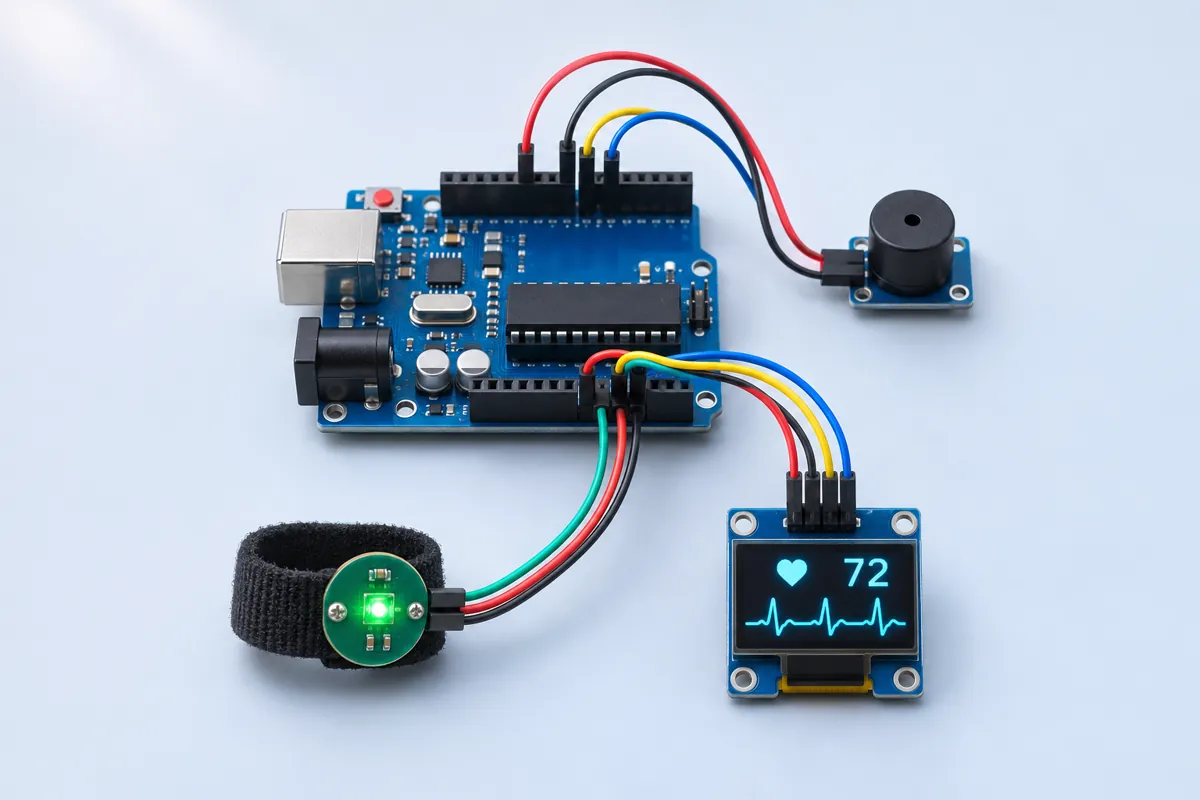
| Pulse Sensor (green round PPG module, 3-wire) | 1 | ₹150 | Buy Pulse Sensor (green round PPG module, 3-wire) |
| 0.96" SSD1306 OLED, I2C, 4-pin | 1 | ₹180 | Buy 0.96" SSD1306 OLED, I2C, 4-pin |
| Active buzzer module | 1 | ₹25 | Buy Active buzzer module |
| Velcro finger strap or clear tape | 1 | ₹20 | Buy Velcro finger strap or clear tape |
| Jumper wires | 1 | ₹30 | Buy Jumper wires |
| Total | ₹855 |
Affiliate disclosure: “Buy” links may earn FlashReady a small commission at no extra cost to you. Prices are indicative.
Wiring
| Arduino Uno R3 | Part · pin | Wire | Notes |
|---|---|---|---|
| A0 | Pulse sensor (optical heart-rate, analog) · S | purple | |
| 5V | Pulse sensor (optical heart-rate, analog) · + | red | |
| GND | Pulse sensor (optical heart-rate, analog) · - | black | |
| A4 | SSD1306 OLED 0.96″ (128×64, I2C) · SDA | blue | |
| A5 | SSD1306 OLED 0.96″ (128×64, I2C) · SCL | yellow | |
| 5V | SSD1306 OLED 0.96″ (128×64, I2C) · VCC | red | |
| GND | SSD1306 OLED 0.96″ (128×64, I2C) · GND | black | |
| D8 | Active buzzer module (high-level trigger) · I/O | orange | |
| 5V | Active buzzer module (high-level trigger) · VCC | red | |
| GND | Active buzzer module (high-level trigger) · GND | black |
Board quirks: <strong>Education only.</strong> This is not a medical device. Clone sensors, finger movement and room light all change the reading. Never use it to decide anything about someone’s health — see a doctor for that. Press lightly and keep still. Pressing hard squeezes the blood out of the fingertip and the wave flattens; moving makes fake beats. Bright tube lights flicker at 100 Hz and sunlight swamps the sensor. Cover the finger and sensor with a dark cloth or a strip of black tape. Cheap boards ship with an exposed back. Put a strip of insulating tape or hot glue over the components so sweaty fingers don’t short them.
Code
// Heart-rate display for a science exhibition — Arduino Uno + Pulse Sensor (PPG) + SSD1306 OLED + buzzer.
// EDUCATION ONLY: this is not a medical device and must not be used to check anyone's health.
// Pulse Sensor S → A0 (powered from 5V), OLED SDA → A4 / SCL → A5 (0x3C), active buzzer module I/O → D8.
// Samples the light signal 100 times a second, draws it as a scrolling waveform, finds each beat
// with a threshold that adapts to the signal, and shows beats per minute averaged over 5 beats.
// Serial (115200): "signal,threshold,bpm" — open the Serial Plotter to see the pulse wave.
#include <Wire.h>
#include <Adafruit_GFX.h>
#include <Adafruit_SSD1306.h>

constexpr uint8_t SENSOR_PIN = A0;
constexpr uint8_t BUZZER_PIN = 8;
constexpr int MIN_SWING = 20;            // ADC counts; a smaller swing means no finger / no pulse
constexpr unsigned long REFRACTORY_MS = 300;  // no two beats closer than this (max 200 BPM)

Adafruit_SSD1306 oled(128, 64, &Wire, -1);
uint8_t wave[128];                       // scrolling waveform, 0..39 pixels
uint8_t head = 0;
long minF = 1023L * 16, maxF = 0;        // min/max in 1/16 counts, slowly forgetting → adaptive threshold
bool above = false;
unsigned long lastBeat = 0, lastSample = 0, lastColumn = 0, beepOff = 0, lastDraw = 0;
unsigned int ibi[5];                     // last 5 beat-to-beat intervals (ms)
uint8_t ibiCount = 0, ibiNext = 0;
int bpm = 0;
int lastSignal = 0;

void drawScreen(bool contact) {
  oled.clearDisplay();
  oled.setTextColor(SSD1306_WHITE);
  oled.setTextSize(1);
  oled.setCursor(0, 0);
  if (!contact) {
    oled.print(F("Place a fingertip"));
    oled.setCursor(0, 10);
    oled.print(F("on the sensor, still"));
  } else {
    oled.setTextSize(2);
    if (bpm) oled.print(bpm);
    else oled.print(F("--"));
    oled.setTextSize(1);
    oled.print(F(" BPM"));
    // Heart dot that flashes on each beat.
    if (millis() - lastBeat < 150) oled.fillCircle(120, 7, 5, SSD1306_WHITE);
    else oled.drawCircle(120, 7, 5, SSD1306_WHITE);
  }
  oled.setCursor(0, 56);
  for (uint8_t x = 1; x < 128; x++) {
    uint8_t a = wave[(head + x - 1) % 128], b = wave[(head + x) % 128];
    oled.drawLine(x - 1, 60 - a - 8, x, 60 - b - 8, SSD1306_WHITE);
  }
  oled.display();
}

void setup() {
  Serial.begin(115200);
  pinMode(BUZZER_PIN, OUTPUT);
  if (!oled.begin(SSD1306_SWITCHCAPVCC, 0x3C)) Serial.println(F("OLED not found at 0x3C"));
  Serial.println(F("Pulse display - education only, not a medical device"));
  Serial.println(F("signal,threshold,bpm"));
  drawScreen(false);
}

void loop() {
  unsigned long now = millis();
  if (beepOff && now > beepOff) {
    digitalWrite(BUZZER_PIN, LOW);
    beepOff = 0;
  }
  if (now - lastSample < 10) return;  // 100 samples per second
  lastSample = now;

  int s = analogRead(SENSOR_PIN);
  lastSignal = s;
  // Min/max jump to new extremes and creep back towards the signal (time constant ≈1.3 s),
  // so the threshold follows changes in finger pressure.
  long s16 = (long)s * 16;
  if (s16 < minF) minF = s16;
  else minF += (s16 - minF) / 128;
  if (s16 > maxF) maxF = s16;
  else maxF -= (maxF - s16) / 128;
  int sigMin = minF / 16, sigMax = maxF / 16;
  int swing = sigMax - sigMin;
  int threshold = sigMin + swing * 3 / 5;  // 60 % of the way up the wave
  bool contact = swing >= MIN_SWING;

  if (contact && !above && s > threshold && now - lastBeat > REFRACTORY_MS) {
    above = true;
    if (lastBeat && now - lastBeat < 1500) {  // 40–200 BPM
      ibi[ibiNext] = now - lastBeat;
      ibiNext = (ibiNext + 1) % 5;
      if (ibiCount < 5) ibiCount++;
      unsigned long sum = 0;
      for (uint8_t i = 0; i < ibiCount; i++) sum += ibi[i];
      bpm = 60000UL * ibiCount / sum;
    }
    lastBeat = now;
    digitalWrite(BUZZER_PIN, HIGH);
    beepOff = now + 30;
  } else if (s < threshold) {
    above = false;
  }
  if (!contact || now - lastBeat > 3000) {  // lost the finger: start the average again
    bpm = 0;
    ibiCount = 0;
  }

  if (now - lastColumn >= 20) {  // 128 columns × 20 ms = 2.56 s of waveform
    lastColumn = now;
    wave[head] = swing > 0 ? constrain((long)(s - sigMin) * 39 / max(swing, 1), 0, 39) : 0;
    head = (head + 1) % 128;
    Serial.print(s);
    Serial.print(',');
    Serial.print(threshold);
    Serial.print(',');
    Serial.println(bpm);
  }
  if (now - lastDraw >= 100) {  // 10 frames per second: a frame takes ~25 ms of I2C, so sampling stays close to on time
    lastDraw = now;
    drawScreen(contact);
  }
}
// Heart-rate display for a science exhibition — Arduino Uno + Pulse Sensor (PPG) + SSD1306 OLED + buzzer.
// EDUCATION ONLY: this is not a medical device and must not be used to check anyone's health.
// Pulse Sensor S → A0 (powered from 5V), OLED SDA → A4 / SCL → A5 (0x3C), active buzzer module I/O → D8.
// Samples the light signal 100 times a second, draws it as a scrolling waveform, finds each beat
// with a threshold that adapts to the signal, and shows beats per minute averaged over 5 beats.
// Serial (115200): "signal,threshold,bpm" — open the Serial Plotter to see the pulse wave.
#include <Wire.h>
#include <Adafruit_GFX.h>
#include <Adafruit_SSD1306.h>
constexpr uint8_t SENSOR_PIN = A0;
constexpr uint8_t BUZZER_PIN = 8;
constexpr int MIN_SWING = 20; // ADC counts; a smaller swing means no finger / no pulse
constexpr unsigned long REFRACTORY_MS = 300; // no two beats closer than this (max 200 BPM)
Adafruit_SSD1306 oled(128, 64, &Wire, -1);
uint8_t wave[128]; // scrolling waveform, 0..39 pixels
uint8_t head = 0;
long minF = 1023L * 16, maxF = 0; // min/max in 1/16 counts, slowly forgetting → adaptive threshold
bool above = false;
unsigned long lastBeat = 0, lastSample = 0, lastColumn = 0, beepOff = 0, lastDraw = 0;
unsigned int ibi[5]; // last 5 beat-to-beat intervals (ms)
uint8_t ibiCount = 0, ibiNext = 0;
int bpm = 0;
int lastSignal = 0;
void drawScreen(bool contact) {
oled.clearDisplay();
oled.setTextColor(SSD1306_WHITE);
oled.setTextSize(1);
oled.setCursor(0, 0);
if (!contact) {
oled.print(F("Place a fingertip"));
oled.setCursor(0, 10);
oled.print(F("on the sensor, still"));
} else {
oled.setTextSize(2);
if (bpm) oled.print(bpm);
else oled.print(F("--"));
oled.setTextSize(1);
oled.print(F(" BPM"));
// Heart dot that flashes on each beat.
if (millis() - lastBeat < 150) oled.fillCircle(120, 7, 5, SSD1306_WHITE);
else oled.drawCircle(120, 7, 5, SSD1306_WHITE);
}
oled.setCursor(0, 56);
for (uint8_t x = 1; x < 128; x++) {
uint8_t a = wave[(head + x - 1) % 128], b = wave[(head + x) % 128];
oled.drawLine(x - 1, 60 - a - 8, x, 60 - b - 8, SSD1306_WHITE);
}
oled.display();
}
void setup() {
Serial.begin(115200);
pinMode(BUZZER_PIN, OUTPUT);
if (!oled.begin(SSD1306_SWITCHCAPVCC, 0x3C)) Serial.println(F("OLED not found at 0x3C"));
Serial.println(F("Pulse display - education only, not a medical device"));
Serial.println(F("signal,threshold,bpm"));
drawScreen(false);
}
void loop() {
unsigned long now = millis();
if (beepOff && now > beepOff) {
digitalWrite(BUZZER_PIN, LOW);
beepOff = 0;
}
if (now - lastSample < 10) return; // 100 samples per second
lastSample = now;
int s = analogRead(SENSOR_PIN);
lastSignal = s;
// Min/max jump to new extremes and creep back towards the signal (time constant ≈1.3 s),
// so the threshold follows changes in finger pressure.
long s16 = (long)s * 16;
if (s16 < minF) minF = s16;
else minF += (s16 - minF) / 128;
if (s16 > maxF) maxF = s16;
else maxF -= (maxF - s16) / 128;
int sigMin = minF / 16, sigMax = maxF / 16;
int swing = sigMax - sigMin;
int threshold = sigMin + swing * 3 / 5; // 60 % of the way up the wave
bool contact = swing >= MIN_SWING;
if (contact && !above && s > threshold && now - lastBeat > REFRACTORY_MS) {
above = true;
if (lastBeat && now - lastBeat < 1500) { // 40–200 BPM
ibi[ibiNext] = now - lastBeat;
ibiNext = (ibiNext + 1) % 5;
if (ibiCount < 5) ibiCount++;
unsigned long sum = 0;
for (uint8_t i = 0; i < ibiCount; i++) sum += ibi[i];
bpm = 60000UL * ibiCount / sum;
}
lastBeat = now;
digitalWrite(BUZZER_PIN, HIGH);
beepOff = now + 30;
} else if (s < threshold) {
above = false;
}
if (!contact || now - lastBeat > 3000) { // lost the finger: start the average again
bpm = 0;
ibiCount = 0;
}
if (now - lastColumn >= 20) { // 128 columns × 20 ms = 2.56 s of waveform
lastColumn = now;
wave[head] = swing > 0 ? constrain((long)(s - sigMin) * 39 / max(swing, 1), 0, 39) : 0;
head = (head + 1) % 128;
Serial.print(s);
Serial.print(',');
Serial.print(threshold);
Serial.print(',');
Serial.println(bpm);
}
if (now - lastDraw >= 100) { // 10 frames per second: a frame takes ~25 ms of I2C, so sampling stays close to on time
lastDraw = now;
drawScreen(contact);
}
}Compiled for uno on avr 1.8.8 with Adafruit SSD1306 2.5.17 · 3 Nov 2026
How it works
Each time your heart beats, a little extra blood pushes into the tiny vessels of your fingertip. The Pulse Sensor shines green light into the skin and measures how much bounces back: more blood absorbs more light, so the reflected light dips slightly with every beat. That technique is called photoplethysmography (PPG) — the same idea used in smartwatches.
This is a learning project, not a medical device. Its numbers can be wrong, and it must not be used to check anyone’s health.
How it works
The sensor’s amplifier turns the light into a voltage around half the supply that rises and falls with the pulse. The Uno reads it on A0 100 times a second.
Finding beats needs a threshold, but every finger gives a different signal. So the sketch keeps a running minimum and maximum that jump to new extremes and slowly creep back (over about 1.3 s). The threshold sits 60 % of the way up between them. Each time the signal climbs through the threshold — at least 300 ms after the previous beat — it counts a beat, notes the time and beeps.
The time between beats is the inter-beat interval (IBI). BPM = 60,000 ÷ average IBI over the last five beats. If the swing is under 20 counts or no beat arrives for 3 s, the display asks for a finger again.
The OLED shows the BPM in large digits, a dot that flashes on each beat, and the last 2.6 seconds of the wave scaled to fit. The Serial Monitor prints signal,threshold,bpm — the Serial Plotter shows the threshold line riding along the wave.
What to show at the exhibition
- Measure a volunteer at rest, then after 20 jumping jacks. The rise and fall back is the most convincing demo.
- Hold your breath for 15 seconds, then breathe out slowly: many people’s pulse changes with breathing (sinus arrhythmia — normal in young people).
- Show what goes wrong: press hard, move the finger, shine a torch. Explaining errors earns marks.
- Put up a chart: “Not a medical device — for learning only.”
Questions the examiner may ask
- Why green light? Blood (haemoglobin) absorbs green strongly, so the change with each pulse is large near the skin surface.
- How do you calculate BPM? 60,000 ms divided by the average time between beats.
- Why an adaptive threshold? Signal size changes with finger, pressure and skin colour; a fixed threshold would miss beats on one person and double-count on another.
- What is the refractory period? A short time after a beat when a second one is impossible, used to ignore the small second bump of the same pulse.
- Why sample 100 times a second? The pulse wave has its useful detail below about 10 Hz, so 100 Hz is plenty and leaves the Uno time to draw the screen.
Cost in India
About ₹850. The green “Pulse Sensor” clones cost ₹120–180; they vary a lot, so buying two and keeping the better one is worth it for an exhibition.
Troubleshooting
It always says “Place a fingertip”
The signal swing is under 20 ADC counts. Check S is on A0 and + on 5V. Try the earlobe or a different finger, and shield it from light.
BPM jumps around or is double the real value
Movement or too much pressure — the dicrotic notch (the small second bump of each pulse) is being counted. Rest the hand on the table and press lightly. The 300 ms refractory time already ignores beats faster than 200 BPM.
The wave is upside down
Some clone boards invert the signal. The beat finder still works, but you can draw 39 − value to flip it.
Upgrades
- Compare resting pulse with pulse after 20 squats — and time how long it takes to come back down.
- Add a second sensor on the toe and measure the pulse transit time between finger and toe.
- Log BPM every second to a laptop and draw a graph in a spreadsheet.