Parts list
| Part | Qty | Approx. | Buy |
|---|---|---|---|
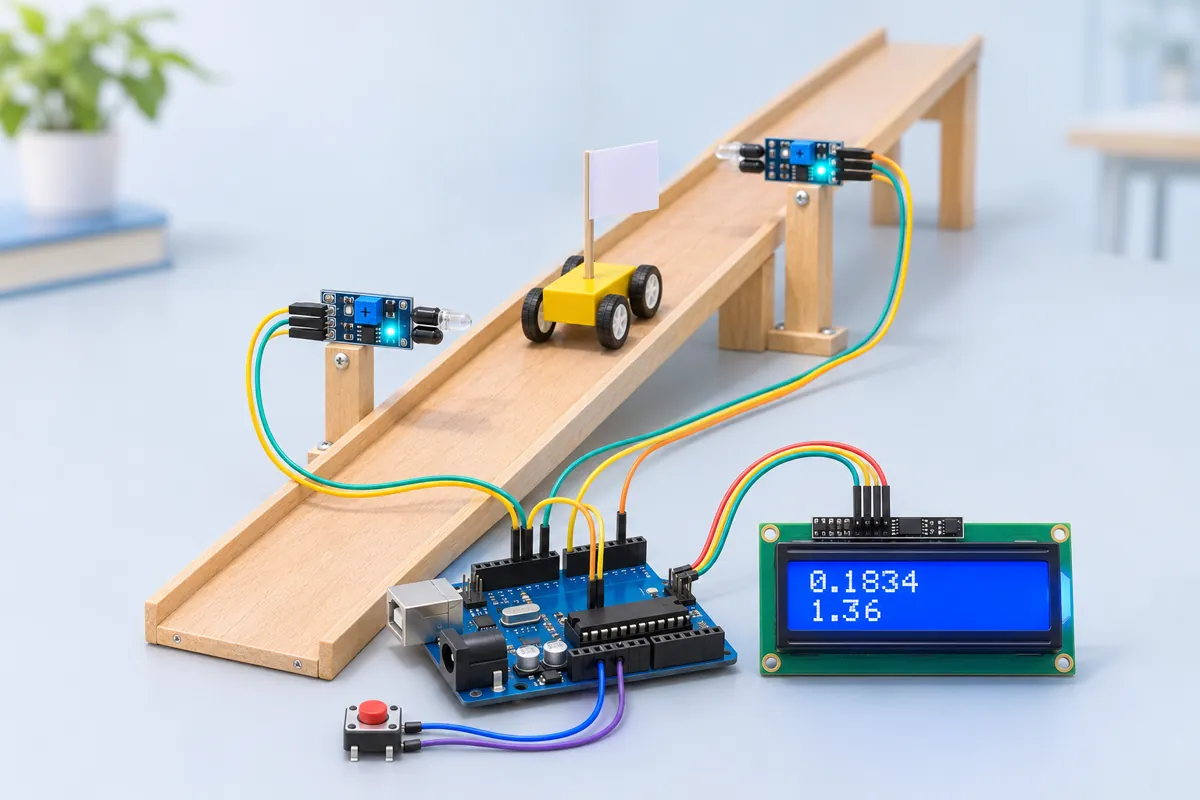
| Arduino Uno R3 (CH340 clone) | 1 | ₹450 | Buy Arduino Uno R3 (CH340 clone) |
| IR obstacle sensor module (FC-51) | 2 | ₹80 | Buy IR obstacle sensor module (FC-51) |
| 16x2 LCD with I2C backpack (PCF8574) | 1 | ₹180 | Buy 16x2 LCD with I2C backpack (PCF8574) |
| Tactile push button | 1 | ₹3 | Buy Tactile push button |
| Long jumper wires (female–male, 40 cm) for the gates | 1 | ₹60 | Buy Long jumper wires (female–male, 40 cm) for the gates |
| Ramp (a 1 m plank or curtain rail), toy trolley, white card flag | 1 | ₹100 | Buy Ramp (a 1 m plank or curtain rail), toy trolley, white card flag |
| Total | ₹873 |
Affiliate disclosure: “Buy” links may earn FlashReady a small commission at no extra cost to you. Prices are indicative.
Wiring
| Arduino Uno R3 | Part · pin | Wire | Notes |
|---|---|---|---|
| D2 | IR obstacle avoidance sensor (FC-51) · OUT | green | Gate A (start) — INT0 |
| 5V | IR obstacle avoidance sensor (FC-51) · VCC | red | |
| GND | IR obstacle avoidance sensor (FC-51) · GND | black | |
| D3 | IR obstacle avoidance sensor (FC-51) #2 · OUT | blue | Gate B (finish) — INT1 |
| 5V | IR obstacle avoidance sensor (FC-51) #2 · VCC | red | |
| GND | IR obstacle avoidance sensor (FC-51) #2 · GND | black | |
| A4 | 16×2 LCD + I2C backpack · SDA | blue | |
| A5 | 16×2 LCD + I2C backpack · SCL | yellow | |
| 5V | 16×2 LCD + I2C backpack · VCC | red | |
| GND | 16×2 LCD + I2C backpack · GND | black | |
| D4 | Push button (6 mm tactile switch) · 1 | orange | Reset / re-arm — internal pull-up |
| GND | Push button (6 mm tactile switch) · 2 | black |
Board quirks: The gates use the Uno’s only two external-interrupt pins, D2 and D3, so a pass is timestamped by hardware even while the LCD is being written. The FC-51 senses reflection, so the trolley needs a white card “flag” on its side passing 1–3 cm in front of each sensor. Mount both sensors at exactly the same height and distance from the track so they trigger at the same point of the flag. The “a = 2d/t²” figure is only right if the trolley is released from rest exactly at gate A. The flag method (speed at each gate from the flag width ÷ blocking time) works for any start — but a reflective sensor’s edge is soft, so treat it as an estimate and compare the two. Set GATE_DISTANCE_M to the centre-to-centre distance between the sensors and FLAG_WIDTH_M to the card’s width, both measured with a scale.
Code
// Two-gate photogate timer — Arduino Uno + 2 IR obstacle sensors + 16x2 I2C LCD + reset button.
// Gate A and gate B sit a measured distance apart along a ramp (or one above the other for a
// falling object). The Uno times the run from A to B to the microsecond and shows the time,
// the average speed and the acceleration. A card "flag" of known width on the trolley also
// gives the speed AT each gate from how long it blocks the sensor.
// Gate A OUT → D2 (INT0), gate B OUT → D3 (INT1), both LOW while blocked. Reset button D4.
// LCD on I2C (SDA A4, SCL A5, address 0x27).
#include <Wire.h>
#include <LiquidCrystal_I2C.h>

constexpr uint8_t GATE_A = 2, GATE_B = 3, BUTTON = 4;
constexpr float GATE_DISTANCE_M = 0.500;  // between the two sensors, measured with a scale
constexpr float FLAG_WIDTH_M = 0.020;     // width of the card that passes the sensors
constexpr unsigned long MIN_BLOCK_US = 2000;  // shorter blocks are sensor chatter

LiquidCrystal_I2C lcd(0x27, 16, 2);

// Bits in `seen`: A blocked, A cleared, B blocked, B cleared.
constexpr uint8_t A_IN = 1, A_OUT = 2, B_IN = 4, B_OUT = 8;
volatile uint8_t seen = 0;
volatile unsigned long aIn, aOut, bIn, bOut;

void gateA() {
  unsigned long t = micros();
  bool blocked = digitalRead(GATE_A) == LOW;
  if (blocked && !(seen & A_IN)) {
    aIn = t;
    seen |= A_IN;
  } else if (!blocked && (seen & A_IN) && !(seen & A_OUT) && t - aIn >= MIN_BLOCK_US) {
    aOut = t;
    seen |= A_OUT;
  }
}

void gateB() {
  unsigned long t = micros();
  bool blocked = digitalRead(GATE_B) == LOW;
  if (!(seen & A_IN)) return;  // the run starts at gate A
  if (blocked && !(seen & B_IN)) {
    bIn = t;
    seen |= B_IN;
  } else if (!blocked && (seen & B_IN) && !(seen & B_OUT) && t - bIn >= MIN_BLOCK_US) {
    bOut = t;
    seen |= B_OUT;
  }
}

void arm() {
  noInterrupts();
  seen = 0;
  interrupts();
  lcd.clear();
  lcd.print(F("d="));
  lcd.print(GATE_DISTANCE_M, 3);
  lcd.print(F("m  READY"));
  lcd.setCursor(0, 1);
  lcd.print(F("Release at A"));
  Serial.println(F("\nArmed — waiting for gate A"));
}

void report() {
  noInterrupts();
  uint8_t s = seen;
  unsigned long ai = aIn, ao = aOut, bi = bIn, bo = bOut;
  interrupts();
  float t = (bi - ai) / 1e6;
  float vAvg = GATE_DISTANCE_M / t;
  float aRest = 2 * GATE_DISTANCE_M / (t * t);  // valid only if it started from rest at A
  Serial.print(F("A->B time: "));
  Serial.print(t, 4);
  Serial.print(F(" s, average speed: "));
  Serial.print(vAvg, 3);
  Serial.print(F(" m/s, a (from rest at A) = 2d/t^2 = "));
  Serial.print(aRest, 3);
  Serial.println(F(" m/s^2"));
  lcd.clear();
  lcd.print(F("t="));
  lcd.print(t, 3);
  lcd.print(F("s v="));
  lcd.print(vAvg, 2);
  lcd.setCursor(0, 1);
  if ((s & A_OUT) && (s & B_OUT)) {
    // Speed at each gate from the flag's blocking time; a from v^2 = u^2 + 2as.
    float vA = FLAG_WIDTH_M / ((ao - ai) / 1e6);
    float vB = FLAG_WIDTH_M / ((bo - bi) / 1e6);
    float a = (vB * vB - vA * vA) / (2 * GATE_DISTANCE_M);
    Serial.print(F("Flag speeds: at A "));
    Serial.print(vA, 3);
    Serial.print(F(" m/s, at B "));
    Serial.print(vB, 3);
    Serial.print(F(" m/s -> a = (vB^2 - vA^2) / 2d = "));
    Serial.print(a, 3);
    Serial.println(F(" m/s^2"));
    lcd.print(F("a="));
    lcd.print(a, 2);
    lcd.print(F(" ("));
    lcd.print(aRest, 2);
    lcd.print(F(")"));
  } else {
    lcd.print(F("a="));
    lcd.print(aRest, 2);
    lcd.print(F(" m/s2"));
  }
}

void setup() {
  pinMode(GATE_A, INPUT_PULLUP);
  pinMode(GATE_B, INPUT_PULLUP);
  pinMode(BUTTON, INPUT_PULLUP);
  Serial.begin(115200);
  Serial.println(F("Photogate timer starting"));
  lcd.init();
  lcd.backlight();
  lcd.print(F("Photogate timer"));
  delay(1000);
  attachInterrupt(digitalPinToInterrupt(GATE_A), gateA, CHANGE);
  attachInterrupt(digitalPinToInterrupt(GATE_B), gateB, CHANGE);
  arm();
}

void loop() {
  static bool reported = false;
  static unsigned long bSeenAt = 0;
  if (digitalRead(BUTTON) == LOW) {
    arm();
    reported = false;
    bSeenAt = 0;
    while (digitalRead(BUTTON) == LOW) delay(5);
    delay(30);
  }
  uint8_t s = seen;
  if (!reported && (s & A_IN) && !(s & B_IN)) {
    static uint8_t shownA = 0;
    if (shownA != s) {
      shownA = s;
      lcd.setCursor(0, 1);
      lcd.print(F("Timing...       "));
    }
  }
  // Report once B has been passed (or 0.5 s after B was blocked, if it never clears).
  if (!reported && (s & B_IN)) {
    if (!bSeenAt) bSeenAt = millis();
    if ((s & B_OUT) || millis() - bSeenAt > 500) {
      report();
      reported = true;
    }
  }
}
// Two-gate photogate timer — Arduino Uno + 2 IR obstacle sensors + 16x2 I2C LCD + reset button.
// Gate A and gate B sit a measured distance apart along a ramp (or one above the other for a
// falling object). The Uno times the run from A to B to the microsecond and shows the time,
// the average speed and the acceleration. A card "flag" of known width on the trolley also
// gives the speed AT each gate from how long it blocks the sensor.
// Gate A OUT → D2 (INT0), gate B OUT → D3 (INT1), both LOW while blocked. Reset button D4.
// LCD on I2C (SDA A4, SCL A5, address 0x27).
#include <Wire.h>
#include <LiquidCrystal_I2C.h>
constexpr uint8_t GATE_A = 2, GATE_B = 3, BUTTON = 4;
constexpr float GATE_DISTANCE_M = 0.500; // between the two sensors, measured with a scale
constexpr float FLAG_WIDTH_M = 0.020; // width of the card that passes the sensors
constexpr unsigned long MIN_BLOCK_US = 2000; // shorter blocks are sensor chatter
LiquidCrystal_I2C lcd(0x27, 16, 2);
// Bits in `seen`: A blocked, A cleared, B blocked, B cleared.
constexpr uint8_t A_IN = 1, A_OUT = 2, B_IN = 4, B_OUT = 8;
volatile uint8_t seen = 0;
volatile unsigned long aIn, aOut, bIn, bOut;
void gateA() {
unsigned long t = micros();
bool blocked = digitalRead(GATE_A) == LOW;
if (blocked && !(seen & A_IN)) {
aIn = t;
seen |= A_IN;
} else if (!blocked && (seen & A_IN) && !(seen & A_OUT) && t - aIn >= MIN_BLOCK_US) {
aOut = t;
seen |= A_OUT;
}
}
void gateB() {
unsigned long t = micros();
bool blocked = digitalRead(GATE_B) == LOW;
if (!(seen & A_IN)) return; // the run starts at gate A
if (blocked && !(seen & B_IN)) {
bIn = t;
seen |= B_IN;
} else if (!blocked && (seen & B_IN) && !(seen & B_OUT) && t - bIn >= MIN_BLOCK_US) {
bOut = t;
seen |= B_OUT;
}
}
void arm() {
noInterrupts();
seen = 0;
interrupts();
lcd.clear();
lcd.print(F("d="));
lcd.print(GATE_DISTANCE_M, 3);
lcd.print(F("m READY"));
lcd.setCursor(0, 1);
lcd.print(F("Release at A"));
Serial.println(F("\nArmed — waiting for gate A"));
}
void report() {
noInterrupts();
uint8_t s = seen;
unsigned long ai = aIn, ao = aOut, bi = bIn, bo = bOut;
interrupts();
float t = (bi - ai) / 1e6;
float vAvg = GATE_DISTANCE_M / t;
float aRest = 2 * GATE_DISTANCE_M / (t * t); // valid only if it started from rest at A
Serial.print(F("A->B time: "));
Serial.print(t, 4);
Serial.print(F(" s, average speed: "));
Serial.print(vAvg, 3);
Serial.print(F(" m/s, a (from rest at A) = 2d/t^2 = "));
Serial.print(aRest, 3);
Serial.println(F(" m/s^2"));
lcd.clear();
lcd.print(F("t="));
lcd.print(t, 3);
lcd.print(F("s v="));
lcd.print(vAvg, 2);
lcd.setCursor(0, 1);
if ((s & A_OUT) && (s & B_OUT)) {
// Speed at each gate from the flag's blocking time; a from v^2 = u^2 + 2as.
float vA = FLAG_WIDTH_M / ((ao - ai) / 1e6);
float vB = FLAG_WIDTH_M / ((bo - bi) / 1e6);
float a = (vB * vB - vA * vA) / (2 * GATE_DISTANCE_M);
Serial.print(F("Flag speeds: at A "));
Serial.print(vA, 3);
Serial.print(F(" m/s, at B "));
Serial.print(vB, 3);
Serial.print(F(" m/s -> a = (vB^2 - vA^2) / 2d = "));
Serial.print(a, 3);
Serial.println(F(" m/s^2"));
lcd.print(F("a="));
lcd.print(a, 2);
lcd.print(F(" ("));
lcd.print(aRest, 2);
lcd.print(F(")"));
} else {
lcd.print(F("a="));
lcd.print(aRest, 2);
lcd.print(F(" m/s2"));
}
}
void setup() {
pinMode(GATE_A, INPUT_PULLUP);
pinMode(GATE_B, INPUT_PULLUP);
pinMode(BUTTON, INPUT_PULLUP);
Serial.begin(115200);
Serial.println(F("Photogate timer starting"));
lcd.init();
lcd.backlight();
lcd.print(F("Photogate timer"));
delay(1000);
attachInterrupt(digitalPinToInterrupt(GATE_A), gateA, CHANGE);
attachInterrupt(digitalPinToInterrupt(GATE_B), gateB, CHANGE);
arm();
}
void loop() {
static bool reported = false;
static unsigned long bSeenAt = 0;
if (digitalRead(BUTTON) == LOW) {
arm();
reported = false;
bSeenAt = 0;
while (digitalRead(BUTTON) == LOW) delay(5);
delay(30);
}
uint8_t s = seen;
if (!reported && (s & A_IN) && !(s & B_IN)) {
static uint8_t shownA = 0;
if (shownA != s) {
shownA = s;
lcd.setCursor(0, 1);
lcd.print(F("Timing... "));
}
}
// Report once B has been passed (or 0.5 s after B was blocked, if it never clears).
if (!reported && (s & B_IN)) {
if (!bSeenAt) bSeenAt = millis();
if ((s & B_OUT) || millis() - bSeenAt > 500) {
report();
reported = true;
}
}
}Compiled for uno on avr 1.8.8 with LiquidCrystal I2C 1.1.2 · 3 Nov 2026
How it works
Ticker-tape timers and stopwatches are how most school labs measure motion — and both are slow and imprecise. A pair of IR “photogates” and an Uno turn the classic inclined-plane experiment into a precise one: the time between the gates is measured to a few microseconds.
How it works
Gate A (D2) and gate B (D3) are FC-51 IR sensors placed a measured distance d apart along the track. Each pulls its output LOW while the flag on the trolley is in front of it. Both pins are the Uno’s hardware interrupt pins: the moment a gate changes, an interrupt routine stores micros().
From the times the Uno calculates:
- Time A→B: t = tB − tA
- Average speed: v = d / t
- Acceleration from rest at A: from d = ½at², a = 2d / t²
- Speed at each gate: flag width ÷ time the flag blocked that gate, then a = (vB² − vA²) / 2d from v² = u² + 2as
The LCD shows t, v and a (with the from-rest value in brackets); the Serial Monitor prints the full working. Press the button to arm the next run.
What to show at the exhibition
Set up a ramp with gate A right at the release point and gate B 50 cm down. Run the trolley three times — the times agree to a millisecond or two, which a stopwatch can never do. Then raise the ramp and show the acceleration increase. Physics teachers love a graph of a against sin θ.
Questions the examiner may ask
- What is an interrupt? A hardware signal that makes the processor pause the main loop and run a short routine immediately, so the time stamp isn’t delayed by whatever the loop was doing.
- How precise is
micros()? It counts in steps of 4 µs on a 16 MHz Uno — far finer than the sensor’s own response (a few hundred microseconds). - Why do the two acceleration values differ? Friction doesn’t explain it (both include friction). The differences come from not starting exactly at rest at A, and from the soft edge of a reflective sensor in the flag method.
- Which equations of motion did you use? s = ut + ½at² with u = 0, and v² = u² + 2as.
Cost in India
About ₹850 including the Uno. The sensors cost ₹35–50 each; a curtain rail or a smooth plank works as a ramp, and a toy car can replace a lab trolley.
Troubleshooting
It shows a result before the trolley reaches gate B
Gate B is triggered by something else (your hand, the ramp edge). Turn its pot down until its green LED stays off with nothing in front of it.
Nothing happens at gate A
The flag is too far away or dark. Use white card, bring it within 3 cm, and check the sensor’s LED lights when the flag passes.
The flag-based acceleration is wild
One sensor sees the flag for much longer than the other (different distance or angle). Align them, use a wider flag (3–5 cm), and rely on the from-rest value for the practical file.
Upgrades
- Add a third gate in the middle and check that the second half of the ramp takes less time than the first.
- Change the ramp angle and plot a against sin θ: the slope is g (minus friction).
- Drop a ball through two gates stacked vertically to measure g by free fall.