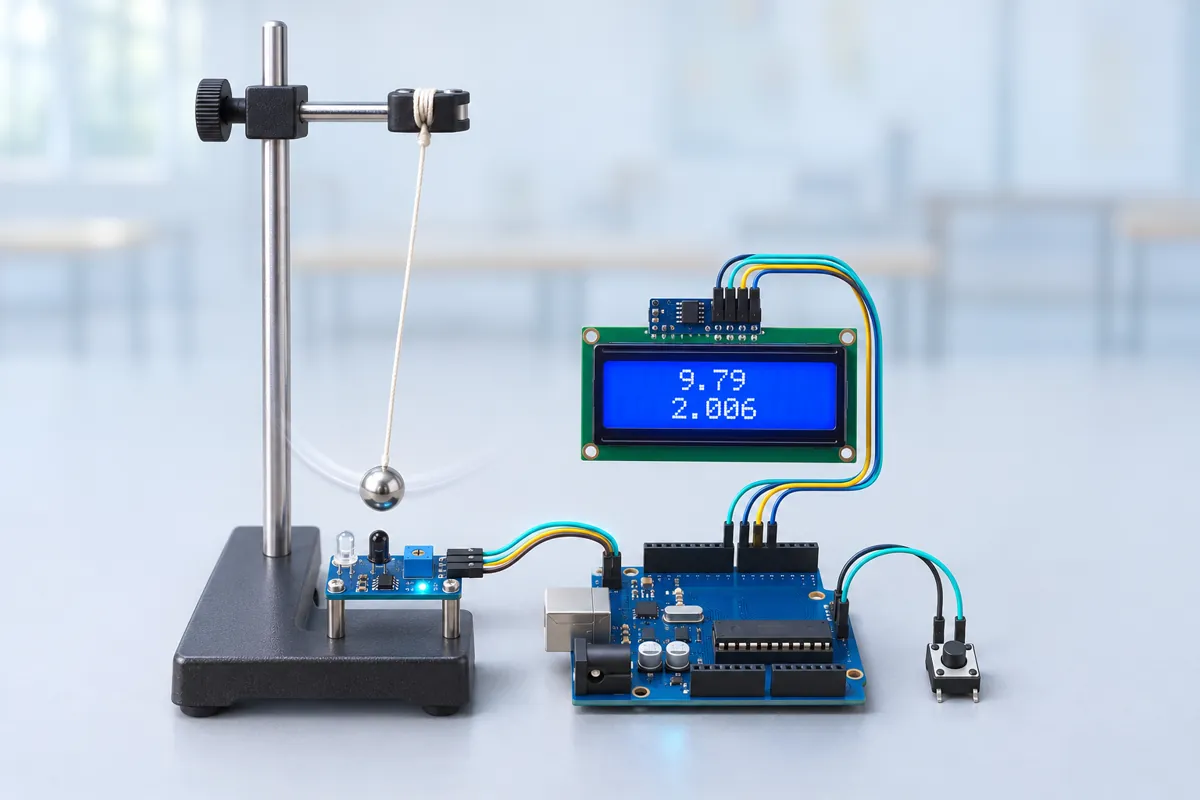
Parts list
| Part | Qty | Approx. | Buy |
|---|---|---|---|
| Arduino Uno R3 (CH340 clone) | 1 | ₹450 | Buy Arduino Uno R3 (CH340 clone) |
| IR obstacle sensor module (FC-51) | 1 | ₹40 | Buy IR obstacle sensor module (FC-51) |
| 16x2 LCD with I2C backpack (PCF8574) | 1 | ₹180 | Buy 16x2 LCD with I2C backpack (PCF8574) |
| Tactile push button | 1 | ₹3 | Buy Tactile push button |
| Pendulum bob (steel ball or a lab bob, 2–3 cm) + thin thread | 1 | ₹60 | Buy Pendulum bob (steel ball or a lab bob, 2–3 cm) + thin thread |
| Retort stand and clamp (from the lab) or a nail on a shelf edge | 1 | ₹0 | Buy Retort stand and clamp (from the lab) or a nail on a shelf edge |
| Jumper wires | 1 | ₹30 | Buy Jumper wires |
| Total | ₹763 |
Affiliate disclosure: “Buy” links may earn FlashReady a small commission at no extra cost to you. Prices are indicative.
Wiring
| Arduino Uno R3 | Part · pin | Wire | Notes |
|---|---|---|---|
| D2 | IR obstacle avoidance sensor (FC-51) · OUT | green | INT0 — LOW while the bob is in front of the sensor |
| 5V | IR obstacle avoidance sensor (FC-51) · VCC | red | |
| GND | IR obstacle avoidance sensor (FC-51) · GND | black | |
| A4 | 16×2 LCD + I2C backpack · SDA | blue | |
| A5 | 16×2 LCD + I2C backpack · SCL | yellow | |
| 5V | 16×2 LCD + I2C backpack · VCC | red | |
| GND | 16×2 LCD + I2C backpack · GND | black | |
| D3 | Push button (6 mm tactile switch) · 1 | orange | New run — internal pull-up |
| GND | Push button (6 mm tactile switch) · 2 | black |
Board quirks: The FC-51 is a reflective sensor, not a beam-break gate: it sees the bob passing 1–5 cm in front of it. Put it beside the lowest point of the swing and adjust its pot until the green LED blinks once on every pass and stays off otherwise. The sketch measures from pass 1 to pass 3, 5, 7… — passes that are the same point moving the same way — so a sensor that is slightly off-centre still gives the true period. LENGTH_M is from the pivot to the centre of the bob, not to its top. Measure the thread with a metre scale and add the bob’s radius (half of its diameter from vernier callipers). Keep the swing under about 10°. The formula T = 2π√(L/g) assumes small angles; at 20° the period is already about 0.8 % longer and g comes out low.
Code
// Simple pendulum — measure g with an IR "photogate". Arduino Uno + IR obstacle sensor + 16x2 I2C LCD.
// The sensor sits beside the lowest point of the swing, so the bob passes it twice per period.
// The Uno timestamps every pass, averages the period over all swings so far and computes
// g = 4π²L / T². Press the button to start a new run (new length, new bob).
// IR sensor OUT → D2 (LOW while the bob is in front), button D3 (to GND).
// LCD on I2C (SDA A4, SCL A5, address 0x27).
#include <Wire.h>
#include <LiquidCrystal_I2C.h>

constexpr uint8_t GATE = 2, BUTTON = 3;
constexpr float LENGTH_M = 0.500;              // pivot to the CENTRE of the bob — measure it
constexpr unsigned long HOLDOFF_US = 200000UL;  // ignore sensor chatter for 0.2 s after a pass

LiquidCrystal_I2C lcd(0x27, 16, 2);

volatile unsigned long firstUs = 0, lastUs = 0;
volatile unsigned int passes = 0;

void onPass() {
  unsigned long now = micros();
  if (passes && now - lastUs < HOLDOFF_US) return;
  if (!passes) firstUs = now;
  lastUs = now;
  passes++;
}

void resetRun() {
  noInterrupts();
  passes = 0;
  interrupts();
  lcd.clear();
  lcd.print(F("L="));
  lcd.print(LENGTH_M, 3);
  lcd.print(F("m"));
  lcd.setCursor(0, 1);
  lcd.print(F("Swing it! <10deg"));
  Serial.println(F("\nNew run — pull the bob aside by less than 10 degrees and let go"));
  Serial.println(F("swing,period_s,avg_period_s,g"));
}

void setup() {
  pinMode(GATE, INPUT_PULLUP);
  pinMode(BUTTON, INPUT_PULLUP);
  Serial.begin(115200);
  lcd.init();
  lcd.backlight();
  lcd.print(F("Pendulum g meter"));
  Serial.print(F("Simple pendulum, L = "));
  Serial.print(LENGTH_M, 3);
  Serial.println(F(" m"));
  delay(1200);
  resetRun();
  attachInterrupt(digitalPinToInterrupt(GATE), onPass, FALLING);
}

void loop() {
  static unsigned int shown = 0;
  if (digitalRead(BUTTON) == LOW) {
    resetRun();
    shown = 0;
    while (digitalRead(BUTTON) == LOW) delay(5);
    delay(30);
  }

  noInterrupts();
  unsigned int n = passes;
  unsigned long first = firstUs, last = lastUs;
  interrupts();

  // Passes 1, 3, 5 … are the same point of the swing moving the same way: one period apart.
  if (n != shown && n >= 3 && (n - 1) % 2 == 0) {
    shown = n;
    unsigned int swings = (n - 1) / 2;
    float avgT = (last - first) / 1e6 / swings;
    static unsigned long prevOdd = 0;
    float thisT = swings > 1 ? (last - prevOdd) / 1e6 : avgT;
    prevOdd = last;
    float g = 4 * PI * PI * LENGTH_M / (avgT * avgT);
    Serial.print(swings);
    Serial.print(F(","));
    Serial.print(thisT, 4);
    Serial.print(F(","));
    Serial.print(avgT, 4);
    Serial.print(F(","));
    Serial.println(g, 3);
    lcd.clear();
    lcd.print(F("T="));
    lcd.print(avgT, 4);
    lcd.print(F("s n="));
    lcd.print(swings);
    lcd.setCursor(0, 1);
    lcd.print(F("g="));
    lcd.print(g, 2);
    lcd.print(F(" m/s2"));
  } else if (n == 1 && shown == 0) {
    shown = 1;
    lcd.setCursor(0, 1);
    lcd.print(F("Timing...       "));
  }
}
// Simple pendulum — measure g with an IR "photogate". Arduino Uno + IR obstacle sensor + 16x2 I2C LCD.
// The sensor sits beside the lowest point of the swing, so the bob passes it twice per period.
// The Uno timestamps every pass, averages the period over all swings so far and computes
// g = 4π²L / T². Press the button to start a new run (new length, new bob).
// IR sensor OUT → D2 (LOW while the bob is in front), button D3 (to GND).
// LCD on I2C (SDA A4, SCL A5, address 0x27).
#include <Wire.h>
#include <LiquidCrystal_I2C.h>
constexpr uint8_t GATE = 2, BUTTON = 3;
constexpr float LENGTH_M = 0.500; // pivot to the CENTRE of the bob — measure it
constexpr unsigned long HOLDOFF_US = 200000UL; // ignore sensor chatter for 0.2 s after a pass
LiquidCrystal_I2C lcd(0x27, 16, 2);
volatile unsigned long firstUs = 0, lastUs = 0;
volatile unsigned int passes = 0;
void onPass() {
unsigned long now = micros();
if (passes && now - lastUs < HOLDOFF_US) return;
if (!passes) firstUs = now;
lastUs = now;
passes++;
}
void resetRun() {
noInterrupts();
passes = 0;
interrupts();
lcd.clear();
lcd.print(F("L="));
lcd.print(LENGTH_M, 3);
lcd.print(F("m"));
lcd.setCursor(0, 1);
lcd.print(F("Swing it! <10deg"));
Serial.println(F("\nNew run — pull the bob aside by less than 10 degrees and let go"));
Serial.println(F("swing,period_s,avg_period_s,g"));
}
void setup() {
pinMode(GATE, INPUT_PULLUP);
pinMode(BUTTON, INPUT_PULLUP);
Serial.begin(115200);
lcd.init();
lcd.backlight();
lcd.print(F("Pendulum g meter"));
Serial.print(F("Simple pendulum, L = "));
Serial.print(LENGTH_M, 3);
Serial.println(F(" m"));
delay(1200);
resetRun();
attachInterrupt(digitalPinToInterrupt(GATE), onPass, FALLING);
}
void loop() {
static unsigned int shown = 0;
if (digitalRead(BUTTON) == LOW) {
resetRun();
shown = 0;
while (digitalRead(BUTTON) == LOW) delay(5);
delay(30);
}
noInterrupts();
unsigned int n = passes;
unsigned long first = firstUs, last = lastUs;
interrupts();
// Passes 1, 3, 5 … are the same point of the swing moving the same way: one period apart.
if (n != shown && n >= 3 && (n - 1) % 2 == 0) {
shown = n;
unsigned int swings = (n - 1) / 2;
float avgT = (last - first) / 1e6 / swings;
static unsigned long prevOdd = 0;
float thisT = swings > 1 ? (last - prevOdd) / 1e6 : avgT;
prevOdd = last;
float g = 4 * PI * PI * LENGTH_M / (avgT * avgT);
Serial.print(swings);
Serial.print(F(","));
Serial.print(thisT, 4);
Serial.print(F(","));
Serial.print(avgT, 4);
Serial.print(F(","));
Serial.println(g, 3);
lcd.clear();
lcd.print(F("T="));
lcd.print(avgT, 4);
lcd.print(F("s n="));
lcd.print(swings);
lcd.setCursor(0, 1);
lcd.print(F("g="));
lcd.print(g, 2);
lcd.print(F(" m/s2"));
} else if (n == 1 && shown == 0) {
shown = 1;
lcd.setCursor(0, 1);
lcd.print(F("Timing... "));
}
}Compiled for uno on avr 1.8.8 with LiquidCrystal I2C 1.1.2 · 3 Nov 2026
How it works
The simple pendulum is the most common Class 11 physics practical: time 20 oscillations with a stopwatch, divide, square, and calculate g. A human reaction time of about 0.2 s at each end of the stopwatch is the biggest error. An IR sensor and an Uno remove it — every pass is timed with micros(), to a few microseconds.
How it works
The FC-51 IR sensor sits beside the lowest point of the swing. Each time the bob passes, the sensor’s output on D2 goes LOW, and an interrupt routine stores the time in microseconds. A 0.2 s hold-off ignores any chatter while the bob is in front of it.
The bob passes the sensor twice per period (once each way). So pass 1, pass 3, pass 5… are one full period apart. After n periods the average period is
T = (time of last odd pass − time of first pass) / n
and from T = 2π√(L/g):
g = 4π²L / T²
The LCD shows the average period, the number of swings and g; the Serial Monitor prints every swing, so you can copy the table into a practical file. Press the button to start a new run.
What to show at the exhibition
Hang the pendulum from a retort stand with the sensor at the bottom, let it swing and watch g settle to 9.7–9.8 m/s² within a few swings. Then let a visitor time 10 swings with a phone stopwatch at the same time — the difference between their result and the Uno’s is the best demonstration of reaction-time error.
Questions the examiner may ask
- Why use an interrupt? The pass is only a few milliseconds long. An interrupt catches the exact moment even if the loop is busy updating the LCD.
- Why pass 1 to pass 3 and not pass 1 to pass 2? Unless the sensor is exactly at the centre, the two half-periods aren’t equal. Same-direction passes are always exactly one period apart.
- Does the mass of the bob matter? No — the period depends only on length and g (for small swings). Try a heavier bob to show it.
- What is the expected value? About 9.78 m/s² near the equator and 9.79 in north India; it rises slightly with latitude. Your result should be within 1 %.
Cost in India
About ₹760 including the Uno; the pendulum stand comes from the school lab. Without the Uno and LCD (just the sensor and Serial Monitor), it costs under ₹100.
Troubleshooting
The period is half of what it should be
The sensor fires twice per pass (chatter) or sees the bob on both sides. Move it so only the bottom of the swing passes in front of it, or raise HOLDOFF_US.
Nothing happens when the bob swings
The bob doesn’t reflect enough IR — a dark or very small bob, or too far away. Wrap the bob in white paper or aluminium foil, move it closer, and turn the sensor’s pot until its LED lights when you hold the bob in front.
g comes out around 9.5 instead of 9.8
Usually the length: measured to the top of the bob, or the thread stretches. Also check the swing is small and the clamp doesn’t wobble.
The LCD shows nothing
Turn the contrast pot on the backpack. Check SDA on A4 and SCL on A5; try address 0x3F if 0x27 doesn’t work.
Upgrades
- Add a potentiometer or keypad to enter L without re-uploading, then plot T² against L for five lengths — the slope is 4π²/g.
- Measure how the period grows with amplitude (large-angle correction) using a protractor behind the pendulum.
- Time a physical pendulum (a swinging metre scale) and compare with the formula for a rod.