Parts list
| Part | Qty | Approx. | Buy |
|---|---|---|---|
| LOLIN S2 Mini (ESP32-S2, USB-C) | 1 | ₹350 | Buy LOLIN S2 Mini (ESP32-S2, USB-C) |
| PN532 NFC module V3 (red board) | 1 | ₹450 | Buy PN532 NFC module V3 (red board) |
| NTAG213/215 NFC stickers (pack of 10) | 1 | ₹150 | Buy NTAG213/215 NFC stickers (pack of 10) |
| USB-C data cable | 1 | ₹120 | Buy USB-C data cable |
| Female–female jumper wires | 6 | ₹60 | Buy Female–female jumper wires |
| Total | ₹1,130 |
Affiliate disclosure: “Buy” links may earn FlashReady a small commission at no extra cost to you. Prices are indicative.
Wiring
| LOLIN S2 Mini | PN532 NFC / RFID module (13.56 MHz, V3) | Wire | Notes |
|---|---|---|---|
| 33 | SDA | blue | GPIO33 — the S2 Mini’s default I2C SDA (D1 mini “D2” position) |
| 35 | SCL | yellow | GPIO35 — default I2C SCL (D1 mini “D1” position) |
| 18 | IRQ | green | GPIO18 — LOW when a tag is present; the board’s own 10 kΩ pull-up on 18 suits this open-drain line |
| 16 | RSTO | brown | GPIO16 — reset, used by the library at start-up |
| 3V3 | VCC | red | 3.3 V keeps the module’s I2C pull-ups at 3.3 V (read range drops only slightly) |
| GND | GND | black |
Board quirks: Set the PN532 V3’s two DIP switches to <strong>I2C</strong>: switch 1 ON, switch 2 OFF. The board answers at 0x24. The ESP32-S2 has a USB-OTG controller and no separate USB-serial chip, so the S2 Mini’s single USB-C port is the keyboard and the Serial Monitor at the same time. If an upload ever fails, hold the 0 button, tap RST, release 0, and upload again. RUN actions press Win+R, type the text and press Enter — they work on Windows. On Linux or macOS use KEYS actions with your desktop’s shortcuts instead. Use only tags you own. The sketch reads just the tag’s UID (its serial number) and never writes to tags. Don’t put passwords or PINs into <code>ACTIONS[]</code>: anyone holding the tag could type them. On v1.0 S2 Minis the silkscreen swaps GPIO12/13; this build doesn’t use either.
Code
// NFC tag shortcuts for your PC — LOLIN S2 Mini (native USB keyboard) + PN532 reader.
// Stick your own NFC tags on things — a notebook, a mug, a CD case — and tap them on the
// reader: the S2 Mini, plugged in as a USB keyboard, opens an app, a folder or a web page.
// Unknown tags just print their UID on the Serial Monitor so you can add them to ACTIONS[].
// The ESP32-S2 has USB-OTG and no USB-serial chip: one USB-C cable is keyboard + Serial.
// PN532 (DIP switches: I2C = 1 ON, 2 OFF): SDA 33, SCL 35 (the S2 Mini's default I2C),
// IRQ 18, RSTO 16, VCC 3V3. On-board blue LED (GPIO15) blinks on every tap.
// Never put passwords or PINs in ACTIONS[] — anyone holding the tag could type them.
#include <USB.h>
#include <USBHIDKeyboard.h>
#include <Wire.h>
#include <Adafruit_PN532.h>

constexpr uint8_t PN532_IRQ = 18, PN532_RST = 16;
Adafruit_PN532 nfc(PN532_IRQ, PN532_RST, &Wire);
USBHIDKeyboard Keyboard;

enum Kind { RUN, TYPE, KEYS };  // RUN = Win+R, text, Enter (Windows)
struct Action {
  const char* uid;  // as printed on the Serial Monitor, e.g. "04A2B3C4D5E680"
  const char* name;
  Kind kind;
  const char* text;  // RUN / TYPE
  uint8_t mod, key;  // KEYS
};
// Replace these UIDs with your own tags' UIDs (tap a tag and copy it from the Serial Monitor).
Action ACTIONS[] = {
  {"04A1B2C3D4E5F6", "Calculator", RUN, "calc", 0, 0},
  {"04A1B2C3D4E5F7", "Downloads folder", RUN, "%USERPROFILE%\\Downloads", 0, 0},
  {"04A1B2C3D4E5F8", "Class timetable", RUN, "https://example.com/timetable", 0, 0},
  {"04A1B2C3D4E5F9", "Lock PC", KEYS, nullptr, KEY_LEFT_GUI, 'l'},
  {"04A1B2C3D4E5FA", "Show desktop", KEYS, nullptr, KEY_LEFT_GUI, 'd'},
};
bool readerOk = false;

void blink() {
  digitalWrite(LED_BUILTIN, HIGH);  // S2 Mini LED: HIGH = on
  delay(60);
  digitalWrite(LED_BUILTIN, LOW);
}

void run(const Action& a) {
  if (a.kind == KEYS) {
    if (a.mod) Keyboard.press(a.mod);
    Keyboard.press(a.key);
    delay(30);
    Keyboard.releaseAll();
    return;
  }
  if (a.kind == RUN) {
    Keyboard.press(KEY_LEFT_GUI);
    Keyboard.press('r');
    delay(30);
    Keyboard.releaseAll();
    delay(400);  // let the Run box open
  }
  Keyboard.print(a.text);
  if (a.kind == RUN) Keyboard.write(KEY_RETURN);
}

void setup() {
  Serial.begin(115200);
  pinMode(LED_BUILTIN, OUTPUT);
  Keyboard.begin();
  USB.productName("FlashReady NFC Shortcuts");
  USB.begin();
  Wire.begin(33, 35);
  nfc.begin();
  uint32_t ver = nfc.getFirmwareVersion();
  if (!ver) {
    Serial.println("PN532 not found - check SDA 33 / SCL 35 and the I2C DIP switches");
    return;
  }
  Serial.printf("PN532 firmware %u.%u\n", (unsigned)(ver >> 16 & 0xFF), (unsigned)(ver >> 8 & 0xFF));
  nfc.SAMConfig();
  readerOk = true;
  Serial.println("Tap one of your NFC tags");
}

void loop() {
  if (!readerOk) {
    delay(1000);
    return;
  }
  uint8_t uid[7], len = 0;
  if (!nfc.readPassiveTargetID(PN532_MIFARE_ISO14443A, uid, &len, 200)) return;
  char hex[15] = "";
  for (uint8_t i = 0; i < len && i < 7; i++) sprintf(hex + 2 * i, "%02X", uid[i]);
  blink();
  bool known = false;
  for (const Action& a : ACTIONS) {
    if (strcmp(a.uid, hex) != 0) continue;
    Serial.printf("Tag %s -> %s\n", hex, a.name);
    run(a);
    known = true;
    break;
  }
  if (!known) Serial.printf("Unknown tag %s - add it to ACTIONS[]\n", hex);
  delay(1500);  // one action per tap, even if the tag stays on the reader
}
// NFC tag shortcuts for your PC — LOLIN S2 Mini (native USB keyboard) + PN532 reader.
// Stick your own NFC tags on things — a notebook, a mug, a CD case — and tap them on the
// reader: the S2 Mini, plugged in as a USB keyboard, opens an app, a folder or a web page.
// Unknown tags just print their UID on the Serial Monitor so you can add them to ACTIONS[].
// The ESP32-S2 has USB-OTG and no USB-serial chip: one USB-C cable is keyboard + Serial.
// PN532 (DIP switches: I2C = 1 ON, 2 OFF): SDA 33, SCL 35 (the S2 Mini's default I2C),
// IRQ 18, RSTO 16, VCC 3V3. On-board blue LED (GPIO15) blinks on every tap.
// Never put passwords or PINs in ACTIONS[] — anyone holding the tag could type them.
#include <USB.h>
#include <USBHIDKeyboard.h>
#include <Wire.h>
#include <Adafruit_PN532.h>
constexpr uint8_t PN532_IRQ = 18, PN532_RST = 16;
Adafruit_PN532 nfc(PN532_IRQ, PN532_RST, &Wire);
USBHIDKeyboard Keyboard;
enum Kind { RUN, TYPE, KEYS }; // RUN = Win+R, text, Enter (Windows)
struct Action {
const char* uid; // as printed on the Serial Monitor, e.g. "04A2B3C4D5E680"
const char* name;
Kind kind;
const char* text; // RUN / TYPE
uint8_t mod, key; // KEYS
};
// Replace these UIDs with your own tags' UIDs (tap a tag and copy it from the Serial Monitor).
Action ACTIONS[] = {
{"04A1B2C3D4E5F6", "Calculator", RUN, "calc", 0, 0},
{"04A1B2C3D4E5F7", "Downloads folder", RUN, "%USERPROFILE%\\Downloads", 0, 0},
{"04A1B2C3D4E5F8", "Class timetable", RUN, "https://example.com/timetable", 0, 0},
{"04A1B2C3D4E5F9", "Lock PC", KEYS, nullptr, KEY_LEFT_GUI, 'l'},
{"04A1B2C3D4E5FA", "Show desktop", KEYS, nullptr, KEY_LEFT_GUI, 'd'},
};
bool readerOk = false;
void blink() {
digitalWrite(LED_BUILTIN, HIGH); // S2 Mini LED: HIGH = on
delay(60);
digitalWrite(LED_BUILTIN, LOW);
}
void run(const Action& a) {
if (a.kind == KEYS) {
if (a.mod) Keyboard.press(a.mod);
Keyboard.press(a.key);
delay(30);
Keyboard.releaseAll();
return;
}
if (a.kind == RUN) {
Keyboard.press(KEY_LEFT_GUI);
Keyboard.press('r');
delay(30);
Keyboard.releaseAll();
delay(400); // let the Run box open
}
Keyboard.print(a.text);
if (a.kind == RUN) Keyboard.write(KEY_RETURN);
}
void setup() {
Serial.begin(115200);
pinMode(LED_BUILTIN, OUTPUT);
Keyboard.begin();
USB.productName("FlashReady NFC Shortcuts");
USB.begin();
Wire.begin(33, 35);
nfc.begin();
uint32_t ver = nfc.getFirmwareVersion();
if (!ver) {
Serial.println("PN532 not found - check SDA 33 / SCL 35 and the I2C DIP switches");
return;
}
Serial.printf("PN532 firmware %u.%u\n", (unsigned)(ver >> 16 & 0xFF), (unsigned)(ver >> 8 & 0xFF));
nfc.SAMConfig();
readerOk = true;
Serial.println("Tap one of your NFC tags");
}
void loop() {
if (!readerOk) {
delay(1000);
return;
}
uint8_t uid[7], len = 0;
if (!nfc.readPassiveTargetID(PN532_MIFARE_ISO14443A, uid, &len, 200)) return;
char hex[15] = "";
for (uint8_t i = 0; i < len && i < 7; i++) sprintf(hex + 2 * i, "%02X", uid[i]);
blink();
bool known = false;
for (const Action& a : ACTIONS) {
if (strcmp(a.uid, hex) != 0) continue;
Serial.printf("Tag %s -> %s\n", hex, a.name);
run(a);
known = true;
break;
}
if (!known) Serial.printf("Unknown tag %s - add it to ACTIONS[]\n", hex);
delay(1500); // one action per tap, even if the tag stays on the reader
}Compiled for s2mini on esp32 3.3.12 with Adafruit PN532 1.3.4 · 3 Nov 2026
How it works
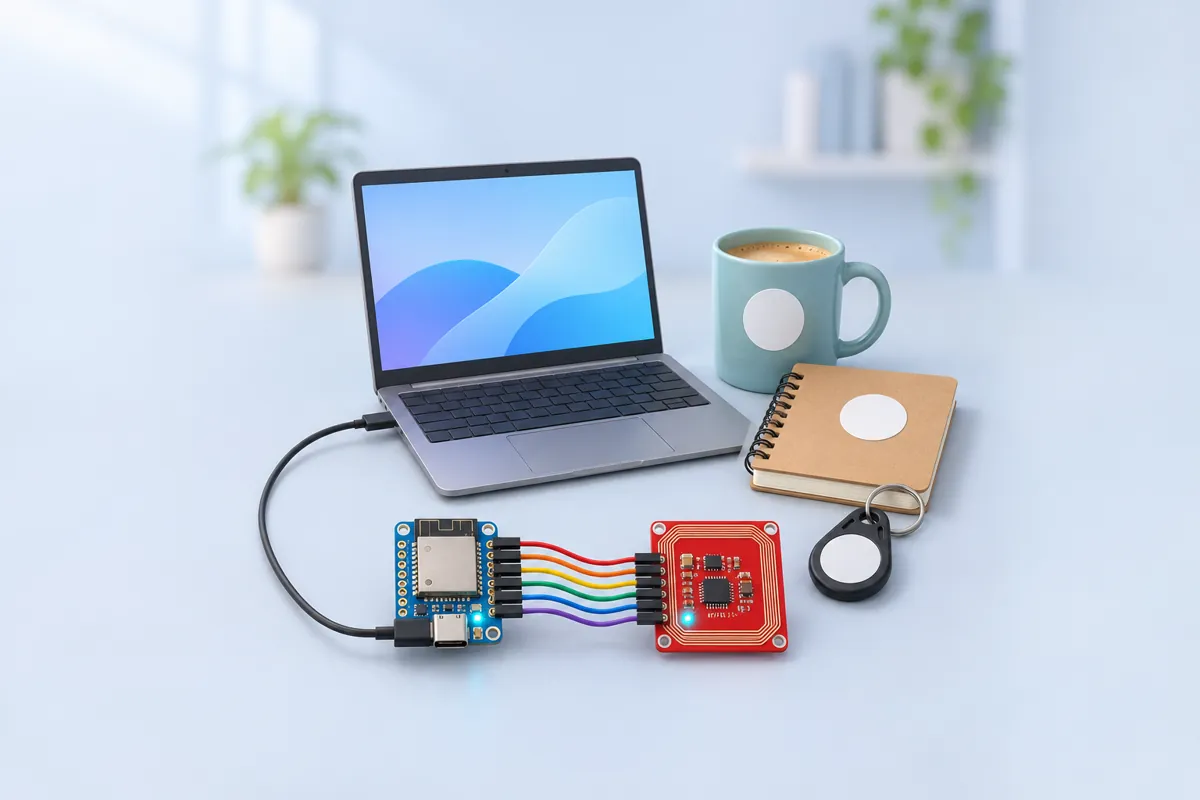
NFC stickers cost a few rupees each and every one has a unique serial number. Put one on a textbook, the cover of a lab notebook, a cup or a stand, and a reader next to the computer can recognise which object you tapped. This project turns that into shortcuts: tap the maths notebook and the class timetable opens; tap the mug and your music folder opens; tap the “away” sticker on the monitor and the PC locks.
The PN532 reads 13.56 MHz NFC tags (the NTAG and MIFARE types sold as stickers and cards). The S2 Mini asks it for any tag every 200 ms. When one is there, the sketch turns its UID into hex, looks it up in the ACTIONS[] table and acts on it, then waits 1.5 s so one tap gives one action. A tag that isn’t in the table only prints its UID, ready to copy into the table.
The LOLIN S2 Mini does the typing. Its ESP32-S2 has a USB-OTG controller, so with TinyUSB it appears to the PC as an ordinary USB keyboard — no driver, no app, no Bluetooth pairing. A RUN action presses Win+R, types a program, folder or web address and presses Enter; a KEYS action presses a shortcut such as Win+L or Win+D; a TYPE action types text into whatever window has focus.
The reader connects over I2C on the S2 Mini’s default pins 33 (SDA) and 35 (SCL), plus IRQ and reset, all at 3.3 V.
Troubleshooting
“PN532 not found”
Check the DIP switches (I2C), SDA on 33 and SCL on 35, and that VCC is on 3V3. Some PN532 clones need IRQ and RSTO wired before they answer at all.
Tags are read but nothing happens on the PC
Copy the UID printed on the Serial Monitor into ACTIONS[] exactly (capital letters, no spaces). Click on the desktop first so a window has keyboard focus.
The Run box opens but the text is cut short
A slow PC needs longer for the Run box to appear. Raise the 400 ms delay in run().
Upgrades
- Add a passive buzzer for a beep on each tap.
- Write NDEF URLs to tags with a phone app so they also work when tapped with a phone.
- Hold a tag for two seconds for a second action on the same tag.