Parts list
| Part | Qty | Approx. | Buy |
|---|---|---|---|
| Raspberry Pi Pico W (MicroPython installed) | 1 | ₹620 | Buy Raspberry Pi Pico W (MicroPython installed) |
| DS18B20 waterproof probe (1 m cable) | 2 | ₹240 | Buy DS18B20 waterproof probe (1 m cable) |
| 4.7 kΩ resistor | 1 | ₹1 | Buy 4.7 kΩ resistor |
| Breadboard + jumper wires | 1 | ₹90 | Buy Breadboard + jumper wires |
| Steel tumbler or paper cup + thermocol lid (for a second run) | 1 | ₹30 | Buy Steel tumbler or paper cup + thermocol lid (for a second run) |
| Micro-USB cable + 5 V adapter or power bank | 1 | ₹150 | Buy Micro-USB cable + 5 V adapter or power bank |
| Total | ₹1,131 |
Affiliate disclosure: “Buy” links may earn FlashReady a small commission at no extra cost to you. Prices are indicative.
Wiring
| Raspberry Pi Pico W | Part · pin | Wire | Notes |
|---|---|---|---|
| GP22 | DS18B20 (1-Wire) · DQ | yellow | Hot-water probe (yellow or white wire) — physical pin 29 |
| 3V3 | DS18B20 (1-Wire) · DQ | red | Via 4.7 kΩ — One pull-up for the whole 1-Wire bus |
| 3V3 | DS18B20 (1-Wire) · VDD | red | |
| GND | DS18B20 (1-Wire) · GND | black | |
| GP22 | DS18B20 (1-Wire) #2 · DQ | yellow | Room-air probe on the same bus |
| 3V3 | DS18B20 (1-Wire) #2 · VDD | red | |
| GND | DS18B20 (1-Wire) #2 · GND | black |
Board quirks: Use hot water from a kettle or geyser, around 70–80 °C — not boiling, and an adult pours it. The DS18B20 probe’s steel tube is fine in water up to about 100 °C, but the cable’s PVC sleeve can soften above that. The probe that is warmer at power-up is taken as the hot-water probe. Put the hot probe in the cup before switching on (or open /reset after it is in). One 4.7 kΩ pull-up from DQ to 3V3 serves both probes — they share the 1-Wire bus and are told apart by their unique 64-bit ROM codes. Fanless still air gives the cleanest curve. A ceiling fan speeds cooling (a bigger k) — which makes a good second experiment. Without Wi-Fi settings the Pico still logs: the CSV lines appear in Thonny’s shell and can be copied into a spreadsheet.
Code
# Newton's law of cooling experiment - Raspberry Pi Pico W (MicroPython) + 2 waterproof DS18B20 probes.
# One probe sits in a cup of hot water, the other in the room air. Every 5 s the Pico W logs both
# temperatures. It fits T(t) = Ta + (T0 - Ta) * e^(-k t) by a straight-line fit of ln(T - Ta) against t,
# and serves a live graph at http://<pico-ip>/ (CSV at /data.csv, new run at /reset).
# Without Wi-Fi it still logs: the CSV lines appear in Thonny's shell.
# Both probes: DQ -> GP22 (one 4.7 kOhm pull-up to 3V3 for the bus), VDD -> 3V3, GND -> GND.
from machine import Pin
import onewire
import ds18x20
import network
import socket
import time
import math
import json
SAMPLE_S = 5
MAX_POINTS = 720 # 1 hour at 5 s
MIN_DIFF_C = 2.0 # points closer than this to room temperature are left out of the fit (noise)
WIFI_SSID = "your-wifi"
WIFI_PASS = "your-password"
# The FlashReady flasher saves your settings to /settings.json; they win over the lines above.
try:
with open("/settings.json") as f:
_s = json.load(f)
except (OSError, ValueError):
_s = {}
WIFI_SSID = _s.get("wifi_ssid") or WIFI_SSID
WIFI_PASS = _s.get("wifi_pass") or WIFI_PASS
led = Pin("LED", Pin.OUT)
bus = ds18x20.DS18X20(onewire.OneWire(Pin(22)))
roms = bus.scan()
print("DS18B20 probes found:", len(roms))
hot_rom = room_rom = None
t0 = time.ticks_ms()
times, hot, room = [], [], []
def read_both():
"""Returns (hot, room) in deg C; room is None with only one probe."""
global hot_rom, room_rom
bus.convert_temp()
time.sleep_ms(750)
vals = [bus.read_temp(r) for r in roms]
if hot_rom is None and vals:
# The warmer probe at the start is the one in the hot water.
i = vals.index(max(vals))
hot_rom = roms[i]
room_rom = roms[1 - i] if len(roms) > 1 else None
print("Hot-water probe:", hot_rom.hex(), " room probe:", room_rom.hex() if room_rom else "none")
h = vals[roms.index(hot_rom)]
r = vals[roms.index(room_rom)] if room_rom else None
return h, r
def fit():
"""(k per minute, T0 fitted, Ta used, points used) or None."""
if not hot:
return None
ta = sum(room) / len(room) if room and room[0] is not None else min(hot) - 1
xs, ys = [], []
for t, h in zip(times, hot):
if h - ta >= MIN_DIFF_C:
xs.append(t / 60)
ys.append(math.log(h - ta))
n = len(xs)
if n < 5:
return None
sx, sy = sum(xs), sum(ys)
sxx = sum(x * x for x in xs)
sxy = sum(x * y for x, y in zip(xs, ys))
den = n * sxx - sx * sx
if den == 0:
return None
slope = (n * sxy - sx * sy) / den
icpt = (sy - slope * sx) / n
return -slope, ta + math.exp(icpt), ta, n
def csv():
yield "t_s,hot_c,room_c\n"
for t, h, r in zip(times, hot, room):
yield "%d,%.2f,%s\n" % (t, h, "" if r is None else "%.2f" % r)
PAGE = """<!doctype html><meta name=viewport content="width=device-width"><title>Cooling curve</title>
<style>body{font-family:sans-serif;margin:16px}canvas{width:100%;max-width:720px;border:1px solid #ccc}</style>
<h2>Newton's law of cooling</h2><p id=s>Loading...</p><canvas id=c width=720 height=360></canvas>
<p><a href=/data.csv>Download CSV</a> · <a href=/reset>Start a new run</a></p>
<script>
async function u(){const d=await (await fetch('/data.json')).json();const c=document.getElementById('c'),g=c.getContext('2d');
g.clearRect(0,0,720,360);if(!d.t.length){return}const all=d.hot.concat(d.room.filter(x=>x!==null));
const lo=Math.floor(Math.min(...all))-2,hi=Math.ceil(Math.max(...all))+2,tm=Math.max(60,d.t[d.t.length-1]);
const X=t=>40+t/tm*670,Y=v=>340-(v-lo)/(hi-lo)*330;g.fillStyle='#888';g.fillText(hi+' C',2,14);g.fillText(lo+' C',2,340);
g.fillText((tm/60).toFixed(1)+' min',660,355);
const line=(a,col)=>{g.strokeStyle=col;g.beginPath();a.forEach((v,i)=>{if(v===null)return;i?g.lineTo(X(d.t[i]),Y(v)):g.moveTo(X(d.t[i]),Y(v))});g.stroke()};
line(d.hot,'#e11d48');line(d.room,'#2563eb');
if(d.k){g.strokeStyle='#16a34a';g.setLineDash([5,4]);g.beginPath();for(let t=0;t<=tm;t+=tm/60){const v=d.ta+(d.t0-d.ta)*Math.exp(-d.k*t/60);t?g.lineTo(X(t),Y(v)):g.moveTo(X(t),Y(v))}g.stroke();g.setLineDash([])}
document.getElementById('s').textContent='Hot '+d.hot[d.hot.length-1].toFixed(1)+' C, room '+(d.room[d.room.length-1]??'-')+' C, '+d.t.length+' points'+(d.k?', k = '+d.k.toFixed(4)+' per min (fit on '+d.n+' points)':'');}
u();setInterval(u,5000);
</script>"""
def data_json():
f = fit()
d = {"t": times, "hot": hot, "room": room}
if f:
d.update(k=f[0], t0=f[1], ta=f[2], n=f[3])
return json.dumps(d)
def serve(server):
global t0, full
try:
conn, _ = server.accept()
except OSError:
return
try:
conn.settimeout(2)
req = conn.recv(512).decode()
path = req.split(" ")[1] if " " in req else "/"
if path.startswith("/data.json"):
conn.send("HTTP/1.0 200 OK\r\nContent-Type: application/json\r\n\r\n")
conn.send(data_json())
elif path.startswith("/data.csv"):
conn.send("HTTP/1.0 200 OK\r\nContent-Type: text/csv\r\nContent-Disposition: attachment; filename=cooling.csv\r\n\r\n")
for line in csv():
conn.send(line)
elif path.startswith("/reset"):
times.clear()
hot.clear()
room.clear()
t0 = time.ticks_ms()
full = False
print("New run started")
conn.send("HTTP/1.0 303 See Other\r\nLocation: /\r\n\r\n")
else:
conn.send("HTTP/1.0 200 OK\r\nContent-Type: text/html\r\n\r\n")
conn.send(PAGE)
except OSError:
pass
finally:
conn.close()
server = None
if WIFI_SSID == "your-wifi":
print("Web page off - no Wi-Fi name set. Flash from flashready.in or type it into main.py. Logging to the shell only.")
else:
wlan = network.WLAN(network.STA_IF)
wlan.active(True)
wlan.connect(WIFI_SSID, WIFI_PASS)
for _ in range(40):
if wlan.isconnected():
break
time.sleep(0.5)
if wlan.isconnected():
print("Open http://%s/ on a phone or laptop on the same Wi-Fi" % wlan.ifconfig()[0])
server = socket.socket()
server.setsockopt(socket.SOL_SOCKET, socket.SO_REUSEADDR, 1)
server.bind(socket.getaddrinfo("0.0.0.0", 80)[0][-1])
server.listen(2)
server.settimeout(0.2)
else:
print("Wi-Fi not found - logging to the shell only")
if not roms:
print("No DS18B20 found - check DQ on GP22, the 4.7 kOhm pull-up to 3V3, VDD and GND")
while True:
led.toggle()
time.sleep(0.2)
print("t_s,hot_c,room_c")
next_sample = time.ticks_ms()
full = False
while True:
if server:
serve(server)
if time.ticks_diff(time.ticks_ms(), next_sample) < 0:
continue
next_sample = time.ticks_add(next_sample, SAMPLE_S * 1000)
led.on()
h, r = read_both()
led.off()
if len(times) < MAX_POINTS:
times.append(time.ticks_diff(time.ticks_ms(), t0) // 1000)
hot.append(round(h, 2))
room.append(None if r is None else round(r, 2))
print("%d,%.2f,%s" % (times[-1], h, "" if r is None else "%.2f" % r))
f = fit()
if f and len(times) % 12 == 0: # once a minute
print("fit: k = %.4f /min, T0 = %.1f C, Ta = %.1f C, %d points" % f)
elif not full:
full = True
print("Run full (1 hour) - open /reset to start again")# Newton's law of cooling experiment - Raspberry Pi Pico W (MicroPython) + 2 waterproof DS18B20 probes.
# One probe sits in a cup of hot water, the other in the room air. Every 5 s the Pico W logs both
# temperatures. It fits T(t) = Ta + (T0 - Ta) * e^(-k t) by a straight-line fit of ln(T - Ta) against t,
# and serves a live graph at http://<pico-ip>/ (CSV at /data.csv, new run at /reset).
# Without Wi-Fi it still logs: the CSV lines appear in Thonny's shell.
# Both probes: DQ -> GP22 (one 4.7 kOhm pull-up to 3V3 for the bus), VDD -> 3V3, GND -> GND.
from machine import Pin
import onewire
import ds18x20
import network
import socket
import time
import math
import json
SAMPLE_S = 5
MAX_POINTS = 720 # 1 hour at 5 s
MIN_DIFF_C = 2.0 # points closer than this to room temperature are left out of the fit (noise)
WIFI_SSID = "your-wifi"
WIFI_PASS = "your-password"
# The FlashReady flasher saves your settings to /settings.json; they win over the lines above.
try:
with open("/settings.json") as f:
_s = json.load(f)
except (OSError, ValueError):
_s = {}
WIFI_SSID = _s.get("wifi_ssid") or WIFI_SSID
WIFI_PASS = _s.get("wifi_pass") or WIFI_PASS
led = Pin("LED", Pin.OUT)
bus = ds18x20.DS18X20(onewire.OneWire(Pin(22)))
roms = bus.scan()
print("DS18B20 probes found:", len(roms))
hot_rom = room_rom = None
t0 = time.ticks_ms()
times, hot, room = [], [], []
def read_both():
"""Returns (hot, room) in deg C; room is None with only one probe."""
global hot_rom, room_rom
bus.convert_temp()
time.sleep_ms(750)
vals = [bus.read_temp(r) for r in roms]
if hot_rom is None and vals:
# The warmer probe at the start is the one in the hot water.
i = vals.index(max(vals))
hot_rom = roms[i]
room_rom = roms[1 - i] if len(roms) > 1 else None
print("Hot-water probe:", hot_rom.hex(), " room probe:", room_rom.hex() if room_rom else "none")
h = vals[roms.index(hot_rom)]
r = vals[roms.index(room_rom)] if room_rom else None
return h, r
def fit():
"""(k per minute, T0 fitted, Ta used, points used) or None."""
if not hot:
return None
ta = sum(room) / len(room) if room and room[0] is not None else min(hot) - 1
xs, ys = [], []
for t, h in zip(times, hot):
if h - ta >= MIN_DIFF_C:
xs.append(t / 60)
ys.append(math.log(h - ta))
n = len(xs)
if n < 5:
return None
sx, sy = sum(xs), sum(ys)
sxx = sum(x * x for x in xs)
sxy = sum(x * y for x, y in zip(xs, ys))
den = n * sxx - sx * sx
if den == 0:
return None
slope = (n * sxy - sx * sy) / den
icpt = (sy - slope * sx) / n
return -slope, ta + math.exp(icpt), ta, n
def csv():
yield "t_s,hot_c,room_c\n"
for t, h, r in zip(times, hot, room):
yield "%d,%.2f,%s\n" % (t, h, "" if r is None else "%.2f" % r)
PAGE = """<!doctype html><meta name=viewport content="width=device-width"><title>Cooling curve</title>
<style>body{font-family:sans-serif;margin:16px}canvas{width:100%;max-width:720px;border:1px solid #ccc}</style>
<h2>Newton's law of cooling</h2><p id=s>Loading...</p><canvas id=c width=720 height=360></canvas>
<p><a href=/data.csv>Download CSV</a> · <a href=/reset>Start a new run</a></p>
<script>
async function u(){const d=await (await fetch('/data.json')).json();const c=document.getElementById('c'),g=c.getContext('2d');
g.clearRect(0,0,720,360);if(!d.t.length){return}const all=d.hot.concat(d.room.filter(x=>x!==null));
const lo=Math.floor(Math.min(...all))-2,hi=Math.ceil(Math.max(...all))+2,tm=Math.max(60,d.t[d.t.length-1]);
const X=t=>40+t/tm*670,Y=v=>340-(v-lo)/(hi-lo)*330;g.fillStyle='#888';g.fillText(hi+' C',2,14);g.fillText(lo+' C',2,340);
g.fillText((tm/60).toFixed(1)+' min',660,355);
const line=(a,col)=>{g.strokeStyle=col;g.beginPath();a.forEach((v,i)=>{if(v===null)return;i?g.lineTo(X(d.t[i]),Y(v)):g.moveTo(X(d.t[i]),Y(v))});g.stroke()};
line(d.hot,'#e11d48');line(d.room,'#2563eb');
if(d.k){g.strokeStyle='#16a34a';g.setLineDash([5,4]);g.beginPath();for(let t=0;t<=tm;t+=tm/60){const v=d.ta+(d.t0-d.ta)*Math.exp(-d.k*t/60);t?g.lineTo(X(t),Y(v)):g.moveTo(X(t),Y(v))}g.stroke();g.setLineDash([])}
document.getElementById('s').textContent='Hot '+d.hot[d.hot.length-1].toFixed(1)+' C, room '+(d.room[d.room.length-1]??'-')+' C, '+d.t.length+' points'+(d.k?', k = '+d.k.toFixed(4)+' per min (fit on '+d.n+' points)':'');}
u();setInterval(u,5000);
</script>"""
def data_json():
f = fit()
d = {"t": times, "hot": hot, "room": room}
if f:
d.update(k=f[0], t0=f[1], ta=f[2], n=f[3])
return json.dumps(d)
def serve(server):
global t0, full
try:
conn, _ = server.accept()
except OSError:
return
try:
conn.settimeout(2)
req = conn.recv(512).decode()
path = req.split(" ")[1] if " " in req else "/"
if path.startswith("/data.json"):
conn.send("HTTP/1.0 200 OK\r\nContent-Type: application/json\r\n\r\n")
conn.send(data_json())
elif path.startswith("/data.csv"):
conn.send("HTTP/1.0 200 OK\r\nContent-Type: text/csv\r\nContent-Disposition: attachment; filename=cooling.csv\r\n\r\n")
for line in csv():
conn.send(line)
elif path.startswith("/reset"):
times.clear()
hot.clear()
room.clear()
t0 = time.ticks_ms()
full = False
print("New run started")
conn.send("HTTP/1.0 303 See Other\r\nLocation: /\r\n\r\n")
else:
conn.send("HTTP/1.0 200 OK\r\nContent-Type: text/html\r\n\r\n")
conn.send(PAGE)
except OSError:
pass
finally:
conn.close()
server = None
if WIFI_SSID == "your-wifi":
print("Web page off - no Wi-Fi name set. Flash from flashready.in or type it into main.py. Logging to the shell only.")
else:
wlan = network.WLAN(network.STA_IF)
wlan.active(True)
wlan.connect(WIFI_SSID, WIFI_PASS)
for _ in range(40):
if wlan.isconnected():
break
time.sleep(0.5)
if wlan.isconnected():
print("Open http://%s/ on a phone or laptop on the same Wi-Fi" % wlan.ifconfig()[0])
server = socket.socket()
server.setsockopt(socket.SOL_SOCKET, socket.SO_REUSEADDR, 1)
server.bind(socket.getaddrinfo("0.0.0.0", 80)[0][-1])
server.listen(2)
server.settimeout(0.2)
else:
print("Wi-Fi not found - logging to the shell only")
if not roms:
print("No DS18B20 found - check DQ on GP22, the 4.7 kOhm pull-up to 3V3, VDD and GND")
while True:
led.toggle()
time.sleep(0.2)
print("t_s,hot_c,room_c")
next_sample = time.ticks_ms()
full = False
while True:
if server:
serve(server)
if time.ticks_diff(time.ticks_ms(), next_sample) < 0:
continue
next_sample = time.ticks_add(next_sample, SAMPLE_S * 1000)
led.on()
h, r = read_both()
led.off()
if len(times) < MAX_POINTS:
times.append(time.ticks_diff(time.ticks_ms(), t0) // 1000)
hot.append(round(h, 2))
room.append(None if r is None else round(r, 2))
print("%d,%.2f,%s" % (times[-1], h, "" if r is None else "%.2f" % r))
f = fit()
if f and len(times) % 12 == 0: # once a minute
print("fit: k = %.4f /min, T0 = %.1f C, Ta = %.1f C, %d points" % f)
elif not full:
full = True
print("Run full (1 hour) - open /reset to start again")Compiled for picow on micropython (mpy-cross v1.29.0) · 3 Nov 2026
How it works
Newton’s law of cooling says that a hot object cools at a rate proportional to how much hotter it is than its surroundings. That gives an exponential curve, T(t) = Tₐ + (T₀ − Tₐ)·e^(−kt). In the school lab it is usually a thermometer, a stopwatch and a lot of writing; here two digital probes record every 5 seconds and the Pico W draws the curve live on any phone on the same Wi-Fi.
How it works
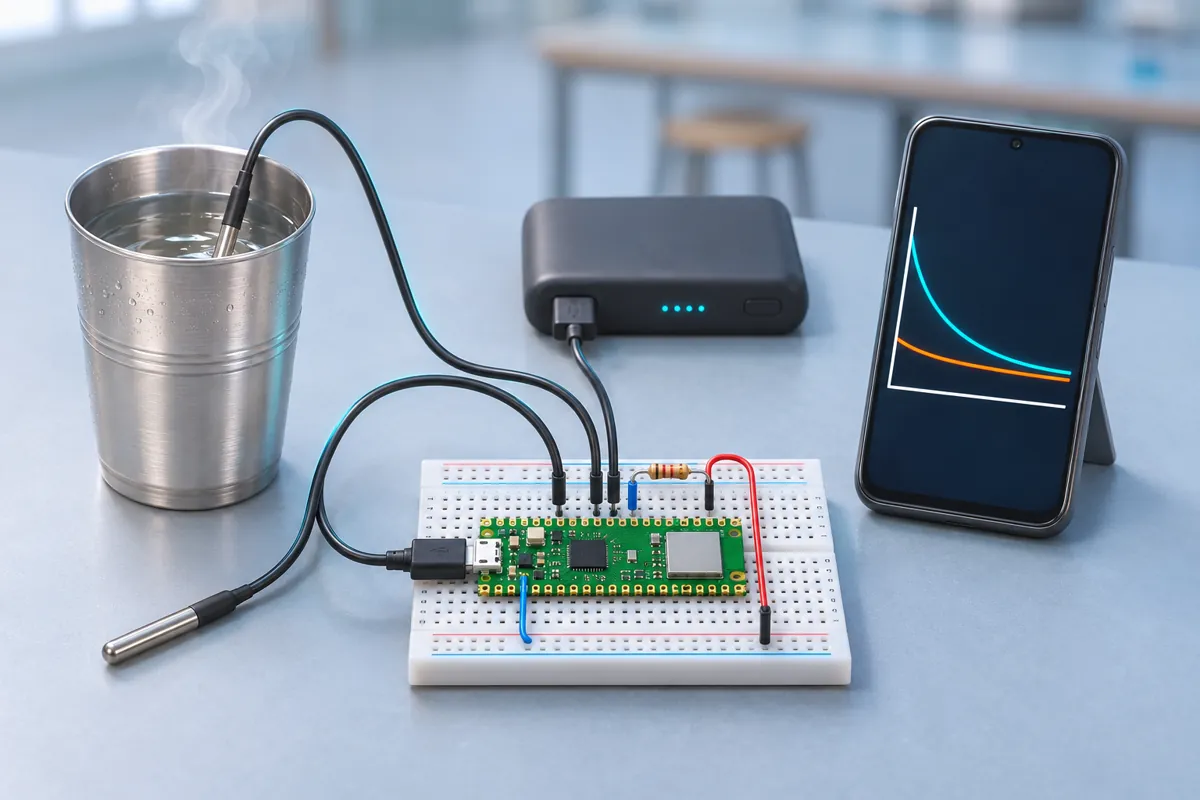
Two DS18B20 probes share one data wire (the 1-Wire bus on GP22). Each DS18B20 has a unique 64-bit address, so the Pico W can read them separately. The one that is warmer at power-up is taken as the hot-water probe; the other measures the room air Tₐ.
Every 5 seconds the Pico W reads both probes and stores the values (up to one hour). It serves a small web page that redraws the graph every 5 seconds: the red line is the water, the blue line the room, and the dashed green line the fitted law.
The fit. Take the log of the law: ln(T − Tₐ) = ln(T₀ − Tₐ) − k·t. Plotting ln(T − Tₐ) against time gives a straight line with slope −k. The Pico W fits that line by least squares, leaving out points less than 2 °C above room temperature (there, sensor noise dominates). It shows k per minute; the shell prints it once a minute too.
/data.csv downloads every point for your lab file; /reset starts a new run.
What to show at the exhibition
Run two cups side by side on two Pico Ws (or one after the other): one open, one with a thermocol lid. Visitors watch the curves separate within a few minutes. Show the fitted k for each and ask: “Which cup keeps tea hot longer, and by how much?”
Questions the examiner may ask
- Why is the curve exponential? The rate of heat loss is proportional to the temperature difference. As the water cools, the difference shrinks, so it cools more and more slowly.
- Why take the logarithm? It turns the exponential into a straight line, and the slope of a straight line is easy to fit and to understand.
- Why measure room temperature too? Tₐ is in the law. A wrong Tₐ bends the log plot and changes k.
- Does the law hold exactly? Roughly, for small temperature differences. At high temperatures, evaporation and radiation make the early cooling faster than the simple law predicts — you can often see the first few minutes stray from the fitted line.
Cost in India
About ₹1,100. Waterproof DS18B20 probes cost ₹100–150 each; the Pico W ₹600–650. Without Wi-Fi, the same build works as a USB data logger with Thonny.
Troubleshooting
“No DS18B20 found”
Check the pull-up between DQ and 3V3, and the probe colours: usually red = VDD, black = GND, yellow (or white) = DQ. Some cheap probes use other colours — check the seller’s sheet.
A probe reads 85.0 °C at the start
85 °C is the DS18B20’s power-on value, returned if a reading is taken before a conversion finishes. The sketch waits 750 ms per conversion; if you still see it, the supply is weak — use short wires.
The page doesn’t open
The phone or laptop must be on the same Wi-Fi as the Pico W. Use the address printed in Thonny’s shell, with http:// (not https://).
k changes a lot between runs
It depends on the cup, the amount of water, a lid, draughts and stirring. Keep everything the same and change one thing per run — that is the experiment.
Upgrades
- Compare cups: steel, glass, paper and a flask — which has the smallest k?
- Add a third probe and cool two cups at once (one with a lid).
- Save each run to the Pico’s flash as a CSV so you can download it later.
- Show the live temperature on an SSD1306 OLED for use without a phone.