Parts list
| Part | Qty | Approx. | Buy |
|---|---|---|---|
| Arduino Uno R3 (CH340 clone) | 1 | ₹450 | Buy Arduino Uno R3 (CH340 clone) |
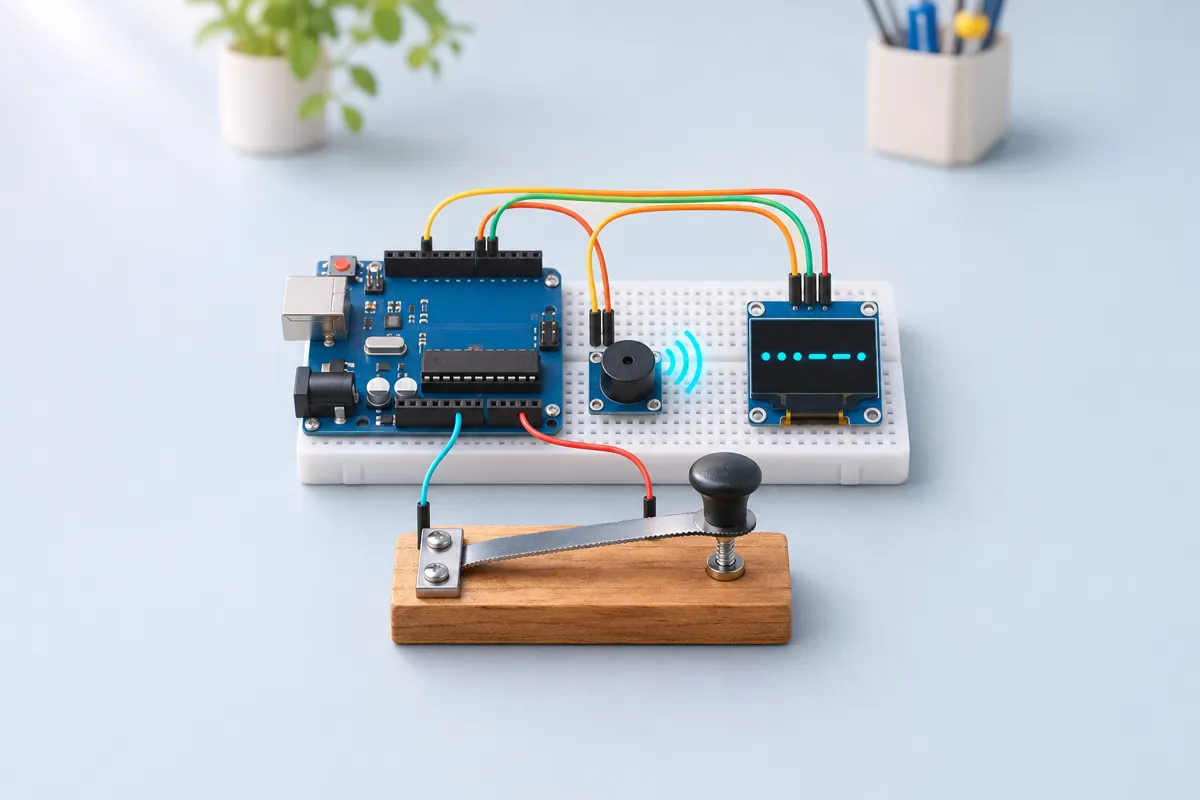
| Big push button or a home-made key (hacksaw blade + screw contact) | 1 | ₹40 | Buy Big push button or a home-made key (hacksaw blade + screw contact) |
| Active buzzer module | 1 | ₹25 | Buy Active buzzer module |
| 0.96" SSD1306 OLED, I2C, 4-pin | 1 | ₹180 | Buy 0.96" SSD1306 OLED, I2C, 4-pin |
| Jumper wires + breadboard | 1 | ₹80 | Buy Jumper wires + breadboard |
| Total | ₹775 |
Affiliate disclosure: “Buy” links may earn FlashReady a small commission at no extra cost to you. Prices are indicative.
Wiring
| Arduino Uno R3 | Part · pin | Wire | Notes |
|---|---|---|---|
| D2 | Push button (6 mm tactile switch) · 1 | orange | The Morse key — internal pull-up |
| GND | Push button (6 mm tactile switch) · 2 | black | |
| D8 | Active buzzer module (high-level trigger) · I/O | purple | Side tone while the key is down |
| 5V | Active buzzer module (high-level trigger) · VCC | red | |
| GND | Active buzzer module (high-level trigger) · GND | black | |
| A4 | SSD1306 OLED 0.96″ (128×64, I2C) · SDA | blue | |
| A5 | SSD1306 OLED 0.96″ (128×64, I2C) · SCL | yellow | |
| 5V | SSD1306 OLED 0.96″ (128×64, I2C) · VCC | red | |
| GND | SSD1306 OLED 0.96″ (128×64, I2C) · GND | black |
Board quirks: A dot is one unit, a dash three units, the gap inside a letter one unit, between letters three, between words seven. The sketch measures your own dots and dashes and keeps adjusting the unit, so it follows you whether you key at 5 or 20 words per minute. Words per minute = 1200 ÷ dot length in ms — the standard “PARIS” timing used by radio amateurs. Holding the key for 2 seconds switches between TRAIN and FREE and resets the speed to 10 WPM. An active buzzer gives a fixed tone (usually around 2–3 kHz), which is shrill. For a softer 600–800 Hz tone, swap in a passive buzzer and use tone(8, 700) / noTone(8).
Code
// Morse code trainer — Arduino Uno + one push button (the key) + active buzzer module + SSD1306 OLED.
// Key in Morse and the OLED decodes it. The dot length adapts to your speed (shown as WPM).
// Two modes, switched by holding the key for 2 s:
//   TRAIN — a random letter or digit appears; key it, and it says right or wrong (with the answer).
//   FREE  — everything you key is decoded into text on the screen.
// Key D2 → GND (internal pull-up), buzzer module I/O → D8, OLED SDA → A4, SCL → A5 (0x3C).
#include <Wire.h>
#include <Adafruit_GFX.h>
#include <Adafruit_SSD1306.h>

constexpr uint8_t KEY_PIN = 2, BUZZER_PIN = 8;
constexpr unsigned int MODE_HOLD_MS = 2000;

// Letter followed by its pattern, space-separated. Kept in flash to save RAM.
const char MORSE[] PROGMEM =
    "A.- B-... C-.-. D-.. E. F..-. G--. H.... I.. J.--- K-.- L.-.. M-- N-. O--- P.--. Q--.- R.-. "
    "S... T- U..- V...- W.-- X-..- Y-.-- Z--.. 0----- 1.---- 2..--- 3...-- 4....- 5..... 6-.... "
    "7--... 8---.. 9----. ";

Adafruit_SSD1306 oled(128, 64, &Wire, -1);
bool train = true;
char target = 'E';
char pattern[8] = "";  // what is being keyed now, e.g. ".-"
uint8_t patLen = 0;
char text[22] = "";    // decoded text in FREE mode (one OLED line)
char verdict[22] = "Key the letter";
unsigned int unit = 120;  // dot length in ms (120 ms ≈ 10 words per minute)
unsigned int score = 0, tries = 0;
bool keyDown = false, spaced = true, modeSwitched = false;
unsigned long edgeAt = 0;

// Find the letter for a pattern (or the pattern for a letter): returns 0 / false if not found.
char decode(const char *pat) {
  for (const char *p = MORSE; pgm_read_byte(p); p++) {
    char letter = pgm_read_byte(p++);
    uint8_t i = 0;
    while (pgm_read_byte(p) != ' ' && pat[i] == (char)pgm_read_byte(p)) p++, i++;
    if (pgm_read_byte(p) == ' ' && pat[i] == 0) return letter;
    while (pgm_read_byte(p) != ' ') p++;
  }
  return 0;
}

void patternOf(char letter, char *out) {
  for (const char *p = MORSE; pgm_read_byte(p); p++) {
    char l = pgm_read_byte(p++);
    uint8_t i = 0;
    while (pgm_read_byte(p) != ' ') {
      if (l == letter) out[i++] = pgm_read_byte(p);
      p++;
    }
    if (l == letter) {
      out[i] = 0;
      return;
    }
  }
  out[0] = 0;
}

void newTarget() {
  const char set[] = "ETIANMSURWDKGOHVFLPJBXCYZQ0123456789";
  target = set[random(36)];
}

void draw() {
  oled.clearDisplay();
  oled.setTextColor(SSD1306_WHITE);
  oled.setTextSize(1);
  oled.setCursor(0, 0);
  oled.print(train ? F("TRAIN") : F("FREE"));
  oled.print(F("  "));
  oled.print(1200 / unit);
  oled.print(F(" WPM"));
  if (train) {
    oled.print(F("  "));
    oled.print(score);
    oled.print('/');
    oled.print(tries);
    oled.setTextSize(3);
    oled.setCursor(0, 14);
    oled.print(target);
    oled.setTextSize(1);
    oled.setCursor(30, 18);
    oled.print(verdict);
  } else {
    oled.setCursor(0, 16);
    oled.print(text);
  }
  oled.setTextSize(2);
  oled.setCursor(0, 46);
  oled.print(pattern);
  oled.display();
}

void letterDone() {
  if (!patLen) return;
  char c = decode(pattern);
  Serial.print(pattern);
  Serial.print(F(" = "));
  Serial.println(c ? c : '?');
  if (train) {
    tries++;
    if (c == target) {
      score++;
      strcpy_P(verdict, PSTR("Right!"));
    } else {
      char want[8];
      patternOf(target, want);
      snprintf_P(verdict, sizeof(verdict), PSTR("No: %c is %s"), target, want);
    }
    newTarget();
  } else {
    uint8_t n = strlen(text);
    if (n >= sizeof(text) - 1) memmove(text, text + 1, n--);  // scroll left
    text[n] = c ? c : '?';
    text[n + 1] = 0;
  }
  patLen = 0;
  pattern[0] = 0;
  draw();
}

void setup() {
  Serial.begin(115200);
  Serial.println(F("Morse trainer ready. Key on D2; hold 2 s to switch TRAIN / FREE."));
  pinMode(KEY_PIN, INPUT_PULLUP);
  pinMode(BUZZER_PIN, OUTPUT);
  if (!oled.begin(SSD1306_SWITCHCAPVCC, 0x3C)) Serial.println(F("OLED not found at 0x3C"));
  randomSeed(analogRead(A0));
  newTarget();
  draw();
}

void loop() {
  unsigned long now = millis();
  bool down = digitalRead(KEY_PIN) == LOW;

  if (down && !keyDown && now - edgeAt > 15) {  // key pressed (15 ms debounce)
    keyDown = true;
    edgeAt = now;
    digitalWrite(BUZZER_PIN, HIGH);  // side tone while the key is down
  } else if (!down && keyDown && now - edgeAt > 15) {  // key released
    keyDown = false;
    digitalWrite(BUZZER_PIN, LOW);
    unsigned int len = now - edgeAt;
    edgeAt = now;
    if (modeSwitched) {
      modeSwitched = false;
      return;
    }
    bool dash = len > 2 * unit;  // the dot/dash boundary sits at 2 units
    // Adapt: a dot is one unit, a dash three. Move a quarter of the way to the new estimate.
    unsigned int est = dash ? len / 3 : len;
    unit = constrain((unit * 3 + est) / 4, 40, 400);
    if (patLen < sizeof(pattern) - 1) {
      pattern[patLen++] = dash ? '-' : '.';
      pattern[patLen] = 0;
    }
    spaced = false;
    draw();
  }

  if (keyDown && !modeSwitched && now - edgeAt > MODE_HOLD_MS) {
    modeSwitched = true;
    digitalWrite(BUZZER_PIN, LOW);
    train = !train;
    patLen = 0;
    pattern[0] = 0;
    unit = 120;
    Serial.println(train ? F("Mode: TRAIN") : F("Mode: FREE"));
    draw();
  }

  if (!keyDown) {
    unsigned long gap = now - edgeAt;
    if (patLen && gap > 3UL * unit) letterDone();  // 3 units of silence ends a letter
    if (!train && !spaced && gap > 7UL * unit) {   // 7 units ends a word
      spaced = true;
      uint8_t n = strlen(text);
      if (n && n < sizeof(text) - 1) text[n] = ' ', text[n + 1] = 0;
      draw();
    }
  }
}
// Morse code trainer — Arduino Uno + one push button (the key) + active buzzer module + SSD1306 OLED.
// Key in Morse and the OLED decodes it. The dot length adapts to your speed (shown as WPM).
// Two modes, switched by holding the key for 2 s:
// TRAIN — a random letter or digit appears; key it, and it says right or wrong (with the answer).
// FREE — everything you key is decoded into text on the screen.
// Key D2 → GND (internal pull-up), buzzer module I/O → D8, OLED SDA → A4, SCL → A5 (0x3C).
#include <Wire.h>
#include <Adafruit_GFX.h>
#include <Adafruit_SSD1306.h>
constexpr uint8_t KEY_PIN = 2, BUZZER_PIN = 8;
constexpr unsigned int MODE_HOLD_MS = 2000;
// Letter followed by its pattern, space-separated. Kept in flash to save RAM.
const char MORSE[] PROGMEM =
"A.- B-... C-.-. D-.. E. F..-. G--. H.... I.. J.--- K-.- L.-.. M-- N-. O--- P.--. Q--.- R.-. "
"S... T- U..- V...- W.-- X-..- Y-.-- Z--.. 0----- 1.---- 2..--- 3...-- 4....- 5..... 6-.... "
"7--... 8---.. 9----. ";
Adafruit_SSD1306 oled(128, 64, &Wire, -1);
bool train = true;
char target = 'E';
char pattern[8] = ""; // what is being keyed now, e.g. ".-"
uint8_t patLen = 0;
char text[22] = ""; // decoded text in FREE mode (one OLED line)
char verdict[22] = "Key the letter";
unsigned int unit = 120; // dot length in ms (120 ms ≈ 10 words per minute)
unsigned int score = 0, tries = 0;
bool keyDown = false, spaced = true, modeSwitched = false;
unsigned long edgeAt = 0;
// Find the letter for a pattern (or the pattern for a letter): returns 0 / false if not found.
char decode(const char *pat) {
for (const char *p = MORSE; pgm_read_byte(p); p++) {
char letter = pgm_read_byte(p++);
uint8_t i = 0;
while (pgm_read_byte(p) != ' ' && pat[i] == (char)pgm_read_byte(p)) p++, i++;
if (pgm_read_byte(p) == ' ' && pat[i] == 0) return letter;
while (pgm_read_byte(p) != ' ') p++;
}
return 0;
}
void patternOf(char letter, char *out) {
for (const char *p = MORSE; pgm_read_byte(p); p++) {
char l = pgm_read_byte(p++);
uint8_t i = 0;
while (pgm_read_byte(p) != ' ') {
if (l == letter) out[i++] = pgm_read_byte(p);
p++;
}
if (l == letter) {
out[i] = 0;
return;
}
}
out[0] = 0;
}
void newTarget() {
const char set[] = "ETIANMSURWDKGOHVFLPJBXCYZQ0123456789";
target = set[random(36)];
}
void draw() {
oled.clearDisplay();
oled.setTextColor(SSD1306_WHITE);
oled.setTextSize(1);
oled.setCursor(0, 0);
oled.print(train ? F("TRAIN") : F("FREE"));
oled.print(F(" "));
oled.print(1200 / unit);
oled.print(F(" WPM"));
if (train) {
oled.print(F(" "));
oled.print(score);
oled.print('/');
oled.print(tries);
oled.setTextSize(3);
oled.setCursor(0, 14);
oled.print(target);
oled.setTextSize(1);
oled.setCursor(30, 18);
oled.print(verdict);
} else {
oled.setCursor(0, 16);
oled.print(text);
}
oled.setTextSize(2);
oled.setCursor(0, 46);
oled.print(pattern);
oled.display();
}
void letterDone() {
if (!patLen) return;
char c = decode(pattern);
Serial.print(pattern);
Serial.print(F(" = "));
Serial.println(c ? c : '?');
if (train) {
tries++;
if (c == target) {
score++;
strcpy_P(verdict, PSTR("Right!"));
} else {
char want[8];
patternOf(target, want);
snprintf_P(verdict, sizeof(verdict), PSTR("No: %c is %s"), target, want);
}
newTarget();
} else {
uint8_t n = strlen(text);
if (n >= sizeof(text) - 1) memmove(text, text + 1, n--); // scroll left
text[n] = c ? c : '?';
text[n + 1] = 0;
}
patLen = 0;
pattern[0] = 0;
draw();
}
void setup() {
Serial.begin(115200);
Serial.println(F("Morse trainer ready. Key on D2; hold 2 s to switch TRAIN / FREE."));
pinMode(KEY_PIN, INPUT_PULLUP);
pinMode(BUZZER_PIN, OUTPUT);
if (!oled.begin(SSD1306_SWITCHCAPVCC, 0x3C)) Serial.println(F("OLED not found at 0x3C"));
randomSeed(analogRead(A0));
newTarget();
draw();
}
void loop() {
unsigned long now = millis();
bool down = digitalRead(KEY_PIN) == LOW;
if (down && !keyDown && now - edgeAt > 15) { // key pressed (15 ms debounce)
keyDown = true;
edgeAt = now;
digitalWrite(BUZZER_PIN, HIGH); // side tone while the key is down
} else if (!down && keyDown && now - edgeAt > 15) { // key released
keyDown = false;
digitalWrite(BUZZER_PIN, LOW);
unsigned int len = now - edgeAt;
edgeAt = now;
if (modeSwitched) {
modeSwitched = false;
return;
}
bool dash = len > 2 * unit; // the dot/dash boundary sits at 2 units
// Adapt: a dot is one unit, a dash three. Move a quarter of the way to the new estimate.
unsigned int est = dash ? len / 3 : len;
unit = constrain((unit * 3 + est) / 4, 40, 400);
if (patLen < sizeof(pattern) - 1) {
pattern[patLen++] = dash ? '-' : '.';
pattern[patLen] = 0;
}
spaced = false;
draw();
}
if (keyDown && !modeSwitched && now - edgeAt > MODE_HOLD_MS) {
modeSwitched = true;
digitalWrite(BUZZER_PIN, LOW);
train = !train;
patLen = 0;
pattern[0] = 0;
unit = 120;
Serial.println(train ? F("Mode: TRAIN") : F("Mode: FREE"));
draw();
}
if (!keyDown) {
unsigned long gap = now - edgeAt;
if (patLen && gap > 3UL * unit) letterDone(); // 3 units of silence ends a letter
if (!train && !spaced && gap > 7UL * unit) { // 7 units ends a word
spaced = true;
uint8_t n = strlen(text);
if (n && n < sizeof(text) - 1) text[n] = ' ', text[n + 1] = 0;
draw();
}
}
}Compiled for uno on avr 1.8.8 with Adafruit SSD1306 2.5.17 · 3 Nov 2026
How it works
Morse code turns letters into short and long signals — dots and dashes. It was the first digital communication, sent over telegraph wires across India from the 1850s, and radio amateurs and the Navy still learn it today. This trainer turns one push button into a Morse key and an Uno into the listener that decodes it.
How it works
The sketch measures how long the key is held. Anything shorter than two units is a dot, longer is a dash. The unit starts at 120 ms (10 words per minute) and adapts: after every symbol it moves a quarter of the way towards the dot length you actually keyed (a dash counts as three units). That is why a beginner tapping slowly and a fast operator both get decoded correctly.
Silence is part of Morse too. When the key has been up for three units, the dots and dashes so far form one letter; the sketch looks the pattern up in a table of A–Z and 0–9 stored in flash memory. In FREE mode, seven units of silence add a space between words.
TRAIN mode shows a random letter or digit in large type. Key it: the screen says Right! or shows the correct pattern, e.g. “No: K is -.-”, and keeps a score. The pattern you are keying appears at the bottom as you go, and the buzzer gives a side tone while the key is pressed — like a real transmitter.
What to show at the exhibition
- Challenge visitors to key SOS (· · · – – – · · ·) — almost everyone knows it — then their name.
- Show a printed Morse chart and explain why E is one dot and T one dash: Samuel Morse’s team gave the shortest codes to the most common English letters.
- Compare it with modern data: Morse is a variable-length code, an early form of the compression used in ZIP files.
Questions the examiner may ask
- How does the Arduino tell a dot from a dash? It times the press with
millis()and compares it with two dot-lengths. - Why does it need gaps? Without timing gaps, “· ·” (E E) and “· ·” (I) would look the same; the length of the silence separates symbols, letters and words.
- What is WPM? Words per minute, based on the word PARIS, which is exactly 50 units long; at 10 WPM a dot is 120 ms.
- Where are the codes stored? In flash memory with
PROGMEM, because the Uno has only 2 KB of RAM and half of it is the OLED’s screen buffer.
Cost in India
About ₹780. A plain push button works; a key made from a hacksaw blade screwed to a block of wood, touching a screw head, feels much more like the real thing and costs almost nothing.
Troubleshooting
Dashes are read as dots
Your dashes are shorter than twice your dots. Make dashes clearly longer — about three dots — and the adaptive timing settles after a few letters.
Letters run together
Leave a pause of about three dots between letters. At the start the unit is 120 ms, so the pause is just over a third of a second.
Random letters appear
The key is bouncing or the wire is long. The sketch ignores edges closer than 15 ms; for a scratchy home-made key add a 100 nF capacitor across it.
Upgrades
- Add a second Uno and a long wire (or nRF24L01 radios) to send messages between two benches.
- Show the Koch method: start with two letters and add one each time you score 90 %.
- Flash an LED as well as beeping, to show how ships signalled with lamps.