Parts list
| Part | Qty | Approx. | Buy |
|---|---|---|---|
| Arduino Uno R3 (CH340 clone) | 1 | ₹450 | Buy Arduino Uno R3 (CH340 clone) |
| L298N dual motor driver | 1 | ₹150 | Buy L298N dual motor driver |
| Metal gear motors, 6 V 300 RPM (N20 or GA12), with rubber wheels | 2 | ₹600 | Buy Metal gear motors, 6 V 300 RPM (N20 or GA12), with rubber wheels |
| HC-SR04 ultrasonic sensor | 1 | ₹90 | Buy HC-SR04 ultrasonic sensor |
| TCRT5000 IR reflective sensor module | 2 | ₹80 | Buy TCRT5000 IR reflective sensor module |
| Active buzzer module | 1 | ₹25 | Buy Active buzzer module |
| 2× 18650 Li-ion cells + holder with switch (7.4 V) | 1 | ₹350 | Buy 2× 18650 Li-ion cells + holder with switch (7.4 V) |
| 10 × 10 cm chassis plate (2–3 mm aluminium or acrylic) + steel scoop | 1 | ₹250 | Buy 10 × 10 cm chassis plate (2–3 mm aluminium or acrylic) + steel scoop |
| Jumper wires + small screws | 1 | ₹60 | Buy Jumper wires + small screws |
| Total | ₹2,055 |
Affiliate disclosure: “Buy” links may earn FlashReady a small commission at no extra cost to you. Prices are indicative.
Wiring
| Arduino Uno R3 | Part · pin | Wire | Notes |
|---|---|---|---|
| — | L298N dual H-bridge motor driver · OUT1 | — | To Left motor (+) (not drawn) |
| — | L298N dual H-bridge motor driver · OUT2 | — | To Left motor (−) (not drawn) |
| — | L298N dual H-bridge motor driver · OUT3 | — | To Right motor (+) (not drawn) |
| — | L298N dual H-bridge motor driver · OUT4 | — | To Right motor (−) (not drawn) |
| 5V | TCRT5000 IR reflective sensor module · VCC | red | |
| GND | TCRT5000 IR reflective sensor module · GND | black | |
| D2 | TCRT5000 IR reflective sensor module · DO | yellow | Front-left edge sensor, facing down |
| 5V | TCRT5000 IR reflective sensor module #2 · VCC | red | |
| GND | TCRT5000 IR reflective sensor module #2 · GND | black | |
| D3 | TCRT5000 IR reflective sensor module #2 · DO | green | Front-right edge sensor, facing down |
| 5V | HC-SR04 ultrasonic sensor · VCC | red | |
| D7 | HC-SR04 ultrasonic sensor · Trig | purple | |
| D8 | HC-SR04 ultrasonic sensor · Echo | green | 5 V echo is fine on the Uno |
| GND | HC-SR04 ultrasonic sensor · GND | black | |
| D5 | L298N dual H-bridge motor driver · ENA | orange | PWM speed, left motor (remove the ENA jumper) |
| A0 | L298N dual H-bridge motor driver · IN1 | yellow | |
| A1 | L298N dual H-bridge motor driver · IN2 | green | |
| D6 | L298N dual H-bridge motor driver · ENB | purple | PWM speed, right motor (remove the ENB jumper) |
| A2 | L298N dual H-bridge motor driver · IN3 | blue | |
| A3 | L298N dual H-bridge motor driver · IN4 | cyan | |
| 5V | L298N dual H-bridge motor driver · 5V | red | L298N’s regulator feeds the Uno’s 5V pin (5V-EN jumper on, battery ≤ 12 V) |
| GND | L298N dual H-bridge motor driver · GND | black | Common ground: battery −, L298N and Uno |
| 2× 18650 Li-ion pack (7.4 V) with switch · + | L298N dual H-bridge motor driver · 12V | red | The holder’s switch is the start switch |
| 2× 18650 Li-ion pack (7.4 V) with switch · - | L298N dual H-bridge motor driver · GND | black | |
| D4 | Active buzzer module (high-level trigger) · I/O | orange | Countdown beeps |
| 5V | Active buzzer module (high-level trigger) · VCC | red | |
| GND | Active buzzer module (high-level trigger) · GND | black |
Board quirks: Classic mini-sumo rules: robot within 10 × 10 cm and 500 g, a black ring (dohyo) about 77 cm across with a white edge line, and a 5-second wait after the start. College fests in India often change the size, weight and start rules — read your event’s rulebook and adjust. The battery holder’s switch is the start switch here; five beeps count down the 5 seconds. Some events require a start button or an IR start module instead. An L298N loses about 2 V, which costs pushing power. For competition, a TB6612FNG or a MOSFET driver and 3S cells within the motor rating hit much harder. Li-ion 18650 cells can catch fire if shorted or over-discharged: use a holder with a switch, protected cells, a proper Li-ion charger, and never leave the robot charging unattended.
Code
// Mini sumo robot — Arduino Uno + 2× TCRT5000 (edge) + HC-SR04 (opponent) + L298N + buzzer module
// Edge sensors face down at the front corners: left DO → D2, right DO → D3.
// HC-SR04 faces forward: Trig D7, Echo D8. Buzzer module I/O → D4.
// L298N: ENA D5, IN1 A0, IN2 A1 (left), ENB D6, IN3 A2, IN4 A3 (right).
// Switch on → five beeps (the 5-second start delay sumo rules ask for) → search, charge, and
// back off whenever a front corner sees the white edge of the black ring (dohyo).
constexpr uint8_t EDGE_L = 2, EDGE_R = 3, TRIG = 7, ECHO = 8, BUZZER = 4;
constexpr uint8_t ENA = 5, IN1 = A0, IN2 = A1;  // left motor
constexpr uint8_t ENB = 6, IN3 = A2, IN4 = A3;  // right motor
// Most TCRT5000 modules pull DO LOW over white and HIGH over black. Flip if yours is opposite.
constexpr bool WHITE_IS_LOW = true;
constexpr uint8_t ATTACK_CM = 40;    // a mini-sumo ring is 77 cm across: anything nearer is the opponent
constexpr uint8_t FULL = 255, SEARCH = 140, BACK = 200;

void motor(uint8_t en, uint8_t a, uint8_t b, int speed) {
  digitalWrite(a, speed >= 0 ? HIGH : LOW);
  digitalWrite(b, speed >= 0 ? LOW : HIGH);
  analogWrite(en, abs(speed));
}

void drive(int left, int right) {
  motor(ENA, IN1, IN2, left);
  motor(ENB, IN3, IN4, right);
}

bool onEdge(uint8_t pin) { return (digitalRead(pin) == LOW) == WHITE_IS_LOW; }

// Distance in cm, or 0 when nothing echoes back within ~1 m.
unsigned int distanceCm() {
  digitalWrite(TRIG, LOW);
  delayMicroseconds(2);
  digitalWrite(TRIG, HIGH);
  delayMicroseconds(10);
  digitalWrite(TRIG, LOW);
  unsigned long us = pulseIn(ECHO, HIGH, 6000UL);  // 6 ms ≈ 1 m: don't wait for far echoes
  return us / 58;
}

void setup() {
  Serial.begin(115200);
  const uint8_t outs[] = {ENA, IN1, IN2, ENB, IN3, IN4, TRIG, BUZZER};
  for (uint8_t p : outs) pinMode(p, OUTPUT);
  pinMode(EDGE_L, INPUT);
  pinMode(EDGE_R, INPUT);
  pinMode(ECHO, INPUT);
  drive(0, 0);
  Serial.println(F("Mini sumo: starting in 5 s"));
  for (uint8_t i = 5; i > 0; i--) {  // 5 s start delay: one beep a second
    Serial.println(i);
    digitalWrite(BUZZER, HIGH);
    delay(i == 1 ? 600 : 150);
    digitalWrite(BUZZER, LOW);
    delay(i == 1 ? 400 : 850);
  }
  Serial.println(F("FIGHT"));
}

void loop() {
  bool left = onEdge(EDGE_L), right = onEdge(EDGE_R);
  if (left || right) {
    // White edge under a front corner: reverse, then turn away from that side.
    Serial.println(left && right ? F("edge: both") : left ? F("edge: left") : F("edge: right"));
    drive(-BACK, -BACK);
    delay(250);
    if (left) drive(SEARCH, -SEARCH);   // edge on the left → turn right
    else drive(-SEARCH, SEARCH);
    delay(220);
    return;
  }
  unsigned int cm = distanceCm();
  if (cm > 0 && cm <= ATTACK_CM) {
    drive(FULL, FULL);  // charge
    Serial.print(F("target "));
    Serial.print(cm);
    Serial.println(F(" cm"));
  } else {
    drive(SEARCH, -SEARCH / 2);  // sweep slowly to the right until the sonar finds it
  }
  delay(15);
}
// Mini sumo robot — Arduino Uno + 2× TCRT5000 (edge) + HC-SR04 (opponent) + L298N + buzzer module
// Edge sensors face down at the front corners: left DO → D2, right DO → D3.
// HC-SR04 faces forward: Trig D7, Echo D8. Buzzer module I/O → D4.
// L298N: ENA D5, IN1 A0, IN2 A1 (left), ENB D6, IN3 A2, IN4 A3 (right).
// Switch on → five beeps (the 5-second start delay sumo rules ask for) → search, charge, and
// back off whenever a front corner sees the white edge of the black ring (dohyo).
constexpr uint8_t EDGE_L = 2, EDGE_R = 3, TRIG = 7, ECHO = 8, BUZZER = 4;
constexpr uint8_t ENA = 5, IN1 = A0, IN2 = A1; // left motor
constexpr uint8_t ENB = 6, IN3 = A2, IN4 = A3; // right motor
// Most TCRT5000 modules pull DO LOW over white and HIGH over black. Flip if yours is opposite.
constexpr bool WHITE_IS_LOW = true;
constexpr uint8_t ATTACK_CM = 40; // a mini-sumo ring is 77 cm across: anything nearer is the opponent
constexpr uint8_t FULL = 255, SEARCH = 140, BACK = 200;
void motor(uint8_t en, uint8_t a, uint8_t b, int speed) {
digitalWrite(a, speed >= 0 ? HIGH : LOW);
digitalWrite(b, speed >= 0 ? LOW : HIGH);
analogWrite(en, abs(speed));
}
void drive(int left, int right) {
motor(ENA, IN1, IN2, left);
motor(ENB, IN3, IN4, right);
}
bool onEdge(uint8_t pin) { return (digitalRead(pin) == LOW) == WHITE_IS_LOW; }
// Distance in cm, or 0 when nothing echoes back within ~1 m.
unsigned int distanceCm() {
digitalWrite(TRIG, LOW);
delayMicroseconds(2);
digitalWrite(TRIG, HIGH);
delayMicroseconds(10);
digitalWrite(TRIG, LOW);
unsigned long us = pulseIn(ECHO, HIGH, 6000UL); // 6 ms ≈ 1 m: don't wait for far echoes
return us / 58;
}
void setup() {
Serial.begin(115200);
const uint8_t outs[] = {ENA, IN1, IN2, ENB, IN3, IN4, TRIG, BUZZER};
for (uint8_t p : outs) pinMode(p, OUTPUT);
pinMode(EDGE_L, INPUT);
pinMode(EDGE_R, INPUT);
pinMode(ECHO, INPUT);
drive(0, 0);
Serial.println(F("Mini sumo: starting in 5 s"));
for (uint8_t i = 5; i > 0; i--) { // 5 s start delay: one beep a second
Serial.println(i);
digitalWrite(BUZZER, HIGH);
delay(i == 1 ? 600 : 150);
digitalWrite(BUZZER, LOW);
delay(i == 1 ? 400 : 850);
}
Serial.println(F("FIGHT"));
}
void loop() {
bool left = onEdge(EDGE_L), right = onEdge(EDGE_R);
if (left || right) {
// White edge under a front corner: reverse, then turn away from that side.
Serial.println(left && right ? F("edge: both") : left ? F("edge: left") : F("edge: right"));
drive(-BACK, -BACK);
delay(250);
if (left) drive(SEARCH, -SEARCH); // edge on the left → turn right
else drive(-SEARCH, SEARCH);
delay(220);
return;
}
unsigned int cm = distanceCm();
if (cm > 0 && cm <= ATTACK_CM) {
drive(FULL, FULL); // charge
Serial.print(F("target "));
Serial.print(cm);
Serial.println(F(" cm"));
} else {
drive(SEARCH, -SEARCH / 2); // sweep slowly to the right until the sonar finds it
}
delay(15);
}Compiled for uno on avr 1.8.8 · 3 Nov 2026
How it works
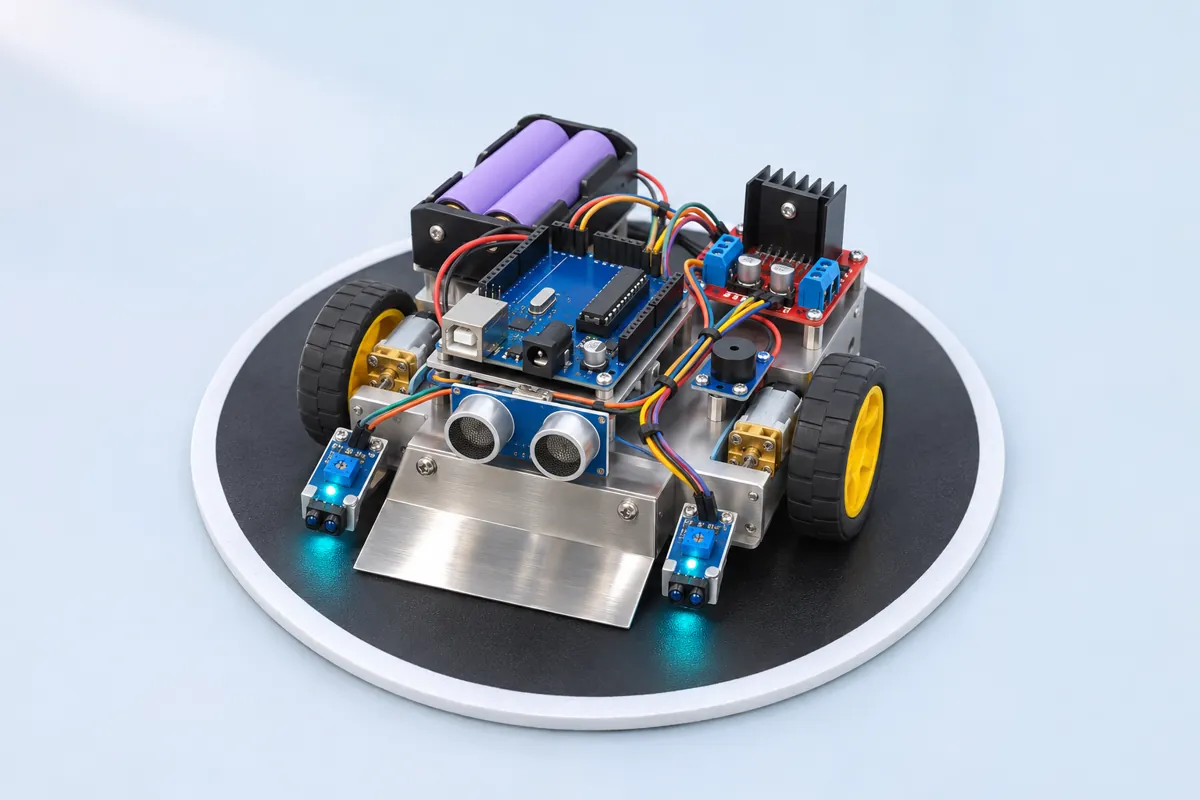
Robot sumo is one of the most popular events at college tech fests: two robots in a ring, each trying to push the other out. A mini sumo robot is small enough to build on a hostel desk, and this one uses the parts from the obstacle-avoiding car plus two edge sensors.
The strategy in code
After switch-on the Uno beeps five times — the 5-second start delay in most rulebooks — then runs this loop about 60 times a second:
- Edge first. Two TCRT5000 sensors at the front corners face the floor. The ring is black with a white border; white reflects IR, so a sensor over the edge reads differently. If either sees white, the robot reverses for 250 ms and turns away from that side. Safety always wins over attack.
- Attack. The HC-SR04 at the front measures the distance. Anything within 40 cm must be the opponent (the ring is only 77 cm wide): full speed ahead.
- Search. Otherwise it sweeps slowly to the right — one wheel forward, the other at half speed — until the sonar finds something.
The sonar’s pulseIn timeout is 6 ms (about 1 m), so a missing echo never slows the loop.
Building for pushing
- Weight low and at the front: put the battery right behind the scoop.
- Grip: rubber or silicone wheels, kept clean. A dusty tyre loses every pushing match.
- A scoop: a thin steel or aluminium wedge at the front, almost touching the floor. Getting under the other robot lifts its wheels.
- Gear motors, not BO motors: metal-gear N20s at 300 RPM have the torque to push; yellow BO motors stall.
Why these parts
The Uno, L298N and HC-SR04 are what most first-year teams already have, and the wiring is the same as the obstacle-avoiding robot: ENA/ENB on PWM pins D5/D6, IN1–IN4 on A0–A3. The two TCRT5000s go on D2/D3, the buzzer on D4. The L298N’s regulator powers the Uno from the same 7.4 V pack.
Troubleshooting
It backs away from the middle of the ring for no reason
The edge sensors see black as white. Turn each TCRT5000’s trimmer until its LED changes exactly at the white line, 3–5 mm above the surface. If yours output the opposite sense, flip WHITE_IS_LOW.
It charges at the walls of the room during testing
Anything inside 40 cm counts as the opponent. On a real ring that’s right; on a table, lower ATTACK_CM.
It drives off the edge before reversing
Mount the edge sensors at the very front corners, ahead of the wheels, and lower FULL a little — at full speed the robot travels a few cm in the time the loop takes.
Upgrades
- Add two side-facing IR distance sensors to turn towards an opponent beside you.
- Replace the HC-SR04 with VL53L0X laser sensors — faster and narrower beams.
- Add a wedge scoop of thin steel sheet: getting under the opponent wins most bouts.