Parts list
| Part | Qty | Approx. | Buy |
|---|---|---|---|
| ESP32-C3 SuperMini | 1 | ₹230 | Buy ESP32-C3 SuperMini |
| TCS34725 colour sensor module (with white LED) | 1 | ₹350 | Buy TCS34725 colour sensor module (with white LED) |
| 0.96" SSD1306 I2C OLED | 1 | ₹220 | Buy 0.96" SSD1306 I2C OLED |
| 12 mm push button | 1 | ₹10 | Buy 12 mm push button |
| Black tube or bottle cap around the sensor (blocks room light) | 1 | ₹10 | Buy Black tube or bottle cap around the sensor (blocks room light) |
| USB power bank or 5 V adapter + cable | 1 | ₹200 | Buy USB power bank or 5 V adapter + cable |
| Total | ₹1,020 |
Affiliate disclosure: “Buy” links may earn FlashReady a small commission at no extra cost to you. Prices are indicative.
Wiring
| ESP32-C3 SuperMini | Part · pin | Wire | Notes |
|---|---|---|---|
| 5 | TCS34725 RGB colour sensor · SDA | blue | GPIO5 — shared I2C bus, off strapping pins 8/9 |
| 6 | TCS34725 RGB colour sensor · SCL | yellow | GPIO6 |
| 7 | TCS34725 RGB colour sensor · LED | white | GPIO7 — HIGH lights the white LED only while measuring |
| 3V3 | TCS34725 RGB colour sensor · VIN | red | VIN, not 3V3 — the 3V3 pin is the module’s regulator output |
| GND | TCS34725 RGB colour sensor · GND | black | |
| 5 | SSD1306 OLED 0.96″ (128×64, I2C) · SDA | blue | |
| 6 | SSD1306 OLED 0.96″ (128×64, I2C) · SCL | yellow | |
| 3V3 | SSD1306 OLED 0.96″ (128×64, I2C) · VCC | red | |
| GND | SSD1306 OLED 0.96″ (128×64, I2C) · GND | black | |
| 10 | Push button (6 mm tactile switch) · 1 | green | GPIO10 — press to measure, hold 3 s on white paper to white-balance |
| GND | Push button (6 mm tactile switch) · 2 | black |
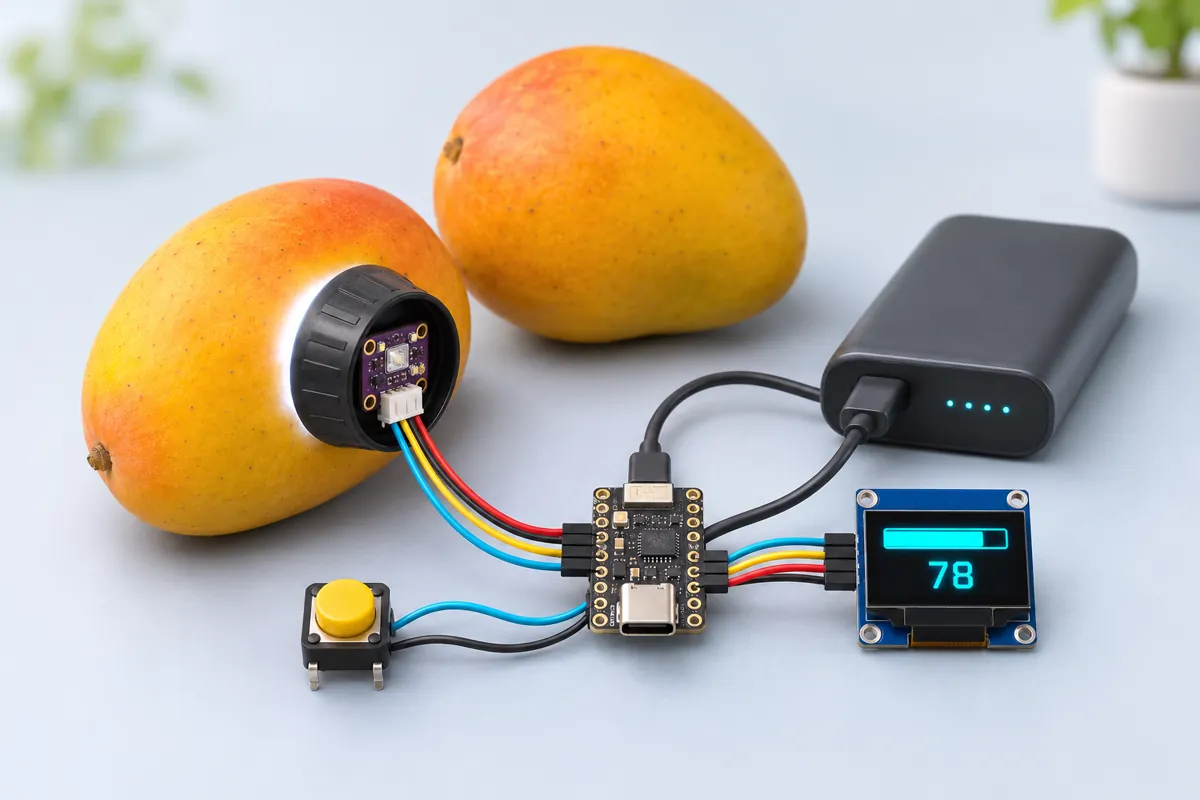
Board quirks: The sensor needs the same light every time. Fit a short black tube (a bottle cap with a hole works) around it so only its own white LED lights the skin, and press it flat against the fruit. White-balance first: hold the button for 3 s with the sensor on plain white paper. The gains are saved in flash and correct for the LED’s bluish light and the sensor’s uneven red/green/blue sensitivity. Colour is only one sign of ripeness. Alphonso, Kesar, Banganapalli and Totapuri turn yellow-orange, but Langra and some Dasheri stay green when ripe — for those, smell and softness still win. Set <code>GREEN_HUE</code> and <code>RIPE_HUE</code> from a raw and a ripe fruit of your variety. Both I2C parts share GPIO5/6. The TCS34725 answers at 0x29 and the OLED at 0x3C, so they don’t clash.
Code
// Mango ripeness checker — ESP32-C3 SuperMini + TCS34725 colour sensor + SSD1306 OLED.
// Hold the sensor's window flat against the fruit's skin and press the button. The white LED
// lights the skin, the sensor reads red/green/blue, and the C3 turns that into a hue angle:
// green skin ~100 degrees, yellow ~55, orange ~35. The hue is mapped onto a 0-100 % ripeness
// scale between GREEN_HUE and RIPE_HUE — set both for your variety (see the page).
// I2C (both parts): SDA 5, SCL 6 — off strapping pins 8/9. TCS34725 LED pin: GPIO7 (HIGH = on).
// White balance: hold the button 3 s with the sensor on plain white paper (saved in flash).
// Button: GPIO10 to GND. Board option: USB CDC On Boot.
#include <Wire.h>
#include <Adafruit_TCS34725.h>
#include <Adafruit_GFX.h>
#include <Adafruit_SSD1306.h>
#include <Preferences.h>

constexpr int SDA_PIN = 5, SCL_PIN = 6, LED_PIN = 7, BTN = 10;
float GREEN_HUE = 100;  // raw, unripe skin of your variety
float RIPE_HUE = 45;    // fully ripe skin

Adafruit_TCS34725 tcs(TCS34725_INTEGRATIONTIME_154MS, TCS34725_GAIN_4X);
Adafruit_SSD1306 oled(128, 64, &Wire, -1);
bool sensorOk = false;
Preferences prefs;
float gainR = 1, gainG = 1, gainB = 1;  // white-balance gains

float hueOf(float r, float g, float b) {  // standard RGB -> hue, 0-360 degrees
  float mx = max(r, max(g, b)), mn = min(r, min(g, b)), d = mx - mn;
  if (d <= 0) return 0;
  float h = mx == r ? fmod((g - b) / d, 6.0f) : mx == g ? (b - r) / d + 2 : (r - g) / d + 4;
  h *= 60;
  return h < 0 ? h + 360 : h;
}

void show(const char* l1, const char* l2, const char* l3) {
  oled.clearDisplay();
  oled.setTextColor(SSD1306_WHITE);
  oled.setTextSize(1);
  oled.setCursor(0, 0);
  oled.print(l1);
  oled.setTextSize(2);
  oled.setCursor(0, 18);
  oled.print(l2);
  oled.setTextSize(1);
  oled.setCursor(0, 48);
  oled.print(l3);
  oled.display();
}

void setup() {
  Serial.begin(115200);
  pinMode(BTN, INPUT_PULLUP);
  pinMode(LED_PIN, OUTPUT);
  digitalWrite(LED_PIN, LOW);
  Wire.begin(SDA_PIN, SCL_PIN);
  if (!oled.begin(SSD1306_SWITCHCAPVCC, 0x3C)) Serial.println("OLED not found at 0x3C");
  sensorOk = tcs.begin();
  if (!sensorOk) {
    Serial.println("TCS34725 not found at 0x29 - check SDA 5 / SCL 6");
    show("Colour sensor", "missing", "check wiring");
    return;
  }
  show("Mango ripeness", "Ready", "Hold on skin, press");
  prefs.begin("mango", false);
  gainR = prefs.getFloat("gr", 1);
  gainG = prefs.getFloat("gg", 1);
  gainB = prefs.getFloat("gb", 1);
  Serial.println("hue,ripeness_pct,r,g,b,clear");
}

void loop() {
  if (!sensorOk || digitalRead(BTN) == HIGH) return;
  digitalWrite(LED_PIN, HIGH);
  delay(200);  // one integration period with the LED on
  float hSum = 0;
  uint16_t r, g, b, c;
  for (int i = 0; i < 3; i++) {  // average three readings
    tcs.getRawData(&r, &g, &b, &c);
    hSum += hueOf(r * gainR, g * gainG, b * gainB);
  }
  uint32_t pressed = millis();
  while (digitalRead(BTN) == LOW && millis() - pressed < 3000) delay(10);
  if (millis() - pressed >= 3000 && r && g && b) {  // held 3 s: white balance on white paper
    float avg = (r + g + b) / 3.0f;
    gainR = avg / r, gainG = avg / g, gainB = avg / b;
    prefs.putFloat("gr", gainR), prefs.putFloat("gg", gainG), prefs.putFloat("gb", gainB);
    digitalWrite(LED_PIN, LOW);
    show("White balance", "Saved", "Now test a fruit");
    Serial.printf("White balance gains %.2f %.2f %.2f\n", gainR, gainG, gainB);
    while (digitalRead(BTN) == LOW) delay(10);
    return;
  }
  digitalWrite(LED_PIN, LOW);
  float hue = hSum / 3;
  char l1[24], l2[16];
  if (c < 200) {  // almost no light came back: not on a fruit
    show("Too dark", "--", "Press the window on");
    return;
  }
  int ripe = constrain((int)((GREEN_HUE - hue) / (GREEN_HUE - RIPE_HUE) * 100), 0, 100);
  const char* verdict = hue > GREEN_HUE + 20 ? "Not a mango?" : ripe < 25 ? "Raw" : ripe < 60 ? "Turning" : ripe < 90 ? "Ripe" : hue < RIPE_HUE - 15 ? "Overripe?" : "Fully ripe";
  snprintf(l1, sizeof l1, "Hue %.0f deg", hue);
  snprintf(l2, sizeof l2, "%d%%", ripe);
  show(l1, l2, verdict);
  Serial.printf("%.1f,%d,%u,%u,%u,%u\n", hue, ripe, r, g, b, c);
  while (digitalRead(BTN) == LOW) delay(10);
}
// Mango ripeness checker — ESP32-C3 SuperMini + TCS34725 colour sensor + SSD1306 OLED.
// Hold the sensor's window flat against the fruit's skin and press the button. The white LED
// lights the skin, the sensor reads red/green/blue, and the C3 turns that into a hue angle:
// green skin ~100 degrees, yellow ~55, orange ~35. The hue is mapped onto a 0-100 % ripeness
// scale between GREEN_HUE and RIPE_HUE — set both for your variety (see the page).
// I2C (both parts): SDA 5, SCL 6 — off strapping pins 8/9. TCS34725 LED pin: GPIO7 (HIGH = on).
// White balance: hold the button 3 s with the sensor on plain white paper (saved in flash).
// Button: GPIO10 to GND. Board option: USB CDC On Boot.
#include <Wire.h>
#include <Adafruit_TCS34725.h>
#include <Adafruit_GFX.h>
#include <Adafruit_SSD1306.h>
#include <Preferences.h>
constexpr int SDA_PIN = 5, SCL_PIN = 6, LED_PIN = 7, BTN = 10;
float GREEN_HUE = 100; // raw, unripe skin of your variety
float RIPE_HUE = 45; // fully ripe skin
Adafruit_TCS34725 tcs(TCS34725_INTEGRATIONTIME_154MS, TCS34725_GAIN_4X);
Adafruit_SSD1306 oled(128, 64, &Wire, -1);
bool sensorOk = false;
Preferences prefs;
float gainR = 1, gainG = 1, gainB = 1; // white-balance gains
float hueOf(float r, float g, float b) { // standard RGB -> hue, 0-360 degrees
float mx = max(r, max(g, b)), mn = min(r, min(g, b)), d = mx - mn;
if (d <= 0) return 0;
float h = mx == r ? fmod((g - b) / d, 6.0f) : mx == g ? (b - r) / d + 2 : (r - g) / d + 4;
h *= 60;
return h < 0 ? h + 360 : h;
}
void show(const char* l1, const char* l2, const char* l3) {
oled.clearDisplay();
oled.setTextColor(SSD1306_WHITE);
oled.setTextSize(1);
oled.setCursor(0, 0);
oled.print(l1);
oled.setTextSize(2);
oled.setCursor(0, 18);
oled.print(l2);
oled.setTextSize(1);
oled.setCursor(0, 48);
oled.print(l3);
oled.display();
}
void setup() {
Serial.begin(115200);
pinMode(BTN, INPUT_PULLUP);
pinMode(LED_PIN, OUTPUT);
digitalWrite(LED_PIN, LOW);
Wire.begin(SDA_PIN, SCL_PIN);
if (!oled.begin(SSD1306_SWITCHCAPVCC, 0x3C)) Serial.println("OLED not found at 0x3C");
sensorOk = tcs.begin();
if (!sensorOk) {
Serial.println("TCS34725 not found at 0x29 - check SDA 5 / SCL 6");
show("Colour sensor", "missing", "check wiring");
return;
}
show("Mango ripeness", "Ready", "Hold on skin, press");
prefs.begin("mango", false);
gainR = prefs.getFloat("gr", 1);
gainG = prefs.getFloat("gg", 1);
gainB = prefs.getFloat("gb", 1);
Serial.println("hue,ripeness_pct,r,g,b,clear");
}
void loop() {
if (!sensorOk || digitalRead(BTN) == HIGH) return;
digitalWrite(LED_PIN, HIGH);
delay(200); // one integration period with the LED on
float hSum = 0;
uint16_t r, g, b, c;
for (int i = 0; i < 3; i++) { // average three readings
tcs.getRawData(&r, &g, &b, &c);
hSum += hueOf(r * gainR, g * gainG, b * gainB);
}
uint32_t pressed = millis();
while (digitalRead(BTN) == LOW && millis() - pressed < 3000) delay(10);
if (millis() - pressed >= 3000 && r && g && b) { // held 3 s: white balance on white paper
float avg = (r + g + b) / 3.0f;
gainR = avg / r, gainG = avg / g, gainB = avg / b;
prefs.putFloat("gr", gainR), prefs.putFloat("gg", gainG), prefs.putFloat("gb", gainB);
digitalWrite(LED_PIN, LOW);
show("White balance", "Saved", "Now test a fruit");
Serial.printf("White balance gains %.2f %.2f %.2f\n", gainR, gainG, gainB);
while (digitalRead(BTN) == LOW) delay(10);
return;
}
digitalWrite(LED_PIN, LOW);
float hue = hSum / 3;
char l1[24], l2[16];
if (c < 200) { // almost no light came back: not on a fruit
show("Too dark", "--", "Press the window on");
return;
}
int ripe = constrain((int)((GREEN_HUE - hue) / (GREEN_HUE - RIPE_HUE) * 100), 0, 100);
const char* verdict = hue > GREEN_HUE + 20 ? "Not a mango?" : ripe < 25 ? "Raw" : ripe < 60 ? "Turning" : ripe < 90 ? "Ripe" : hue < RIPE_HUE - 15 ? "Overripe?" : "Fully ripe";
snprintf(l1, sizeof l1, "Hue %.0f deg", hue);
snprintf(l2, sizeof l2, "%d%%", ripe);
show(l1, l2, verdict);
Serial.printf("%.1f,%d,%u,%u,%u,%u\n", hue, ripe, r, g, b, c);
while (digitalRead(BTN) == LOW) delay(10);
}Compiled for c3supermini on esp32 3.3.12 with Adafruit TCS34725 1.4.4 · 3 Nov 2026
How it works
Traders, farmers and households judge mangoes by eye, and two people rarely agree on “ready”. A colour sensor turns the skin colour into a number, so you can sort a crate of fruit the same way every time — or run a neat school experiment on how fruit ripens over a week.
The TCS34725 has red, green, blue and clear photodiodes behind an infrared-blocking filter, plus a white LED to light the surface. When you press the button, the C3 switches the LED on, takes three readings, and converts each red/green/blue triple into a hue angle — where the colour sits on the colour wheel. Raw green mango skin is around 100°, yellow about 55°, orange-red about 35°.
The hue is placed on a 0–100 % ripeness scale between two reference values for your variety, GREEN_HUE and RIPE_HUE, and the OLED shows the hue, the percentage and a word: Raw, Turning, Ripe or Fully ripe. If almost no light comes back, it says “Too dark” instead of guessing. Every reading also goes to the Serial Monitor as CSV.
The ESP32-C3 SuperMini keeps it pocket-sized and runs from a power bank. Both I2C parts share GPIO5/6, set with Wire.begin(5, 6) because the board’s default I2C pins are strapping pins.
Troubleshooting
“Too dark” on every fruit
The LED isn’t lighting. Check the LED wire on GPIO7; on some modules the LED pin is labelled LED or LEDON.
White paper reads as green or blue
Do the 3-second white balance. Read the gains in the Serial Monitor — they should be between about 0.6 and 1.6.
Readings change a lot on the same fruit
Room light is leaking in or the sensor isn’t flat. Use the black tube and measure the same spot (the shoulder near the stalk ripens first).
Upgrades
- Measure three spots and average them before giving a verdict.
- Save reference hues for several fruits (banana, tomato, papaya) and pick with a second button.
- Build a sorting chute with a servo, like the colour sorting machine project.