Parts list
| Part | Qty | Approx. | Buy |
|---|---|---|---|
| Raspberry Pi Pico 2 W | 1 | ₹750 | Buy Raspberry Pi Pico 2 W |
| RDM6300 125 kHz RFID reader with coil | 1 | ₹250 | Buy RDM6300 125 kHz RFID reader with coil |
| 0.96" SSD1306 I2C OLED | 1 | ₹220 | Buy 0.96" SSD1306 I2C OLED |
| 1 kΩ + 2 kΩ resistors (divider) | 1 | ₹2 | Buy 1 kΩ + 2 kΩ resistors (divider) |
| 12 mm push buttons | 2 | ₹20 | Buy 12 mm push buttons |
| Active buzzer module | 1 | ₹25 | Buy Active buzzer module |
| 125 kHz EM4100 tags: cards for students, thin stickers or key tags for books (pack of 50) | 1 | ₹500 | Buy 125 kHz EM4100 tags: cards for students, thin stickers or key tags for books (pack of 50) |
| 5 V USB adapter + cable | 1 | ₹150 | Buy 5 V USB adapter + cable |
| Total | ₹1,917 |
Affiliate disclosure: “Buy” links may earn FlashReady a small commission at no extra cost to you. Prices are indicative.
Wiring
| Raspberry Pi Pico 2 W | Part · pin | Wire | Notes |
|---|---|---|---|
| GP5 | RDM6300 125 kHz RFID reader (EM4100) · TX | green | Via 1 kΩ / 2 kΩ divider — Pin 7 — UART1 RX. The RDM6300’s TX is a 5 V signal |
| VBUS | RDM6300 125 kHz RFID reader (EM4100) · +5V | red | Pin 40 — the reader needs 5 V. Its RX pin stays unconnected; the coil goes on ANT1/ANT2 |
| GND | RDM6300 125 kHz RFID reader (EM4100) · GND | black | |
| GP16 | SSD1306 OLED 0.96″ (128×64, I2C) · SDA | blue | Pin 21 — I2C0 SDA |
| GP17 | SSD1306 OLED 0.96″ (128×64, I2C) · SCL | yellow | Pin 22 — I2C0 SCL |
| 3V3 | SSD1306 OLED 0.96″ (128×64, I2C) · VCC | red | |
| GND | SSD1306 OLED 0.96″ (128×64, I2C) · GND | black | |
| GP14 | Push button (6 mm tactile switch) · 1 | green | Pin 19 — ISSUE (internal pull-up, switch to GND) |
| GND | Push button (6 mm tactile switch) · 2 | black | |
| GP15 | Push button (6 mm tactile switch) #2 · 1 | orange | Pin 20 — RETURN |
| GND | Push button (6 mm tactile switch) #2 · 2 | black | |
| GP18 | Active buzzer module (high-level trigger) · I/O | purple | Pin 24 |
| 3V3 | Active buzzer module (high-level trigger) · VCC | red | |
| GND | Active buzzer module (high-level trigger) · GND | black |
Board quirks: The RDM6300 reads 125 kHz EM4100 cards — the cheap read-only kind many schools already use as ID cards. It does not read 13.56 MHz NFC or MIFARE tags. Use only tags and cards issued by your school; the project reads IDs and never writes anything. Its TX pin outputs 5 V, so it reaches GP5 through a 1 kΩ / 2 kΩ divider. The Pico 2 W’s GPIOs tolerate 5 V only while powered; the divider keeps them safe at all times. Keep the reader’s coil away from metal (and from the Pico’s antenna end) — a steel shelf cuts the read range from a few centimetres to nothing. Names are optional: create <code>/names.json</code> in Thonny with tag IDs and names. Without it, the OLED shows the last six digits of each tag. Buttons use the internal pull-ups and switch to GND, avoiding the RP2350’s pull-down erratum (E9).
Code
# Class library book tracker - Raspberry Pi Pico 2 W (MicroPython) + RDM6300 125 kHz reader
# + SSD1306 OLED + ISSUE / RETURN buttons. Students tap their school ID card, then the book's
# 125 kHz tag; returns need only the book. Loans live in /loans.json in the Pico's flash,
# every action is appended to /log.csv, and a web page on the school Wi-Fi lists the books
# that are out, with overdue ones (over LOAN_DAYS) marked. Optional /names.json maps tag IDs
# to names: {"0012345678": "Riya 7B", "0098765432": "Panchatantra"}.
# Reads tag IDs only; it never writes to any card. Copy ssd1306.py to the board too.
# RDM6300: TX -> 1k/2k divider -> GP5 (UART1 RX), +5V -> VBUS, GND. OLED: SDA GP16, SCL GP17.
# Buttons: ISSUE GP14, RETURN GP15 (to GND). Active buzzer I/O: GP18.
from machine import Pin, UART, I2C
import network
import ntptime
import socket
import json
import time
from ssd1306 import SSD1306_I2C

WIFI_SSID = "your-wifi"
WIFI_PASS = "your-password"
LOAN_DAYS = 14
IST = 19800

try:
    with open("/settings.json") as f:
        _s = json.load(f)
except (OSError, ValueError):
    _s = {}
WIFI_SSID = _s.get("wifi_ssid") or WIFI_SSID
WIFI_PASS = _s.get("wifi_pass") or WIFI_PASS

uart = UART(1, baudrate=9600, tx=Pin(4), rx=Pin(5))
issue_btn = Pin(14, Pin.IN, Pin.PULL_UP)
return_btn = Pin(15, Pin.IN, Pin.PULL_UP)
buzzer = Pin(18, Pin.OUT, value=0)
try:
    oled = SSD1306_I2C(128, 64, I2C(0, sda=Pin(16), scl=Pin(17), freq=400_000))
except OSError:
    oled = None
    print("OLED not found at 0x3C - check SDA GP16 / SCL GP17")


def load(name, default):
    try:
        with open(name) as f:
            return json.load(f)
    except (OSError, ValueError):
        return default


loans = load("/loans.json", {})   # book tag -> [student tag, epoch]
names = load("/names.json", {})


def show(*lines):
    if oled is None:
        return
    oled.fill(0)
    for i, line in enumerate(lines[:6]):
        oled.text(line[:16], 0, i * 11)
    oled.show()


def beep(ms=80):
    buzzer.value(1)
    time.sleep_ms(ms)
    buzzer.value(0)


def name(tag):
    return names.get(tag, tag[-6:])


def now():
    return time.time() + IST


def stamp(t=None):
    return "%04d-%02d-%02d %02d:%02d" % time.localtime(t or now())[:5]


def read_tag(timeout_ms):
    """One RDM6300 frame: 0x02, 10 hex chars (version + 32-bit ID), 2 hex checksum, 0x03."""
    t0 = time.ticks_ms()
    buf = b""
    while time.ticks_diff(time.ticks_ms(), t0) < timeout_ms:
        if uart.any():
            buf += uart.read()
            i = buf.find(b"\x02")
            if i >= 0 and len(buf) >= i + 14 and buf[i + 13] == 3:
                frame = buf[i + 1:i + 13].decode()
                data = [int(frame[k:k + 2], 16) for k in range(0, 12, 2)]
                if data[0] ^ data[1] ^ data[2] ^ data[3] ^ data[4] == data[5]:
                    time.sleep_ms(300)
                    while uart.any():  # the reader repeats while the tag stays: drop the rest
                        uart.read()
                    return frame[2:10]
                buf = b""
        else:
            time.sleep_ms(10)
    return None


def save_loans():
    with open("/loans.json", "w") as f:
        json.dump(loans, f)


def log(action, book, student):
    with open("/log.csv", "a") as f:
        f.write("%s,%s,%s,%s\n" % (stamp(), action, book, student))
    print(stamp(), action, name(book), name(student))


def page():
    rows = ""
    for book, (student, since) in sorted(loans.items(), key=lambda x: x[1][1]):
        days = int((now() - since) // 86400)
        late = " style='color:#c00'" if days > LOAN_DAYS else ""
        rows += "<tr%s><td>%s<td>%s<td>%d days" % (late, name(book), name(student), days)
    return ("<!doctype html><meta name=viewport content='width=device-width'><title>Library</title>"
            "<style>body{font:17px sans-serif;margin:12px}td{padding:4px 10px}</style><h3>Books out: %d</h3>"
            "<table>%s</table><p>Red = over %d days. <a href=/log.csv>Download log.csv</a>" % (len(loans), rows, LOAN_DAYS))


def wifi():
    if WIFI_SSID == "your-wifi":
        print("Web page and dates off - no Wi-Fi name set. Flash from flashready.in or type it into main.py.")
        return None
    w = network.WLAN(network.STA_IF)
    w.active(True)
    w.connect(WIFI_SSID, WIFI_PASS)
    for _ in range(40):
        if w.isconnected():
            break
        time.sleep(0.5)
    if not w.isconnected():
        print("Wi-Fi not reached")
        return None
    try:
        ntptime.settime()
    except OSError:
        print("NTP failed")
    print("Open http://%s/" % w.ifconfig()[0])
    return w.ifconfig()[0]


server = None
if wifi():
    server = socket.socket()
    server.setsockopt(socket.SOL_SOCKET, socket.SO_REUSEADDR, 1)
    server.bind(("0.0.0.0", 80))
    server.listen(2)
    server.settimeout(0.2)


def idle():
    show("CLASS LIBRARY", "", "ISSUE: button 1", "RETURN: button 2", "", "%d books out" % len(loans))


idle()
while True:
    if issue_btn.value() == 0:
        beep(30)
        show("ISSUE", "", "Tap student card")
        student = read_tag(10000)
        if student:
            beep(30)
            show("ISSUE", name(student), "", "Tap the book")
            book = read_tag(10000)
            if book and book != student:
                loans[book] = [student, now()]
                save_loans()
                log("issue", book, student)
                show("ISSUED", name(book), "to " + name(student), "", "Return in %d days" % LOAN_DAYS)
                beep(250)
                time.sleep(2)
        idle()
    elif return_btn.value() == 0:
        beep(30)
        show("RETURN", "", "Tap the book")
        book = read_tag(10000)
        if book and book in loans:
            student, since = loans.pop(book)
            save_loans()
            log("return", book, student)
            days = int((now() - since) // 86400)
            show("RETURNED", name(book), "by " + name(student), "after %d days" % days, "LATE!" if days > LOAN_DAYS else "Thank you")
            beep(250 if days <= LOAN_DAYS else 900)
            time.sleep(2)
        elif book:
            show("Not issued:", name(book))
            beep(600)
            time.sleep(2)
        idle()
    else:
        tag = read_tag(50)  # a tap without a button: show the book's status
        if tag:
            beep(30)
            if tag in loans:
                show(name(tag), "is with", name(loans[tag][0]), "since", stamp(loans[tag][1])[:10])
            else:
                show(name(tag), "", "on the shelf /", "a student card")
            time.sleep(2)
            idle()
    if server:
        try:
            cl, _ = server.accept()
        except OSError:
            continue
        try:
            req = cl.recv(512)
            if b"GET /log.csv" in req:
                cl.send(b"HTTP/1.0 200 OK\r\nContent-Type: text/csv\r\n\r\ntime_ist,action,book,student\r\n")
                with open("/log.csv") as f:
                    while True:
                        chunk = f.read(1024)
                        if not chunk:
                            break
                        cl.send(chunk)
            else:
                cl.send(b"HTTP/1.0 200 OK\r\nContent-Type: text/html\r\n\r\n" + page().encode())
        except OSError:
            pass
        cl.close()
# Class library book tracker - Raspberry Pi Pico 2 W (MicroPython) + RDM6300 125 kHz reader
# + SSD1306 OLED + ISSUE / RETURN buttons. Students tap their school ID card, then the book's
# 125 kHz tag; returns need only the book. Loans live in /loans.json in the Pico's flash,
# every action is appended to /log.csv, and a web page on the school Wi-Fi lists the books
# that are out, with overdue ones (over LOAN_DAYS) marked. Optional /names.json maps tag IDs
# to names: {"0012345678": "Riya 7B", "0098765432": "Panchatantra"}.
# Reads tag IDs only; it never writes to any card. Copy ssd1306.py to the board too.
# RDM6300: TX -> 1k/2k divider -> GP5 (UART1 RX), +5V -> VBUS, GND. OLED: SDA GP16, SCL GP17.
# Buttons: ISSUE GP14, RETURN GP15 (to GND). Active buzzer I/O: GP18.
from machine import Pin, UART, I2C
import network
import ntptime
import socket
import json
import time
from ssd1306 import SSD1306_I2C
WIFI_SSID = "your-wifi"
WIFI_PASS = "your-password"
LOAN_DAYS = 14
IST = 19800
try:
with open("/settings.json") as f:
_s = json.load(f)
except (OSError, ValueError):
_s = {}
WIFI_SSID = _s.get("wifi_ssid") or WIFI_SSID
WIFI_PASS = _s.get("wifi_pass") or WIFI_PASS
uart = UART(1, baudrate=9600, tx=Pin(4), rx=Pin(5))
issue_btn = Pin(14, Pin.IN, Pin.PULL_UP)
return_btn = Pin(15, Pin.IN, Pin.PULL_UP)
buzzer = Pin(18, Pin.OUT, value=0)
try:
oled = SSD1306_I2C(128, 64, I2C(0, sda=Pin(16), scl=Pin(17), freq=400_000))
except OSError:
oled = None
print("OLED not found at 0x3C - check SDA GP16 / SCL GP17")
def load(name, default):
try:
with open(name) as f:
return json.load(f)
except (OSError, ValueError):
return default
loans = load("/loans.json", {}) # book tag -> [student tag, epoch]
names = load("/names.json", {})
def show(*lines):
if oled is None:
return
oled.fill(0)
for i, line in enumerate(lines[:6]):
oled.text(line[:16], 0, i * 11)
oled.show()
def beep(ms=80):
buzzer.value(1)
time.sleep_ms(ms)
buzzer.value(0)
def name(tag):
return names.get(tag, tag[-6:])
def now():
return time.time() + IST
def stamp(t=None):
return "%04d-%02d-%02d %02d:%02d" % time.localtime(t or now())[:5]
def read_tag(timeout_ms):
"""One RDM6300 frame: 0x02, 10 hex chars (version + 32-bit ID), 2 hex checksum, 0x03."""
t0 = time.ticks_ms()
buf = b""
while time.ticks_diff(time.ticks_ms(), t0) < timeout_ms:
if uart.any():
buf += uart.read()
i = buf.find(b"\x02")
if i >= 0 and len(buf) >= i + 14 and buf[i + 13] == 3:
frame = buf[i + 1:i + 13].decode()
data = [int(frame[k:k + 2], 16) for k in range(0, 12, 2)]
if data[0] ^ data[1] ^ data[2] ^ data[3] ^ data[4] == data[5]:
time.sleep_ms(300)
while uart.any(): # the reader repeats while the tag stays: drop the rest
uart.read()
return frame[2:10]
buf = b""
else:
time.sleep_ms(10)
return None
def save_loans():
with open("/loans.json", "w") as f:
json.dump(loans, f)
def log(action, book, student):
with open("/log.csv", "a") as f:
f.write("%s,%s,%s,%s\n" % (stamp(), action, book, student))
print(stamp(), action, name(book), name(student))
def page():
rows = ""
for book, (student, since) in sorted(loans.items(), key=lambda x: x[1][1]):
days = int((now() - since) // 86400)
late = " style='color:#c00'" if days > LOAN_DAYS else ""
rows += "<tr%s><td>%s<td>%s<td>%d days" % (late, name(book), name(student), days)
return ("<!doctype html><meta name=viewport content='width=device-width'><title>Library</title>"
"<style>body{font:17px sans-serif;margin:12px}td{padding:4px 10px}</style><h3>Books out: %d</h3>"
"<table>%s</table><p>Red = over %d days. <a href=/log.csv>Download log.csv</a>" % (len(loans), rows, LOAN_DAYS))
def wifi():
if WIFI_SSID == "your-wifi":
print("Web page and dates off - no Wi-Fi name set. Flash from flashready.in or type it into main.py.")
return None
w = network.WLAN(network.STA_IF)
w.active(True)
w.connect(WIFI_SSID, WIFI_PASS)
for _ in range(40):
if w.isconnected():
break
time.sleep(0.5)
if not w.isconnected():
print("Wi-Fi not reached")
return None
try:
ntptime.settime()
except OSError:
print("NTP failed")
print("Open http://%s/" % w.ifconfig()[0])
return w.ifconfig()[0]
server = None
if wifi():
server = socket.socket()
server.setsockopt(socket.SOL_SOCKET, socket.SO_REUSEADDR, 1)
server.bind(("0.0.0.0", 80))
server.listen(2)
server.settimeout(0.2)
def idle():
show("CLASS LIBRARY", "", "ISSUE: button 1", "RETURN: button 2", "", "%d books out" % len(loans))
idle()
while True:
if issue_btn.value() == 0:
beep(30)
show("ISSUE", "", "Tap student card")
student = read_tag(10000)
if student:
beep(30)
show("ISSUE", name(student), "", "Tap the book")
book = read_tag(10000)
if book and book != student:
loans[book] = [student, now()]
save_loans()
log("issue", book, student)
show("ISSUED", name(book), "to " + name(student), "", "Return in %d days" % LOAN_DAYS)
beep(250)
time.sleep(2)
idle()
elif return_btn.value() == 0:
beep(30)
show("RETURN", "", "Tap the book")
book = read_tag(10000)
if book and book in loans:
student, since = loans.pop(book)
save_loans()
log("return", book, student)
days = int((now() - since) // 86400)
show("RETURNED", name(book), "by " + name(student), "after %d days" % days, "LATE!" if days > LOAN_DAYS else "Thank you")
beep(250 if days <= LOAN_DAYS else 900)
time.sleep(2)
elif book:
show("Not issued:", name(book))
beep(600)
time.sleep(2)
idle()
else:
tag = read_tag(50) # a tap without a button: show the book's status
if tag:
beep(30)
if tag in loans:
show(name(tag), "is with", name(loans[tag][0]), "since", stamp(loans[tag][1])[:10])
else:
show(name(tag), "", "on the shelf /", "a student card")
time.sleep(2)
idle()
if server:
try:
cl, _ = server.accept()
except OSError:
continue
try:
req = cl.recv(512)
if b"GET /log.csv" in req:
cl.send(b"HTTP/1.0 200 OK\r\nContent-Type: text/csv\r\n\r\ntime_ist,action,book,student\r\n")
with open("/log.csv") as f:
while True:
chunk = f.read(1024)
if not chunk:
break
cl.send(chunk)
else:
cl.send(b"HTTP/1.0 200 OK\r\nContent-Type: text/html\r\n\r\n" + page().encode())
except OSError:
pass
cl.close()Arduino IDE: keep ssd1306.py in the same folder as the .ino (tab menu → New Tab, same name). Flashing from this page doesn’t need it.
# MicroPython SSD1306 OLED driver, I2C interface.
# From micropython-lib (micropython/drivers/display/ssd1306/ssd1306.py), MIT License,
# Copyright (c) 2013-2023 Damien P. George and contributors. The SPI class is omitted.
from micropython import const
import framebuf

SET_CONTRAST = const(0x81)
SET_ENTIRE_ON = const(0xA4)
SET_NORM_INV = const(0xA6)
SET_DISP = const(0xAE)
SET_MEM_ADDR = const(0x20)
SET_COL_ADDR = const(0x21)
SET_PAGE_ADDR = const(0x22)
SET_DISP_START_LINE = const(0x40)
SET_SEG_REMAP = const(0xA0)
SET_MUX_RATIO = const(0xA8)
SET_IREF_SELECT = const(0xAD)
SET_COM_OUT_DIR = const(0xC0)
SET_DISP_OFFSET = const(0xD3)
SET_COM_PIN_CFG = const(0xDA)
SET_DISP_CLK_DIV = const(0xD5)
SET_PRECHARGE = const(0xD9)
SET_VCOM_DESEL = const(0xDB)
SET_CHARGE_PUMP = const(0x8D)


class SSD1306(framebuf.FrameBuffer):
    def __init__(self, width, height, external_vcc):
        self.width = width
        self.height = height
        self.external_vcc = external_vcc
        self.pages = self.height // 8
        self.buffer = bytearray(self.pages * self.width)
        super().__init__(self.buffer, self.width, self.height, framebuf.MONO_VLSB)
        self.init_display()

    def init_display(self):
        for cmd in (
            SET_DISP,
            SET_MEM_ADDR,
            0x00,
            SET_DISP_START_LINE,
            SET_SEG_REMAP | 0x01,
            SET_MUX_RATIO,
            self.height - 1,
            SET_COM_OUT_DIR | 0x08,
            SET_DISP_OFFSET,
            0x00,
            SET_COM_PIN_CFG,
            0x02 if self.width > 2 * self.height else 0x12,
            SET_DISP_CLK_DIV,
            0x80,
            SET_PRECHARGE,
            0x22 if self.external_vcc else 0xF1,
            SET_VCOM_DESEL,
            0x30,
            SET_CONTRAST,
            0xFF,
            SET_ENTIRE_ON,
            SET_NORM_INV,
            SET_IREF_SELECT,
            0x30,
            SET_CHARGE_PUMP,
            0x10 if self.external_vcc else 0x14,
            SET_DISP | 0x01,
        ):
            self.write_cmd(cmd)
        self.fill(0)
        self.show()

    def poweroff(self):
        self.write_cmd(SET_DISP)

    def poweron(self):
        self.write_cmd(SET_DISP | 0x01)

    def contrast(self, contrast):
        self.write_cmd(SET_CONTRAST)
        self.write_cmd(contrast)

    def invert(self, invert):
        self.write_cmd(SET_NORM_INV | (invert & 1))

    def rotate(self, rotate):
        self.write_cmd(SET_COM_OUT_DIR | ((rotate & 1) << 3))
        self.write_cmd(SET_SEG_REMAP | (rotate & 1))

    def show(self):
        x0 = 0
        x1 = self.width - 1
        if self.width != 128:
            # Narrow displays use the centred columns of the 128-column controller.
            col_offset = (128 - self.width) // 2
            x0 += col_offset
            x1 += col_offset
        self.write_cmd(SET_COL_ADDR)
        self.write_cmd(x0)
        self.write_cmd(x1)
        self.write_cmd(SET_PAGE_ADDR)
        self.write_cmd(0)
        self.write_cmd(self.pages - 1)
        self.write_data(self.buffer)


class SSD1306_I2C(SSD1306):
    def __init__(self, width, height, i2c, addr=0x3C, external_vcc=False):
        self.i2c = i2c
        self.addr = addr
        self.temp = bytearray(2)
        self.write_list = [b"\x40", None]  # Co=0, D/C#=1
        super().__init__(width, height, external_vcc)

    def write_cmd(self, cmd):
        self.temp[0] = 0x80  # Co=1, D/C#=0
        self.temp[1] = cmd
        self.i2c.writeto(self.addr, self.temp)

    def write_data(self, buf):
        self.write_list[1] = buf
        self.i2c.writevto(self.addr, self.write_list)
# MicroPython SSD1306 OLED driver, I2C interface.
# From micropython-lib (micropython/drivers/display/ssd1306/ssd1306.py), MIT License,
# Copyright (c) 2013-2023 Damien P. George and contributors. The SPI class is omitted.
from micropython import const
import framebuf
SET_CONTRAST = const(0x81)
SET_ENTIRE_ON = const(0xA4)
SET_NORM_INV = const(0xA6)
SET_DISP = const(0xAE)
SET_MEM_ADDR = const(0x20)
SET_COL_ADDR = const(0x21)
SET_PAGE_ADDR = const(0x22)
SET_DISP_START_LINE = const(0x40)
SET_SEG_REMAP = const(0xA0)
SET_MUX_RATIO = const(0xA8)
SET_IREF_SELECT = const(0xAD)
SET_COM_OUT_DIR = const(0xC0)
SET_DISP_OFFSET = const(0xD3)
SET_COM_PIN_CFG = const(0xDA)
SET_DISP_CLK_DIV = const(0xD5)
SET_PRECHARGE = const(0xD9)
SET_VCOM_DESEL = const(0xDB)
SET_CHARGE_PUMP = const(0x8D)
class SSD1306(framebuf.FrameBuffer):
def __init__(self, width, height, external_vcc):
self.width = width
self.height = height
self.external_vcc = external_vcc
self.pages = self.height // 8
self.buffer = bytearray(self.pages * self.width)
super().__init__(self.buffer, self.width, self.height, framebuf.MONO_VLSB)
self.init_display()
def init_display(self):
for cmd in (
SET_DISP,
SET_MEM_ADDR,
0x00,
SET_DISP_START_LINE,
SET_SEG_REMAP | 0x01,
SET_MUX_RATIO,
self.height - 1,
SET_COM_OUT_DIR | 0x08,
SET_DISP_OFFSET,
0x00,
SET_COM_PIN_CFG,
0x02 if self.width > 2 * self.height else 0x12,
SET_DISP_CLK_DIV,
0x80,
SET_PRECHARGE,
0x22 if self.external_vcc else 0xF1,
SET_VCOM_DESEL,
0x30,
SET_CONTRAST,
0xFF,
SET_ENTIRE_ON,
SET_NORM_INV,
SET_IREF_SELECT,
0x30,
SET_CHARGE_PUMP,
0x10 if self.external_vcc else 0x14,
SET_DISP | 0x01,
):
self.write_cmd(cmd)
self.fill(0)
self.show()
def poweroff(self):
self.write_cmd(SET_DISP)
def poweron(self):
self.write_cmd(SET_DISP | 0x01)
def contrast(self, contrast):
self.write_cmd(SET_CONTRAST)
self.write_cmd(contrast)
def invert(self, invert):
self.write_cmd(SET_NORM_INV | (invert & 1))
def rotate(self, rotate):
self.write_cmd(SET_COM_OUT_DIR | ((rotate & 1) << 3))
self.write_cmd(SET_SEG_REMAP | (rotate & 1))
def show(self):
x0 = 0
x1 = self.width - 1
if self.width != 128:
# Narrow displays use the centred columns of the 128-column controller.
col_offset = (128 - self.width) // 2
x0 += col_offset
x1 += col_offset
self.write_cmd(SET_COL_ADDR)
self.write_cmd(x0)
self.write_cmd(x1)
self.write_cmd(SET_PAGE_ADDR)
self.write_cmd(0)
self.write_cmd(self.pages - 1)
self.write_data(self.buffer)
class SSD1306_I2C(SSD1306):
def __init__(self, width, height, i2c, addr=0x3C, external_vcc=False):
self.i2c = i2c
self.addr = addr
self.temp = bytearray(2)
self.write_list = [b"\x40", None] # Co=0, D/C#=1
super().__init__(width, height, external_vcc)
def write_cmd(self, cmd):
self.temp[0] = 0x80 # Co=1, D/C#=0
self.temp[1] = cmd
self.i2c.writeto(self.addr, self.temp)
def write_data(self, buf):
self.write_list[1] = buf
self.i2c.writevto(self.addr, self.write_list)Compiled for pico2w on micropython (mpy-cross v1.29.0) · 3 Nov 2026
How it works
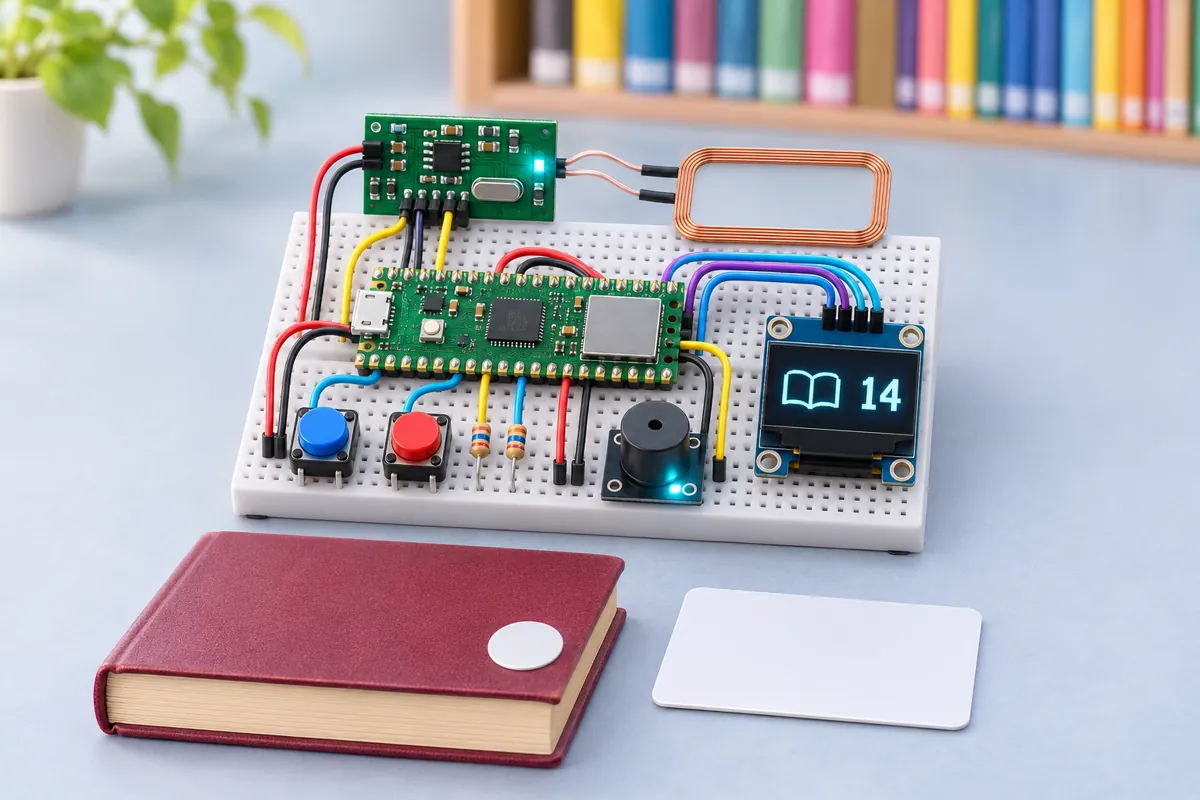
Many classrooms have a cupboard of storybooks and a register that nobody keeps up to date. This tracker turns it into a two-tap routine. To borrow, a student presses ISSUE, taps their ID card, then taps the sticker inside the book. To return, press RETURN and tap the book. The OLED confirms each step, the buzzer beeps, and a late return (over 14 days) gets a long beep and “LATE!”.
The reader is an RDM6300, a 125 kHz RFID module that simply sends each tag’s ID over a serial line at 9600 baud: a start byte, ten hex digits (version and 32-bit ID), a two-digit checksum and an end byte. The MicroPython code checks the XOR checksum and drops the repeats the reader sends while a tag stays on it. Loans are a small dictionary — book ID → student ID and the time — saved as /loans.json in the Pico 2 W’s flash after every change, so a power cut loses nothing. Every issue and return is also appended to /log.csv.
The Pico 2 W joins the school Wi-Fi and serves a page listing every book that is out, who has it and for how many days, with overdue books in red, plus a link to download the full log. Tapping a tag without pressing a button shows who has that book.
The RDM6300 needs 5 V from VBUS, and its 5 V TX output comes back to GP5 (UART1 RX) through a divider. The OLED sits on I2C0 (GP16/GP17), and the buttons and buzzer use GP14, GP15 and GP18 — all on the same side of the board.
Troubleshooting
Tapping a tag does nothing
Check the coil is plugged into ANT1/ANT2, the reader has 5 V on +5V, and TX reaches GP5 through the divider. The RDM6300’s LED (if fitted) blinks when it reads a tag.
“Not issued” when returning a book
That book was never issued, or it was issued with the student card and book tag the wrong way round. Tap the book without pressing a button to see its status.
Dates on the web page are wrong
The Pico 2 W gets the date from NTP when it starts. Without Wi-Fi it has no calendar, so loan days count from 2000 or 1970.
Upgrades
- Send a weekly list of overdue books to the class teacher by email or ntfy.
- Add a 16×2 or TFT display at the desk showing the books out.
- Let students reserve a book with a third button.