Parts list
| Part | Qty | Approx. | Buy |
|---|---|---|---|
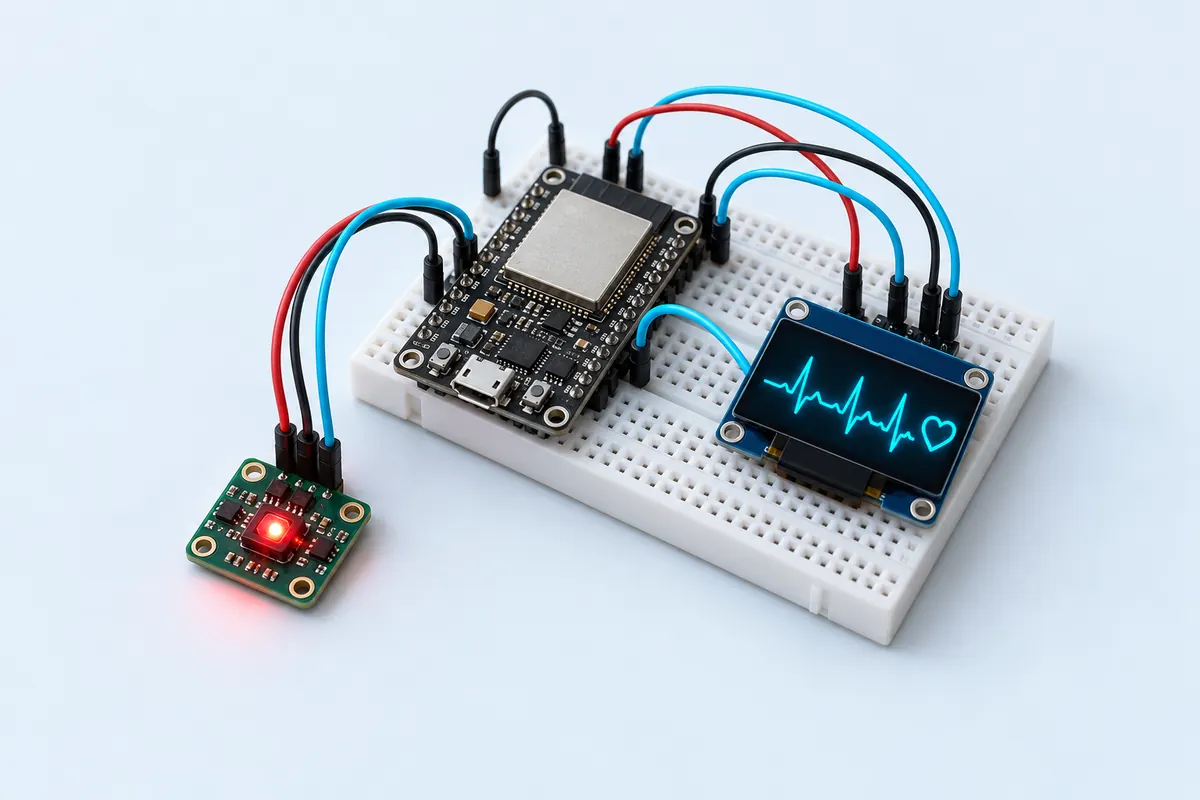
| ESP32 DevKit V1 (30-pin) | 1 | ₹380 | Buy ESP32 DevKit V1 (30-pin) |
| MAX30102 pulse oximeter module | 1 | ₹200 | Buy MAX30102 pulse oximeter module |
| 0.96" SSD1306 OLED, I2C, 4-pin | 1 | ₹180 | Buy 0.96" SSD1306 OLED, I2C, 4-pin |
| Jumper wires | 1 | ₹30 | Buy Jumper wires |
| Total | ₹790 |
Affiliate disclosure: “Buy” links may earn FlashReady a small commission at no extra cost to you. Prices are indicative.
Wiring
| ESP32 DevKit V1 | Part · pin | Wire | Notes |
|---|---|---|---|
| 3V3 | MAX30102 pulse oximeter module · VIN | red | |
| GND | MAX30102 pulse oximeter module · GND | black | |
| D21 | MAX30102 pulse oximeter module · SDA | blue | |
| D22 | MAX30102 pulse oximeter module · SCL | yellow | |
| 3V3 | SSD1306 OLED 0.96″ (128×64, I2C) · VCC | red | |
| GND | SSD1306 OLED 0.96″ (128×64, I2C) · GND | black | |
| D21 | SSD1306 OLED 0.96″ (128×64, I2C) · SDA | blue | |
| D22 | SSD1306 OLED 0.96″ (128×64, I2C) · SCL | yellow |
Board quirks: Not a medical device: readings are estimates for learning. Never use them for health decisions. Many purple MAX30102 modules pull I2C up to 1.8 V. If the sensor isn’t found, run the I2C scanner — some need a module with 3.3 V pull-ups.
Code
// Heart-rate & SpO2 display — ESP32 DevKit V1 + MAX30102 + 0.96" SSD1306 OLED.
// Rest a fingertip on the sensor; BPM and an SpO2 estimate appear every few seconds.
// Not a medical device — for learning only. Both modules on I2C: D21 (SDA), D22 (SCL).
#include <Wire.h>
#include "MAX30105.h"
#include "spo2_algorithm.h"
#include <Adafruit_GFX.h>
#include <Adafruit_SSD1306.h>

MAX30105 sensor;
Adafruit_SSD1306 oled(128, 64, &Wire, -1);

constexpr int N = 100;           // 100 samples at 25 Hz effective = 4 s window
uint32_t irBuf[N], redBuf[N];

void show(const char* line1, const char* line2) {
  oled.clearDisplay();
  oled.setTextSize(2);
  oled.setCursor(0, 8);
  oled.print(line1);
  oled.setCursor(0, 36);
  oled.print(line2);
  oled.display();
}

void setup() {
  Serial.begin(115200);
  Wire.begin(21, 22);
  if (!oled.begin(SSD1306_SWITCHCAPVCC, 0x3C)) Serial.println("OLED not found");
  oled.setTextColor(SSD1306_WHITE);
  if (!sensor.begin(Wire, I2C_SPEED_FAST)) {
    show("MAX30102", "not found");
    for (;;) delay(1000);
  }
  // LED brightness 60, average 4, red+IR, 100 Hz, 411 µs pulse, 4096 nA range
  sensor.setup(60, 4, 2, 100, 411, 4096);
  show("Place", "finger");
}

void loop() {
  for (int i = 0; i < N; i++) {
    while (!sensor.available()) sensor.check();
    redBuf[i] = sensor.getRed();
    irBuf[i] = sensor.getIR();
    sensor.nextSample();
  }
  if (irBuf[N - 1] < 50000) {    // no finger on the sensor
    show("Place", "finger");
    return;
  }
  int32_t spo2, hr;
  int8_t spo2Ok, hrOk;
  maxim_heart_rate_and_oxygen_saturation(irBuf, N, redBuf, &spo2, &spo2Ok, &hr, &hrOk);
  char a[16], b[16];
  snprintf(a, sizeof a, hrOk ? "%ld BPM" : "-- BPM", (long)hr);
  snprintf(b, sizeof b, spo2Ok ? "SpO2 %ld%%" : "SpO2 --", (long)spo2);
  show(a, b);
  Serial.printf("%s  %s\n", a, b);
}
// Heart-rate & SpO2 display — ESP32 DevKit V1 + MAX30102 + 0.96" SSD1306 OLED.
// Rest a fingertip on the sensor; BPM and an SpO2 estimate appear every few seconds.
// Not a medical device — for learning only. Both modules on I2C: D21 (SDA), D22 (SCL).
#include <Wire.h>
#include "MAX30105.h"
#include "spo2_algorithm.h"
#include <Adafruit_GFX.h>
#include <Adafruit_SSD1306.h>
MAX30105 sensor;
Adafruit_SSD1306 oled(128, 64, &Wire, -1);
constexpr int N = 100; // 100 samples at 25 Hz effective = 4 s window
uint32_t irBuf[N], redBuf[N];
void show(const char* line1, const char* line2) {
oled.clearDisplay();
oled.setTextSize(2);
oled.setCursor(0, 8);
oled.print(line1);
oled.setCursor(0, 36);
oled.print(line2);
oled.display();
}
void setup() {
Serial.begin(115200);
Wire.begin(21, 22);
if (!oled.begin(SSD1306_SWITCHCAPVCC, 0x3C)) Serial.println("OLED not found");
oled.setTextColor(SSD1306_WHITE);
if (!sensor.begin(Wire, I2C_SPEED_FAST)) {
show("MAX30102", "not found");
for (;;) delay(1000);
}
// LED brightness 60, average 4, red+IR, 100 Hz, 411 µs pulse, 4096 nA range
sensor.setup(60, 4, 2, 100, 411, 4096);
show("Place", "finger");
}
void loop() {
for (int i = 0; i < N; i++) {
while (!sensor.available()) sensor.check();
redBuf[i] = sensor.getRed();
irBuf[i] = sensor.getIR();
sensor.nextSample();
}
if (irBuf[N - 1] < 50000) { // no finger on the sensor
show("Place", "finger");
return;
}
int32_t spo2, hr;
int8_t spo2Ok, hrOk;
maxim_heart_rate_and_oxygen_saturation(irBuf, N, redBuf, &spo2, &spo2Ok, &hr, &hrOk);
char a[16], b[16];
snprintf(a, sizeof a, hrOk ? "%ld BPM" : "-- BPM", (long)hr);
snprintf(b, sizeof b, spo2Ok ? "SpO2 %ld%%" : "SpO2 --", (long)spo2);
show(a, b);
Serial.printf("%s %s\n", a, b);
}Compiled for esp32 on esp32 3.3.12 with SparkFun MAX3010x Pulse and Proximity Sensor Library 1.1.2 · 3 Nov 2026
How it works
The MAX30102 shines red and infrared light into your fingertip and measures how much comes back. With every heartbeat, a little more blood in the finger absorbs a little more light — that tiny ripple is your pulse.
Oxygen-rich and oxygen-poor blood absorb red and infrared light differently. Comparing the two signals gives an estimate of SpO2, the percentage of haemoglobin carrying oxygen.
The sketch collects 100 samples (about four seconds), then runs Maxim’s reference algorithm from the SparkFun library to work out the heart rate and SpO2. Each value comes with a “valid” flag; when the signal is too weak or noisy the display shows dashes instead of a made-up number.
Accuracy depends heavily on finger pressure, movement and ambient light. That’s exactly why this is a learning project, not a medical device — and a great way to understand how the clip on a hospital monitor works.
Troubleshooting
Always “Place finger”
Rest your fingertip lightly — pressing hard stops the blood flow. The sketch needs an IR reading above 50,000 to detect a finger.
Numbers jump around
Keep still for the full four-second window and shield the sensor from room light with your other hand or a small cap.
“MAX30102 not found”
Check SDA/SCL, then run the I2C scanner: the sensor answers at 0x57.
Upgrades
- Draw the live pulse waveform on the OLED.
- Send readings to your phone over Bluetooth LE.
- Add a finger clip so the pressure stays constant.