Parts list
| Part | Qty | Approx. | Buy |
|---|---|---|---|
| Seeed XIAO ESP32S3 | 1 | ₹900 | Buy Seeed XIAO ESP32S3 |
| APDS9960 gesture sensor (GY-9960-3.3) | 1 | ₹300 | Buy APDS9960 gesture sensor (GY-9960-3.3) |
| USB-C data cable (1 m) or USB-C OTG adapter for a phone/tablet | 1 | ₹150 | Buy USB-C data cable (1 m) or USB-C OTG adapter for a phone/tablet |
| Small clear box or a cling-film-wrapped holder | 1 | ₹60 | Buy Small clear box or a cling-film-wrapped holder |
| Female–female jumper wires | 4 | ₹40 | Buy Female–female jumper wires |
| Total | ₹1,450 |
Affiliate disclosure: “Buy” links may earn FlashReady a small commission at no extra cost to you. Prices are indicative.
Wiring
| XIAO ESP32S3 | APDS-9960 gesture / proximity / colour sensor (GY-9960) | Wire | Notes |
|---|---|---|---|
| D4 | SDA | blue | D4 = GPIO5, the XIAO’s default I2C SDA |
| D5 | SCL | yellow | D5 = GPIO6, default I2C SCL |
| 3V3 | VCC | red | 3.3 V only — the purple GY-9960 board has no regulator. VL stays unconnected (PS jumper bridged) |
| GND | GND | black | INT stays unconnected; the library polls the sensor |
Board quirks: The S3’s USB-OTG controller makes the XIAO a USB keyboard; the profile sets <code>USB Mode = USB-OTG (TinyUSB)</code> and the Serial Monitor still works over the same cable. If a later upload fails, hold BOOT, tap RESET, release BOOT and upload again. Directions depend on how the sensor is mounted. If “left” turns the page back, rotate the board 180° or swap the two cases in <code>loop()</code>. Gestures work best 3–10 cm above the sensor with a flat hand moving in about half a second. Strong sunlight or a bright kitchen tube right overhead can blind it; a little shade helps. Many Android phones and tablets accept USB keyboards through an OTG adapter — arrow keys and Space then work in YouTube and PDF readers too.
Code
// Touch-free recipe page turner — Seeed XIAO ESP32S3 + APDS9960 gesture sensor.
// Wave a hand over the sensor and the XIAO, plugged into the laptop or tablet as a USB
// keyboard, sends: left/right = Left/Right arrow (previous/next page, or seek a video 5 s),
// up = Space (play/pause), down = Page Down. No app, no Bluetooth pairing.
// APDS9960: SDA D4 (GPIO5), SCL D5 (GPIO6), VCC 3V3 — never 5 V. User LED (GPIO21) blinks.
// Board option: USB Mode = USB-OTG (TinyUSB) — set in sketch.yaml. Serial stays on USB too.
#if ARDUINO_USB_MODE
#error "Set Tools > USB Mode to 'USB-OTG (TinyUSB)' - the keyboard needs the S3's USB-OTG controller"
#endif
#include <USB.h>
#include <USBHIDKeyboard.h>
#include <Wire.h>
#include <Adafruit_APDS9960.h>

USBHIDKeyboard Keyboard;
Adafruit_APDS9960 apds;
bool sensorOk = false;
uint32_t count = 0;

void send(uint8_t key, const char* what) {
  Keyboard.press(key);
  delay(20);
  Keyboard.releaseAll();
  count++;
  Serial.printf("gesture %-5s -> %s (%lu)\n", what, key == ' ' ? "Space" : key == KEY_LEFT_ARROW ? "Left" : key == KEY_RIGHT_ARROW ? "Right" : "PageDown", count);
  digitalWrite(LED_BUILTIN, LOW);  // the XIAO's LED is active-LOW
  delay(80);
  digitalWrite(LED_BUILTIN, HIGH);
}

void setup() {
  Serial.begin(115200);
  pinMode(LED_BUILTIN, OUTPUT);
  digitalWrite(LED_BUILTIN, HIGH);
  Keyboard.begin();
  USB.productName("FlashReady Page Turner");
  USB.begin();
  Wire.begin(5, 6);  // D4 / D5
  sensorOk = apds.begin();
  if (!sensorOk) {
    Serial.println("APDS9960 not found at 0x39 - check D4/D5 and 3.3 V");
    return;
  }
  apds.enableProximity(true);
  apds.enableGesture(true);
  Serial.println("Page turner ready - wave about 5 cm above the sensor");
}

void loop() {
  if (!sensorOk) {
    delay(1000);
    return;
  }
  switch (apds.readGesture()) {
    case APDS9960_LEFT: send(KEY_LEFT_ARROW, "left"); break;
    case APDS9960_RIGHT: send(KEY_RIGHT_ARROW, "right"); break;
    case APDS9960_UP: send(' ', "up"); break;
    case APDS9960_DOWN: send(KEY_PAGE_DOWN, "down"); break;
    default: break;
  }
}
// Touch-free recipe page turner — Seeed XIAO ESP32S3 + APDS9960 gesture sensor.
// Wave a hand over the sensor and the XIAO, plugged into the laptop or tablet as a USB
// keyboard, sends: left/right = Left/Right arrow (previous/next page, or seek a video 5 s),
// up = Space (play/pause), down = Page Down. No app, no Bluetooth pairing.
// APDS9960: SDA D4 (GPIO5), SCL D5 (GPIO6), VCC 3V3 — never 5 V. User LED (GPIO21) blinks.
// Board option: USB Mode = USB-OTG (TinyUSB) — set in sketch.yaml. Serial stays on USB too.
#if ARDUINO_USB_MODE
#error "Set Tools > USB Mode to 'USB-OTG (TinyUSB)' - the keyboard needs the S3's USB-OTG controller"
#endif
#include <USB.h>
#include <USBHIDKeyboard.h>
#include <Wire.h>
#include <Adafruit_APDS9960.h>
USBHIDKeyboard Keyboard;
Adafruit_APDS9960 apds;
bool sensorOk = false;
uint32_t count = 0;
void send(uint8_t key, const char* what) {
Keyboard.press(key);
delay(20);
Keyboard.releaseAll();
count++;
Serial.printf("gesture %-5s -> %s (%lu)\n", what, key == ' ' ? "Space" : key == KEY_LEFT_ARROW ? "Left" : key == KEY_RIGHT_ARROW ? "Right" : "PageDown", count);
digitalWrite(LED_BUILTIN, LOW); // the XIAO's LED is active-LOW
delay(80);
digitalWrite(LED_BUILTIN, HIGH);
}
void setup() {
Serial.begin(115200);
pinMode(LED_BUILTIN, OUTPUT);
digitalWrite(LED_BUILTIN, HIGH);
Keyboard.begin();
USB.productName("FlashReady Page Turner");
USB.begin();
Wire.begin(5, 6); // D4 / D5
sensorOk = apds.begin();
if (!sensorOk) {
Serial.println("APDS9960 not found at 0x39 - check D4/D5 and 3.3 V");
return;
}
apds.enableProximity(true);
apds.enableGesture(true);
Serial.println("Page turner ready - wave about 5 cm above the sensor");
}
void loop() {
if (!sensorOk) {
delay(1000);
return;
}
switch (apds.readGesture()) {
case APDS9960_LEFT: send(KEY_LEFT_ARROW, "left"); break;
case APDS9960_RIGHT: send(KEY_RIGHT_ARROW, "right"); break;
case APDS9960_UP: send(' ', "up"); break;
case APDS9960_DOWN: send(KEY_PAGE_DOWN, "down"); break;
default: break;
}
}Compiled for xiaos3 on esp32 3.3.12 with Adafruit APDS9960 Library 1.3.1 · 3 Nov 2026
How it works
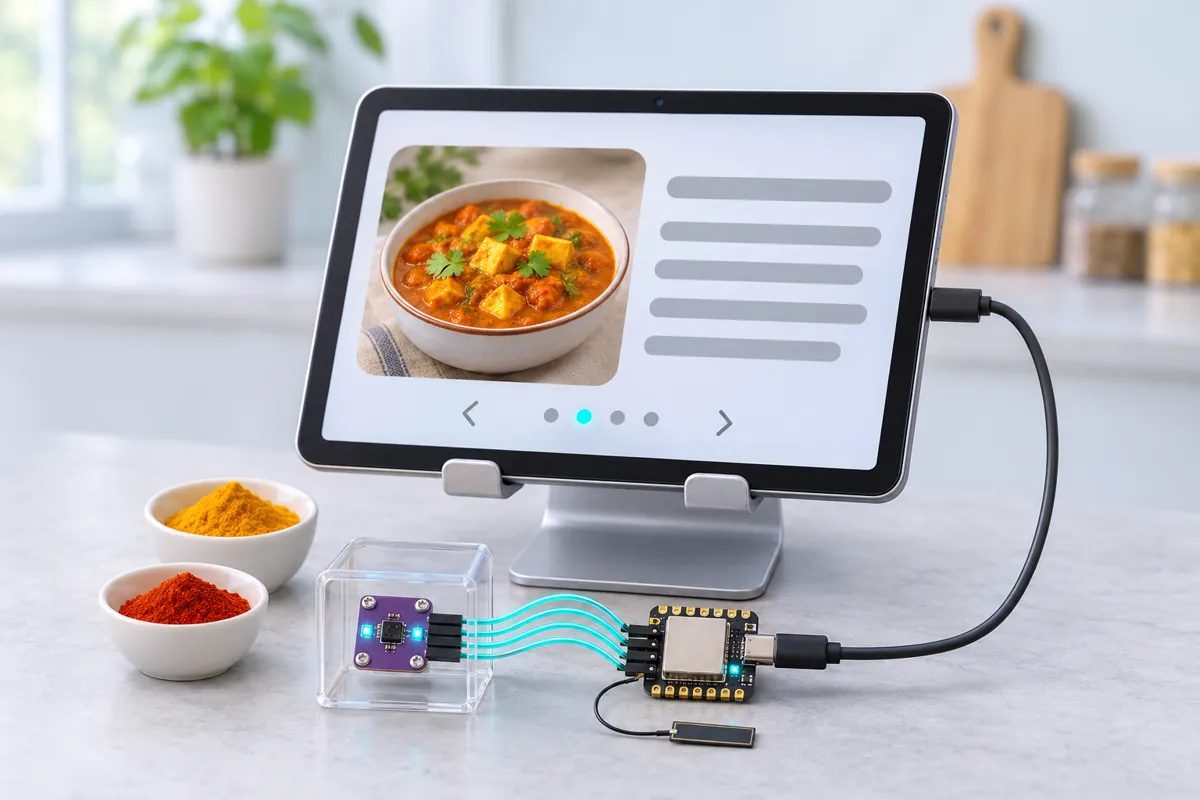
Cooking from a phone or laptop means touching the screen with oily, floury or masala-covered fingers — or the screen goes to sleep just as you need the next step. This page turner sits next to the stove: wave a hand over it and the recipe scrolls, or the video pauses.
The sensor is an APDS9960, the same kind of chip used for gesture and proximity sensing in phones. It has four infrared photodiodes and an IR LED; as a hand passes over, the reflections reach the photodiodes one after another, and the chip works out whether the hand moved left, right, up or down.
The XIAO ESP32S3 turns each gesture into a key press. Its S3 chip has a real USB-OTG controller, so it plugs into a laptop, tablet or (through an OTG adapter) a phone as an ordinary USB keyboard: left and right send the arrow keys (previous/next page, or skip a video 5 s), up sends Space (play/pause) and down sends Page Down. Nothing to install, nothing to pair. The XIAO’s tiny user LED on GPIO21 blinks with every key, and the Serial Monitor prints each gesture.
The XIAO is small enough to hide inside a matchbox-sized holder. Its default I2C pins D4 and D5 go straight to the sensor; the only rule is 3.3 V — the common purple sensor board has no regulator.
Troubleshooting
“APDS9960 not found at 0x39”
Check SDA on D4 and SCL on D5, and that VCC is on 3V3. A board that was ever given 5 V is usually dead.
Nothing happens on the laptop
Click once on the recipe page or video so it has keyboard focus. Check the Serial Monitor: if gestures print there, the keys are being sent.
Gestures are missed or come out wrong
Move slower and keep the hand flat, 5 cm above. Wrapping the sensor in cling film is fine, but a thick plastic window reflects the infrared and confuses it.
Upgrades
- Hold a hand still over the sensor for 2 s to send F (full screen) using the proximity reading.
- Add a second mode for slide shows: left/right become Page Up / Page Down.
- Run it from a tiny Li-Po on the XIAO’s battery pads and send keys over Bluetooth instead of USB.