Parts list
| Part | Qty | Approx. | Buy |
|---|---|---|---|
| Seeed XIAO ESP32S3 | 1 | ₹900 | Buy Seeed XIAO ESP32S3 |
| 2.13" e-paper module 250×122 (Waveshare V4 or WeAct, SSD1680) | 1 | ₹900 | Buy 2.13" e-paper module 250×122 (Waveshare V4 or WeAct, SSD1680) |
| 5 V USB phone charger + USB-C cable | 1 | ₹200 | Buy 5 V USB phone charger + USB-C cable |
| Photo frame or acrylic stand to hold the panel | 1 | ₹150 | Buy Photo frame or acrylic stand to hold the panel |
| Female–female jumper wires | 8 | ₹80 | Buy Female–female jumper wires |
| Total | ₹2,230 |
Affiliate disclosure: “Buy” links may earn FlashReady a small commission at no extra cost to you. Prices are indicative.
Wiring
| XIAO ESP32S3 | E-paper display 2.13″ (250×122, SPI) | Wire | Notes |
|---|---|---|---|
| D10 | DIN | green | D10 = GPIO9, the XIAO’s default SPI MOSI (printed SDA on WeAct boards) |
| D8 | CLK | yellow | D8 = GPIO7, default SPI SCK (printed SCL on WeAct boards) |
| D1 | CS | white | D1 = GPIO2 |
| D0 | DC | purple | D0 = GPIO1 |
| D3 | RST | brown | D3 = GPIO4 (RES on WeAct boards) |
| D7 | BUSY | orange | D7 = GPIO44 — an input here; keeps BUSY off strapping pin D2 (GPIO3) |
| 3V3 | VCC | red | |
| GND | GND | black |
Board quirks: GxEPD2 needs the class that matches your panel’s controller. The sketch uses <code>GxEPD2_213_GDEY0213B74</code> (SSD1680: Waveshare 2.13″ V4, most WeAct boards). If the picture is garbled or shifted, try <code>GxEPD2_213_B74</code> or <code>GxEPD2_213_BN</code>. A full refresh takes about 2 s and flashes black and white — that is normal. After drawing, <code>hibernate()</code> switches the panel off; the image stays. The board makes its own Wi-Fi network, so no router or internet is needed in the shop. Set its password when you flash; if you don’t, it uses <code>rates</code> plus six characters of the chip ID and prints it on the Serial Monitor. The built-in fonts have no ₹ sign, so type “Rs 40/kg”. Each name holds 14 characters and each price 10.
Code
// E-paper shop rate board — Seeed XIAO ESP32S3 + 2.13" e-paper (250x122, SSD1680).
// The XIAO makes its own Wi-Fi network ("RateBoard-xxxx"). Join it from your phone, open
// http://192.168.4.1, type today's rates and press Save: the e-paper redraws and then keeps
// the rates on screen with no power at all — through a power cut, or unplugged.
// E-paper: DIN D10 (GPIO9), CLK D8 (GPIO7) — the XIAO's default SPI pins — CS D1 (GPIO2),
// DC D0 (GPIO1), RST D3 (GPIO4), BUSY D7 (GPIO44), VCC 3V3.
#include <WiFi.h>
#include <WebServer.h>
#include <Preferences.h>
#include <GxEPD2_BW.h>
#include <Fonts/FreeSansBold9pt7b.h>
#include <Fonts/FreeSansBold12pt7b.h>
#include "fr_settings.h"
const char* AP_PASS = ""; // 8+ characters; empty = a password made from the chip ID (shown on screen)
FrSetting SETTINGS[] = {{"ap_pass", &AP_PASS, false}};
constexpr int EPD_CS = 2, EPD_DC = 1, EPD_RST = 4, EPD_BUSY = 44;
// Waveshare 2.13" V4 / WeAct 2.13" (SSD1680). Older V2/V3 panels: try GxEPD2_213_B74 or GxEPD2_213_BN.
GxEPD2_BW<GxEPD2_213_GDEY0213B74, GxEPD2_213_GDEY0213B74::HEIGHT> epd(GxEPD2_213_GDEY0213B74(EPD_CS, EPD_DC, EPD_RST, EPD_BUSY));
WebServer web(80);
Preferences prefs;
constexpr int ROWS = 5;
String item[ROWS], price[ROWS], title;
uint32_t updates = 0;
char ssid[24], pass[24];
String esc(const String& s) { // HTML-escape what the shopkeeper typed
String o;
for (char ch : s) {
if (ch == '<') o += "<";
else if (ch == '>') o += ">";
else if (ch == '&') o += "&";
else if (ch == '"') o += """;
else o += ch;
}
return o;
}
void load() {
prefs.begin("rates", true);
title = prefs.getString("title", "TODAY'S RATES");
for (int i = 0; i < ROWS; i++) {
item[i] = prefs.getString(("i" + String(i)).c_str(), i == 0 ? "Tomato" : i == 1 ? "Onion" : "");
price[i] = prefs.getString(("p" + String(i)).c_str(), i == 0 ? "Rs 40/kg" : i == 1 ? "Rs 35/kg" : "");
}
updates = prefs.getUInt("n", 0);
prefs.end();
}
void draw() {
epd.setRotation(1); // landscape 250 x 122
epd.setFullWindow();
epd.firstPage();
do {
epd.fillScreen(GxEPD_WHITE);
epd.fillRect(0, 0, 250, 24, GxEPD_BLACK);
epd.setTextColor(GxEPD_WHITE);
epd.setFont(&FreeSansBold12pt7b);
epd.setCursor(4, 19);
epd.print(title);
epd.setTextColor(GxEPD_BLACK);
epd.setFont(&FreeSansBold9pt7b);
for (int i = 0; i < ROWS; i++) {
int y = 42 + i * 18;
epd.setCursor(4, y);
epd.print(item[i]);
int16_t x1, y1;
uint16_t w, h;
epd.getTextBounds(price[i], 0, y, &x1, &y1, &w, &h);
epd.setCursor(246 - w, y);
epd.print(price[i]);
}
} while (epd.nextPage());
epd.hibernate(); // panel draws nothing now; the picture stays
Serial.printf("E-paper updated (#%lu)\n", updates);
}
void page() {
String h = F("<!doctype html><meta name=viewport content='width=device-width'><title>Rates</title>"
"<style>body{font:18px sans-serif;margin:12px}input{font:18px sans-serif;width:46%;margin:3px 0}"
"button{font:20px sans-serif;width:100%;padding:12px;margin-top:10px}</style><h3>Rate board</h3><form method=post action=/save>");
h += "<input name=t maxlength=20 style='width:96%' value=\"" + esc(title) + "\"><br>";
for (int i = 0; i < ROWS; i++)
h += "<input name=i" + String(i) + " maxlength=14 value=\"" + esc(item[i]) + "\"> <input name=p" + String(i) + " maxlength=10 value=\"" + esc(price[i]) + "\"><br>";
h += F("<button>Save and update the board</button></form><p>Use Rs, not the rupee sign - the e-paper font has no ₹.");
web.send(200, "text/html", h);
}
void save() {
prefs.begin("rates", false);
title = web.arg("t").substring(0, 20);
prefs.putString("title", title);
for (int i = 0; i < ROWS; i++) {
item[i] = web.arg("i" + String(i)).substring(0, 14);
price[i] = web.arg("p" + String(i)).substring(0, 10);
prefs.putString(("i" + String(i)).c_str(), item[i]);
prefs.putString(("p" + String(i)).c_str(), price[i]);
}
prefs.putUInt("n", ++updates);
prefs.end();
web.sendHeader("Location", "/");
web.send(303);
draw();
}
void setup() {
Serial.begin(115200);
frSettingsBegin(SETTINGS);
uint32_t id = (uint32_t)ESP.getEfuseMac();
snprintf(ssid, sizeof ssid, "RateBoard-%04X", (unsigned)(id & 0xFFFF));
if (strlen(AP_PASS) >= 8) strlcpy(pass, AP_PASS, sizeof pass);
else {
snprintf(pass, sizeof pass, "rates%06X", (unsigned)(id >> 8 & 0xFFFFFF));
Serial.printf("No board password set - using %s (also shown on the Serial Monitor only)\n", pass);
}
WiFi.mode(WIFI_AP);
WiFi.softAP(ssid, pass);
Serial.printf("Join Wi-Fi %s, open http://%s\n", ssid, WiFi.softAPIP().toString().c_str());
web.on("/", page);
web.on("/save", HTTP_POST, save);
web.begin();
epd.init(115200, true, 2, false);
load();
draw();
}
void loop() { web.handleClient(); }// E-paper shop rate board — Seeed XIAO ESP32S3 + 2.13" e-paper (250x122, SSD1680).
// The XIAO makes its own Wi-Fi network ("RateBoard-xxxx"). Join it from your phone, open
// http://192.168.4.1, type today's rates and press Save: the e-paper redraws and then keeps
// the rates on screen with no power at all — through a power cut, or unplugged.
// E-paper: DIN D10 (GPIO9), CLK D8 (GPIO7) — the XIAO's default SPI pins — CS D1 (GPIO2),
// DC D0 (GPIO1), RST D3 (GPIO4), BUSY D7 (GPIO44), VCC 3V3.
#include <WiFi.h>
#include <WebServer.h>
#include <Preferences.h>
#include <GxEPD2_BW.h>
#include <Fonts/FreeSansBold9pt7b.h>
#include <Fonts/FreeSansBold12pt7b.h>
#include "fr_settings.h"
const char* AP_PASS = ""; // 8+ characters; empty = a password made from the chip ID (shown on screen)
FrSetting SETTINGS[] = {{"ap_pass", &AP_PASS, false}};
constexpr int EPD_CS = 2, EPD_DC = 1, EPD_RST = 4, EPD_BUSY = 44;
// Waveshare 2.13" V4 / WeAct 2.13" (SSD1680). Older V2/V3 panels: try GxEPD2_213_B74 or GxEPD2_213_BN.
GxEPD2_BW<GxEPD2_213_GDEY0213B74, GxEPD2_213_GDEY0213B74::HEIGHT> epd(GxEPD2_213_GDEY0213B74(EPD_CS, EPD_DC, EPD_RST, EPD_BUSY));
WebServer web(80);
Preferences prefs;
constexpr int ROWS = 5;
String item[ROWS], price[ROWS], title;
uint32_t updates = 0;
char ssid[24], pass[24];
String esc(const String& s) { // HTML-escape what the shopkeeper typed
String o;
for (char ch : s) {
if (ch == '<') o += "<";
else if (ch == '>') o += ">";
else if (ch == '&') o += "&";
else if (ch == '"') o += """;
else o += ch;
}
return o;
}
void load() {
prefs.begin("rates", true);
title = prefs.getString("title", "TODAY'S RATES");
for (int i = 0; i < ROWS; i++) {
item[i] = prefs.getString(("i" + String(i)).c_str(), i == 0 ? "Tomato" : i == 1 ? "Onion" : "");
price[i] = prefs.getString(("p" + String(i)).c_str(), i == 0 ? "Rs 40/kg" : i == 1 ? "Rs 35/kg" : "");
}
updates = prefs.getUInt("n", 0);
prefs.end();
}
void draw() {
epd.setRotation(1); // landscape 250 x 122
epd.setFullWindow();
epd.firstPage();
do {
epd.fillScreen(GxEPD_WHITE);
epd.fillRect(0, 0, 250, 24, GxEPD_BLACK);
epd.setTextColor(GxEPD_WHITE);
epd.setFont(&FreeSansBold12pt7b);
epd.setCursor(4, 19);
epd.print(title);
epd.setTextColor(GxEPD_BLACK);
epd.setFont(&FreeSansBold9pt7b);
for (int i = 0; i < ROWS; i++) {
int y = 42 + i * 18;
epd.setCursor(4, y);
epd.print(item[i]);
int16_t x1, y1;
uint16_t w, h;
epd.getTextBounds(price[i], 0, y, &x1, &y1, &w, &h);
epd.setCursor(246 - w, y);
epd.print(price[i]);
}
} while (epd.nextPage());
epd.hibernate(); // panel draws nothing now; the picture stays
Serial.printf("E-paper updated (#%lu)\n", updates);
}
void page() {
String h = F("<!doctype html><meta name=viewport content='width=device-width'><title>Rates</title>"
"<style>body{font:18px sans-serif;margin:12px}input{font:18px sans-serif;width:46%;margin:3px 0}"
"button{font:20px sans-serif;width:100%;padding:12px;margin-top:10px}</style><h3>Rate board</h3><form method=post action=/save>");
h += "<input name=t maxlength=20 style='width:96%' value=\"" + esc(title) + "\"><br>";
for (int i = 0; i < ROWS; i++)
h += "<input name=i" + String(i) + " maxlength=14 value=\"" + esc(item[i]) + "\"> <input name=p" + String(i) + " maxlength=10 value=\"" + esc(price[i]) + "\"><br>";
h += F("<button>Save and update the board</button></form><p>Use Rs, not the rupee sign - the e-paper font has no ₹.");
web.send(200, "text/html", h);
}
void save() {
prefs.begin("rates", false);
title = web.arg("t").substring(0, 20);
prefs.putString("title", title);
for (int i = 0; i < ROWS; i++) {
item[i] = web.arg("i" + String(i)).substring(0, 14);
price[i] = web.arg("p" + String(i)).substring(0, 10);
prefs.putString(("i" + String(i)).c_str(), item[i]);
prefs.putString(("p" + String(i)).c_str(), price[i]);
}
prefs.putUInt("n", ++updates);
prefs.end();
web.sendHeader("Location", "/");
web.send(303);
draw();
}
void setup() {
Serial.begin(115200);
frSettingsBegin(SETTINGS);
uint32_t id = (uint32_t)ESP.getEfuseMac();
snprintf(ssid, sizeof ssid, "RateBoard-%04X", (unsigned)(id & 0xFFFF));
if (strlen(AP_PASS) >= 8) strlcpy(pass, AP_PASS, sizeof pass);
else {
snprintf(pass, sizeof pass, "rates%06X", (unsigned)(id >> 8 & 0xFFFFFF));
Serial.printf("No board password set - using %s (also shown on the Serial Monitor only)\n", pass);
}
WiFi.mode(WIFI_AP);
WiFi.softAP(ssid, pass);
Serial.printf("Join Wi-Fi %s, open http://%s\n", ssid, WiFi.softAPIP().toString().c_str());
web.on("/", page);
web.on("/save", HTTP_POST, save);
web.begin();
epd.init(115200, true, 2, false);
load();
draw();
}
void loop() { web.handleClient(); }Arduino IDE: keep fr_settings.h in the same folder as the .ino (tab menu → New Tab, same name). Flashing from this page doesn’t need it.
// fr_settings.h — FlashReady on-board settings (Wi-Fi name, phone number, ...) over USB.
//
// Why: the pre-built file on flashready.in is the same for everyone, so your own settings
// can't be inside it. Instead the board asks for them over USB serial and keeps them in
// its EEPROM. If you use Arduino IDE you can still type them into the constants in the
// sketch — this file then changes nothing except a 2-second pause at start-up.
//
// The protocol, in plain words (one text line each way, ending in \n, at 115200 baud):
//  1. Right after Serial.begin(115200) the board prints
//       FR?SETTINGS v1 keys=wifi_ssid,wifi_pass missing=wifi_pass
//     "missing" lists the required settings that still have no real value.
//  2. If nothing is missing it listens for 2 seconds and then carries on. If something is
//     missing it keeps listening, printing the line again every 2 seconds, for up to
//     30 seconds; then it carries on anyway and the sketch skips whatever needs the
//     missing value (an alarm still sounds, it just can't send the SMS).
//  3. The flasher answers   FR!SET wifi_ssid=My%20Home&wifi_pass=secret
//     (values URL-encoded). The board stores them and answers FR!OK, then carries on with
//     the new values. Errors: FR!ERR unknown <key>, FR!ERR long <key> (nothing is stored).
//     A key that is left out keeps its stored value; "key=" (empty) removes it.
//     "FR!SET" with nothing after it means "carry on now": FR!OK, nothing is stored.
//  4. FR!CLEAR wipes everything that was stored, answers FR!OK and keeps listening.
//  Other lines are ignored.
//
// A stored value wins over the constant in the sketch. A constant that is still a
// placeholder ("YOUR_SSID", "your-wifi", "+91XXXXXXXXXX") or empty counts as not set.
//
// EEPROM block at FR_SETTINGS_ADDR: 'F' 'R' 0x01, length (uint16, low byte first), then
// "key=value\n" lines. Uses FR_SETTINGS_SIZE bytes; move FR_SETTINGS_ADDR with a #define
// before the #include if your sketch uses EEPROM for something else.
//
// Use in a sketch:
//   const char* WIFI_SSID = "YOUR_SSID";
//   FrSetting SETTINGS[] = { {"wifi_ssid", &WIFI_SSID, true} };   // key, constant, required
//   void setup() { Serial.begin(115200); frSettingsBegin(SETTINGS); ... WiFi.begin(WIFI_SSID, ...); }
// After frSettingsBegin() each constant points at the value to use ("" if none is set).
#pragma once
#include <Arduino.h>
#include <EEPROM.h>
#include <string.h>

#ifndef FR_SETTINGS_ADDR
#define FR_SETTINGS_ADDR 0
#endif
#ifndef FR_SETTINGS_SIZE
#if defined(__AVR__)
#define FR_SETTINGS_SIZE 96  // 2 KB of RAM on an Uno: a phone number fits easily
#else
#define FR_SETTINGS_SIZE 512
#endif
#endif
#ifndef FR_LINE_MAX
#if defined(__AVR__)
#define FR_LINE_MAX 128
#else
#define FR_LINE_MAX 1024
#endif
#endif
#define FR_MAX_KEYS 8
#define FR_WAIT_MAX_MS 30000UL  // never wait longer than this for missing settings
#define FR_DATA_MAX (FR_SETTINGS_SIZE - 5)

struct FrSetting {
  const char* key;     // [a-z0-9_], as in settings.json
  const char** value;  // the sketch's constant; replaced by the value to use
  bool required;
};

// Stored settings in RAM as "key=value\0key=value\0" (only non-empty values).
static char frData[FR_DATA_MAX + 1];
static uint16_t frLen = 0;

static inline void frEepromBegin() {
#if defined(ESP32) || defined(ESP8266)
  static bool started = false;
  if (!started) EEPROM.begin(FR_SETTINGS_ADDR + FR_SETTINGS_SIZE);
  started = true;
#endif
}

static inline void frLoad() {
  frEepromBegin();
  frLen = 0;
  frData[0] = 0;
  if (EEPROM.read(FR_SETTINGS_ADDR) != 'F' || EEPROM.read(FR_SETTINGS_ADDR + 1) != 'R' || EEPROM.read(FR_SETTINGS_ADDR + 2) != 1) return;
  uint16_t n = EEPROM.read(FR_SETTINGS_ADDR + 3) | (EEPROM.read(FR_SETTINGS_ADDR + 4) << 8);
  if (n > FR_DATA_MAX) return;
  for (uint16_t i = 0; i < n; i++) {
    char c = EEPROM.read(FR_SETTINGS_ADDR + 5 + i);
    frData[i] = c == '\n' ? '\0' : c;
  }
  frData[n] = 0;
  frLen = n;
}

static inline void frPut(int addr, uint8_t b) {
#if defined(__AVR__)
  EEPROM.update(addr, b);
#else
  EEPROM.write(addr, b);
#endif
}

static inline void frSave() {
  frEepromBegin();
  frPut(FR_SETTINGS_ADDR, 'F');
  frPut(FR_SETTINGS_ADDR + 1, 'R');
  frPut(FR_SETTINGS_ADDR + 2, 1);
  frPut(FR_SETTINGS_ADDR + 3, frLen & 0xFF);
  frPut(FR_SETTINGS_ADDR + 4, frLen >> 8);
  for (uint16_t i = 0; i < frLen; i++) frPut(FR_SETTINGS_ADDR + 5 + i, frData[i] ? frData[i] : '\n');
#if defined(ESP32) || defined(ESP8266)
  EEPROM.commit();
#endif
}

// The stored value for key, or nullptr.
static inline const char* frStored(const char* key) {
  size_t kl = strlen(key);
  for (uint16_t i = 0; i < frLen; i += strlen(frData + i) + 1) {
    if (strncmp(frData + i, key, kl) == 0 && frData[i + kl] == '=') return frData + i + kl + 1;
  }
  return nullptr;
}

// Empty, "your_…" / "YOUR-…" / "your …", or a "+91XXXX…" phone number.
static inline bool frIsPlaceholder(const char* v) {
  if (!v || !*v) return true;
  if (strncasecmp(v, "your", 4) == 0 && (v[4] == '_' || v[4] == '-' || v[4] == ' ')) return true;
  return v[0] == '+' && strstr(v, "XXXX") != nullptr;
}

// The stored value for key, else the fallback constant; "" if that is a placeholder.
static inline const char* frSettingsGet(const char* key, const char* fallback) {
  const char* v = frStored(key);
  if (!v) v = fallback;
  return frIsPlaceholder(v) ? "" : v;
}

static inline bool frIsMissing(const FrSetting& s) {
  return s.required && !*frSettingsGet(s.key, *s.value);
}

static inline void frRequest(FrSetting* s, uint8_t n) {
  Serial.print(F("FR?SETTINGS v1 keys="));
  for (uint8_t i = 0; i < n; i++) {
    if (i) Serial.print(',');
    Serial.print(s[i].key);
  }
  Serial.print(F(" missing="));
  bool first = true;
  for (uint8_t i = 0; i < n; i++) {
    if (!frIsMissing(s[i])) continue;
    if (!first) Serial.print(',');
    Serial.print(s[i].key);
    first = false;
  }
  Serial.print('\n');
}

static inline void frReply(const __FlashStringHelper* what, const char* key) {
  Serial.print(what);
  Serial.print(key);
  Serial.print('\n');
}

static inline int8_t frHex(char c) {
  if (c >= '0' && c <= '9') return c - '0';
  c |= 0x20;
  return (c >= 'a' && c <= 'f') ? c - 'a' + 10 : -1;
}

// Percent-decodes in place. Drops NUL, CR and LF: they can't be stored.
static inline void frDecode(char* s) {
  char* o = s;
  for (; *s; s++) {
    char c = *s;
    if (c == '%' && frHex(s[1]) >= 0 && frHex(s[2]) >= 0) {
      c = (char)(frHex(s[1]) << 4 | frHex(s[2]));
      s += 2;
    }
    if (c != '\0' && c != '\n' && c != '\r') *o++ = c;
  }
  *o = 0;
}

// "k1=v1&k2=v2" (cut short if the line overflowed). Saves and returns true, or replies with an error.
static inline bool frSet(FrSetting* s, uint8_t n, char* p, bool overflow) {
  const char* upd[FR_MAX_KEYS] = {};
  while (*p) {
    char* amp = strchr(p, '&');
    bool last = !amp;
    if (amp) *amp = 0;
    char* eq = strchr(p, '=');
    if (eq) *eq = 0;
    if (*p) {
      if (last && overflow) {
        frReply(F("FR!ERR long "), p);
        return false;
      }
      uint8_t i = 0;
      while (i < n && strcmp(s[i].key, p) != 0) i++;
      if (i == n) {
        frReply(F("FR!ERR unknown "), p);
        return false;
      }
      char* v = eq ? eq + 1 : p + strlen(p);  // "key" alone = "key="
      frDecode(v);
      upd[i] = v;
    }
    if (last) break;
    p = amp + 1;
  }
  // Build the new block: for each key, the new value or the one already stored.
  char next[FR_DATA_MAX + 1];
  uint16_t len = 0;
  for (uint8_t i = 0; i < n; i++) {
    const char* v = upd[i] ? upd[i] : frStored(s[i].key);
    if (!v || !*v) continue;
    size_t kl = strlen(s[i].key), vl = strlen(v);
    if (len + kl + vl + 2 > FR_DATA_MAX) {
      frReply(F("FR!ERR long "), s[i].key);
      return false;
    }
    memcpy(next + len, s[i].key, kl);
    next[len + kl] = '=';
    memcpy(next + len + kl + 1, v, vl + 1);
    len += kl + vl + 2;
  }
  memcpy(frData, next, len);
  frData[len] = 0;
  frLen = len;
  frSave();
  return true;
}

// Handles one received line. Returns true once settings were saved (boot carries on).
static inline bool frCommand(FrSetting* s, uint8_t n, char* line, bool overflow) {
  if (strcmp(line, "FR!CLEAR") == 0) {
    frLen = 0;
    frData[0] = 0;
    frSave();
    Serial.print(F("FR!OK\n"));
    return false;
  }
  if (strncmp(line, "FR!SET", 6) != 0 || (line[6] != ' ' && line[6] != 0)) return false;  // not for us
  char* p = line + 6;
  while (*p == ' ') p++;
  if (*p && !frSet(s, n, p, overflow)) return false;  // empty FR!SET = carry on, store nothing
  Serial.print(F("FR!OK\n"));
  return true;
}

// Call right after Serial.begin(115200). Prints the request, waits as described at the top
// (30 s at most), then points every constant in the list at the value to use ("" = not set).
static inline void frSettingsBegin(FrSetting* s, uint8_t n) {
  frLoad();
  char line[FR_LINE_MAX];
  uint16_t len = 0;
  bool overflow = false;
  frRequest(s, n);
  unsigned long start = millis(), quietSince = start;
  while (millis() - start < FR_WAIT_MAX_MS) {
    int c = Serial.read();
    if (c >= 0) {
      quietSince = millis();
      if (c == '\r') continue;
      if (c != '\n') {
        if (len < FR_LINE_MAX - 1) line[len++] = (char)c;
        else overflow = true;
        continue;
      }
      line[len] = 0;
      bool saved = frCommand(s, n, line, overflow);
      len = 0;
      overflow = false;
      if (saved) break;
      continue;
    }
    if (millis() - quietSince < 2000) {
      delay(1);  // also keeps the ESP8266 watchdog fed
      continue;
    }
    len = 0;  // drop half a line
    overflow = false;
    bool missing = false;
    for (uint8_t i = 0; i < n; i++) missing |= frIsMissing(s[i]);
    if (!missing) break;
    frRequest(s, n);
    quietSince = millis();
  }
  for (uint8_t i = 0; i < n; i++) *s[i].value = frSettingsGet(s[i].key, *s[i].value);
}

template <size_t N>
static inline void frSettingsBegin(FrSetting (&s)[N]) {
  static_assert(N <= FR_MAX_KEYS, "fr_settings.h: at most FR_MAX_KEYS settings");
  frSettingsBegin(s, (uint8_t)N);
}
// fr_settings.h — FlashReady on-board settings (Wi-Fi name, phone number, ...) over USB.
//
// Why: the pre-built file on flashready.in is the same for everyone, so your own settings
// can't be inside it. Instead the board asks for them over USB serial and keeps them in
// its EEPROM. If you use Arduino IDE you can still type them into the constants in the
// sketch — this file then changes nothing except a 2-second pause at start-up.
//
// The protocol, in plain words (one text line each way, ending in \n, at 115200 baud):
// 1. Right after Serial.begin(115200) the board prints
// FR?SETTINGS v1 keys=wifi_ssid,wifi_pass missing=wifi_pass
// "missing" lists the required settings that still have no real value.
// 2. If nothing is missing it listens for 2 seconds and then carries on. If something is
// missing it keeps listening, printing the line again every 2 seconds, for up to
// 30 seconds; then it carries on anyway and the sketch skips whatever needs the
// missing value (an alarm still sounds, it just can't send the SMS).
// 3. The flasher answers FR!SET wifi_ssid=My%20Home&wifi_pass=secret
// (values URL-encoded). The board stores them and answers FR!OK, then carries on with
// the new values. Errors: FR!ERR unknown <key>, FR!ERR long <key> (nothing is stored).
// A key that is left out keeps its stored value; "key=" (empty) removes it.
// "FR!SET" with nothing after it means "carry on now": FR!OK, nothing is stored.
// 4. FR!CLEAR wipes everything that was stored, answers FR!OK and keeps listening.
// Other lines are ignored.
//
// A stored value wins over the constant in the sketch. A constant that is still a
// placeholder ("YOUR_SSID", "your-wifi", "+91XXXXXXXXXX") or empty counts as not set.
//
// EEPROM block at FR_SETTINGS_ADDR: 'F' 'R' 0x01, length (uint16, low byte first), then
// "key=value\n" lines. Uses FR_SETTINGS_SIZE bytes; move FR_SETTINGS_ADDR with a #define
// before the #include if your sketch uses EEPROM for something else.
//
// Use in a sketch:
// const char* WIFI_SSID = "YOUR_SSID";
// FrSetting SETTINGS[] = { {"wifi_ssid", &WIFI_SSID, true} }; // key, constant, required
// void setup() { Serial.begin(115200); frSettingsBegin(SETTINGS); ... WiFi.begin(WIFI_SSID, ...); }
// After frSettingsBegin() each constant points at the value to use ("" if none is set).
#pragma once
#include <Arduino.h>
#include <EEPROM.h>
#include <string.h>
#ifndef FR_SETTINGS_ADDR
#define FR_SETTINGS_ADDR 0
#endif
#ifndef FR_SETTINGS_SIZE
#if defined(__AVR__)
#define FR_SETTINGS_SIZE 96 // 2 KB of RAM on an Uno: a phone number fits easily
#else
#define FR_SETTINGS_SIZE 512
#endif
#endif
#ifndef FR_LINE_MAX
#if defined(__AVR__)
#define FR_LINE_MAX 128
#else
#define FR_LINE_MAX 1024
#endif
#endif
#define FR_MAX_KEYS 8
#define FR_WAIT_MAX_MS 30000UL // never wait longer than this for missing settings
#define FR_DATA_MAX (FR_SETTINGS_SIZE - 5)
struct FrSetting {
const char* key; // [a-z0-9_], as in settings.json
const char** value; // the sketch's constant; replaced by the value to use
bool required;
};
// Stored settings in RAM as "key=value\0key=value\0" (only non-empty values).
static char frData[FR_DATA_MAX + 1];
static uint16_t frLen = 0;
static inline void frEepromBegin() {
#if defined(ESP32) || defined(ESP8266)
static bool started = false;
if (!started) EEPROM.begin(FR_SETTINGS_ADDR + FR_SETTINGS_SIZE);
started = true;
#endif
}
static inline void frLoad() {
frEepromBegin();
frLen = 0;
frData[0] = 0;
if (EEPROM.read(FR_SETTINGS_ADDR) != 'F' || EEPROM.read(FR_SETTINGS_ADDR + 1) != 'R' || EEPROM.read(FR_SETTINGS_ADDR + 2) != 1) return;
uint16_t n = EEPROM.read(FR_SETTINGS_ADDR + 3) | (EEPROM.read(FR_SETTINGS_ADDR + 4) << 8);
if (n > FR_DATA_MAX) return;
for (uint16_t i = 0; i < n; i++) {
char c = EEPROM.read(FR_SETTINGS_ADDR + 5 + i);
frData[i] = c == '\n' ? '\0' : c;
}
frData[n] = 0;
frLen = n;
}
static inline void frPut(int addr, uint8_t b) {
#if defined(__AVR__)
EEPROM.update(addr, b);
#else
EEPROM.write(addr, b);
#endif
}
static inline void frSave() {
frEepromBegin();
frPut(FR_SETTINGS_ADDR, 'F');
frPut(FR_SETTINGS_ADDR + 1, 'R');
frPut(FR_SETTINGS_ADDR + 2, 1);
frPut(FR_SETTINGS_ADDR + 3, frLen & 0xFF);
frPut(FR_SETTINGS_ADDR + 4, frLen >> 8);
for (uint16_t i = 0; i < frLen; i++) frPut(FR_SETTINGS_ADDR + 5 + i, frData[i] ? frData[i] : '\n');
#if defined(ESP32) || defined(ESP8266)
EEPROM.commit();
#endif
}
// The stored value for key, or nullptr.
static inline const char* frStored(const char* key) {
size_t kl = strlen(key);
for (uint16_t i = 0; i < frLen; i += strlen(frData + i) + 1) {
if (strncmp(frData + i, key, kl) == 0 && frData[i + kl] == '=') return frData + i + kl + 1;
}
return nullptr;
}
// Empty, "your_…" / "YOUR-…" / "your …", or a "+91XXXX…" phone number.
static inline bool frIsPlaceholder(const char* v) {
if (!v || !*v) return true;
if (strncasecmp(v, "your", 4) == 0 && (v[4] == '_' || v[4] == '-' || v[4] == ' ')) return true;
return v[0] == '+' && strstr(v, "XXXX") != nullptr;
}
// The stored value for key, else the fallback constant; "" if that is a placeholder.
static inline const char* frSettingsGet(const char* key, const char* fallback) {
const char* v = frStored(key);
if (!v) v = fallback;
return frIsPlaceholder(v) ? "" : v;
}
static inline bool frIsMissing(const FrSetting& s) {
return s.required && !*frSettingsGet(s.key, *s.value);
}
static inline void frRequest(FrSetting* s, uint8_t n) {
Serial.print(F("FR?SETTINGS v1 keys="));
for (uint8_t i = 0; i < n; i++) {
if (i) Serial.print(',');
Serial.print(s[i].key);
}
Serial.print(F(" missing="));
bool first = true;
for (uint8_t i = 0; i < n; i++) {
if (!frIsMissing(s[i])) continue;
if (!first) Serial.print(',');
Serial.print(s[i].key);
first = false;
}
Serial.print('\n');
}
static inline void frReply(const __FlashStringHelper* what, const char* key) {
Serial.print(what);
Serial.print(key);
Serial.print('\n');
}
static inline int8_t frHex(char c) {
if (c >= '0' && c <= '9') return c - '0';
c |= 0x20;
return (c >= 'a' && c <= 'f') ? c - 'a' + 10 : -1;
}
// Percent-decodes in place. Drops NUL, CR and LF: they can't be stored.
static inline void frDecode(char* s) {
char* o = s;
for (; *s; s++) {
char c = *s;
if (c == '%' && frHex(s[1]) >= 0 && frHex(s[2]) >= 0) {
c = (char)(frHex(s[1]) << 4 | frHex(s[2]));
s += 2;
}
if (c != '\0' && c != '\n' && c != '\r') *o++ = c;
}
*o = 0;
}
// "k1=v1&k2=v2" (cut short if the line overflowed). Saves and returns true, or replies with an error.
static inline bool frSet(FrSetting* s, uint8_t n, char* p, bool overflow) {
const char* upd[FR_MAX_KEYS] = {};
while (*p) {
char* amp = strchr(p, '&');
bool last = !amp;
if (amp) *amp = 0;
char* eq = strchr(p, '=');
if (eq) *eq = 0;
if (*p) {
if (last && overflow) {
frReply(F("FR!ERR long "), p);
return false;
}
uint8_t i = 0;
while (i < n && strcmp(s[i].key, p) != 0) i++;
if (i == n) {
frReply(F("FR!ERR unknown "), p);
return false;
}
char* v = eq ? eq + 1 : p + strlen(p); // "key" alone = "key="
frDecode(v);
upd[i] = v;
}
if (last) break;
p = amp + 1;
}
// Build the new block: for each key, the new value or the one already stored.
char next[FR_DATA_MAX + 1];
uint16_t len = 0;
for (uint8_t i = 0; i < n; i++) {
const char* v = upd[i] ? upd[i] : frStored(s[i].key);
if (!v || !*v) continue;
size_t kl = strlen(s[i].key), vl = strlen(v);
if (len + kl + vl + 2 > FR_DATA_MAX) {
frReply(F("FR!ERR long "), s[i].key);
return false;
}
memcpy(next + len, s[i].key, kl);
next[len + kl] = '=';
memcpy(next + len + kl + 1, v, vl + 1);
len += kl + vl + 2;
}
memcpy(frData, next, len);
frData[len] = 0;
frLen = len;
frSave();
return true;
}
// Handles one received line. Returns true once settings were saved (boot carries on).
static inline bool frCommand(FrSetting* s, uint8_t n, char* line, bool overflow) {
if (strcmp(line, "FR!CLEAR") == 0) {
frLen = 0;
frData[0] = 0;
frSave();
Serial.print(F("FR!OK\n"));
return false;
}
if (strncmp(line, "FR!SET", 6) != 0 || (line[6] != ' ' && line[6] != 0)) return false; // not for us
char* p = line + 6;
while (*p == ' ') p++;
if (*p && !frSet(s, n, p, overflow)) return false; // empty FR!SET = carry on, store nothing
Serial.print(F("FR!OK\n"));
return true;
}
// Call right after Serial.begin(115200). Prints the request, waits as described at the top
// (30 s at most), then points every constant in the list at the value to use ("" = not set).
static inline void frSettingsBegin(FrSetting* s, uint8_t n) {
frLoad();
char line[FR_LINE_MAX];
uint16_t len = 0;
bool overflow = false;
frRequest(s, n);
unsigned long start = millis(), quietSince = start;
while (millis() - start < FR_WAIT_MAX_MS) {
int c = Serial.read();
if (c >= 0) {
quietSince = millis();
if (c == '\r') continue;
if (c != '\n') {
if (len < FR_LINE_MAX - 1) line[len++] = (char)c;
else overflow = true;
continue;
}
line[len] = 0;
bool saved = frCommand(s, n, line, overflow);
len = 0;
overflow = false;
if (saved) break;
continue;
}
if (millis() - quietSince < 2000) {
delay(1); // also keeps the ESP8266 watchdog fed
continue;
}
len = 0; // drop half a line
overflow = false;
bool missing = false;
for (uint8_t i = 0; i < n; i++) missing |= frIsMissing(s[i]);
if (!missing) break;
frRequest(s, n);
quietSince = millis();
}
for (uint8_t i = 0; i < n; i++) *s[i].value = frSettingsGet(s[i].key, *s[i].value);
}
template <size_t N>
static inline void frSettingsBegin(FrSetting (&s)[N]) {
static_assert(N <= FR_MAX_KEYS, "fr_settings.h: at most FR_MAX_KEYS settings");
frSettingsBegin(s, (uint8_t)N);
}Compiled for xiaos3 on esp32 3.3.12 with GxEPD2 1.6.9 · 3 Nov 2026
How it works
Vegetable, fruit, milk and kirana shops change prices every morning, and most write them on a whiteboard or slip of cardboard. An e-paper rate board looks neater, is readable in bright sunlight, and has one property no LCD or LED board has: once the picture is drawn it stays on the screen with no power at all. A power cut in the afternoon doesn’t blank the rates.
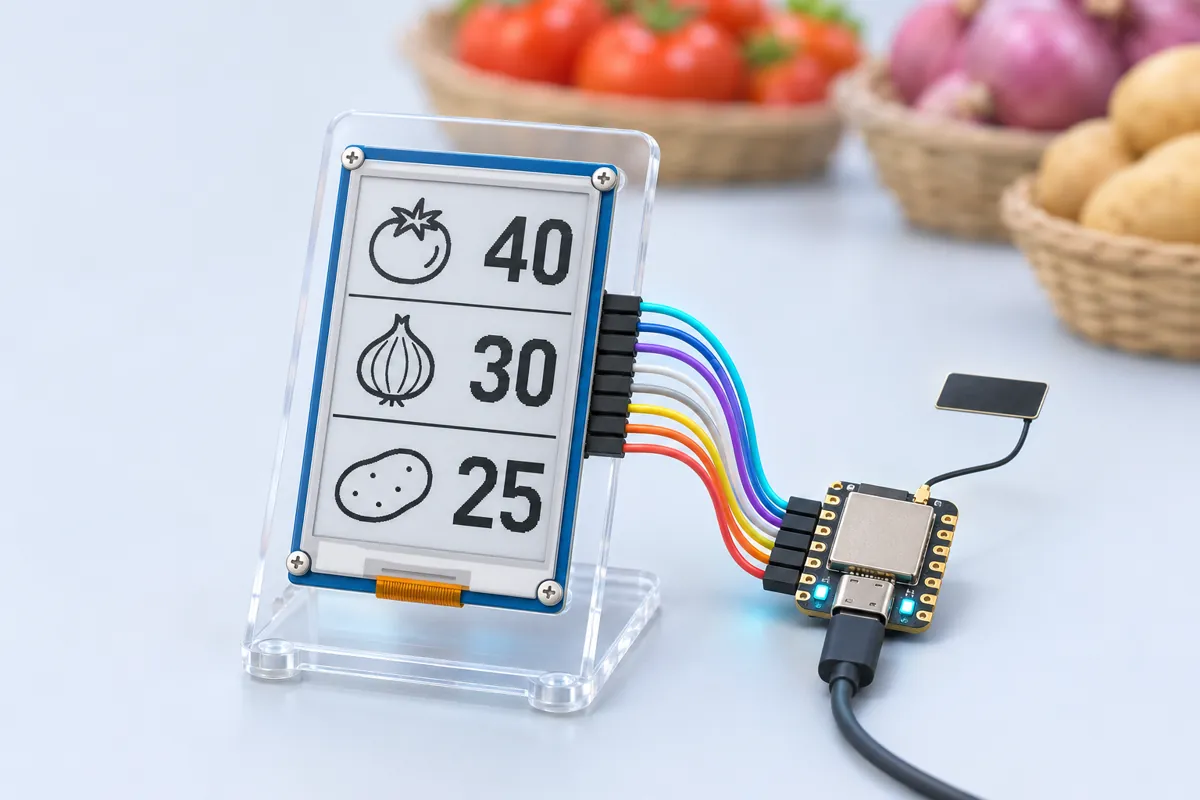
The XIAO ESP32S3 runs its own small Wi-Fi network, named RateBoard-xxxx. The shopkeeper joins it from a phone, opens http://192.168.4.1 and gets a form with a heading and five lines of item and price. Pressing Save stores the lines in the XIAO’s flash, sends the browser back to the form, and redraws the panel: a black heading bar with the title, then each item on the left and its price right-aligned. The rates are redrawn from flash every time the board powers up, so unplugging it changes nothing.
The panel is a 2.13″, 250×122-pixel black-and-white e-paper on SPI. The XIAO’s default SPI pins D8 (SCK) and D10 (MOSI) go to CLK and DIN; CS, DC, RST and BUSY take D1, D0, D3 and D7. That keeps strapping pin D2 free, and everything runs at 3.3 V, so no level shifting is needed. The XIAO is small enough to tape behind the panel in a photo frame.
Troubleshooting
The e-paper stays blank or shows noise
Check BUSY on D7 and RST on D3 — the library waits on BUSY, and a wrong pin makes it time out. Then try the other panel classes named in the sketch.
My phone can’t open 192.168.4.1
Phones often drop a Wi-Fi network that has no internet. When it asks “stay connected?”, choose yes, or turn mobile data off for a minute.
Rates are lost after unplugging
They are stored in the XIAO’s flash (Preferences) and redrawn at power-on. If they reset, the Save button may not have been pressed — the page reloads after each save.
Upgrades
- Add a red/black/white panel and print offer prices in red.
- Let several boards share one rate list by joining the shop’s Wi-Fi and reading a Google Sheet.
- Run it from a small Li-Po on the XIAO’s battery pads with deep sleep — it only needs power while updating.