Parts list
| Part | Qty | Approx. | Buy |
|---|---|---|---|
| Arduino Uno R3 (CH340 clone) | 1 | ₹450 | Buy Arduino Uno R3 (CH340 clone) |
| TCS34725 colour sensor module (with white LED) | 1 | ₹350 | Buy TCS34725 colour sensor module (with white LED) |
| SG90 micro servo | 2 | ₹220 | Buy SG90 micro servo |
| 5 V 2 A adapter with DC jack breakout | 1 | ₹200 | Buy 5 V 2 A adapter with DC jack breakout |
| 470 µF / 16 V capacitor | 2 | ₹20 | Buy 470 µF / 16 V capacitor |
| Sunboard / cardboard, a pen tube or straw, glue gun sticks | 1 | ₹150 | Buy Sunboard / cardboard, a pen tube or straw, glue gun sticks |
| Coloured beads, Gems or Skittles to sort | 1 | ₹50 | Buy Coloured beads, Gems or Skittles to sort |
| Jumper wires | 1 | ₹40 | Buy Jumper wires |
| Total | ₹1,480 |
Affiliate disclosure: “Buy” links may earn FlashReady a small commission at no extra cost to you. Prices are indicative.
Wiring
| Arduino Uno R3 | Part · pin | Wire | Notes |
|---|---|---|---|
| A4 | TCS34725 RGB colour sensor · SDA | blue | |
| A5 | TCS34725 RGB colour sensor · SCL | yellow | |
| 5V | TCS34725 RGB colour sensor · VIN | red | On-board 3.3 V regulator and level shifting; leave 3V3 and LED unconnected (LED stays on) |
| GND | TCS34725 RGB colour sensor · GND | black | |
| D9 | SG90 micro servo (9 g) · SIG | orange | Feeder disc servo |
| 5 V 2 A adapter (servos) · +5V | SG90 micro servo (9 g) · VCC | red | 470 µF capacitor across each servo’s VCC and GND |
| 5 V 2 A adapter (servos) · GND | SG90 micro servo (9 g) · GND | black | |
| GND | SG90 micro servo (9 g) · GND | black | Common ground: adapter GND joined to the Uno’s GND |
| D10 | SG90 micro servo (9 g) #2 · SIG | white | Chute servo |
| 5 V 2 A adapter (servos) · +5V | SG90 micro servo (9 g) #2 · VCC | red | |
| 5 V 2 A adapter (servos) · GND | SG90 micro servo (9 g) #2 · GND | black | |
| GND | SG90 micro servo (9 g) #2 · GND | black |
Board quirks: Power the two servos from their own 5 V adapter, with its GND joined to the Uno’s GND. Two SG90s starting together can pull close to an amp and reset an Uno fed from USB. Shade the sensor: build it into a small dark box over the disc’s SENSE position. Room light, especially tube lights, changes the readings more than the object does. Hue boundaries are tuned for bright plastic beads. Feed each colour once, read the hue in the Serial Monitor, and adjust the numbers in classify() for your own objects. The Servo library uses Timer1, so PWM on D9/D10 for anything else is gone. That is fine — the servos are on exactly those pins.
Code
// Colour sorting machine — Arduino Uno + TCS34725 colour sensor + 2 × SG90 servos.
// The feeder servo turns a disc with one hole: it picks a bead/sweet from the tube (LOAD), stops it
// under the sensor (SENSE), then lets it fall (DROP). Before it drops, the chute servo turns to the
// bin for that colour. Six bins: red, orange, yellow, green, blue, other.
// TCS34725 VIN → 5V, SDA → A4, SCL → A5 (I2C 0x29), LED pin open (light always on).
// Feeder servo SIG → D9, chute servo SIG → D10; both servos powered from a separate 5 V 2 A
// adapter with its GND joined to the Uno's GND.
// The sensor is read with plain Wire calls (register map from the TCS3472 datasheet).
#include <Wire.h>
#include <Servo.h>

constexpr uint8_t TCS_ADDR = 0x29;
constexpr uint8_t FEEDER_PIN = 9, CHUTE_PIN = 10;
// Feeder angles: adjust to your disc and tube.
constexpr uint8_t FEED_LOAD = 160, FEED_SENSE = 95, FEED_DROP = 30;
// Chute angle for each bin.
const char *const BIN_NAME[6] = {"red", "orange", "yellow", "green", "blue", "other"};
const uint8_t BIN_ANGLE[6] = {30, 58, 86, 114, 142, 170};

Servo feeder, chute;
bool sensorOk = false;
unsigned int counts[6];

void tcsWrite(uint8_t reg, uint8_t val) {
  Wire.beginTransmission(TCS_ADDR);
  Wire.write(0x80 | reg);  // command bit + register address
  Wire.write(val);
  Wire.endTransmission();
}

bool tcsBegin() {
  Wire.beginTransmission(TCS_ADDR);
  Wire.write(0x80 | 0x12);  // ID register
  if (Wire.endTransmission() != 0) return false;
  if (Wire.requestFrom(TCS_ADDR, (uint8_t)1) != 1) return false;
  uint8_t id = Wire.read();
  if (id != 0x44 && id != 0x4D) {  // 0x44 = TCS34721/5, 0x4D = TCS34723/7
    Serial.print(F("Unexpected TCS ID 0x"));
    Serial.println(id, HEX);
    return false;
  }
  tcsWrite(0x01, 0xD5);  // ATIME: (256 − 213) × 2.4 ms ≈ 103 ms integration
  tcsWrite(0x0F, 0x01);  // CONTROL: gain 4×
  tcsWrite(0x00, 0x01);  // ENABLE: power on
  delay(3);
  tcsWrite(0x00, 0x03);  // ENABLE: power on + RGBC on
  delay(110);
  return true;
}

// Clear, red, green, blue counts (16-bit each) in one auto-increment read from 0x14.
bool tcsRead(uint16_t &c, uint16_t &r, uint16_t &g, uint16_t &b) {
  Wire.beginTransmission(TCS_ADDR);
  Wire.write(0xA0 | 0x14);  // command + auto-increment + CDATAL
  if (Wire.endTransmission() != 0) return false;
  if (Wire.requestFrom(TCS_ADDR, (uint8_t)8) != 8) return false;
  uint16_t v[4];
  for (uint8_t i = 0; i < 4; i++) {
    uint8_t lo = Wire.read();  // two statements: the order of reads inside one expression isn't defined
    v[i] = lo | (Wire.read() << 8);
  }
  c = v[0], r = v[1], g = v[2], b = v[3];
  return true;
}

// Hue (0–360°) and saturation (0–1) from the raw channels → bin number.
uint8_t classify(uint16_t c, uint16_t r, uint16_t g, uint16_t b) {
  if (c < 200) return 5;  // too dark: empty slot or a black object
  float rf = r / (float)c, gf = g / (float)c, bf = b / (float)c;
  float mx = max(rf, max(gf, bf)), mn = min(rf, min(gf, bf));
  float sat = mx > 0 ? (mx - mn) / mx : 0;
  float hue;
  if (mx == mn) hue = 0;
  else if (mx == rf) hue = 60 * fmod((gf - bf) / (mx - mn), 6);
  else if (mx == gf) hue = 60 * ((bf - rf) / (mx - mn) + 2);
  else hue = 60 * ((rf - gf) / (mx - mn) + 4);
  if (hue < 0) hue += 360;
  Serial.print(F("C="));
  Serial.print(c);
  Serial.print(F(" R="));
  Serial.print(r);
  Serial.print(F(" G="));
  Serial.print(g);
  Serial.print(F(" B="));
  Serial.print(b);
  Serial.print(F(" hue="));
  Serial.print(hue, 0);
  Serial.print(F(" sat="));
  Serial.print(sat, 2);
  if (sat < 0.25) return 5;  // white, grey or brown: not a clear colour
  // Hue boundaries — tune them from the Serial readings of your own beads.
  if (hue < 18 || hue >= 330) return 0;  // red
  if (hue < 40) return 1;                // orange
  if (hue < 75) return 2;                // yellow
  if (hue < 165) return 3;               // green
  if (hue < 260) return 4;               // blue
  return 5;                              // purple/pink → other
}

void setup() {
  Serial.begin(115200);
  Wire.begin();
  feeder.attach(FEEDER_PIN);
  chute.attach(CHUTE_PIN);
  feeder.write(FEED_LOAD);
  chute.write(BIN_ANGLE[5]);
  delay(500);
  chute.write(90);
  Serial.println(F("Colour sorter starting"));
  sensorOk = tcsBegin();
  if (!sensorOk) Serial.println(F("TCS34725 not found - check VIN 5V, SDA A4, SCL A5. Retrying..."));
}

void loop() {
  if (!sensorOk) {
    // Park the machine and keep looking for the sensor.
    feeder.write(FEED_LOAD);
    delay(2000);
    sensorOk = tcsBegin();
    if (sensorOk) Serial.println(F("TCS34725 found"));
    return;
  }

  feeder.write(FEED_LOAD);  // pick one object from the tube
  delay(500);
  feeder.write(FEED_SENSE);  // stop it under the sensor
  delay(350);
  uint16_t c = 0, r = 0, g = 0, b = 0;
  delay(110);  // one fresh integration with the object in place
  if (!tcsRead(c, r, g, b)) {
    sensorOk = false;
    Serial.println(F("TCS34725 stopped answering"));
    return;
  }
  uint8_t bin = classify(c, r, g, b);
  counts[bin]++;
  Serial.print(F(" -> "));
  Serial.print(BIN_NAME[bin]);
  Serial.print(F(" (#"));
  Serial.print(counts[bin]);
  Serial.println(')');
  chute.write(BIN_ANGLE[bin]);  // aim the chute first…
  delay(300);
  feeder.write(FEED_DROP);  // …then let it fall
  delay(400);
}
// Colour sorting machine — Arduino Uno + TCS34725 colour sensor + 2 × SG90 servos.
// The feeder servo turns a disc with one hole: it picks a bead/sweet from the tube (LOAD), stops it
// under the sensor (SENSE), then lets it fall (DROP). Before it drops, the chute servo turns to the
// bin for that colour. Six bins: red, orange, yellow, green, blue, other.
// TCS34725 VIN → 5V, SDA → A4, SCL → A5 (I2C 0x29), LED pin open (light always on).
// Feeder servo SIG → D9, chute servo SIG → D10; both servos powered from a separate 5 V 2 A
// adapter with its GND joined to the Uno's GND.
// The sensor is read with plain Wire calls (register map from the TCS3472 datasheet).
#include <Wire.h>
#include <Servo.h>
constexpr uint8_t TCS_ADDR = 0x29;
constexpr uint8_t FEEDER_PIN = 9, CHUTE_PIN = 10;
// Feeder angles: adjust to your disc and tube.
constexpr uint8_t FEED_LOAD = 160, FEED_SENSE = 95, FEED_DROP = 30;
// Chute angle for each bin.
const char *const BIN_NAME[6] = {"red", "orange", "yellow", "green", "blue", "other"};
const uint8_t BIN_ANGLE[6] = {30, 58, 86, 114, 142, 170};
Servo feeder, chute;
bool sensorOk = false;
unsigned int counts[6];
void tcsWrite(uint8_t reg, uint8_t val) {
Wire.beginTransmission(TCS_ADDR);
Wire.write(0x80 | reg); // command bit + register address
Wire.write(val);
Wire.endTransmission();
}
bool tcsBegin() {
Wire.beginTransmission(TCS_ADDR);
Wire.write(0x80 | 0x12); // ID register
if (Wire.endTransmission() != 0) return false;
if (Wire.requestFrom(TCS_ADDR, (uint8_t)1) != 1) return false;
uint8_t id = Wire.read();
if (id != 0x44 && id != 0x4D) { // 0x44 = TCS34721/5, 0x4D = TCS34723/7
Serial.print(F("Unexpected TCS ID 0x"));
Serial.println(id, HEX);
return false;
}
tcsWrite(0x01, 0xD5); // ATIME: (256 − 213) × 2.4 ms ≈ 103 ms integration
tcsWrite(0x0F, 0x01); // CONTROL: gain 4×
tcsWrite(0x00, 0x01); // ENABLE: power on
delay(3);
tcsWrite(0x00, 0x03); // ENABLE: power on + RGBC on
delay(110);
return true;
}
// Clear, red, green, blue counts (16-bit each) in one auto-increment read from 0x14.
bool tcsRead(uint16_t &c, uint16_t &r, uint16_t &g, uint16_t &b) {
Wire.beginTransmission(TCS_ADDR);
Wire.write(0xA0 | 0x14); // command + auto-increment + CDATAL
if (Wire.endTransmission() != 0) return false;
if (Wire.requestFrom(TCS_ADDR, (uint8_t)8) != 8) return false;
uint16_t v[4];
for (uint8_t i = 0; i < 4; i++) {
uint8_t lo = Wire.read(); // two statements: the order of reads inside one expression isn't defined
v[i] = lo | (Wire.read() << 8);
}
c = v[0], r = v[1], g = v[2], b = v[3];
return true;
}
// Hue (0–360°) and saturation (0–1) from the raw channels → bin number.
uint8_t classify(uint16_t c, uint16_t r, uint16_t g, uint16_t b) {
if (c < 200) return 5; // too dark: empty slot or a black object
float rf = r / (float)c, gf = g / (float)c, bf = b / (float)c;
float mx = max(rf, max(gf, bf)), mn = min(rf, min(gf, bf));
float sat = mx > 0 ? (mx - mn) / mx : 0;
float hue;
if (mx == mn) hue = 0;
else if (mx == rf) hue = 60 * fmod((gf - bf) / (mx - mn), 6);
else if (mx == gf) hue = 60 * ((bf - rf) / (mx - mn) + 2);
else hue = 60 * ((rf - gf) / (mx - mn) + 4);
if (hue < 0) hue += 360;
Serial.print(F("C="));
Serial.print(c);
Serial.print(F(" R="));
Serial.print(r);
Serial.print(F(" G="));
Serial.print(g);
Serial.print(F(" B="));
Serial.print(b);
Serial.print(F(" hue="));
Serial.print(hue, 0);
Serial.print(F(" sat="));
Serial.print(sat, 2);
if (sat < 0.25) return 5; // white, grey or brown: not a clear colour
// Hue boundaries — tune them from the Serial readings of your own beads.
if (hue < 18 || hue >= 330) return 0; // red
if (hue < 40) return 1; // orange
if (hue < 75) return 2; // yellow
if (hue < 165) return 3; // green
if (hue < 260) return 4; // blue
return 5; // purple/pink → other
}
void setup() {
Serial.begin(115200);
Wire.begin();
feeder.attach(FEEDER_PIN);
chute.attach(CHUTE_PIN);
feeder.write(FEED_LOAD);
chute.write(BIN_ANGLE[5]);
delay(500);
chute.write(90);
Serial.println(F("Colour sorter starting"));
sensorOk = tcsBegin();
if (!sensorOk) Serial.println(F("TCS34725 not found - check VIN 5V, SDA A4, SCL A5. Retrying..."));
}
void loop() {
if (!sensorOk) {
// Park the machine and keep looking for the sensor.
feeder.write(FEED_LOAD);
delay(2000);
sensorOk = tcsBegin();
if (sensorOk) Serial.println(F("TCS34725 found"));
return;
}
feeder.write(FEED_LOAD); // pick one object from the tube
delay(500);
feeder.write(FEED_SENSE); // stop it under the sensor
delay(350);
uint16_t c = 0, r = 0, g = 0, b = 0;
delay(110); // one fresh integration with the object in place
if (!tcsRead(c, r, g, b)) {
sensorOk = false;
Serial.println(F("TCS34725 stopped answering"));
return;
}
uint8_t bin = classify(c, r, g, b);
counts[bin]++;
Serial.print(F(" -> "));
Serial.print(BIN_NAME[bin]);
Serial.print(F(" (#"));
Serial.print(counts[bin]);
Serial.println(')');
chute.write(BIN_ANGLE[bin]); // aim the chute first…
delay(300);
feeder.write(FEED_DROP); // …then let it fall
delay(400);
}Compiled for uno on avr 1.8.8 with Servo 1.3.0 · 3 Nov 2026
How it works
A colour sorter is one of the most popular science-exhibition machines, and for good reason: people can drop things in and watch it decide. Industry uses the same idea to sort rice, dal, coffee beans and recycled plastic at high speed.
How it works
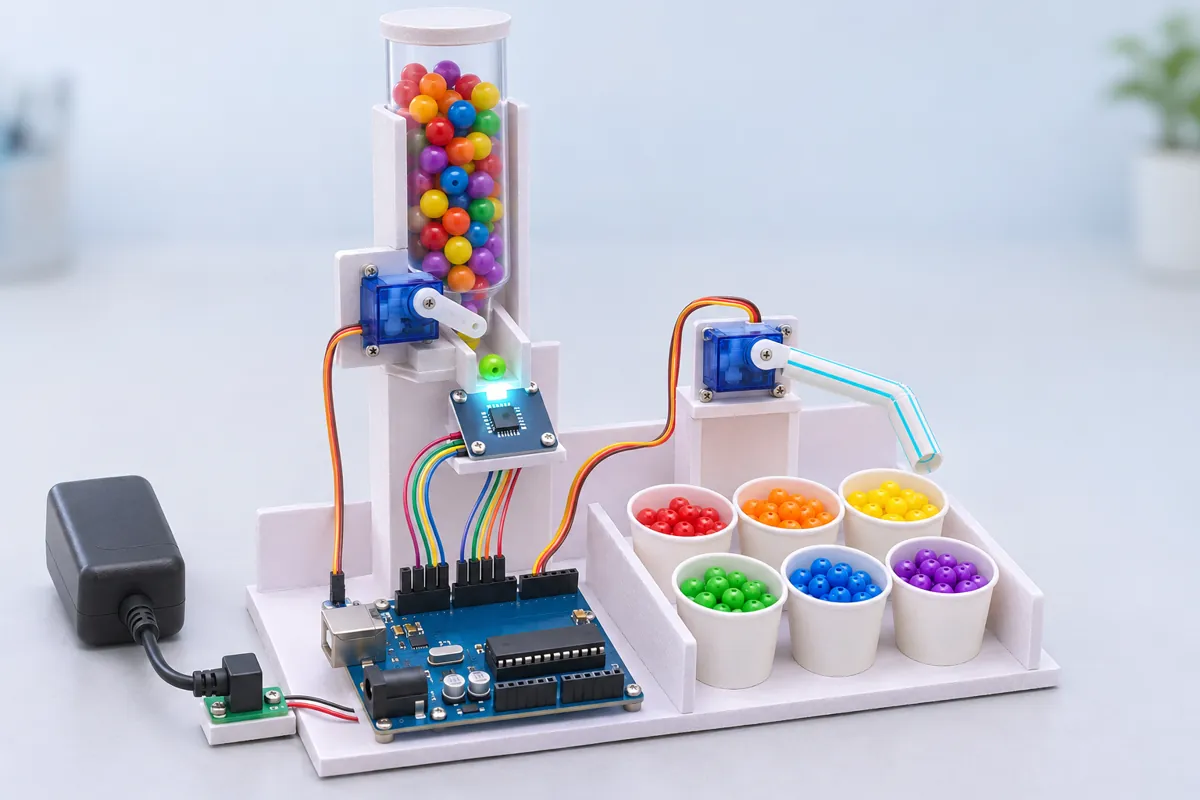
The machine has two moving parts, both cheap SG90 servos:
- The feeder turns a disc with one hole in it. At LOAD the hole sits under a tube of beads and one falls in. At SENSE it stops under the colour sensor. At DROP it lines up with a slot and the bead falls out.
- The chute servo turns a slide to one of six bins before the bead drops.
The TCS34725 has photodiodes behind red, green, blue and clear filters, plus a white LED that lights the object. The Uno reads the four counts over I2C with plain Wire calls: it sets a 103 ms integration time and 4× gain, then reads all eight data bytes in one go.
To decide the colour, the sketch divides red, green and blue by the clear count (so a bead under brighter light doesn’t look like a different colour) and converts them to hue — the angle on a colour wheel: red near 0°, yellow about 60°, green 120°, blue 240°. Saturation says how strongly coloured it is; white and grey beads have low saturation and go to the “other” bin. Every reading is printed, so you can see why each bead went where it did.
What to show at the exhibition
- Let visitors pour in a mixed handful and guess where each one will go.
- Show the Serial Monitor: the hue number for each bead next to a printed colour wheel makes the maths visible.
- Put a white and a black bead in to show the “other” bin and explain saturation and brightness.
- Mention real uses: optical sorters in rice mills reject discoloured grains with puffs of air.
Questions the examiner may ask
- Why divide by the clear channel? The raw numbers depend on brightness. Ratios depend only on the colour.
- What is hue? The colour’s position on a 360° colour wheel, worked out from which of R, G, B is largest and by how much.
- Why does the sensor have its own LED? So the object is lit by the same white light every time; room light changes through the day.
- Why does the chute move before the feeder drops? So the bead lands in the right bin — the order of servo moves is the machine’s program.
- Why a separate power supply for the servos? Servo motors take large current spikes when they start, which would make the Uno’s 5 V dip and reset it.
Cost in India
About ₹1,450. The TCS34725 module is the costliest part at ₹300–450. The body can be sunboard, a shoe box or 3D-printed parts; a ballpoint pen barrel makes a good feed tube for small beads.
Troubleshooting
Serial Monitor says “TCS34725 not found”
Check VIN to 5V (not 3V3), SDA on A4 and SCL on A5. An I2C scanner should show 0x29. If it prints “Unexpected TCS ID”, you have a different chip on the module.
Everything goes to “other”
Either the clear count is under 200 (the object is too far from the sensor — keep it 3–10 mm away) or the saturation is low (ambient light washing it out). Shade the sensor.
Objects jam in the disc
Make the hole about 1.5× the object size and the disc thickness about one object. Adjust FEED_LOAD, FEED_SENSE and FEED_DROP so the hole lines up exactly with the tube, the sensor and the drop slot.
The Uno resets when a servo moves
The servos are still on the Uno’s 5V, or the common GND is missing. Use the separate adapter and add the 470 µF capacitors.
Upgrades
- Add a 16×2 I2C LCD showing the count in each bin.
- Teach mode: press a button with a sample under the sensor to store its colour, then sort by nearest stored colour.
- Sort by size as well with a second IR sensor across the tube.