Parts list
| Part | Qty | Approx. | Buy |
|---|---|---|---|
| ESP32 DevKit V1 (30-pin) | 1 | ₹380 | Buy ESP32 DevKit V1 (30-pin) |
| DS18B20 waterproof probe (1 m cable) | 1 | ₹120 | Buy DS18B20 waterproof probe (1 m cable) |
| 4.7 kΩ resistor | 1 | ₹2 | Buy 4.7 kΩ resistor |
| Active buzzer module | 1 | ₹25 | Buy Active buzzer module |
| 5 V USB adapter + cable | 1 | ₹120 | Buy 5 V USB adapter + cable |
| Total | ₹647 |
Affiliate disclosure: “Buy” links may earn FlashReady a small commission at no extra cost to you. Prices are indicative.
Wiring
| ESP32 DevKit V1 | Part · pin | Wire | Notes |
|---|---|---|---|
| D4 | DS18B20 (1-Wire) · DQ | yellow | |
| 3V3 | DS18B20 (1-Wire) · DQ | red | Via 4.7 kΩ — Pull-up from DQ to 3.3 V |
| 3V3 | DS18B20 (1-Wire) · VDD | red | |
| GND | DS18B20 (1-Wire) · GND | black | |
| D25 | Active buzzer module (high-level trigger) · I/O | orange | |
| 3V3 | Active buzzer module (high-level trigger) · VCC | red | |
| GND | Active buzzer module (high-level trigger) · GND | black |
Board quirks: Run the probe’s thin cable through the door seal; it won’t stop the door closing. Keep the ESP32 outside — Wi-Fi doesn’t get through a metal fridge. Pick a long, random ntfy topic name (anyone who knows it can read your alerts) and install the ntfy app to subscribe to it. The sketch uses plain HTTP to keep it simple. For anything sensitive, switch to https://ntfy.sh with a certificate check. A missing or broken probe reads −127 °C; the sketch treats that as an alarm, not as "very cold".
Code
// Cold storage temperature alert — ESP32 DevKit V1 + DS18B20 (waterproof probe) + buzzer module
// DS18B20 data on D4 with a 4.7 kΩ pull-up to 3V3, buzzer module on D25.
// Pushes a phone alert through ntfy.sh when the chiller stays above 8 °C for 10 minutes.
#include <WiFi.h>
#include <HTTPClient.h>
#include <OneWire.h>
#include <DallasTemperature.h>
#include "fr_settings.h"

const char* WIFI_SSID = "YOUR_SSID";
const char* WIFI_PASS = "YOUR_PASSWORD";
const char* NTFY_TOPIC = "YOUR-PRIVATE-TOPIC";  // pick a hard-to-guess topic
// Filled in from the FlashReady flasher over USB (kept on the board), or type the values above.
FrSetting SETTINGS[] = {
  {"wifi_ssid", &WIFI_SSID, true},
  {"wifi_pass", &WIFI_PASS, true},
  {"ntfy_topic", &NTFY_TOPIC, true},
};

constexpr uint8_t TEMP_PIN = 4;
constexpr uint8_t BUZZER_PIN = 25;
constexpr float MAX_C = 8.0;                               // e.g. 2–8 °C for milk or vaccines
constexpr unsigned long TOO_WARM_FOR_MS = 10UL * 60UL * 1000UL;

OneWire bus(TEMP_PIN);
DallasTemperature probe(&bus);
unsigned long warmSince = 0;
bool alerted = false;

void push(const String& msg) {
  if (!*NTFY_TOPIC || WiFi.status() != WL_CONNECTED) return;
  HTTPClient http;
  http.begin(String("http://ntfy.sh/") + NTFY_TOPIC);
  http.addHeader("Title", "Cold storage");
  int code = http.POST(msg);
  Serial.printf("ntfy -> %d\n", code);
  http.end();
}

void setup() {
  Serial.begin(115200);
  frSettingsBegin(SETTINGS);
  pinMode(BUZZER_PIN, OUTPUT);
  probe.begin();
  if (*WIFI_SSID && *NTFY_TOPIC) WiFi.begin(WIFI_SSID, WIFI_PASS);
  else Serial.println("Phone alerts off — no Wi-Fi name or ntfy topic set. Flash from flashready.in or type them into the code.");  // the buzzer still works
}

void loop() {
  probe.requestTemperatures();
  float c = probe.getTempCByIndex(0);
  bool sensorOk = c > -100;
  Serial.printf("temp=%.2f C\n", c);

  if (!sensorOk) {
    digitalWrite(BUZZER_PIN, HIGH);  // a missing probe is an alarm, not "all fine"
  } else if (c > MAX_C) {
    if (warmSince == 0) warmSince = millis();
    if (!alerted && millis() - warmSince > TOO_WARM_FOR_MS) {
      push("Too warm: " + String(c, 1) + " °C for 10 minutes");
      alerted = true;
    }
    digitalWrite(BUZZER_PIN, alerted ? HIGH : LOW);
  } else {
    if (alerted) push("Back to normal: " + String(c, 1) + " °C");
    warmSince = 0;
    alerted = false;
    digitalWrite(BUZZER_PIN, LOW);
  }
  delay(5000);
}
// Cold storage temperature alert — ESP32 DevKit V1 + DS18B20 (waterproof probe) + buzzer module
// DS18B20 data on D4 with a 4.7 kΩ pull-up to 3V3, buzzer module on D25.
// Pushes a phone alert through ntfy.sh when the chiller stays above 8 °C for 10 minutes.
#include <WiFi.h>
#include <HTTPClient.h>
#include <OneWire.h>
#include <DallasTemperature.h>
#include "fr_settings.h"
const char* WIFI_SSID = "YOUR_SSID";
const char* WIFI_PASS = "YOUR_PASSWORD";
const char* NTFY_TOPIC = "YOUR-PRIVATE-TOPIC"; // pick a hard-to-guess topic
// Filled in from the FlashReady flasher over USB (kept on the board), or type the values above.
FrSetting SETTINGS[] = {
{"wifi_ssid", &WIFI_SSID, true},
{"wifi_pass", &WIFI_PASS, true},
{"ntfy_topic", &NTFY_TOPIC, true},
};
constexpr uint8_t TEMP_PIN = 4;
constexpr uint8_t BUZZER_PIN = 25;
constexpr float MAX_C = 8.0; // e.g. 2–8 °C for milk or vaccines
constexpr unsigned long TOO_WARM_FOR_MS = 10UL * 60UL * 1000UL;
OneWire bus(TEMP_PIN);
DallasTemperature probe(&bus);
unsigned long warmSince = 0;
bool alerted = false;
void push(const String& msg) {
if (!*NTFY_TOPIC || WiFi.status() != WL_CONNECTED) return;
HTTPClient http;
http.begin(String("http://ntfy.sh/") + NTFY_TOPIC);
http.addHeader("Title", "Cold storage");
int code = http.POST(msg);
Serial.printf("ntfy -> %d\n", code);
http.end();
}
void setup() {
Serial.begin(115200);
frSettingsBegin(SETTINGS);
pinMode(BUZZER_PIN, OUTPUT);
probe.begin();
if (*WIFI_SSID && *NTFY_TOPIC) WiFi.begin(WIFI_SSID, WIFI_PASS);
else Serial.println("Phone alerts off — no Wi-Fi name or ntfy topic set. Flash from flashready.in or type them into the code."); // the buzzer still works
}
void loop() {
probe.requestTemperatures();
float c = probe.getTempCByIndex(0);
bool sensorOk = c > -100;
Serial.printf("temp=%.2f C\n", c);
if (!sensorOk) {
digitalWrite(BUZZER_PIN, HIGH); // a missing probe is an alarm, not "all fine"
} else if (c > MAX_C) {
if (warmSince == 0) warmSince = millis();
if (!alerted && millis() - warmSince > TOO_WARM_FOR_MS) {
push("Too warm: " + String(c, 1) + " °C for 10 minutes");
alerted = true;
}
digitalWrite(BUZZER_PIN, alerted ? HIGH : LOW);
} else {
if (alerted) push("Back to normal: " + String(c, 1) + " °C");
warmSince = 0;
alerted = false;
digitalWrite(BUZZER_PIN, LOW);
}
delay(5000);
}Arduino IDE: keep fr_settings.h in the same folder as the .ino (tab menu → New Tab, same name). Flashing from this page doesn’t need it.
// fr_settings.h — FlashReady on-board settings (Wi-Fi name, phone number, ...) over USB.
//
// Why: the pre-built file on flashready.in is the same for everyone, so your own settings
// can't be inside it. Instead the board asks for them over USB serial and keeps them in
// its EEPROM. If you use Arduino IDE you can still type them into the constants in the
// sketch — this file then changes nothing except a 2-second pause at start-up.
//
// The protocol, in plain words (one text line each way, ending in \n, at 115200 baud):
//  1. Right after Serial.begin(115200) the board prints
//       FR?SETTINGS v1 keys=wifi_ssid,wifi_pass missing=wifi_pass
//     "missing" lists the required settings that still have no real value.
//  2. If nothing is missing it listens for 2 seconds and then carries on. If something is
//     missing it keeps listening, printing the line again every 2 seconds, for up to
//     30 seconds; then it carries on anyway and the sketch skips whatever needs the
//     missing value (an alarm still sounds, it just can't send the SMS).
//  3. The flasher answers   FR!SET wifi_ssid=My%20Home&wifi_pass=secret
//     (values URL-encoded). The board stores them and answers FR!OK, then carries on with
//     the new values. Errors: FR!ERR unknown <key>, FR!ERR long <key> (nothing is stored).
//     A key that is left out keeps its stored value; "key=" (empty) removes it.
//     "FR!SET" with nothing after it means "carry on now": FR!OK, nothing is stored.
//  4. FR!CLEAR wipes everything that was stored, answers FR!OK and keeps listening.
//  Other lines are ignored.
//
// A stored value wins over the constant in the sketch. A constant that is still a
// placeholder ("YOUR_SSID", "your-wifi", "+91XXXXXXXXXX") or empty counts as not set.
//
// EEPROM block at FR_SETTINGS_ADDR: 'F' 'R' 0x01, length (uint16, low byte first), then
// "key=value\n" lines. Uses FR_SETTINGS_SIZE bytes; move FR_SETTINGS_ADDR with a #define
// before the #include if your sketch uses EEPROM for something else.
//
// Use in a sketch:
//   const char* WIFI_SSID = "YOUR_SSID";
//   FrSetting SETTINGS[] = { {"wifi_ssid", &WIFI_SSID, true} };   // key, constant, required
//   void setup() { Serial.begin(115200); frSettingsBegin(SETTINGS); ... WiFi.begin(WIFI_SSID, ...); }
// After frSettingsBegin() each constant points at the value to use ("" if none is set).
#pragma once
#include <Arduino.h>
#include <EEPROM.h>
#include <string.h>

#ifndef FR_SETTINGS_ADDR
#define FR_SETTINGS_ADDR 0
#endif
#ifndef FR_SETTINGS_SIZE
#if defined(__AVR__)
#define FR_SETTINGS_SIZE 96  // 2 KB of RAM on an Uno: a phone number fits easily
#else
#define FR_SETTINGS_SIZE 512
#endif
#endif
#ifndef FR_LINE_MAX
#if defined(__AVR__)
#define FR_LINE_MAX 128
#else
#define FR_LINE_MAX 1024
#endif
#endif
#define FR_MAX_KEYS 8
#define FR_WAIT_MAX_MS 30000UL  // never wait longer than this for missing settings
#define FR_DATA_MAX (FR_SETTINGS_SIZE - 5)

struct FrSetting {
  const char* key;     // [a-z0-9_], as in settings.json
  const char** value;  // the sketch's constant; replaced by the value to use
  bool required;
};

// Stored settings in RAM as "key=value\0key=value\0" (only non-empty values).
static char frData[FR_DATA_MAX + 1];
static uint16_t frLen = 0;

static inline void frEepromBegin() {
#if defined(ESP32) || defined(ESP8266)
  static bool started = false;
  if (!started) EEPROM.begin(FR_SETTINGS_ADDR + FR_SETTINGS_SIZE);
  started = true;
#endif
}

static inline void frLoad() {
  frEepromBegin();
  frLen = 0;
  frData[0] = 0;
  if (EEPROM.read(FR_SETTINGS_ADDR) != 'F' || EEPROM.read(FR_SETTINGS_ADDR + 1) != 'R' || EEPROM.read(FR_SETTINGS_ADDR + 2) != 1) return;
  uint16_t n = EEPROM.read(FR_SETTINGS_ADDR + 3) | (EEPROM.read(FR_SETTINGS_ADDR + 4) << 8);
  if (n > FR_DATA_MAX) return;
  for (uint16_t i = 0; i < n; i++) {
    char c = EEPROM.read(FR_SETTINGS_ADDR + 5 + i);
    frData[i] = c == '\n' ? '\0' : c;
  }
  frData[n] = 0;
  frLen = n;
}

static inline void frPut(int addr, uint8_t b) {
#if defined(__AVR__)
  EEPROM.update(addr, b);
#else
  EEPROM.write(addr, b);
#endif
}

static inline void frSave() {
  frEepromBegin();
  frPut(FR_SETTINGS_ADDR, 'F');
  frPut(FR_SETTINGS_ADDR + 1, 'R');
  frPut(FR_SETTINGS_ADDR + 2, 1);
  frPut(FR_SETTINGS_ADDR + 3, frLen & 0xFF);
  frPut(FR_SETTINGS_ADDR + 4, frLen >> 8);
  for (uint16_t i = 0; i < frLen; i++) frPut(FR_SETTINGS_ADDR + 5 + i, frData[i] ? frData[i] : '\n');
#if defined(ESP32) || defined(ESP8266)
  EEPROM.commit();
#endif
}

// The stored value for key, or nullptr.
static inline const char* frStored(const char* key) {
  size_t kl = strlen(key);
  for (uint16_t i = 0; i < frLen; i += strlen(frData + i) + 1) {
    if (strncmp(frData + i, key, kl) == 0 && frData[i + kl] == '=') return frData + i + kl + 1;
  }
  return nullptr;
}

// Empty, "your_…" / "YOUR-…" / "your …", or a "+91XXXX…" phone number.
static inline bool frIsPlaceholder(const char* v) {
  if (!v || !*v) return true;
  if (strncasecmp(v, "your", 4) == 0 && (v[4] == '_' || v[4] == '-' || v[4] == ' ')) return true;
  return v[0] == '+' && strstr(v, "XXXX") != nullptr;
}

// The stored value for key, else the fallback constant; "" if that is a placeholder.
static inline const char* frSettingsGet(const char* key, const char* fallback) {
  const char* v = frStored(key);
  if (!v) v = fallback;
  return frIsPlaceholder(v) ? "" : v;
}

static inline bool frIsMissing(const FrSetting& s) {
  return s.required && !*frSettingsGet(s.key, *s.value);
}

static inline void frRequest(FrSetting* s, uint8_t n) {
  Serial.print(F("FR?SETTINGS v1 keys="));
  for (uint8_t i = 0; i < n; i++) {
    if (i) Serial.print(',');
    Serial.print(s[i].key);
  }
  Serial.print(F(" missing="));
  bool first = true;
  for (uint8_t i = 0; i < n; i++) {
    if (!frIsMissing(s[i])) continue;
    if (!first) Serial.print(',');
    Serial.print(s[i].key);
    first = false;
  }
  Serial.print('\n');
}

static inline void frReply(const __FlashStringHelper* what, const char* key) {
  Serial.print(what);
  Serial.print(key);
  Serial.print('\n');
}

static inline int8_t frHex(char c) {
  if (c >= '0' && c <= '9') return c - '0';
  c |= 0x20;
  return (c >= 'a' && c <= 'f') ? c - 'a' + 10 : -1;
}

// Percent-decodes in place. Drops NUL, CR and LF: they can't be stored.
static inline void frDecode(char* s) {
  char* o = s;
  for (; *s; s++) {
    char c = *s;
    if (c == '%' && frHex(s[1]) >= 0 && frHex(s[2]) >= 0) {
      c = (char)(frHex(s[1]) << 4 | frHex(s[2]));
      s += 2;
    }
    if (c != '\0' && c != '\n' && c != '\r') *o++ = c;
  }
  *o = 0;
}

// "k1=v1&k2=v2" (cut short if the line overflowed). Saves and returns true, or replies with an error.
static inline bool frSet(FrSetting* s, uint8_t n, char* p, bool overflow) {
  const char* upd[FR_MAX_KEYS] = {};
  while (*p) {
    char* amp = strchr(p, '&');
    bool last = !amp;
    if (amp) *amp = 0;
    char* eq = strchr(p, '=');
    if (eq) *eq = 0;
    if (*p) {
      if (last && overflow) {
        frReply(F("FR!ERR long "), p);
        return false;
      }
      uint8_t i = 0;
      while (i < n && strcmp(s[i].key, p) != 0) i++;
      if (i == n) {
        frReply(F("FR!ERR unknown "), p);
        return false;
      }
      char* v = eq ? eq + 1 : p + strlen(p);  // "key" alone = "key="
      frDecode(v);
      upd[i] = v;
    }
    if (last) break;
    p = amp + 1;
  }
  // Build the new block: for each key, the new value or the one already stored.
  char next[FR_DATA_MAX + 1];
  uint16_t len = 0;
  for (uint8_t i = 0; i < n; i++) {
    const char* v = upd[i] ? upd[i] : frStored(s[i].key);
    if (!v || !*v) continue;
    size_t kl = strlen(s[i].key), vl = strlen(v);
    if (len + kl + vl + 2 > FR_DATA_MAX) {
      frReply(F("FR!ERR long "), s[i].key);
      return false;
    }
    memcpy(next + len, s[i].key, kl);
    next[len + kl] = '=';
    memcpy(next + len + kl + 1, v, vl + 1);
    len += kl + vl + 2;
  }
  memcpy(frData, next, len);
  frData[len] = 0;
  frLen = len;
  frSave();
  return true;
}

// Handles one received line. Returns true once settings were saved (boot carries on).
static inline bool frCommand(FrSetting* s, uint8_t n, char* line, bool overflow) {
  if (strcmp(line, "FR!CLEAR") == 0) {
    frLen = 0;
    frData[0] = 0;
    frSave();
    Serial.print(F("FR!OK\n"));
    return false;
  }
  if (strncmp(line, "FR!SET", 6) != 0 || (line[6] != ' ' && line[6] != 0)) return false;  // not for us
  char* p = line + 6;
  while (*p == ' ') p++;
  if (*p && !frSet(s, n, p, overflow)) return false;  // empty FR!SET = carry on, store nothing
  Serial.print(F("FR!OK\n"));
  return true;
}

// Call right after Serial.begin(115200). Prints the request, waits as described at the top
// (30 s at most), then points every constant in the list at the value to use ("" = not set).
static inline void frSettingsBegin(FrSetting* s, uint8_t n) {
  frLoad();
  char line[FR_LINE_MAX];
  uint16_t len = 0;
  bool overflow = false;
  frRequest(s, n);
  unsigned long start = millis(), quietSince = start;
  while (millis() - start < FR_WAIT_MAX_MS) {
    int c = Serial.read();
    if (c >= 0) {
      quietSince = millis();
      if (c == '\r') continue;
      if (c != '\n') {
        if (len < FR_LINE_MAX - 1) line[len++] = (char)c;
        else overflow = true;
        continue;
      }
      line[len] = 0;
      bool saved = frCommand(s, n, line, overflow);
      len = 0;
      overflow = false;
      if (saved) break;
      continue;
    }
    if (millis() - quietSince < 2000) {
      delay(1);  // also keeps the ESP8266 watchdog fed
      continue;
    }
    len = 0;  // drop half a line
    overflow = false;
    bool missing = false;
    for (uint8_t i = 0; i < n; i++) missing |= frIsMissing(s[i]);
    if (!missing) break;
    frRequest(s, n);
    quietSince = millis();
  }
  for (uint8_t i = 0; i < n; i++) *s[i].value = frSettingsGet(s[i].key, *s[i].value);
}

template <size_t N>
static inline void frSettingsBegin(FrSetting (&s)[N]) {
  static_assert(N <= FR_MAX_KEYS, "fr_settings.h: at most FR_MAX_KEYS settings");
  frSettingsBegin(s, (uint8_t)N);
}
// fr_settings.h — FlashReady on-board settings (Wi-Fi name, phone number, ...) over USB.
//
// Why: the pre-built file on flashready.in is the same for everyone, so your own settings
// can't be inside it. Instead the board asks for them over USB serial and keeps them in
// its EEPROM. If you use Arduino IDE you can still type them into the constants in the
// sketch — this file then changes nothing except a 2-second pause at start-up.
//
// The protocol, in plain words (one text line each way, ending in \n, at 115200 baud):
// 1. Right after Serial.begin(115200) the board prints
// FR?SETTINGS v1 keys=wifi_ssid,wifi_pass missing=wifi_pass
// "missing" lists the required settings that still have no real value.
// 2. If nothing is missing it listens for 2 seconds and then carries on. If something is
// missing it keeps listening, printing the line again every 2 seconds, for up to
// 30 seconds; then it carries on anyway and the sketch skips whatever needs the
// missing value (an alarm still sounds, it just can't send the SMS).
// 3. The flasher answers FR!SET wifi_ssid=My%20Home&wifi_pass=secret
// (values URL-encoded). The board stores them and answers FR!OK, then carries on with
// the new values. Errors: FR!ERR unknown <key>, FR!ERR long <key> (nothing is stored).
// A key that is left out keeps its stored value; "key=" (empty) removes it.
// "FR!SET" with nothing after it means "carry on now": FR!OK, nothing is stored.
// 4. FR!CLEAR wipes everything that was stored, answers FR!OK and keeps listening.
// Other lines are ignored.
//
// A stored value wins over the constant in the sketch. A constant that is still a
// placeholder ("YOUR_SSID", "your-wifi", "+91XXXXXXXXXX") or empty counts as not set.
//
// EEPROM block at FR_SETTINGS_ADDR: 'F' 'R' 0x01, length (uint16, low byte first), then
// "key=value\n" lines. Uses FR_SETTINGS_SIZE bytes; move FR_SETTINGS_ADDR with a #define
// before the #include if your sketch uses EEPROM for something else.
//
// Use in a sketch:
// const char* WIFI_SSID = "YOUR_SSID";
// FrSetting SETTINGS[] = { {"wifi_ssid", &WIFI_SSID, true} }; // key, constant, required
// void setup() { Serial.begin(115200); frSettingsBegin(SETTINGS); ... WiFi.begin(WIFI_SSID, ...); }
// After frSettingsBegin() each constant points at the value to use ("" if none is set).
#pragma once
#include <Arduino.h>
#include <EEPROM.h>
#include <string.h>
#ifndef FR_SETTINGS_ADDR
#define FR_SETTINGS_ADDR 0
#endif
#ifndef FR_SETTINGS_SIZE
#if defined(__AVR__)
#define FR_SETTINGS_SIZE 96 // 2 KB of RAM on an Uno: a phone number fits easily
#else
#define FR_SETTINGS_SIZE 512
#endif
#endif
#ifndef FR_LINE_MAX
#if defined(__AVR__)
#define FR_LINE_MAX 128
#else
#define FR_LINE_MAX 1024
#endif
#endif
#define FR_MAX_KEYS 8
#define FR_WAIT_MAX_MS 30000UL // never wait longer than this for missing settings
#define FR_DATA_MAX (FR_SETTINGS_SIZE - 5)
struct FrSetting {
const char* key; // [a-z0-9_], as in settings.json
const char** value; // the sketch's constant; replaced by the value to use
bool required;
};
// Stored settings in RAM as "key=value\0key=value\0" (only non-empty values).
static char frData[FR_DATA_MAX + 1];
static uint16_t frLen = 0;
static inline void frEepromBegin() {
#if defined(ESP32) || defined(ESP8266)
static bool started = false;
if (!started) EEPROM.begin(FR_SETTINGS_ADDR + FR_SETTINGS_SIZE);
started = true;
#endif
}
static inline void frLoad() {
frEepromBegin();
frLen = 0;
frData[0] = 0;
if (EEPROM.read(FR_SETTINGS_ADDR) != 'F' || EEPROM.read(FR_SETTINGS_ADDR + 1) != 'R' || EEPROM.read(FR_SETTINGS_ADDR + 2) != 1) return;
uint16_t n = EEPROM.read(FR_SETTINGS_ADDR + 3) | (EEPROM.read(FR_SETTINGS_ADDR + 4) << 8);
if (n > FR_DATA_MAX) return;
for (uint16_t i = 0; i < n; i++) {
char c = EEPROM.read(FR_SETTINGS_ADDR + 5 + i);
frData[i] = c == '\n' ? '\0' : c;
}
frData[n] = 0;
frLen = n;
}
static inline void frPut(int addr, uint8_t b) {
#if defined(__AVR__)
EEPROM.update(addr, b);
#else
EEPROM.write(addr, b);
#endif
}
static inline void frSave() {
frEepromBegin();
frPut(FR_SETTINGS_ADDR, 'F');
frPut(FR_SETTINGS_ADDR + 1, 'R');
frPut(FR_SETTINGS_ADDR + 2, 1);
frPut(FR_SETTINGS_ADDR + 3, frLen & 0xFF);
frPut(FR_SETTINGS_ADDR + 4, frLen >> 8);
for (uint16_t i = 0; i < frLen; i++) frPut(FR_SETTINGS_ADDR + 5 + i, frData[i] ? frData[i] : '\n');
#if defined(ESP32) || defined(ESP8266)
EEPROM.commit();
#endif
}
// The stored value for key, or nullptr.
static inline const char* frStored(const char* key) {
size_t kl = strlen(key);
for (uint16_t i = 0; i < frLen; i += strlen(frData + i) + 1) {
if (strncmp(frData + i, key, kl) == 0 && frData[i + kl] == '=') return frData + i + kl + 1;
}
return nullptr;
}
// Empty, "your_…" / "YOUR-…" / "your …", or a "+91XXXX…" phone number.
static inline bool frIsPlaceholder(const char* v) {
if (!v || !*v) return true;
if (strncasecmp(v, "your", 4) == 0 && (v[4] == '_' || v[4] == '-' || v[4] == ' ')) return true;
return v[0] == '+' && strstr(v, "XXXX") != nullptr;
}
// The stored value for key, else the fallback constant; "" if that is a placeholder.
static inline const char* frSettingsGet(const char* key, const char* fallback) {
const char* v = frStored(key);
if (!v) v = fallback;
return frIsPlaceholder(v) ? "" : v;
}
static inline bool frIsMissing(const FrSetting& s) {
return s.required && !*frSettingsGet(s.key, *s.value);
}
static inline void frRequest(FrSetting* s, uint8_t n) {
Serial.print(F("FR?SETTINGS v1 keys="));
for (uint8_t i = 0; i < n; i++) {
if (i) Serial.print(',');
Serial.print(s[i].key);
}
Serial.print(F(" missing="));
bool first = true;
for (uint8_t i = 0; i < n; i++) {
if (!frIsMissing(s[i])) continue;
if (!first) Serial.print(',');
Serial.print(s[i].key);
first = false;
}
Serial.print('\n');
}
static inline void frReply(const __FlashStringHelper* what, const char* key) {
Serial.print(what);
Serial.print(key);
Serial.print('\n');
}
static inline int8_t frHex(char c) {
if (c >= '0' && c <= '9') return c - '0';
c |= 0x20;
return (c >= 'a' && c <= 'f') ? c - 'a' + 10 : -1;
}
// Percent-decodes in place. Drops NUL, CR and LF: they can't be stored.
static inline void frDecode(char* s) {
char* o = s;
for (; *s; s++) {
char c = *s;
if (c == '%' && frHex(s[1]) >= 0 && frHex(s[2]) >= 0) {
c = (char)(frHex(s[1]) << 4 | frHex(s[2]));
s += 2;
}
if (c != '\0' && c != '\n' && c != '\r') *o++ = c;
}
*o = 0;
}
// "k1=v1&k2=v2" (cut short if the line overflowed). Saves and returns true, or replies with an error.
static inline bool frSet(FrSetting* s, uint8_t n, char* p, bool overflow) {
const char* upd[FR_MAX_KEYS] = {};
while (*p) {
char* amp = strchr(p, '&');
bool last = !amp;
if (amp) *amp = 0;
char* eq = strchr(p, '=');
if (eq) *eq = 0;
if (*p) {
if (last && overflow) {
frReply(F("FR!ERR long "), p);
return false;
}
uint8_t i = 0;
while (i < n && strcmp(s[i].key, p) != 0) i++;
if (i == n) {
frReply(F("FR!ERR unknown "), p);
return false;
}
char* v = eq ? eq + 1 : p + strlen(p); // "key" alone = "key="
frDecode(v);
upd[i] = v;
}
if (last) break;
p = amp + 1;
}
// Build the new block: for each key, the new value or the one already stored.
char next[FR_DATA_MAX + 1];
uint16_t len = 0;
for (uint8_t i = 0; i < n; i++) {
const char* v = upd[i] ? upd[i] : frStored(s[i].key);
if (!v || !*v) continue;
size_t kl = strlen(s[i].key), vl = strlen(v);
if (len + kl + vl + 2 > FR_DATA_MAX) {
frReply(F("FR!ERR long "), s[i].key);
return false;
}
memcpy(next + len, s[i].key, kl);
next[len + kl] = '=';
memcpy(next + len + kl + 1, v, vl + 1);
len += kl + vl + 2;
}
memcpy(frData, next, len);
frData[len] = 0;
frLen = len;
frSave();
return true;
}
// Handles one received line. Returns true once settings were saved (boot carries on).
static inline bool frCommand(FrSetting* s, uint8_t n, char* line, bool overflow) {
if (strcmp(line, "FR!CLEAR") == 0) {
frLen = 0;
frData[0] = 0;
frSave();
Serial.print(F("FR!OK\n"));
return false;
}
if (strncmp(line, "FR!SET", 6) != 0 || (line[6] != ' ' && line[6] != 0)) return false; // not for us
char* p = line + 6;
while (*p == ' ') p++;
if (*p && !frSet(s, n, p, overflow)) return false; // empty FR!SET = carry on, store nothing
Serial.print(F("FR!OK\n"));
return true;
}
// Call right after Serial.begin(115200). Prints the request, waits as described at the top
// (30 s at most), then points every constant in the list at the value to use ("" = not set).
static inline void frSettingsBegin(FrSetting* s, uint8_t n) {
frLoad();
char line[FR_LINE_MAX];
uint16_t len = 0;
bool overflow = false;
frRequest(s, n);
unsigned long start = millis(), quietSince = start;
while (millis() - start < FR_WAIT_MAX_MS) {
int c = Serial.read();
if (c >= 0) {
quietSince = millis();
if (c == '\r') continue;
if (c != '\n') {
if (len < FR_LINE_MAX - 1) line[len++] = (char)c;
else overflow = true;
continue;
}
line[len] = 0;
bool saved = frCommand(s, n, line, overflow);
len = 0;
overflow = false;
if (saved) break;
continue;
}
if (millis() - quietSince < 2000) {
delay(1); // also keeps the ESP8266 watchdog fed
continue;
}
len = 0; // drop half a line
overflow = false;
bool missing = false;
for (uint8_t i = 0; i < n; i++) missing |= frIsMissing(s[i]);
if (!missing) break;
frRequest(s, n);
quietSince = millis();
}
for (uint8_t i = 0; i < n; i++) *s[i].value = frSettingsGet(s[i].key, *s[i].value);
}
template <size_t N>
static inline void frSettingsBegin(FrSetting (&s)[N]) {
static_assert(N <= FR_MAX_KEYS, "fr_settings.h: at most FR_MAX_KEYS settings");
frSettingsBegin(s, (uint8_t)N);
}Compiled for esp32 on esp32 3.3.12 with OneWire 2.3.8 · 3 Nov 2026
How it works
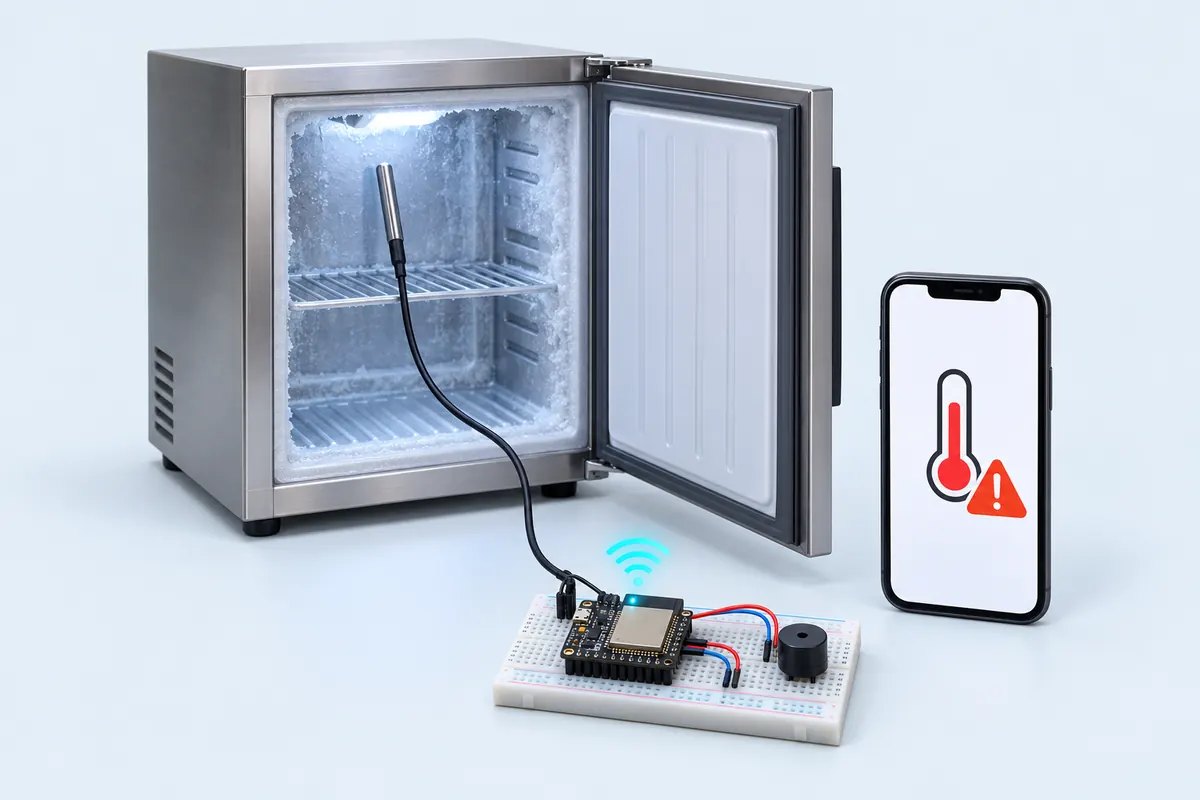
Shops, dairies and clinics lose money — or medicine — when a fridge or chiller quietly fails overnight. This alert watches the temperature with a waterproof DS18B20 probe and sends a notification to your phone when it stays above 8 °C for 10 minutes.
The probe goes inside the cold space; the ESP32 stays outside where Wi-Fi works. The DS18B20 talks on one data wire, DQ on D4, which needs a 4.7 kΩ pull-up to 3.3 V. The sketch reads it every 5 seconds.
A short spike above 8 °C is normal when the door is opened, so the sketch starts a timer instead of alerting at once. Only if it’s still too warm after 10 minutes does it send the notification and turn on the buzzer on D25. When the temperature comes back down you get a “back to normal” message.
Notifications use ntfy.sh, a free push service that needs no account: the ESP32 posts a message to a topic URL and the ntfy app on your phone shows it. Pick a long random topic name. Flash it from this page and the flasher asks for the topic and your Wi-Fi name and password (they’re stored on the board, not sent to us) — or type them into the code if you use Arduino IDE.
Troubleshooting
No notification arrives
Watch the Serial Monitor for "ntfy -> 200". A negative number means no Wi-Fi or no internet; check the SSID and password and that you subscribed to exactly the same topic.
Alerts every time the door is opened
Opening the door warms the air quickly. Put the probe in a small bottle of water so it follows the stored goods, not the air — or raise TOO_WARM_FOR_MS.
The buzzer sounds constantly
The probe isn’t being read (−127). Check the 4.7 kΩ pull-up between DQ and 3V3.
Upgrades
- Log a reading every 5 minutes to a Google Sheet as a temperature record.
- Add a second probe for the freezer compartment.
- Run it from a power bank so it can still alert you when the power goes.