Parts list
| Part | Qty | Approx. | Buy |
|---|---|---|---|
| Arduino Uno R3 (CH340 clone) | 1 | ₹450 | Buy Arduino Uno R3 (CH340 clone) |
| KY-038 sound sensor module (microphone + LM393) | 1 | ₹50 | Buy KY-038 sound sensor module (microphone + LM393) |
| WS2812B 8-LED stick | 1 | ₹120 | Buy WS2812B 8-LED stick |
| Active buzzer module | 1 | ₹25 | Buy Active buzzer module |
| 330 Ω resistor + 1000 µF / 10 V capacitor | 1 | ₹10 | Buy 330 Ω resistor + 1000 µF / 10 V capacitor |
| 5 V 1 A USB adapter | 1 | ₹150 | Buy 5 V 1 A USB adapter |
| Jumper wires + a frosted plastic box or tube for the bar | 1 | ₹80 | Buy Jumper wires + a frosted plastic box or tube for the bar |
| Total | ₹885 |
Affiliate disclosure: “Buy” links may earn FlashReady a small commission at no extra cost to you. Prices are indicative.
Wiring
| Arduino Uno R3 | Part · pin | Wire | Notes |
|---|---|---|---|
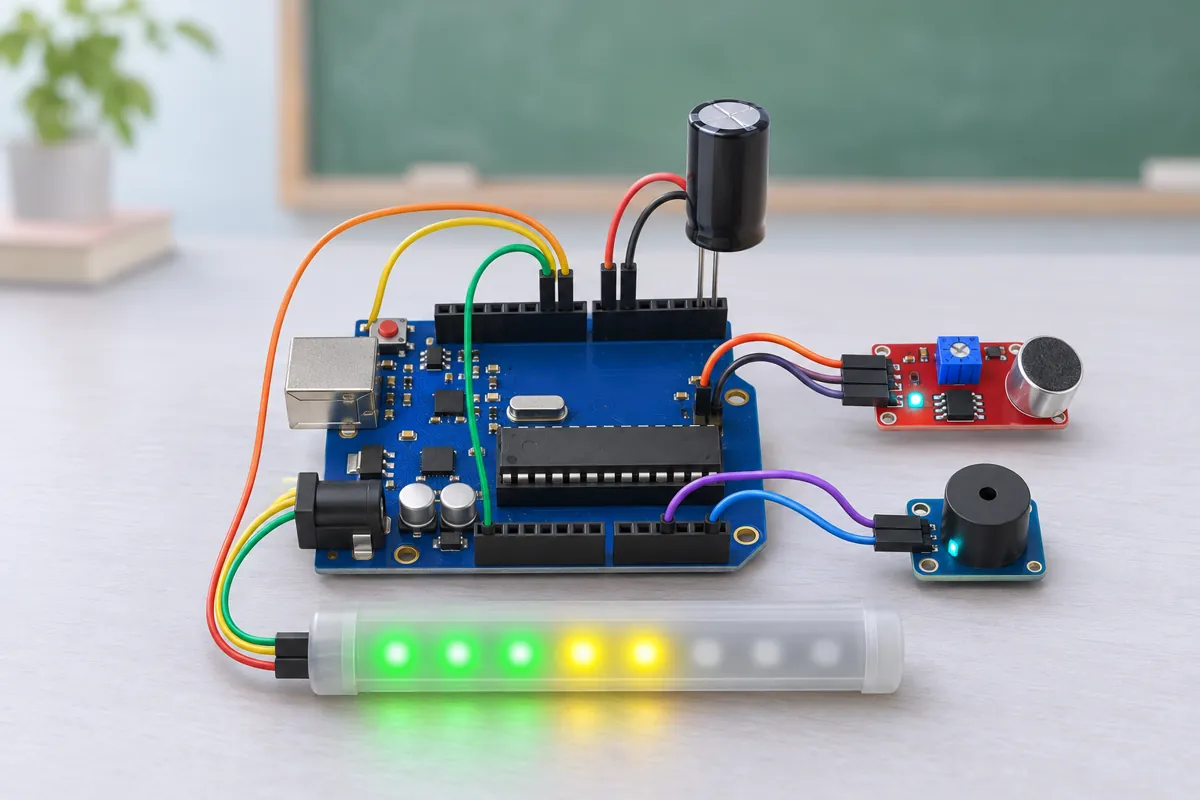
| A0 | KY-038 sound sensor (microphone + LM393) · A0 | green | Analog output (printed AO on some boards). D0 is not used |
| 5V | KY-038 sound sensor (microphone + LM393) · + | red | |
| GND | KY-038 sound sensor (microphone + LM393) · G | black | |
| D6 | WS2812B addressable RGB LED strip (NeoPixel) · DIN | green | Via 330 Ω — 470–1000 µF across 5V/GND at the stick |
| 5V | WS2812B addressable RGB LED strip (NeoPixel) · 5V | red | |
| GND | WS2812B addressable RGB LED strip (NeoPixel) · GND | black | |
| D8 | Active buzzer module (high-level trigger) · I/O | orange | |
| 5V | Active buzzer module (high-level trigger) · VCC | red | |
| GND | Active buzzer module (high-level trigger) · GND | black |
Board quirks: Stay quiet for the first 2 seconds after power-up: the sketch measures the room’s quiet level then and subtracts it from every reading, so fan hum and the module’s own noise don’t light the bar. The KY-038’s electret microphone is not calibrated — the bar shows “louder” and “quieter”, not decibels. Tune FULL_SCALE (300 by default) so normal teaching sits in the green and a noisy class reaches the red. The blue pot on the module only sets the D0 comparator threshold, which this sketch doesn’t use. Leave it alone; the sketch reads only A0. Mount the module away from the ceiling fan’s airflow; moving air on the microphone reads as noise.
Code
// Classroom noise meter — Arduino Uno + KY-038 sound sensor + WS2812B 8-LED stick + active buzzer.
// Every 50 ms the sketch measures how far the microphone signal swings (peak-to-peak on A0),
// smooths it, and fills the LED bar: green, then yellow, then red. If the room stays in the red
// for 3 seconds, the bar flashes and the buzzer gives a short "shh" reminder.
// KY-038 A0 → A0, WS2812B DIN → D6 through 330 Ω, buzzer module I/O → D8.
#include <Adafruit_NeoPixel.h>

constexpr uint8_t MIC_PIN = A0;
constexpr uint8_t LED_PIN = 6;
constexpr uint8_t NUM_LEDS = 8;
constexpr uint8_t BUZZER_PIN = 8;
constexpr uint16_t FULL_SCALE = 300;      // peak-to-peak (ADC counts) that fills the whole bar — tune for your room
constexpr unsigned long LOUD_MS = 3000;   // this long in the red → reminder
constexpr unsigned long REMIND_GAP_MS = 10000;

Adafruit_NeoPixel bar(NUM_LEDS, LED_PIN, NEO_GRB + NEO_KHZ800);
uint16_t quiet = 0;       // the room's quiet level, measured at power-up
float level = 0;          // smoothed loudness, 0..NUM_LEDS
unsigned long loudSince = 0, lastRemind = 0, lastPrint = 0;

// Peak-to-peak swing of the microphone signal over one 50 ms window (2.5 cycles of 50 Hz hum).
uint16_t swing() {
  uint16_t lo = 1023, hi = 0;
  unsigned long t0 = millis();
  while (millis() - t0 < 50) {
    uint16_t v = analogRead(MIC_PIN);
    if (v < lo) lo = v;
    if (v > hi) hi = v;
  }
  return hi - lo;
}

uint32_t colourFor(uint8_t i) {
  if (i < 4) return bar.Color(0, 160, 0);    // LEDs 1–4 green
  if (i < 6) return bar.Color(200, 120, 0);  // 5–6 yellow
  return bar.Color(220, 0, 0);               // 7–8 red
}

void drawBar(uint8_t lit) {
  for (uint8_t i = 0; i < NUM_LEDS; i++) bar.setPixelColor(i, i < lit ? colourFor(i) : 0);
  if (lit == 0) bar.setPixelColor(0, bar.Color(0, 12, 0));  // dim green: "on, and quiet"
  bar.show();
}

void remind() {
  Serial.println(F("Too loud for 3 s — reminder"));
  for (uint8_t k = 0; k < 3; k++) {
    bar.fill(bar.Color(220, 0, 0));
    bar.show();
    digitalWrite(BUZZER_PIN, HIGH);
    delay(120);
    bar.clear();
    bar.show();
    digitalWrite(BUZZER_PIN, LOW);
    delay(180);
  }
}

void setup() {
  Serial.begin(115200);
  Serial.println(F("Classroom noise meter — measuring the quiet level, please stay silent"));
  pinMode(BUZZER_PIN, OUTPUT);
  bar.begin();
  bar.setBrightness(90);
  // Sweep the bar once (LED check), then learn the room's quiet level over 2 s.
  for (uint8_t i = 1; i <= NUM_LEDS; i++) {
    drawBar(i);
    delay(120);
  }
  uint32_t sum = 0;
  for (uint8_t i = 0; i < 40; i++) sum += swing();
  quiet = sum / 40;
  drawBar(0);
  Serial.print(F("Quiet level: "));
  Serial.println(quiet);
  Serial.println(F("swing,leds"));
}

void loop() {
  uint16_t s = swing();
  uint16_t above = s > quiet ? s - quiet : 0;
  float target = (float)above * NUM_LEDS / FULL_SCALE;
  if (target > NUM_LEDS) target = NUM_LEDS;
  // Rise fast, fall slowly — the bar reacts to a shout but doesn't flicker.
  level += (target - level) * (target > level ? 0.5 : 0.08);
  uint8_t lit = (uint8_t)(level + 0.5);
  drawBar(lit);

  unsigned long now = millis();
  if (lit >= 7) {
    if (!loudSince) loudSince = now;
    if (now - loudSince >= LOUD_MS && now - lastRemind >= REMIND_GAP_MS) {
      remind();
      lastRemind = millis();
      loudSince = 0;
    }
  } else loudSince = 0;

  if (now - lastPrint >= 500) {  // for the Serial Plotter
    lastPrint = now;
    Serial.print(s);
    Serial.print(',');
    Serial.println(lit);
  }
}
// Classroom noise meter — Arduino Uno + KY-038 sound sensor + WS2812B 8-LED stick + active buzzer.
// Every 50 ms the sketch measures how far the microphone signal swings (peak-to-peak on A0),
// smooths it, and fills the LED bar: green, then yellow, then red. If the room stays in the red
// for 3 seconds, the bar flashes and the buzzer gives a short "shh" reminder.
// KY-038 A0 → A0, WS2812B DIN → D6 through 330 Ω, buzzer module I/O → D8.
#include <Adafruit_NeoPixel.h>
constexpr uint8_t MIC_PIN = A0;
constexpr uint8_t LED_PIN = 6;
constexpr uint8_t NUM_LEDS = 8;
constexpr uint8_t BUZZER_PIN = 8;
constexpr uint16_t FULL_SCALE = 300; // peak-to-peak (ADC counts) that fills the whole bar — tune for your room
constexpr unsigned long LOUD_MS = 3000; // this long in the red → reminder
constexpr unsigned long REMIND_GAP_MS = 10000;
Adafruit_NeoPixel bar(NUM_LEDS, LED_PIN, NEO_GRB + NEO_KHZ800);
uint16_t quiet = 0; // the room's quiet level, measured at power-up
float level = 0; // smoothed loudness, 0..NUM_LEDS
unsigned long loudSince = 0, lastRemind = 0, lastPrint = 0;
// Peak-to-peak swing of the microphone signal over one 50 ms window (2.5 cycles of 50 Hz hum).
uint16_t swing() {
uint16_t lo = 1023, hi = 0;
unsigned long t0 = millis();
while (millis() - t0 < 50) {
uint16_t v = analogRead(MIC_PIN);
if (v < lo) lo = v;
if (v > hi) hi = v;
}
return hi - lo;
}
uint32_t colourFor(uint8_t i) {
if (i < 4) return bar.Color(0, 160, 0); // LEDs 1–4 green
if (i < 6) return bar.Color(200, 120, 0); // 5–6 yellow
return bar.Color(220, 0, 0); // 7–8 red
}
void drawBar(uint8_t lit) {
for (uint8_t i = 0; i < NUM_LEDS; i++) bar.setPixelColor(i, i < lit ? colourFor(i) : 0);
if (lit == 0) bar.setPixelColor(0, bar.Color(0, 12, 0)); // dim green: "on, and quiet"
bar.show();
}
void remind() {
Serial.println(F("Too loud for 3 s — reminder"));
for (uint8_t k = 0; k < 3; k++) {
bar.fill(bar.Color(220, 0, 0));
bar.show();
digitalWrite(BUZZER_PIN, HIGH);
delay(120);
bar.clear();
bar.show();
digitalWrite(BUZZER_PIN, LOW);
delay(180);
}
}
void setup() {
Serial.begin(115200);
Serial.println(F("Classroom noise meter — measuring the quiet level, please stay silent"));
pinMode(BUZZER_PIN, OUTPUT);
bar.begin();
bar.setBrightness(90);
// Sweep the bar once (LED check), then learn the room's quiet level over 2 s.
for (uint8_t i = 1; i <= NUM_LEDS; i++) {
drawBar(i);
delay(120);
}
uint32_t sum = 0;
for (uint8_t i = 0; i < 40; i++) sum += swing();
quiet = sum / 40;
drawBar(0);
Serial.print(F("Quiet level: "));
Serial.println(quiet);
Serial.println(F("swing,leds"));
}
void loop() {
uint16_t s = swing();
uint16_t above = s > quiet ? s - quiet : 0;
float target = (float)above * NUM_LEDS / FULL_SCALE;
if (target > NUM_LEDS) target = NUM_LEDS;
// Rise fast, fall slowly — the bar reacts to a shout but doesn't flicker.
level += (target - level) * (target > level ? 0.5 : 0.08);
uint8_t lit = (uint8_t)(level + 0.5);
drawBar(lit);
unsigned long now = millis();
if (lit >= 7) {
if (!loudSince) loudSince = now;
if (now - loudSince >= LOUD_MS && now - lastRemind >= REMIND_GAP_MS) {
remind();
lastRemind = millis();
loudSince = 0;
}
} else loudSince = 0;
if (now - lastPrint >= 500) { // for the Serial Plotter
lastPrint = now;
Serial.print(s);
Serial.print(',');
Serial.println(lit);
}
}Compiled for uno on avr 1.8.8 with Adafruit NeoPixel 1.15.5 · 3 Nov 2026
How it works
A noise meter is a favourite with teachers and librarians: a bar of lights on the wall that the whole class can see. Green means fine, yellow means getting loud, red means too loud — and if the class stays in the red, the meter gives a short reminder on its own, so the teacher doesn’t have to.
How it works
The KY-038 has an electret microphone and an amplifier. Its A0 pin carries the sound wave sitting on a steady DC level (about half the supply). The loudness is the size of the swing, not the voltage itself, so every 50 ms the Uno reads A0 as fast as it can (about 400 samples) and keeps the lowest and highest values. Their difference — the peak-to-peak swing — grows with the sound level.
At power-up the sketch averages 40 such windows to learn the room’s quiet level. Each new reading has that subtracted, is scaled so FULL_SCALE fills all 8 LEDs, and is smoothed: the bar rises quickly when someone shouts, but falls slowly, so it doesn’t flicker.
LEDs 1–4 are green, 5–6 yellow, 7–8 red. If 7 or more LEDs stay lit for 3 seconds, the bar flashes red three times with three short beeps. The reminder can repeat only every 10 seconds.
What to show at the exhibition
Put the meter on the table and invite visitors to make it go red — clap, talk, whistle. Then show the Serial Plotter on a laptop: the swing value rises with loudness and you can see claps as sharp spikes. Explain why the room’s background noise is subtracted.
Questions the examiner may ask
- Why not just read A0 once? Sound is a wave: one sample could land anywhere on it. The peak-to-peak value over a window captures how big the wave is.
- Why a 50 ms window? It covers two and a half cycles of 50 Hz mains hum and many cycles of speech frequencies, while still updating 20 times a second.
- Is this decibels? No. Decibels are logarithmic and need a calibrated microphone. This shows relative loudness, which is all a classroom needs.
- Why does the bar fall slowly? Smoothing with different rise and fall rates — the same idea as the needle of an old VU meter.
Cost in India
About ₹900 including the adapter. The KY-038 costs ₹40–60; the WS2812B stick ₹100–150. A frosted plastic box or a piece of white PVC pipe over the LEDs makes the bar easy to see from the back of the room.
Troubleshooting
The bar is always full
Someone talked during the 2-second calibration, or FULL_SCALE is too small. Press reset in a quiet moment, or raise FULL_SCALE to 500.
The bar never moves
Check that the wire goes to the A0 pin of the module, not D0. Open the Serial Plotter at 115200 baud and clap — the first number should jump.
It beeps all the time
The room really is loud, or the sensor is next to a speaker or fan. The reminder repeats at most once every 10 seconds; change REMIND_GAP_MS for longer.
Upgrades
- Add a TM1637 showing “quiet minutes” earned — a class reward counter.
- Use a MAX4466 or MAX9814 microphone module for a cleaner, more sensitive signal.
- Log the noise level every minute to an SD card and graph a whole school day.