Parts list
| Part | Qty | Approx. | Buy |
|---|---|---|---|
| ESP32-C3 SuperMini | 1 | ₹230 | Buy ESP32-C3 SuperMini |
| Active buzzer module (high-level trigger) | 1 | ₹25 | Buy Active buzzer module (high-level trigger) |
| Jumper wires (female–female) | 3 | ₹15 | Buy Jumper wires (female–female) |
| 5 V USB adapter + USB-C cable (on the same UPS as the DVR) | 1 | ₹150 | Buy 5 V USB adapter + USB-C cable (on the same UPS as the DVR) |
| Total | ₹420 |
Affiliate disclosure: “Buy” links may earn FlashReady a small commission at no extra cost to you. Prices are indicative.
Wiring
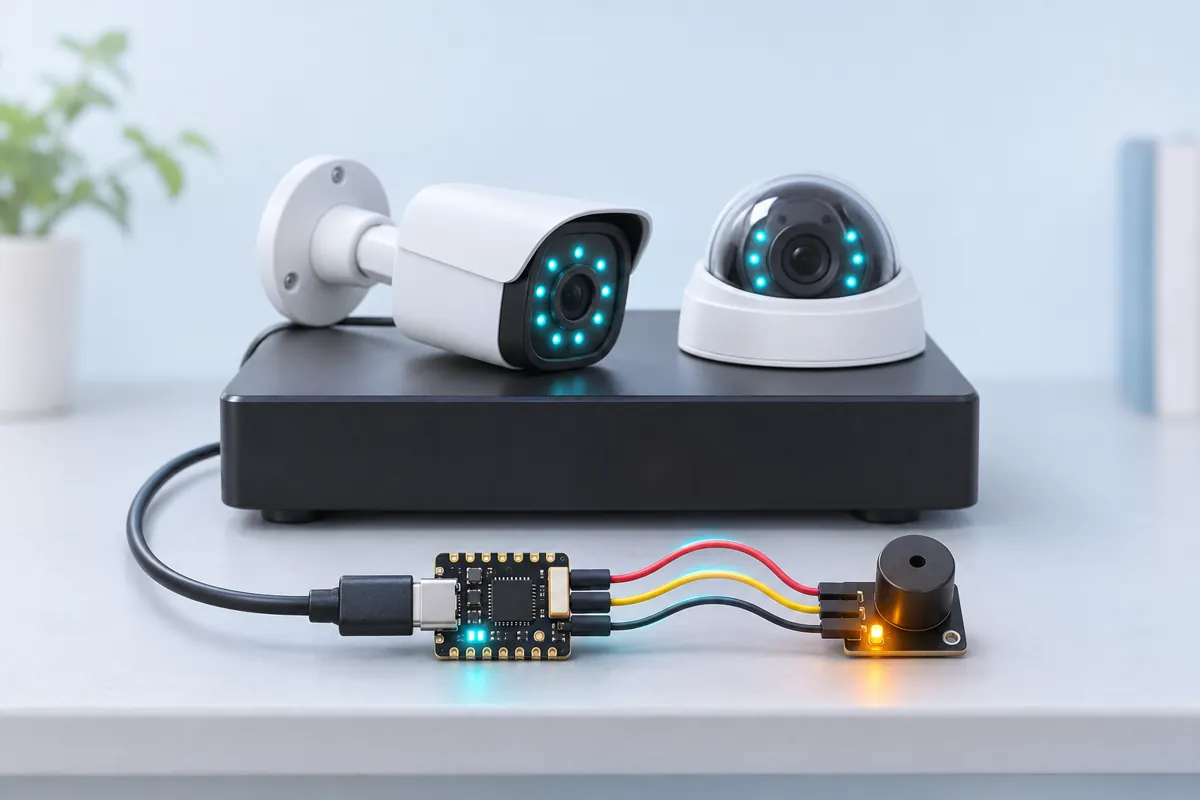
| ESP32-C3 SuperMini | Active buzzer module (high-level trigger) | Wire | Notes |
|---|---|---|---|
| 3 | I/O | orange | GPIO3 |
| 5V | VCC | red | 5 V from USB for a louder beep; the 3.3 V GPIO still switches it |
| GND | GND | black |
Board quirks: It only checks devices you list, by opening one TCP connection to each — the same thing the DVR app does. Only watch equipment you own or manage. Ports: most IP cameras serve video (RTSP) on 554. DVR/NVR web pages are on 80; mobile-app ports differ by brand (often 8000 or 37777). Use any port the device answers on. A device must miss three checks in a row (3 minutes) before it counts as offline, so a camera rebooting at night doesn’t wake anyone. Give cameras and the DVR fixed IP addresses (DHCP reservation in the router). If the router hands them new addresses after a power cut, the watchdog checks the old ones.
Code
// CCTV camera watchdog — ESP32-C3 SuperMini + active buzzer module
// Buzzer module: I/O → GPIO3, VCC → 5V, GND → GND.
// Every minute it checks that each of your own cameras / DVR / NVR still answers on its port
// (RTSP 554 for IP cameras, 80 or 37777/8000 for most DVR web or app ports). A device that misses
// three checks in a row counts as offline: the buzzer beeps and an optional ntfy alert goes out.
// It only opens a TCP connection to devices you list — nothing else on the network is touched.
#include <WiFi.h>
#include <HTTPClient.h>
#include "fr_settings.h"

const char* WIFI_SSID = "YOUR_SSID";
const char* WIFI_PASS = "YOUR_PASSWORD";
const char* DEVICES = "192.168.1.64:554,192.168.1.65:554,192.168.1.108:80";  // ip:port, comma-separated
const char* NTFY_TOPIC = "YOUR-PRIVATE-TOPIC";  // optional
// Filled in from the FlashReady flasher over USB (kept on the board), or type the values above.
FrSetting SETTINGS[] = {
  {"wifi_ssid", &WIFI_SSID, true},
  {"wifi_pass", &WIFI_PASS, true},
  {"devices", &DEVICES, true},
  {"ntfy_topic", &NTFY_TOPIC, false},
};

constexpr uint8_t BUZZER_PIN = 3;
constexpr unsigned long CHECK_EVERY_MS = 60000;
constexpr uint8_t FAILS_FOR_OFFLINE = 3;
constexpr uint8_t MAX_DEVICES = 8;

struct Device {
  IPAddress ip;
  uint16_t port;
  uint8_t fails;
  bool offline;
};
Device devices[MAX_DEVICES];
uint8_t deviceCount = 0;
unsigned long lastCheck = 0, lastBeep = 0;
bool firstCheck = true;

void parseDevices() {
  String list = DEVICES;
  int start = 0;
  while (start < (int)list.length() && deviceCount < MAX_DEVICES) {
    int comma = list.indexOf(',', start);
    String item = list.substring(start, comma < 0 ? list.length() : comma);
    item.trim();
    int colon = item.indexOf(':');
    IPAddress ip;
    if (colon > 0 && ip.fromString(item.substring(0, colon))) {
      devices[deviceCount++] = {ip, (uint16_t)item.substring(colon + 1).toInt(), 0, false};
    } else if (item.length()) {
      Serial.printf("Skipping \"%s\" — write it as ip:port\n", item.c_str());
    }
    if (comma < 0) break;
    start = comma + 1;
  }
  Serial.printf("Watching %u device(s)\n", deviceCount);
}

void push(const String& msg) {
  Serial.println(msg);
  if (!*NTFY_TOPIC || WiFi.status() != WL_CONNECTED) return;
  HTTPClient http;
  http.begin(String("http://ntfy.sh/") + NTFY_TOPIC);
  http.addHeader("Title", "CCTV watchdog");
  int code = http.POST(msg);
  Serial.printf("ntfy -> %d\n", code);
  http.end();
}

bool answers(const Device& d) {
  WiFiClient c;
  bool ok = c.connect(d.ip, d.port, 2000);
  c.stop();
  return ok;
}

void setup() {
  Serial.begin(115200);
  frSettingsBegin(SETTINGS);
  pinMode(BUZZER_PIN, OUTPUT);
  digitalWrite(BUZZER_PIN, LOW);
  if (!*WIFI_SSID || !*DEVICES) {
    Serial.println("Watchdog off — no Wi-Fi name or device list set. Flash from flashready.in or type them into the code.");
    return;
  }
  parseDevices();
  WiFi.begin(WIFI_SSID, WIFI_PASS);
}

void loop() {
  if (!*WIFI_SSID || !*DEVICES) return;
  uint8_t offline = 0;
  for (uint8_t i = 0; i < deviceCount; i++) offline += devices[i].offline;

  // While anything is offline: two short beeps every 10 seconds.
  if (offline && millis() - lastBeep > 10000) {
    lastBeep = millis();
    for (int i = 0; i < 2; i++) {
      digitalWrite(BUZZER_PIN, HIGH);
      delay(100);
      digitalWrite(BUZZER_PIN, LOW);
      delay(150);
    }
  }

  if (!firstCheck && millis() - lastCheck < CHECK_EVERY_MS) return;
  if (WiFi.status() != WL_CONNECTED) {
    delay(500);
    return;
  }
  firstCheck = false;
  lastCheck = millis();
  for (uint8_t i = 0; i < deviceCount; i++) {
    Device& d = devices[i];
    bool ok = answers(d);
    if (ok) d.fails = 0;
    else if (d.fails < 250) d.fails++;
    Serial.printf("%s:%u %s\n", d.ip.toString().c_str(), d.port, ok ? "OK" : "no answer");
    if (!d.offline && d.fails >= FAILS_FOR_OFFLINE) {
      d.offline = true;
      push("OFFLINE: " + d.ip.toString() + ":" + String(d.port) + " (3 checks missed)");
    } else if (d.offline && ok) {
      d.offline = false;
      push("Back online: " + d.ip.toString() + ":" + String(d.port));
    }
  }
}
// CCTV camera watchdog — ESP32-C3 SuperMini + active buzzer module
// Buzzer module: I/O → GPIO3, VCC → 5V, GND → GND.
// Every minute it checks that each of your own cameras / DVR / NVR still answers on its port
// (RTSP 554 for IP cameras, 80 or 37777/8000 for most DVR web or app ports). A device that misses
// three checks in a row counts as offline: the buzzer beeps and an optional ntfy alert goes out.
// It only opens a TCP connection to devices you list — nothing else on the network is touched.
#include <WiFi.h>
#include <HTTPClient.h>
#include "fr_settings.h"
const char* WIFI_SSID = "YOUR_SSID";
const char* WIFI_PASS = "YOUR_PASSWORD";
const char* DEVICES = "192.168.1.64:554,192.168.1.65:554,192.168.1.108:80"; // ip:port, comma-separated
const char* NTFY_TOPIC = "YOUR-PRIVATE-TOPIC"; // optional
// Filled in from the FlashReady flasher over USB (kept on the board), or type the values above.
FrSetting SETTINGS[] = {
{"wifi_ssid", &WIFI_SSID, true},
{"wifi_pass", &WIFI_PASS, true},
{"devices", &DEVICES, true},
{"ntfy_topic", &NTFY_TOPIC, false},
};
constexpr uint8_t BUZZER_PIN = 3;
constexpr unsigned long CHECK_EVERY_MS = 60000;
constexpr uint8_t FAILS_FOR_OFFLINE = 3;
constexpr uint8_t MAX_DEVICES = 8;
struct Device {
IPAddress ip;
uint16_t port;
uint8_t fails;
bool offline;
};
Device devices[MAX_DEVICES];
uint8_t deviceCount = 0;
unsigned long lastCheck = 0, lastBeep = 0;
bool firstCheck = true;
void parseDevices() {
String list = DEVICES;
int start = 0;
while (start < (int)list.length() && deviceCount < MAX_DEVICES) {
int comma = list.indexOf(',', start);
String item = list.substring(start, comma < 0 ? list.length() : comma);
item.trim();
int colon = item.indexOf(':');
IPAddress ip;
if (colon > 0 && ip.fromString(item.substring(0, colon))) {
devices[deviceCount++] = {ip, (uint16_t)item.substring(colon + 1).toInt(), 0, false};
} else if (item.length()) {
Serial.printf("Skipping \"%s\" — write it as ip:port\n", item.c_str());
}
if (comma < 0) break;
start = comma + 1;
}
Serial.printf("Watching %u device(s)\n", deviceCount);
}
void push(const String& msg) {
Serial.println(msg);
if (!*NTFY_TOPIC || WiFi.status() != WL_CONNECTED) return;
HTTPClient http;
http.begin(String("http://ntfy.sh/") + NTFY_TOPIC);
http.addHeader("Title", "CCTV watchdog");
int code = http.POST(msg);
Serial.printf("ntfy -> %d\n", code);
http.end();
}
bool answers(const Device& d) {
WiFiClient c;
bool ok = c.connect(d.ip, d.port, 2000);
c.stop();
return ok;
}
void setup() {
Serial.begin(115200);
frSettingsBegin(SETTINGS);
pinMode(BUZZER_PIN, OUTPUT);
digitalWrite(BUZZER_PIN, LOW);
if (!*WIFI_SSID || !*DEVICES) {
Serial.println("Watchdog off — no Wi-Fi name or device list set. Flash from flashready.in or type them into the code.");
return;
}
parseDevices();
WiFi.begin(WIFI_SSID, WIFI_PASS);
}
void loop() {
if (!*WIFI_SSID || !*DEVICES) return;
uint8_t offline = 0;
for (uint8_t i = 0; i < deviceCount; i++) offline += devices[i].offline;
// While anything is offline: two short beeps every 10 seconds.
if (offline && millis() - lastBeep > 10000) {
lastBeep = millis();
for (int i = 0; i < 2; i++) {
digitalWrite(BUZZER_PIN, HIGH);
delay(100);
digitalWrite(BUZZER_PIN, LOW);
delay(150);
}
}
if (!firstCheck && millis() - lastCheck < CHECK_EVERY_MS) return;
if (WiFi.status() != WL_CONNECTED) {
delay(500);
return;
}
firstCheck = false;
lastCheck = millis();
for (uint8_t i = 0; i < deviceCount; i++) {
Device& d = devices[i];
bool ok = answers(d);
if (ok) d.fails = 0;
else if (d.fails < 250) d.fails++;
Serial.printf("%s:%u %s\n", d.ip.toString().c_str(), d.port, ok ? "OK" : "no answer");
if (!d.offline && d.fails >= FAILS_FOR_OFFLINE) {
d.offline = true;
push("OFFLINE: " + d.ip.toString() + ":" + String(d.port) + " (3 checks missed)");
} else if (d.offline && ok) {
d.offline = false;
push("Back online: " + d.ip.toString() + ":" + String(d.port));
}
}
}Arduino IDE: keep fr_settings.h in the same folder as the .ino (tab menu → New Tab, same name). Flashing from this page doesn’t need it.
// fr_settings.h — FlashReady on-board settings (Wi-Fi name, phone number, ...) over USB.
//
// Why: the pre-built file on flashready.in is the same for everyone, so your own settings
// can't be inside it. Instead the board asks for them over USB serial and keeps them in
// its EEPROM. If you use Arduino IDE you can still type them into the constants in the
// sketch — this file then changes nothing except a 2-second pause at start-up.
//
// The protocol, in plain words (one text line each way, ending in \n, at 115200 baud):
//  1. Right after Serial.begin(115200) the board prints
//       FR?SETTINGS v1 keys=wifi_ssid,wifi_pass missing=wifi_pass
//     "missing" lists the required settings that still have no real value.
//  2. If nothing is missing it listens for 2 seconds and then carries on. If something is
//     missing it keeps listening, printing the line again every 2 seconds, for up to
//     30 seconds; then it carries on anyway and the sketch skips whatever needs the
//     missing value (an alarm still sounds, it just can't send the SMS).
//  3. The flasher answers   FR!SET wifi_ssid=My%20Home&wifi_pass=secret
//     (values URL-encoded). The board stores them and answers FR!OK, then carries on with
//     the new values. Errors: FR!ERR unknown <key>, FR!ERR long <key> (nothing is stored).
//     A key that is left out keeps its stored value; "key=" (empty) removes it.
//     "FR!SET" with nothing after it means "carry on now": FR!OK, nothing is stored.
//  4. FR!CLEAR wipes everything that was stored, answers FR!OK and keeps listening.
//  Other lines are ignored.
//
// A stored value wins over the constant in the sketch. A constant that is still a
// placeholder ("YOUR_SSID", "your-wifi", "+91XXXXXXXXXX") or empty counts as not set.
//
// EEPROM block at FR_SETTINGS_ADDR: 'F' 'R' 0x01, length (uint16, low byte first), then
// "key=value\n" lines. Uses FR_SETTINGS_SIZE bytes; move FR_SETTINGS_ADDR with a #define
// before the #include if your sketch uses EEPROM for something else.
//
// Use in a sketch:
//   const char* WIFI_SSID = "YOUR_SSID";
//   FrSetting SETTINGS[] = { {"wifi_ssid", &WIFI_SSID, true} };   // key, constant, required
//   void setup() { Serial.begin(115200); frSettingsBegin(SETTINGS); ... WiFi.begin(WIFI_SSID, ...); }
// After frSettingsBegin() each constant points at the value to use ("" if none is set).
#pragma once
#include <Arduino.h>
#include <EEPROM.h>
#include <string.h>

#ifndef FR_SETTINGS_ADDR
#define FR_SETTINGS_ADDR 0
#endif
#ifndef FR_SETTINGS_SIZE
#if defined(__AVR__)
#define FR_SETTINGS_SIZE 96  // 2 KB of RAM on an Uno: a phone number fits easily
#else
#define FR_SETTINGS_SIZE 512
#endif
#endif
#ifndef FR_LINE_MAX
#if defined(__AVR__)
#define FR_LINE_MAX 128
#else
#define FR_LINE_MAX 1024
#endif
#endif
#define FR_MAX_KEYS 8
#define FR_WAIT_MAX_MS 30000UL  // never wait longer than this for missing settings
#define FR_DATA_MAX (FR_SETTINGS_SIZE - 5)

struct FrSetting {
  const char* key;     // [a-z0-9_], as in settings.json
  const char** value;  // the sketch's constant; replaced by the value to use
  bool required;
};

// Stored settings in RAM as "key=value\0key=value\0" (only non-empty values).
static char frData[FR_DATA_MAX + 1];
static uint16_t frLen = 0;

static inline void frEepromBegin() {
#if defined(ESP32) || defined(ESP8266)
  static bool started = false;
  if (!started) EEPROM.begin(FR_SETTINGS_ADDR + FR_SETTINGS_SIZE);
  started = true;
#endif
}

static inline void frLoad() {
  frEepromBegin();
  frLen = 0;
  frData[0] = 0;
  if (EEPROM.read(FR_SETTINGS_ADDR) != 'F' || EEPROM.read(FR_SETTINGS_ADDR + 1) != 'R' || EEPROM.read(FR_SETTINGS_ADDR + 2) != 1) return;
  uint16_t n = EEPROM.read(FR_SETTINGS_ADDR + 3) | (EEPROM.read(FR_SETTINGS_ADDR + 4) << 8);
  if (n > FR_DATA_MAX) return;
  for (uint16_t i = 0; i < n; i++) {
    char c = EEPROM.read(FR_SETTINGS_ADDR + 5 + i);
    frData[i] = c == '\n' ? '\0' : c;
  }
  frData[n] = 0;
  frLen = n;
}

static inline void frPut(int addr, uint8_t b) {
#if defined(__AVR__)
  EEPROM.update(addr, b);
#else
  EEPROM.write(addr, b);
#endif
}

static inline void frSave() {
  frEepromBegin();
  frPut(FR_SETTINGS_ADDR, 'F');
  frPut(FR_SETTINGS_ADDR + 1, 'R');
  frPut(FR_SETTINGS_ADDR + 2, 1);
  frPut(FR_SETTINGS_ADDR + 3, frLen & 0xFF);
  frPut(FR_SETTINGS_ADDR + 4, frLen >> 8);
  for (uint16_t i = 0; i < frLen; i++) frPut(FR_SETTINGS_ADDR + 5 + i, frData[i] ? frData[i] : '\n');
#if defined(ESP32) || defined(ESP8266)
  EEPROM.commit();
#endif
}

// The stored value for key, or nullptr.
static inline const char* frStored(const char* key) {
  size_t kl = strlen(key);
  for (uint16_t i = 0; i < frLen; i += strlen(frData + i) + 1) {
    if (strncmp(frData + i, key, kl) == 0 && frData[i + kl] == '=') return frData + i + kl + 1;
  }
  return nullptr;
}

// Empty, "your_…" / "YOUR-…" / "your …", or a "+91XXXX…" phone number.
static inline bool frIsPlaceholder(const char* v) {
  if (!v || !*v) return true;
  if (strncasecmp(v, "your", 4) == 0 && (v[4] == '_' || v[4] == '-' || v[4] == ' ')) return true;
  return v[0] == '+' && strstr(v, "XXXX") != nullptr;
}

// The stored value for key, else the fallback constant; "" if that is a placeholder.
static inline const char* frSettingsGet(const char* key, const char* fallback) {
  const char* v = frStored(key);
  if (!v) v = fallback;
  return frIsPlaceholder(v) ? "" : v;
}

static inline bool frIsMissing(const FrSetting& s) {
  return s.required && !*frSettingsGet(s.key, *s.value);
}

static inline void frRequest(FrSetting* s, uint8_t n) {
  Serial.print(F("FR?SETTINGS v1 keys="));
  for (uint8_t i = 0; i < n; i++) {
    if (i) Serial.print(',');
    Serial.print(s[i].key);
  }
  Serial.print(F(" missing="));
  bool first = true;
  for (uint8_t i = 0; i < n; i++) {
    if (!frIsMissing(s[i])) continue;
    if (!first) Serial.print(',');
    Serial.print(s[i].key);
    first = false;
  }
  Serial.print('\n');
}

static inline void frReply(const __FlashStringHelper* what, const char* key) {
  Serial.print(what);
  Serial.print(key);
  Serial.print('\n');
}

static inline int8_t frHex(char c) {
  if (c >= '0' && c <= '9') return c - '0';
  c |= 0x20;
  return (c >= 'a' && c <= 'f') ? c - 'a' + 10 : -1;
}

// Percent-decodes in place. Drops NUL, CR and LF: they can't be stored.
static inline void frDecode(char* s) {
  char* o = s;
  for (; *s; s++) {
    char c = *s;
    if (c == '%' && frHex(s[1]) >= 0 && frHex(s[2]) >= 0) {
      c = (char)(frHex(s[1]) << 4 | frHex(s[2]));
      s += 2;
    }
    if (c != '\0' && c != '\n' && c != '\r') *o++ = c;
  }
  *o = 0;
}

// "k1=v1&k2=v2" (cut short if the line overflowed). Saves and returns true, or replies with an error.
static inline bool frSet(FrSetting* s, uint8_t n, char* p, bool overflow) {
  const char* upd[FR_MAX_KEYS] = {};
  while (*p) {
    char* amp = strchr(p, '&');
    bool last = !amp;
    if (amp) *amp = 0;
    char* eq = strchr(p, '=');
    if (eq) *eq = 0;
    if (*p) {
      if (last && overflow) {
        frReply(F("FR!ERR long "), p);
        return false;
      }
      uint8_t i = 0;
      while (i < n && strcmp(s[i].key, p) != 0) i++;
      if (i == n) {
        frReply(F("FR!ERR unknown "), p);
        return false;
      }
      char* v = eq ? eq + 1 : p + strlen(p);  // "key" alone = "key="
      frDecode(v);
      upd[i] = v;
    }
    if (last) break;
    p = amp + 1;
  }
  // Build the new block: for each key, the new value or the one already stored.
  char next[FR_DATA_MAX + 1];
  uint16_t len = 0;
  for (uint8_t i = 0; i < n; i++) {
    const char* v = upd[i] ? upd[i] : frStored(s[i].key);
    if (!v || !*v) continue;
    size_t kl = strlen(s[i].key), vl = strlen(v);
    if (len + kl + vl + 2 > FR_DATA_MAX) {
      frReply(F("FR!ERR long "), s[i].key);
      return false;
    }
    memcpy(next + len, s[i].key, kl);
    next[len + kl] = '=';
    memcpy(next + len + kl + 1, v, vl + 1);
    len += kl + vl + 2;
  }
  memcpy(frData, next, len);
  frData[len] = 0;
  frLen = len;
  frSave();
  return true;
}

// Handles one received line. Returns true once settings were saved (boot carries on).
static inline bool frCommand(FrSetting* s, uint8_t n, char* line, bool overflow) {
  if (strcmp(line, "FR!CLEAR") == 0) {
    frLen = 0;
    frData[0] = 0;
    frSave();
    Serial.print(F("FR!OK\n"));
    return false;
  }
  if (strncmp(line, "FR!SET", 6) != 0 || (line[6] != ' ' && line[6] != 0)) return false;  // not for us
  char* p = line + 6;
  while (*p == ' ') p++;
  if (*p && !frSet(s, n, p, overflow)) return false;  // empty FR!SET = carry on, store nothing
  Serial.print(F("FR!OK\n"));
  return true;
}

// Call right after Serial.begin(115200). Prints the request, waits as described at the top
// (30 s at most), then points every constant in the list at the value to use ("" = not set).
static inline void frSettingsBegin(FrSetting* s, uint8_t n) {
  frLoad();
  char line[FR_LINE_MAX];
  uint16_t len = 0;
  bool overflow = false;
  frRequest(s, n);
  unsigned long start = millis(), quietSince = start;
  while (millis() - start < FR_WAIT_MAX_MS) {
    int c = Serial.read();
    if (c >= 0) {
      quietSince = millis();
      if (c == '\r') continue;
      if (c != '\n') {
        if (len < FR_LINE_MAX - 1) line[len++] = (char)c;
        else overflow = true;
        continue;
      }
      line[len] = 0;
      bool saved = frCommand(s, n, line, overflow);
      len = 0;
      overflow = false;
      if (saved) break;
      continue;
    }
    if (millis() - quietSince < 2000) {
      delay(1);  // also keeps the ESP8266 watchdog fed
      continue;
    }
    len = 0;  // drop half a line
    overflow = false;
    bool missing = false;
    for (uint8_t i = 0; i < n; i++) missing |= frIsMissing(s[i]);
    if (!missing) break;
    frRequest(s, n);
    quietSince = millis();
  }
  for (uint8_t i = 0; i < n; i++) *s[i].value = frSettingsGet(s[i].key, *s[i].value);
}

template <size_t N>
static inline void frSettingsBegin(FrSetting (&s)[N]) {
  static_assert(N <= FR_MAX_KEYS, "fr_settings.h: at most FR_MAX_KEYS settings");
  frSettingsBegin(s, (uint8_t)N);
}
// fr_settings.h — FlashReady on-board settings (Wi-Fi name, phone number, ...) over USB.
//
// Why: the pre-built file on flashready.in is the same for everyone, so your own settings
// can't be inside it. Instead the board asks for them over USB serial and keeps them in
// its EEPROM. If you use Arduino IDE you can still type them into the constants in the
// sketch — this file then changes nothing except a 2-second pause at start-up.
//
// The protocol, in plain words (one text line each way, ending in \n, at 115200 baud):
// 1. Right after Serial.begin(115200) the board prints
// FR?SETTINGS v1 keys=wifi_ssid,wifi_pass missing=wifi_pass
// "missing" lists the required settings that still have no real value.
// 2. If nothing is missing it listens for 2 seconds and then carries on. If something is
// missing it keeps listening, printing the line again every 2 seconds, for up to
// 30 seconds; then it carries on anyway and the sketch skips whatever needs the
// missing value (an alarm still sounds, it just can't send the SMS).
// 3. The flasher answers FR!SET wifi_ssid=My%20Home&wifi_pass=secret
// (values URL-encoded). The board stores them and answers FR!OK, then carries on with
// the new values. Errors: FR!ERR unknown <key>, FR!ERR long <key> (nothing is stored).
// A key that is left out keeps its stored value; "key=" (empty) removes it.
// "FR!SET" with nothing after it means "carry on now": FR!OK, nothing is stored.
// 4. FR!CLEAR wipes everything that was stored, answers FR!OK and keeps listening.
// Other lines are ignored.
//
// A stored value wins over the constant in the sketch. A constant that is still a
// placeholder ("YOUR_SSID", "your-wifi", "+91XXXXXXXXXX") or empty counts as not set.
//
// EEPROM block at FR_SETTINGS_ADDR: 'F' 'R' 0x01, length (uint16, low byte first), then
// "key=value\n" lines. Uses FR_SETTINGS_SIZE bytes; move FR_SETTINGS_ADDR with a #define
// before the #include if your sketch uses EEPROM for something else.
//
// Use in a sketch:
// const char* WIFI_SSID = "YOUR_SSID";
// FrSetting SETTINGS[] = { {"wifi_ssid", &WIFI_SSID, true} }; // key, constant, required
// void setup() { Serial.begin(115200); frSettingsBegin(SETTINGS); ... WiFi.begin(WIFI_SSID, ...); }
// After frSettingsBegin() each constant points at the value to use ("" if none is set).
#pragma once
#include <Arduino.h>
#include <EEPROM.h>
#include <string.h>
#ifndef FR_SETTINGS_ADDR
#define FR_SETTINGS_ADDR 0
#endif
#ifndef FR_SETTINGS_SIZE
#if defined(__AVR__)
#define FR_SETTINGS_SIZE 96 // 2 KB of RAM on an Uno: a phone number fits easily
#else
#define FR_SETTINGS_SIZE 512
#endif
#endif
#ifndef FR_LINE_MAX
#if defined(__AVR__)
#define FR_LINE_MAX 128
#else
#define FR_LINE_MAX 1024
#endif
#endif
#define FR_MAX_KEYS 8
#define FR_WAIT_MAX_MS 30000UL // never wait longer than this for missing settings
#define FR_DATA_MAX (FR_SETTINGS_SIZE - 5)
struct FrSetting {
const char* key; // [a-z0-9_], as in settings.json
const char** value; // the sketch's constant; replaced by the value to use
bool required;
};
// Stored settings in RAM as "key=value\0key=value\0" (only non-empty values).
static char frData[FR_DATA_MAX + 1];
static uint16_t frLen = 0;
static inline void frEepromBegin() {
#if defined(ESP32) || defined(ESP8266)
static bool started = false;
if (!started) EEPROM.begin(FR_SETTINGS_ADDR + FR_SETTINGS_SIZE);
started = true;
#endif
}
static inline void frLoad() {
frEepromBegin();
frLen = 0;
frData[0] = 0;
if (EEPROM.read(FR_SETTINGS_ADDR) != 'F' || EEPROM.read(FR_SETTINGS_ADDR + 1) != 'R' || EEPROM.read(FR_SETTINGS_ADDR + 2) != 1) return;
uint16_t n = EEPROM.read(FR_SETTINGS_ADDR + 3) | (EEPROM.read(FR_SETTINGS_ADDR + 4) << 8);
if (n > FR_DATA_MAX) return;
for (uint16_t i = 0; i < n; i++) {
char c = EEPROM.read(FR_SETTINGS_ADDR + 5 + i);
frData[i] = c == '\n' ? '\0' : c;
}
frData[n] = 0;
frLen = n;
}
static inline void frPut(int addr, uint8_t b) {
#if defined(__AVR__)
EEPROM.update(addr, b);
#else
EEPROM.write(addr, b);
#endif
}
static inline void frSave() {
frEepromBegin();
frPut(FR_SETTINGS_ADDR, 'F');
frPut(FR_SETTINGS_ADDR + 1, 'R');
frPut(FR_SETTINGS_ADDR + 2, 1);
frPut(FR_SETTINGS_ADDR + 3, frLen & 0xFF);
frPut(FR_SETTINGS_ADDR + 4, frLen >> 8);
for (uint16_t i = 0; i < frLen; i++) frPut(FR_SETTINGS_ADDR + 5 + i, frData[i] ? frData[i] : '\n');
#if defined(ESP32) || defined(ESP8266)
EEPROM.commit();
#endif
}
// The stored value for key, or nullptr.
static inline const char* frStored(const char* key) {
size_t kl = strlen(key);
for (uint16_t i = 0; i < frLen; i += strlen(frData + i) + 1) {
if (strncmp(frData + i, key, kl) == 0 && frData[i + kl] == '=') return frData + i + kl + 1;
}
return nullptr;
}
// Empty, "your_…" / "YOUR-…" / "your …", or a "+91XXXX…" phone number.
static inline bool frIsPlaceholder(const char* v) {
if (!v || !*v) return true;
if (strncasecmp(v, "your", 4) == 0 && (v[4] == '_' || v[4] == '-' || v[4] == ' ')) return true;
return v[0] == '+' && strstr(v, "XXXX") != nullptr;
}
// The stored value for key, else the fallback constant; "" if that is a placeholder.
static inline const char* frSettingsGet(const char* key, const char* fallback) {
const char* v = frStored(key);
if (!v) v = fallback;
return frIsPlaceholder(v) ? "" : v;
}
static inline bool frIsMissing(const FrSetting& s) {
return s.required && !*frSettingsGet(s.key, *s.value);
}
static inline void frRequest(FrSetting* s, uint8_t n) {
Serial.print(F("FR?SETTINGS v1 keys="));
for (uint8_t i = 0; i < n; i++) {
if (i) Serial.print(',');
Serial.print(s[i].key);
}
Serial.print(F(" missing="));
bool first = true;
for (uint8_t i = 0; i < n; i++) {
if (!frIsMissing(s[i])) continue;
if (!first) Serial.print(',');
Serial.print(s[i].key);
first = false;
}
Serial.print('\n');
}
static inline void frReply(const __FlashStringHelper* what, const char* key) {
Serial.print(what);
Serial.print(key);
Serial.print('\n');
}
static inline int8_t frHex(char c) {
if (c >= '0' && c <= '9') return c - '0';
c |= 0x20;
return (c >= 'a' && c <= 'f') ? c - 'a' + 10 : -1;
}
// Percent-decodes in place. Drops NUL, CR and LF: they can't be stored.
static inline void frDecode(char* s) {
char* o = s;
for (; *s; s++) {
char c = *s;
if (c == '%' && frHex(s[1]) >= 0 && frHex(s[2]) >= 0) {
c = (char)(frHex(s[1]) << 4 | frHex(s[2]));
s += 2;
}
if (c != '\0' && c != '\n' && c != '\r') *o++ = c;
}
*o = 0;
}
// "k1=v1&k2=v2" (cut short if the line overflowed). Saves and returns true, or replies with an error.
static inline bool frSet(FrSetting* s, uint8_t n, char* p, bool overflow) {
const char* upd[FR_MAX_KEYS] = {};
while (*p) {
char* amp = strchr(p, '&');
bool last = !amp;
if (amp) *amp = 0;
char* eq = strchr(p, '=');
if (eq) *eq = 0;
if (*p) {
if (last && overflow) {
frReply(F("FR!ERR long "), p);
return false;
}
uint8_t i = 0;
while (i < n && strcmp(s[i].key, p) != 0) i++;
if (i == n) {
frReply(F("FR!ERR unknown "), p);
return false;
}
char* v = eq ? eq + 1 : p + strlen(p); // "key" alone = "key="
frDecode(v);
upd[i] = v;
}
if (last) break;
p = amp + 1;
}
// Build the new block: for each key, the new value or the one already stored.
char next[FR_DATA_MAX + 1];
uint16_t len = 0;
for (uint8_t i = 0; i < n; i++) {
const char* v = upd[i] ? upd[i] : frStored(s[i].key);
if (!v || !*v) continue;
size_t kl = strlen(s[i].key), vl = strlen(v);
if (len + kl + vl + 2 > FR_DATA_MAX) {
frReply(F("FR!ERR long "), s[i].key);
return false;
}
memcpy(next + len, s[i].key, kl);
next[len + kl] = '=';
memcpy(next + len + kl + 1, v, vl + 1);
len += kl + vl + 2;
}
memcpy(frData, next, len);
frData[len] = 0;
frLen = len;
frSave();
return true;
}
// Handles one received line. Returns true once settings were saved (boot carries on).
static inline bool frCommand(FrSetting* s, uint8_t n, char* line, bool overflow) {
if (strcmp(line, "FR!CLEAR") == 0) {
frLen = 0;
frData[0] = 0;
frSave();
Serial.print(F("FR!OK\n"));
return false;
}
if (strncmp(line, "FR!SET", 6) != 0 || (line[6] != ' ' && line[6] != 0)) return false; // not for us
char* p = line + 6;
while (*p == ' ') p++;
if (*p && !frSet(s, n, p, overflow)) return false; // empty FR!SET = carry on, store nothing
Serial.print(F("FR!OK\n"));
return true;
}
// Call right after Serial.begin(115200). Prints the request, waits as described at the top
// (30 s at most), then points every constant in the list at the value to use ("" = not set).
static inline void frSettingsBegin(FrSetting* s, uint8_t n) {
frLoad();
char line[FR_LINE_MAX];
uint16_t len = 0;
bool overflow = false;
frRequest(s, n);
unsigned long start = millis(), quietSince = start;
while (millis() - start < FR_WAIT_MAX_MS) {
int c = Serial.read();
if (c >= 0) {
quietSince = millis();
if (c == '\r') continue;
if (c != '\n') {
if (len < FR_LINE_MAX - 1) line[len++] = (char)c;
else overflow = true;
continue;
}
line[len] = 0;
bool saved = frCommand(s, n, line, overflow);
len = 0;
overflow = false;
if (saved) break;
continue;
}
if (millis() - quietSince < 2000) {
delay(1); // also keeps the ESP8266 watchdog fed
continue;
}
len = 0; // drop half a line
overflow = false;
bool missing = false;
for (uint8_t i = 0; i < n; i++) missing |= frIsMissing(s[i]);
if (!missing) break;
frRequest(s, n);
quietSince = millis();
}
for (uint8_t i = 0; i < n; i++) *s[i].value = frSettingsGet(s[i].key, *s[i].value);
}
template <size_t N>
static inline void frSettingsBegin(FrSetting (&s)[N]) {
static_assert(N <= FR_MAX_KEYS, "fr_settings.h: at most FR_MAX_KEYS settings");
frSettingsBegin(s, (uint8_t)N);
}Compiled for c3supermini on esp32 3.3.12 · 3 Nov 2026
How it works
A CCTV system fails quietly. A camera’s cable gets cut by a rat or a thief, a 12 V adapter dies in the heat, the DVR hangs after a power cut — and nobody notices until something happens and the footage isn’t there. Shops, godowns and apartment societies in India often find out weeks later. This watchdog checks every camera and the recorder once a minute and makes noise the moment one disappears.
How it works
You give it a list such as 192.168.1.64:554,192.168.1.65:554,192.168.1.108:80 — each device’s IP address and a port it answers on. Every 60 seconds the C3 opens a TCP connection to each with a 2-second timeout. That needs no login and no video decoding: if the camera’s video server accepts the connection, the camera is powered, connected and running.
- A device that fails three checks in a row becomes OFFLINE: the buzzer gives two short beeps every 10 seconds, and if you set an ntfy topic, your phone gets “OFFLINE: 192.168.1.65:554”.
- When it answers again, the beeps stop and “Back online” is sent.
Every check is printed to the Serial Monitor, so a laptop on USB keeps a full log.
Finding the IPs and ports
Open the DVR/NVR menu → Network: it lists its own IP, and for IP cameras the channel list shows each camera’s IP. Or open the router’s DHCP client list. The common ports:
| Device | Port to watch |
|---|---|
| IP camera (video stream, RTSP) | 554 |
| DVR / NVR web page | 80 |
| DVR mobile-app port | brand-specific, e.g. 8000 or 37777 |
Analog (coaxial) cameras on a DVR don’t have their own IP; watch the DVR, and use its “video loss” alarm for single cameras.
Why these parts
The ESP32-C3 SuperMini is the cheapest Wi-Fi board that does this comfortably, small enough to hide next to the DVR. An active buzzer module needs only one GPIO and makes a sound you hear across a shop. Power the C3 from the same UPS or inverter as the cameras and router; otherwise every power cut sets it off.
Troubleshooting
A camera that works shows “no answer”
Open the camera’s address in a browser from a phone on the same Wi-Fi. If that fails too, the IP or port is wrong; analog cameras on a DVR have no IP of their own — watch the DVR instead.
The buzzer beeps all the time
At least one listed device is offline. The Serial Monitor shows each check; remove a device you’ve decommissioned from the list.
No phone alerts
The ntfy topic is optional — set it in the flasher and subscribe to the same topic in the ntfy app. The board must reach the internet for alerts; the beeps work without it.
Upgrades
- Add a relay to power-cycle a hung camera’s PoE injector or 12 V supply after an outage.
- Show the status of each camera on a small OLED or WS2812 strip, one LED per camera.
- Also watch the DVR’s hard disk status page and alert when recording stops.