Parts list
| Part | Qty | Approx. | Buy |
|---|---|---|---|
| Arduino Nano (CH340, ATmega328P) | 1 | ₹280 | Buy Arduino Nano (CH340, ATmega328P) |
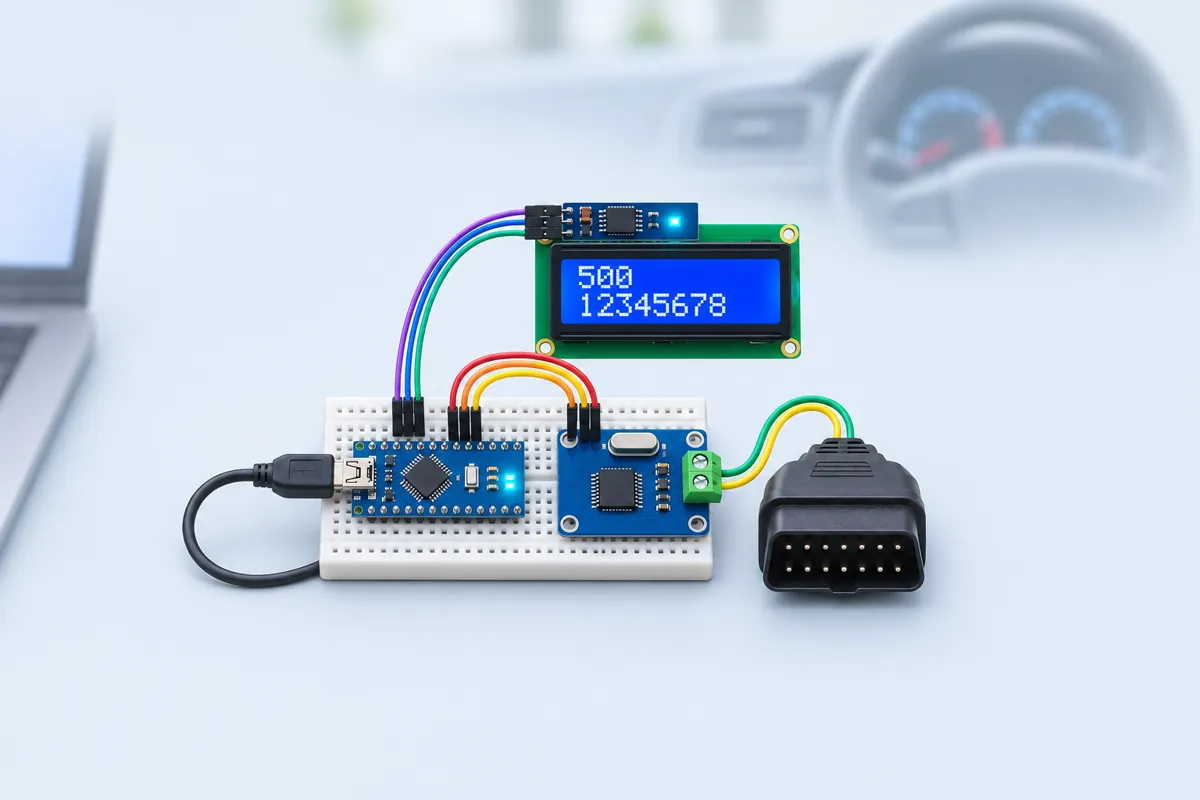
| MCP2515 CAN module with TJA1050 (8 MHz crystal) | 1 | ₹220 | Buy MCP2515 CAN module with TJA1050 (8 MHz crystal) |
| 16×2 LCD with I2C backpack (0x27) | 1 | ₹220 | Buy 16×2 LCD with I2C backpack (0x27) |
| OBD-II male plug with flying leads (or OBD-II to DB9 cable) | 1 | ₹250 | Buy OBD-II male plug with flying leads (or OBD-II to DB9 cable) |
| Laptop with a mini-USB cable (power and logging) | 1 | ₹80 | Buy Laptop with a mini-USB cable (power and logging) |
| Total | ₹1,050 |
Affiliate disclosure: “Buy” links may earn FlashReady a small commission at no extra cost to you. Prices are indicative.
Wiring
| Arduino Nano | Part · pin | Wire | Notes |
|---|---|---|---|
| — | MCP2515 CAN bus module (with TJA1050) · H | — | To OBD-II pin 6 (CAN-H) (not drawn) |
| — | MCP2515 CAN bus module (with TJA1050) · L | — | To OBD-II pin 14 (CAN-L) (not drawn) |
| — | MCP2515 CAN bus module (with TJA1050) · GND | — | To OBD-II pin 5 (signal ground) (not drawn) |
| D10 | MCP2515 CAN bus module (with TJA1050) · CS | purple | |
| D11 | MCP2515 CAN bus module (with TJA1050) · SI | blue | MOSI |
| D12 | MCP2515 CAN bus module (with TJA1050) · SO | green | MISO — 5 V, fine on the Nano |
| D13 | MCP2515 CAN bus module (with TJA1050) · SCK | yellow | |
| D2 | MCP2515 CAN bus module (with TJA1050) · INT | orange | LOW while a received frame waits |
| 5V | MCP2515 CAN bus module (with TJA1050) · VCC | red | The TJA1050 transceiver needs 5 V |
| GND | MCP2515 CAN bus module (with TJA1050) · GND | black | |
| A4 | 16×2 LCD + I2C backpack · SDA | blue | |
| A5 | 16×2 LCD + I2C backpack · SCL | yellow | |
| 5V | 16×2 LCD + I2C backpack · VCC | red | |
| GND | 16×2 LCD + I2C backpack · GND | black |
Board quirks: Listen-only: the MCP2515 is switched to its listen-only mode right after start-up, so it never transmits, never acknowledges a frame and never sends error frames. Even so, only connect to your own vehicle, with the engine off or parked, and don’t drive with loose wires near the pedals. Remove the module’s 120 Ω terminator jumper (J1) before connecting to a car — the car’s bus is already terminated at both ends. Check the crystal on your module: 8.000 MHz is the common one (<code>MCP_8MHZ</code>); 16 MHz modules need <code>MCP_16MHZ</code>, or every bit rate will be wrong. Many newer cars have a gateway behind the OBD port that passes only diagnostic replies, not the normal traffic between modules. Then you’ll see “No CAN traffic” even with the ignition on — that’s the car, not your wiring.
Code
// CAN bus sniffer (listen-only) — Arduino Nano + MCP2515 module (8 MHz crystal) + 16x2 I2C LCD
// MCP2515: CS D10, SI D11, SO D12, SCK D13, INT D2, VCC 5V. LCD: SDA A4, SCL A5, 5V.
// CAN-H / CAN-L go to the car's OBD-II pins 6 / 14, module GND to OBD pin 5 (signal ground).
// The MCP2515 is put in LISTEN-ONLY mode: it never transmits, never acknowledges a frame and
// never sends error frames, so it can't disturb the car. It finds the bit rate by itself
// (500k, 250k, 125k), prints every frame in candump format for SavvyCAN, and shows a summary.
#include <SPI.h>
#include <mcp_can.h>
#include <LiquidCrystal_I2C.h>

constexpr uint8_t CS_PIN = 10, INT_PIN = 2;
constexpr uint8_t CRYSTAL = MCP_8MHZ;  // look at the silver can on your module: 8.000 → MCP_8MHZ, 16.000 → MCP_16MHZ
constexpr uint8_t MAX_IDS = 64;

MCP_CAN can(CS_PIN);
LiquidCrystal_I2C lcd(0x27, 16, 2);
const uint8_t RATES[] = {CAN_500KBPS, CAN_250KBPS, CAN_125KBPS};
const char* const RATE_NAMES[] = {"500k", "250k", "125k"};
int8_t rateIndex = -1;
uint32_t ids[MAX_IDS];
uint8_t idCount = 0;
uint32_t frames = 0, framesThisSecond = 0, dropped = 0;
unsigned long lastSecond = 0;
uint16_t fps = 0;

void status(const __FlashStringHelper* a, const char* b) {
  lcd.clear();
  lcd.print(a);
  lcd.setCursor(0, 1);
  lcd.print(b);
}

// Try each bit rate in listen-only mode until frames arrive.
bool findBitrate() {
  for (uint8_t i = 0; i < sizeof(RATES); i++) {
    if (can.begin(MCP_ANY, RATES[i], CRYSTAL) != CAN_OK) {
      Serial.println(F("MCP2515 not answering — check CS D10, SPI wires, 5V and the crystal setting"));
      status(F("MCP2515 error"), "check wiring");
      return false;
    }
    can.setMode(MCP_LISTENONLY);
    status(F("Listening at"), RATE_NAMES[i]);
    unsigned long t = millis();
    while (millis() - t < 2000) {
      if (!digitalRead(INT_PIN)) {
        rateIndex = i;
        Serial.print(F("# bit rate "));
        Serial.println(RATE_NAMES[i]);
        return true;
      }
    }
  }
  Serial.println(F("# no frames at 500k/250k/125k — ignition on? OBD pins 6/14? terminator jumper off?"));
  status(F("No CAN traffic"), "ignition on?");
  return false;
}

void remember(uint32_t id) {
  for (uint8_t i = 0; i < idCount; i++)
    if (ids[i] == id) return;
  if (idCount < MAX_IDS) ids[idCount++] = id;
}

void setup() {
  Serial.begin(115200);
  pinMode(INT_PIN, INPUT);
  lcd.init();
  lcd.backlight();
  status(F("CAN sniffer"), "listen-only");
  delay(1000);
}

void loop() {
  if (rateIndex < 0) {
    if (!findBitrate()) delay(3000);
    return;
  }
  if (!digitalRead(INT_PIN)) {  // INT goes LOW while a frame waits in the MCP2515
    unsigned long id;
    uint8_t len;
    uint8_t data[8];
    if (can.readMsgBuf(&id, &len, data) == CAN_OK) {
      frames++;
      framesThisSecond++;
      bool ext = id & 0x80000000UL, rtr = id & 0x40000000UL;
      id &= 0x1FFFFFFFUL;
      remember(id);
      if (Serial.availableForWrite() < 40) {  // the USB link can't keep up on a busy bus: skip the line
        dropped++;
      } else {
        char line[48];
        unsigned long ms = millis();
        int n = snprintf(line, sizeof(line), ext ? "(%lu.%03lu) can0 %08lX#" : "(%lu.%03lu) can0 %03lX#", ms / 1000, ms % 1000, id);
        if (rtr) n += snprintf(line + n, sizeof(line) - n, "R");
        else
          for (uint8_t i = 0; i < len && i < 8; i++) n += snprintf(line + n, sizeof(line) - n, "%02X", data[i]);
        Serial.println(line);
      }
    }
  }
  if (millis() - lastSecond >= 1000) {
    lastSecond = millis();
    fps = framesThisSecond;
    framesThisSecond = 0;
    char a[17], b[17];
    snprintf(a, sizeof(a), "%s %u fr/s", RATE_NAMES[rateIndex], fps);
    snprintf(b, sizeof(b), "IDs %u drop %lu", idCount, dropped);
    lcd.clear();
    lcd.print(a);
    lcd.setCursor(0, 1);
    lcd.print(b);
  }
}
// CAN bus sniffer (listen-only) — Arduino Nano + MCP2515 module (8 MHz crystal) + 16x2 I2C LCD
// MCP2515: CS D10, SI D11, SO D12, SCK D13, INT D2, VCC 5V. LCD: SDA A4, SCL A5, 5V.
// CAN-H / CAN-L go to the car's OBD-II pins 6 / 14, module GND to OBD pin 5 (signal ground).
// The MCP2515 is put in LISTEN-ONLY mode: it never transmits, never acknowledges a frame and
// never sends error frames, so it can't disturb the car. It finds the bit rate by itself
// (500k, 250k, 125k), prints every frame in candump format for SavvyCAN, and shows a summary.
#include <SPI.h>
#include <mcp_can.h>
#include <LiquidCrystal_I2C.h>
constexpr uint8_t CS_PIN = 10, INT_PIN = 2;
constexpr uint8_t CRYSTAL = MCP_8MHZ; // look at the silver can on your module: 8.000 → MCP_8MHZ, 16.000 → MCP_16MHZ
constexpr uint8_t MAX_IDS = 64;
MCP_CAN can(CS_PIN);
LiquidCrystal_I2C lcd(0x27, 16, 2);
const uint8_t RATES[] = {CAN_500KBPS, CAN_250KBPS, CAN_125KBPS};
const char* const RATE_NAMES[] = {"500k", "250k", "125k"};
int8_t rateIndex = -1;
uint32_t ids[MAX_IDS];
uint8_t idCount = 0;
uint32_t frames = 0, framesThisSecond = 0, dropped = 0;
unsigned long lastSecond = 0;
uint16_t fps = 0;
void status(const __FlashStringHelper* a, const char* b) {
lcd.clear();
lcd.print(a);
lcd.setCursor(0, 1);
lcd.print(b);
}
// Try each bit rate in listen-only mode until frames arrive.
bool findBitrate() {
for (uint8_t i = 0; i < sizeof(RATES); i++) {
if (can.begin(MCP_ANY, RATES[i], CRYSTAL) != CAN_OK) {
Serial.println(F("MCP2515 not answering — check CS D10, SPI wires, 5V and the crystal setting"));
status(F("MCP2515 error"), "check wiring");
return false;
}
can.setMode(MCP_LISTENONLY);
status(F("Listening at"), RATE_NAMES[i]);
unsigned long t = millis();
while (millis() - t < 2000) {
if (!digitalRead(INT_PIN)) {
rateIndex = i;
Serial.print(F("# bit rate "));
Serial.println(RATE_NAMES[i]);
return true;
}
}
}
Serial.println(F("# no frames at 500k/250k/125k — ignition on? OBD pins 6/14? terminator jumper off?"));
status(F("No CAN traffic"), "ignition on?");
return false;
}
void remember(uint32_t id) {
for (uint8_t i = 0; i < idCount; i++)
if (ids[i] == id) return;
if (idCount < MAX_IDS) ids[idCount++] = id;
}
void setup() {
Serial.begin(115200);
pinMode(INT_PIN, INPUT);
lcd.init();
lcd.backlight();
status(F("CAN sniffer"), "listen-only");
delay(1000);
}
void loop() {
if (rateIndex < 0) {
if (!findBitrate()) delay(3000);
return;
}
if (!digitalRead(INT_PIN)) { // INT goes LOW while a frame waits in the MCP2515
unsigned long id;
uint8_t len;
uint8_t data[8];
if (can.readMsgBuf(&id, &len, data) == CAN_OK) {
frames++;
framesThisSecond++;
bool ext = id & 0x80000000UL, rtr = id & 0x40000000UL;
id &= 0x1FFFFFFFUL;
remember(id);
if (Serial.availableForWrite() < 40) { // the USB link can't keep up on a busy bus: skip the line
dropped++;
} else {
char line[48];
unsigned long ms = millis();
int n = snprintf(line, sizeof(line), ext ? "(%lu.%03lu) can0 %08lX#" : "(%lu.%03lu) can0 %03lX#", ms / 1000, ms % 1000, id);
if (rtr) n += snprintf(line + n, sizeof(line) - n, "R");
else
for (uint8_t i = 0; i < len && i < 8; i++) n += snprintf(line + n, sizeof(line) - n, "%02X", data[i]);
Serial.println(line);
}
}
}
if (millis() - lastSecond >= 1000) {
lastSecond = millis();
fps = framesThisSecond;
framesThisSecond = 0;
char a[17], b[17];
snprintf(a, sizeof(a), "%s %u fr/s", RATE_NAMES[rateIndex], fps);
snprintf(b, sizeof(b), "IDs %u drop %lu", idCount, dropped);
lcd.clear();
lcd.print(a);
lcd.setCursor(0, 1);
lcd.print(b);
}
}Compiled for nano on avr 1.8.8 with mcp_can 1.5.1 · 3 Nov 2026
How it works
Inside a modern car, dozens of computers — engine, ABS, airbags, instrument cluster, body control — talk over a CAN bus: two twisted wires carrying short messages, each with an ID and up to 8 data bytes. Much of it is reachable at the OBD-II port under the dashboard, which most cars sold in India over the last decade have. This sniffer lets you watch that traffic — without ever sending anything.
Why listen-only matters
A normal CAN node acknowledges every frame it receives and sends error frames when it sees a problem. A wrongly configured node can disturb the bus. The MCP2515 has a listen-only mode in which its transmitter is completely silent: no messages, no acknowledgements, no error frames. The sketch switches to it immediately after initialising, before any frame can arrive. Bit-rate detection is done the same way — listen at 500 kbit/s for 2 seconds; if nothing valid arrives, try 250k, then 125k — which is safe because a listen-only node with the wrong rate stays silent.
What you get
- Serial (115200 baud): every frame in candump format, e.g.
(12.345) can0 1A0#0F3C000000000000, which SavvyCAN and the Linux can-utils can import. 11-bit IDs print as 3 hex digits, 29-bit IDs as 8, remote frames end inR. - LCD: the detected bit rate, frames per second, the number of different IDs seen, and how many lines were dropped because USB couldn’t keep up.
A family car at idle typically shows a few hundred frames per second at 500 kbit/s.
How it works
The MCP2515 is a CAN controller on SPI (D10–D13 on the Nano) with a TJA1050 transceiver that drives the two bus wires. When a frame arrives, the module pulls INT (D2) low; the Nano reads it with the mcp_can library, strips the flag bits from the ID, records the ID in a list of up to 64, and prints the line — unless the serial buffer is nearly full, in which case it counts a drop rather than stalling and missing frames.
Connecting to the car
| OBD-II pin | Signal | Module |
|---|---|---|
| 6 | CAN-H | H |
| 14 | CAN-L | L |
| 5 | Signal ground | GND |
Power the Nano from the laptop’s USB, not from the car. Plug in with the ignition off, then switch to “ON” (engine off is fine). Treat this as a learning tool: don’t modify the car’s systems, and remember that what you read is specific to your make and model.
Troubleshooting
“MCP2515 error” on the LCD
The Nano can’t talk to the module over SPI: check CS D10, SI D11, SO D12, SCK D13, and 5 V. Serial shows the library’s own messages too.
“No CAN traffic” with the ignition on
Check CAN-H on OBD pin 6 and CAN-L on pin 14 (not swapped), ground to pin 5, the terminator jumper off and the crystal setting. Pre-2008 Indian cars may use K-line (pin 7) instead of CAN for diagnostics.
The “drop” counter climbs fast
The bus carries more frames than 115200 baud USB can print. The summary on the LCD stays right; for a full log, add an ID filter in the sketch so only the IDs you care about are printed.
Upgrades
- Load the log into SavvyCAN and watch which bytes change when you press the brake or turn the wheel.
- Add a microSD module and log a whole drive, then study it at home.
- Decode a few known OBD-II broadcasts (engine RPM, speed) where your car shares them.