Parts list
| Part | Qty | Approx. | Buy |
|---|---|---|---|
| ESP32-S3-DevKitC-1 (N8 or N16R8) | 1 | ₹650 | Buy ESP32-S3-DevKitC-1 (N8 or N16R8) |
| TM1637 4-digit 7-segment display module | 1 | ₹90 | Buy TM1637 4-digit 7-segment display module |
| Jumper wires (female–female) | 4 | ₹20 | Buy Jumper wires (female–female) |
| 5 V USB adapter + USB-C cable | 1 | ₹150 | Buy 5 V USB adapter + USB-C cable |
| Total | ₹910 |
Affiliate disclosure: “Buy” links may earn FlashReady a small commission at no extra cost to you. Prices are indicative.
Wiring
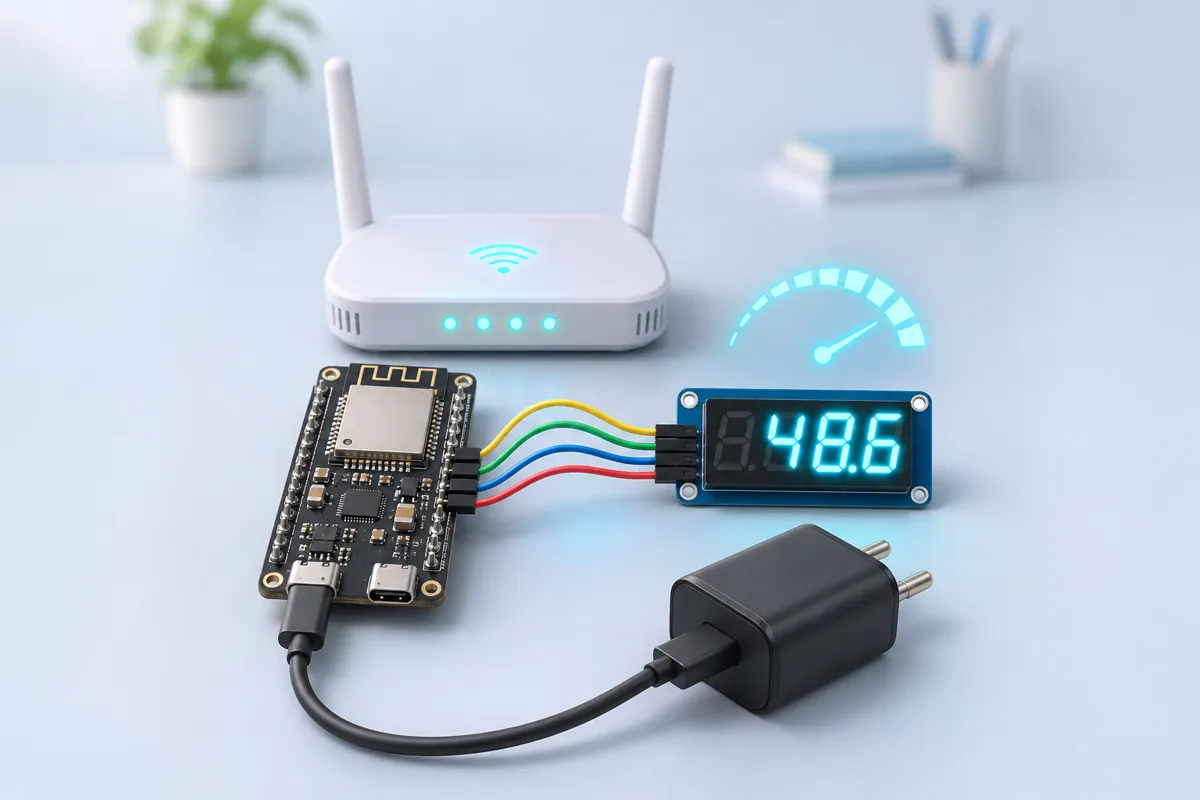
| ESP32-S3-DevKitC-1 | TM1637 4-digit 7-segment display | Wire | Notes |
|---|---|---|---|
| 4 | CLK | yellow | GPIO4 |
| 5 | DIO | blue | GPIO5 |
| 3V3 | VCC | red | Runs at 3.3 V, a little dimmer than at 5 V |
| GND | GND | black |
Board quirks: The ESP32-S3 on 2.4 GHz Wi-Fi with TLS tops out around 15–25 Mbit/s. It can’t confirm a 100 or 300 Mbit/s plan — it shows when the link gets slower than its own ceiling or drops, which is when people actually notice. Each test downloads 5 MB, so a day uses about 240 MB — check your plan has no low data cap. Raise <code>TEST_EVERY_MS</code> to test less often. The default test file is Cloudflare’s public speed-test endpoint. You can point <code>TEST_URL</code> at any large file — including one on a PC on your own network, which then measures only your Wi-Fi. Place it where your phone usually is, not right beside the router: you want to measure what you experience.
Code
// Broadband speed logger — ESP32-S3-DevKitC-1 + TM1637 4-digit display
// TM1637: CLK GPIO4, DIO GPIO5, VCC 3V3. Every 30 minutes it downloads a 5 MB test file,
// shows the speed in Mbit/s on the display and prints a timestamped CSV line, so a week of
// "evening slowdowns" becomes evidence. The ESP32-S3 on 2.4 GHz tops out around 15–25 Mbit/s,
// so it proves slowdowns and outages on any plan, but can't confirm a 300 Mbit/s plan.
#include <WiFi.h>
#include <WiFiClientSecure.h>
#include <HTTPClient.h>
#include <TM1637Display.h>
#include <time.h>
#include "fr_settings.h"

const char* WIFI_SSID = "YOUR_SSID";
const char* WIFI_PASS = "YOUR_PASSWORD";
const char* TEST_URL = "https://speed.cloudflare.com/__down?bytes=5000000";
// Filled in from the FlashReady flasher over USB (kept on the board), or type the values above.
FrSetting SETTINGS[] = {{"wifi_ssid", &WIFI_SSID, true}, {"wifi_pass", &WIFI_PASS, true}, {"test_url", &TEST_URL, false}};

constexpr uint8_t CLK_PIN = 4, DIO_PIN = 5;
constexpr unsigned long TEST_EVERY_MS = 30UL * 60UL * 1000UL;
constexpr unsigned long TEST_TIMEOUT_MS = 30000;
constexpr float SLOW_MBPS = 5.0;  // below this the CSV line says SLOW

TM1637Display display(CLK_PIN, DIO_PIN);
const uint8_t DASHES[] = {SEG_G, SEG_G, SEG_G, SEG_G};
const uint8_t NET[] = {SEG_C | SEG_E | SEG_G, SEG_A | SEG_D | SEG_E | SEG_F | SEG_G, SEG_D | SEG_E | SEG_F | SEG_G, 0};  // "nEt"
unsigned long lastTest = 0;
bool first = true;
uint8_t buf[4096];

// Returns Mbit/s, or -1 if the download failed.
float speedTest(long& bytesOut) {
  WiFiClientSecure tls;
  tls.setInsecure();  // nothing secret is sent; we only time a public test file
  HTTPClient http;
  bytesOut = 0;
  if (!http.begin(tls, TEST_URL)) return -1;
  int code = http.GET();
  if (code != 200) {
    Serial.printf("download -> HTTP %d\n", code);
    http.end();
    return -1;
  }
  long expected = http.getSize();  // -1 if the server doesn't say
  WiFiClient* stream = http.getStreamPtr();
  unsigned long t0 = millis(), last = t0;
  while (http.connected() && (expected < 0 || bytesOut < expected) && millis() - t0 < TEST_TIMEOUT_MS) {
    size_t avail = stream->available();
    if (avail) {
      bytesOut += stream->readBytes(buf, min(avail, sizeof(buf)));
      last = millis();
    } else {
      delay(1);
    }
  }
  http.end();
  unsigned long ms = max(1UL, last - t0);
  return bytesOut > 0 ? bytesOut * 8.0f / ms / 1000.0f : -1;
}

String stamp() {
  time_t now = time(nullptr);
  if (now < 1700000000) return String(millis() / 1000) + "s";
  now += 19800;  // IST
  struct tm t;
  gmtime_r(&now, &t);
  char s[20];
  strftime(s, sizeof(s), "%Y-%m-%d %H:%M", &t);
  return s;
}

void setup() {
  Serial.begin(115200);
  frSettingsBegin(SETTINGS);
  display.setBrightness(5);
  display.setSegments(DASHES);
  if (!*WIFI_SSID) {
    Serial.println("Speed tests off — no Wi-Fi name set. Flash from flashready.in or type it into the code.");
    return;
  }
  WiFi.mode(WIFI_STA);
  WiFi.begin(WIFI_SSID, WIFI_PASS);
  configTime(0, 0, "pool.ntp.org", "time.google.com");
  Serial.println("time_ist,mbps,bytes,rssi_dbm,status");
}

void loop() {
  if (!*WIFI_SSID) return;
  if (!first && millis() - lastTest < TEST_EVERY_MS) {
    delay(200);
    return;
  }
  if (WiFi.status() != WL_CONNECTED) {
    display.setSegments(NET);  // "nEt": no Wi-Fi
    delay(1000);
    return;
  }
  first = false;
  lastTest = millis();
  display.setSegments(DASHES);  // testing…
  long bytes;
  float mbps = speedTest(bytes);
  if (mbps < 0) {
    display.setSegments(DASHES);
    Serial.printf("%s,0,%ld,%d,FAILED\n", stamp().c_str(), bytes, WiFi.RSSI());
    return;
  }
  display.showNumberDec((int)(mbps + 0.5f));  // whole Mbit/s: most TM1637 modules have a colon, not decimal points
  Serial.printf("%s,%.1f,%ld,%d,%s\n", stamp().c_str(), mbps, bytes, WiFi.RSSI(), mbps < SLOW_MBPS ? "SLOW" : "OK");
}
// Broadband speed logger — ESP32-S3-DevKitC-1 + TM1637 4-digit display
// TM1637: CLK GPIO4, DIO GPIO5, VCC 3V3. Every 30 minutes it downloads a 5 MB test file,
// shows the speed in Mbit/s on the display and prints a timestamped CSV line, so a week of
// "evening slowdowns" becomes evidence. The ESP32-S3 on 2.4 GHz tops out around 15–25 Mbit/s,
// so it proves slowdowns and outages on any plan, but can't confirm a 300 Mbit/s plan.
#include <WiFi.h>
#include <WiFiClientSecure.h>
#include <HTTPClient.h>
#include <TM1637Display.h>
#include <time.h>
#include "fr_settings.h"
const char* WIFI_SSID = "YOUR_SSID";
const char* WIFI_PASS = "YOUR_PASSWORD";
const char* TEST_URL = "https://speed.cloudflare.com/__down?bytes=5000000";
// Filled in from the FlashReady flasher over USB (kept on the board), or type the values above.
FrSetting SETTINGS[] = {{"wifi_ssid", &WIFI_SSID, true}, {"wifi_pass", &WIFI_PASS, true}, {"test_url", &TEST_URL, false}};
constexpr uint8_t CLK_PIN = 4, DIO_PIN = 5;
constexpr unsigned long TEST_EVERY_MS = 30UL * 60UL * 1000UL;
constexpr unsigned long TEST_TIMEOUT_MS = 30000;
constexpr float SLOW_MBPS = 5.0; // below this the CSV line says SLOW
TM1637Display display(CLK_PIN, DIO_PIN);
const uint8_t DASHES[] = {SEG_G, SEG_G, SEG_G, SEG_G};
const uint8_t NET[] = {SEG_C | SEG_E | SEG_G, SEG_A | SEG_D | SEG_E | SEG_F | SEG_G, SEG_D | SEG_E | SEG_F | SEG_G, 0}; // "nEt"
unsigned long lastTest = 0;
bool first = true;
uint8_t buf[4096];
// Returns Mbit/s, or -1 if the download failed.
float speedTest(long& bytesOut) {
WiFiClientSecure tls;
tls.setInsecure(); // nothing secret is sent; we only time a public test file
HTTPClient http;
bytesOut = 0;
if (!http.begin(tls, TEST_URL)) return -1;
int code = http.GET();
if (code != 200) {
Serial.printf("download -> HTTP %d\n", code);
http.end();
return -1;
}
long expected = http.getSize(); // -1 if the server doesn't say
WiFiClient* stream = http.getStreamPtr();
unsigned long t0 = millis(), last = t0;
while (http.connected() && (expected < 0 || bytesOut < expected) && millis() - t0 < TEST_TIMEOUT_MS) {
size_t avail = stream->available();
if (avail) {
bytesOut += stream->readBytes(buf, min(avail, sizeof(buf)));
last = millis();
} else {
delay(1);
}
}
http.end();
unsigned long ms = max(1UL, last - t0);
return bytesOut > 0 ? bytesOut * 8.0f / ms / 1000.0f : -1;
}
String stamp() {
time_t now = time(nullptr);
if (now < 1700000000) return String(millis() / 1000) + "s";
now += 19800; // IST
struct tm t;
gmtime_r(&now, &t);
char s[20];
strftime(s, sizeof(s), "%Y-%m-%d %H:%M", &t);
return s;
}
void setup() {
Serial.begin(115200);
frSettingsBegin(SETTINGS);
display.setBrightness(5);
display.setSegments(DASHES);
if (!*WIFI_SSID) {
Serial.println("Speed tests off — no Wi-Fi name set. Flash from flashready.in or type it into the code.");
return;
}
WiFi.mode(WIFI_STA);
WiFi.begin(WIFI_SSID, WIFI_PASS);
configTime(0, 0, "pool.ntp.org", "time.google.com");
Serial.println("time_ist,mbps,bytes,rssi_dbm,status");
}
void loop() {
if (!*WIFI_SSID) return;
if (!first && millis() - lastTest < TEST_EVERY_MS) {
delay(200);
return;
}
if (WiFi.status() != WL_CONNECTED) {
display.setSegments(NET); // "nEt": no Wi-Fi
delay(1000);
return;
}
first = false;
lastTest = millis();
display.setSegments(DASHES); // testing…
long bytes;
float mbps = speedTest(bytes);
if (mbps < 0) {
display.setSegments(DASHES);
Serial.printf("%s,0,%ld,%d,FAILED\n", stamp().c_str(), bytes, WiFi.RSSI());
return;
}
display.showNumberDec((int)(mbps + 0.5f)); // whole Mbit/s: most TM1637 modules have a colon, not decimal points
Serial.printf("%s,%.1f,%ld,%d,%s\n", stamp().c_str(), mbps, bytes, WiFi.RSSI(), mbps < SLOW_MBPS ? "SLOW" : "OK");
}Arduino IDE: keep fr_settings.h in the same folder as the .ino (tab menu → New Tab, same name). Flashing from this page doesn’t need it.
// fr_settings.h — FlashReady on-board settings (Wi-Fi name, phone number, ...) over USB.
//
// Why: the pre-built file on flashready.in is the same for everyone, so your own settings
// can't be inside it. Instead the board asks for them over USB serial and keeps them in
// its EEPROM. If you use Arduino IDE you can still type them into the constants in the
// sketch — this file then changes nothing except a 2-second pause at start-up.
//
// The protocol, in plain words (one text line each way, ending in \n, at 115200 baud):
//  1. Right after Serial.begin(115200) the board prints
//       FR?SETTINGS v1 keys=wifi_ssid,wifi_pass missing=wifi_pass
//     "missing" lists the required settings that still have no real value.
//  2. If nothing is missing it listens for 2 seconds and then carries on. If something is
//     missing it keeps listening, printing the line again every 2 seconds, for up to
//     30 seconds; then it carries on anyway and the sketch skips whatever needs the
//     missing value (an alarm still sounds, it just can't send the SMS).
//  3. The flasher answers   FR!SET wifi_ssid=My%20Home&wifi_pass=secret
//     (values URL-encoded). The board stores them and answers FR!OK, then carries on with
//     the new values. Errors: FR!ERR unknown <key>, FR!ERR long <key> (nothing is stored).
//     A key that is left out keeps its stored value; "key=" (empty) removes it.
//     "FR!SET" with nothing after it means "carry on now": FR!OK, nothing is stored.
//  4. FR!CLEAR wipes everything that was stored, answers FR!OK and keeps listening.
//  Other lines are ignored.
//
// A stored value wins over the constant in the sketch. A constant that is still a
// placeholder ("YOUR_SSID", "your-wifi", "+91XXXXXXXXXX") or empty counts as not set.
//
// EEPROM block at FR_SETTINGS_ADDR: 'F' 'R' 0x01, length (uint16, low byte first), then
// "key=value\n" lines. Uses FR_SETTINGS_SIZE bytes; move FR_SETTINGS_ADDR with a #define
// before the #include if your sketch uses EEPROM for something else.
//
// Use in a sketch:
//   const char* WIFI_SSID = "YOUR_SSID";
//   FrSetting SETTINGS[] = { {"wifi_ssid", &WIFI_SSID, true} };   // key, constant, required
//   void setup() { Serial.begin(115200); frSettingsBegin(SETTINGS); ... WiFi.begin(WIFI_SSID, ...); }
// After frSettingsBegin() each constant points at the value to use ("" if none is set).
#pragma once
#include <Arduino.h>
#include <EEPROM.h>
#include <string.h>

#ifndef FR_SETTINGS_ADDR
#define FR_SETTINGS_ADDR 0
#endif
#ifndef FR_SETTINGS_SIZE
#if defined(__AVR__)
#define FR_SETTINGS_SIZE 96  // 2 KB of RAM on an Uno: a phone number fits easily
#else
#define FR_SETTINGS_SIZE 512
#endif
#endif
#ifndef FR_LINE_MAX
#if defined(__AVR__)
#define FR_LINE_MAX 128
#else
#define FR_LINE_MAX 1024
#endif
#endif
#define FR_MAX_KEYS 8
#define FR_WAIT_MAX_MS 30000UL  // never wait longer than this for missing settings
#define FR_DATA_MAX (FR_SETTINGS_SIZE - 5)

struct FrSetting {
  const char* key;     // [a-z0-9_], as in settings.json
  const char** value;  // the sketch's constant; replaced by the value to use
  bool required;
};

// Stored settings in RAM as "key=value\0key=value\0" (only non-empty values).
static char frData[FR_DATA_MAX + 1];
static uint16_t frLen = 0;

static inline void frEepromBegin() {
#if defined(ESP32) || defined(ESP8266)
  static bool started = false;
  if (!started) EEPROM.begin(FR_SETTINGS_ADDR + FR_SETTINGS_SIZE);
  started = true;
#endif
}

static inline void frLoad() {
  frEepromBegin();
  frLen = 0;
  frData[0] = 0;
  if (EEPROM.read(FR_SETTINGS_ADDR) != 'F' || EEPROM.read(FR_SETTINGS_ADDR + 1) != 'R' || EEPROM.read(FR_SETTINGS_ADDR + 2) != 1) return;
  uint16_t n = EEPROM.read(FR_SETTINGS_ADDR + 3) | (EEPROM.read(FR_SETTINGS_ADDR + 4) << 8);
  if (n > FR_DATA_MAX) return;
  for (uint16_t i = 0; i < n; i++) {
    char c = EEPROM.read(FR_SETTINGS_ADDR + 5 + i);
    frData[i] = c == '\n' ? '\0' : c;
  }
  frData[n] = 0;
  frLen = n;
}

static inline void frPut(int addr, uint8_t b) {
#if defined(__AVR__)
  EEPROM.update(addr, b);
#else
  EEPROM.write(addr, b);
#endif
}

static inline void frSave() {
  frEepromBegin();
  frPut(FR_SETTINGS_ADDR, 'F');
  frPut(FR_SETTINGS_ADDR + 1, 'R');
  frPut(FR_SETTINGS_ADDR + 2, 1);
  frPut(FR_SETTINGS_ADDR + 3, frLen & 0xFF);
  frPut(FR_SETTINGS_ADDR + 4, frLen >> 8);
  for (uint16_t i = 0; i < frLen; i++) frPut(FR_SETTINGS_ADDR + 5 + i, frData[i] ? frData[i] : '\n');
#if defined(ESP32) || defined(ESP8266)
  EEPROM.commit();
#endif
}

// The stored value for key, or nullptr.
static inline const char* frStored(const char* key) {
  size_t kl = strlen(key);
  for (uint16_t i = 0; i < frLen; i += strlen(frData + i) + 1) {
    if (strncmp(frData + i, key, kl) == 0 && frData[i + kl] == '=') return frData + i + kl + 1;
  }
  return nullptr;
}

// Empty, "your_…" / "YOUR-…" / "your …", or a "+91XXXX…" phone number.
static inline bool frIsPlaceholder(const char* v) {
  if (!v || !*v) return true;
  if (strncasecmp(v, "your", 4) == 0 && (v[4] == '_' || v[4] == '-' || v[4] == ' ')) return true;
  return v[0] == '+' && strstr(v, "XXXX") != nullptr;
}

// The stored value for key, else the fallback constant; "" if that is a placeholder.
static inline const char* frSettingsGet(const char* key, const char* fallback) {
  const char* v = frStored(key);
  if (!v) v = fallback;
  return frIsPlaceholder(v) ? "" : v;
}

static inline bool frIsMissing(const FrSetting& s) {
  return s.required && !*frSettingsGet(s.key, *s.value);
}

static inline void frRequest(FrSetting* s, uint8_t n) {
  Serial.print(F("FR?SETTINGS v1 keys="));
  for (uint8_t i = 0; i < n; i++) {
    if (i) Serial.print(',');
    Serial.print(s[i].key);
  }
  Serial.print(F(" missing="));
  bool first = true;
  for (uint8_t i = 0; i < n; i++) {
    if (!frIsMissing(s[i])) continue;
    if (!first) Serial.print(',');
    Serial.print(s[i].key);
    first = false;
  }
  Serial.print('\n');
}

static inline void frReply(const __FlashStringHelper* what, const char* key) {
  Serial.print(what);
  Serial.print(key);
  Serial.print('\n');
}

static inline int8_t frHex(char c) {
  if (c >= '0' && c <= '9') return c - '0';
  c |= 0x20;
  return (c >= 'a' && c <= 'f') ? c - 'a' + 10 : -1;
}

// Percent-decodes in place. Drops NUL, CR and LF: they can't be stored.
static inline void frDecode(char* s) {
  char* o = s;
  for (; *s; s++) {
    char c = *s;
    if (c == '%' && frHex(s[1]) >= 0 && frHex(s[2]) >= 0) {
      c = (char)(frHex(s[1]) << 4 | frHex(s[2]));
      s += 2;
    }
    if (c != '\0' && c != '\n' && c != '\r') *o++ = c;
  }
  *o = 0;
}

// "k1=v1&k2=v2" (cut short if the line overflowed). Saves and returns true, or replies with an error.
static inline bool frSet(FrSetting* s, uint8_t n, char* p, bool overflow) {
  const char* upd[FR_MAX_KEYS] = {};
  while (*p) {
    char* amp = strchr(p, '&');
    bool last = !amp;
    if (amp) *amp = 0;
    char* eq = strchr(p, '=');
    if (eq) *eq = 0;
    if (*p) {
      if (last && overflow) {
        frReply(F("FR!ERR long "), p);
        return false;
      }
      uint8_t i = 0;
      while (i < n && strcmp(s[i].key, p) != 0) i++;
      if (i == n) {
        frReply(F("FR!ERR unknown "), p);
        return false;
      }
      char* v = eq ? eq + 1 : p + strlen(p);  // "key" alone = "key="
      frDecode(v);
      upd[i] = v;
    }
    if (last) break;
    p = amp + 1;
  }
  // Build the new block: for each key, the new value or the one already stored.
  char next[FR_DATA_MAX + 1];
  uint16_t len = 0;
  for (uint8_t i = 0; i < n; i++) {
    const char* v = upd[i] ? upd[i] : frStored(s[i].key);
    if (!v || !*v) continue;
    size_t kl = strlen(s[i].key), vl = strlen(v);
    if (len + kl + vl + 2 > FR_DATA_MAX) {
      frReply(F("FR!ERR long "), s[i].key);
      return false;
    }
    memcpy(next + len, s[i].key, kl);
    next[len + kl] = '=';
    memcpy(next + len + kl + 1, v, vl + 1);
    len += kl + vl + 2;
  }
  memcpy(frData, next, len);
  frData[len] = 0;
  frLen = len;
  frSave();
  return true;
}

// Handles one received line. Returns true once settings were saved (boot carries on).
static inline bool frCommand(FrSetting* s, uint8_t n, char* line, bool overflow) {
  if (strcmp(line, "FR!CLEAR") == 0) {
    frLen = 0;
    frData[0] = 0;
    frSave();
    Serial.print(F("FR!OK\n"));
    return false;
  }
  if (strncmp(line, "FR!SET", 6) != 0 || (line[6] != ' ' && line[6] != 0)) return false;  // not for us
  char* p = line + 6;
  while (*p == ' ') p++;
  if (*p && !frSet(s, n, p, overflow)) return false;  // empty FR!SET = carry on, store nothing
  Serial.print(F("FR!OK\n"));
  return true;
}

// Call right after Serial.begin(115200). Prints the request, waits as described at the top
// (30 s at most), then points every constant in the list at the value to use ("" = not set).
static inline void frSettingsBegin(FrSetting* s, uint8_t n) {
  frLoad();
  char line[FR_LINE_MAX];
  uint16_t len = 0;
  bool overflow = false;
  frRequest(s, n);
  unsigned long start = millis(), quietSince = start;
  while (millis() - start < FR_WAIT_MAX_MS) {
    int c = Serial.read();
    if (c >= 0) {
      quietSince = millis();
      if (c == '\r') continue;
      if (c != '\n') {
        if (len < FR_LINE_MAX - 1) line[len++] = (char)c;
        else overflow = true;
        continue;
      }
      line[len] = 0;
      bool saved = frCommand(s, n, line, overflow);
      len = 0;
      overflow = false;
      if (saved) break;
      continue;
    }
    if (millis() - quietSince < 2000) {
      delay(1);  // also keeps the ESP8266 watchdog fed
      continue;
    }
    len = 0;  // drop half a line
    overflow = false;
    bool missing = false;
    for (uint8_t i = 0; i < n; i++) missing |= frIsMissing(s[i]);
    if (!missing) break;
    frRequest(s, n);
    quietSince = millis();
  }
  for (uint8_t i = 0; i < n; i++) *s[i].value = frSettingsGet(s[i].key, *s[i].value);
}

template <size_t N>
static inline void frSettingsBegin(FrSetting (&s)[N]) {
  static_assert(N <= FR_MAX_KEYS, "fr_settings.h: at most FR_MAX_KEYS settings");
  frSettingsBegin(s, (uint8_t)N);
}
// fr_settings.h — FlashReady on-board settings (Wi-Fi name, phone number, ...) over USB.
//
// Why: the pre-built file on flashready.in is the same for everyone, so your own settings
// can't be inside it. Instead the board asks for them over USB serial and keeps them in
// its EEPROM. If you use Arduino IDE you can still type them into the constants in the
// sketch — this file then changes nothing except a 2-second pause at start-up.
//
// The protocol, in plain words (one text line each way, ending in \n, at 115200 baud):
// 1. Right after Serial.begin(115200) the board prints
// FR?SETTINGS v1 keys=wifi_ssid,wifi_pass missing=wifi_pass
// "missing" lists the required settings that still have no real value.
// 2. If nothing is missing it listens for 2 seconds and then carries on. If something is
// missing it keeps listening, printing the line again every 2 seconds, for up to
// 30 seconds; then it carries on anyway and the sketch skips whatever needs the
// missing value (an alarm still sounds, it just can't send the SMS).
// 3. The flasher answers FR!SET wifi_ssid=My%20Home&wifi_pass=secret
// (values URL-encoded). The board stores them and answers FR!OK, then carries on with
// the new values. Errors: FR!ERR unknown <key>, FR!ERR long <key> (nothing is stored).
// A key that is left out keeps its stored value; "key=" (empty) removes it.
// "FR!SET" with nothing after it means "carry on now": FR!OK, nothing is stored.
// 4. FR!CLEAR wipes everything that was stored, answers FR!OK and keeps listening.
// Other lines are ignored.
//
// A stored value wins over the constant in the sketch. A constant that is still a
// placeholder ("YOUR_SSID", "your-wifi", "+91XXXXXXXXXX") or empty counts as not set.
//
// EEPROM block at FR_SETTINGS_ADDR: 'F' 'R' 0x01, length (uint16, low byte first), then
// "key=value\n" lines. Uses FR_SETTINGS_SIZE bytes; move FR_SETTINGS_ADDR with a #define
// before the #include if your sketch uses EEPROM for something else.
//
// Use in a sketch:
// const char* WIFI_SSID = "YOUR_SSID";
// FrSetting SETTINGS[] = { {"wifi_ssid", &WIFI_SSID, true} }; // key, constant, required
// void setup() { Serial.begin(115200); frSettingsBegin(SETTINGS); ... WiFi.begin(WIFI_SSID, ...); }
// After frSettingsBegin() each constant points at the value to use ("" if none is set).
#pragma once
#include <Arduino.h>
#include <EEPROM.h>
#include <string.h>
#ifndef FR_SETTINGS_ADDR
#define FR_SETTINGS_ADDR 0
#endif
#ifndef FR_SETTINGS_SIZE
#if defined(__AVR__)
#define FR_SETTINGS_SIZE 96 // 2 KB of RAM on an Uno: a phone number fits easily
#else
#define FR_SETTINGS_SIZE 512
#endif
#endif
#ifndef FR_LINE_MAX
#if defined(__AVR__)
#define FR_LINE_MAX 128
#else
#define FR_LINE_MAX 1024
#endif
#endif
#define FR_MAX_KEYS 8
#define FR_WAIT_MAX_MS 30000UL // never wait longer than this for missing settings
#define FR_DATA_MAX (FR_SETTINGS_SIZE - 5)
struct FrSetting {
const char* key; // [a-z0-9_], as in settings.json
const char** value; // the sketch's constant; replaced by the value to use
bool required;
};
// Stored settings in RAM as "key=value\0key=value\0" (only non-empty values).
static char frData[FR_DATA_MAX + 1];
static uint16_t frLen = 0;
static inline void frEepromBegin() {
#if defined(ESP32) || defined(ESP8266)
static bool started = false;
if (!started) EEPROM.begin(FR_SETTINGS_ADDR + FR_SETTINGS_SIZE);
started = true;
#endif
}
static inline void frLoad() {
frEepromBegin();
frLen = 0;
frData[0] = 0;
if (EEPROM.read(FR_SETTINGS_ADDR) != 'F' || EEPROM.read(FR_SETTINGS_ADDR + 1) != 'R' || EEPROM.read(FR_SETTINGS_ADDR + 2) != 1) return;
uint16_t n = EEPROM.read(FR_SETTINGS_ADDR + 3) | (EEPROM.read(FR_SETTINGS_ADDR + 4) << 8);
if (n > FR_DATA_MAX) return;
for (uint16_t i = 0; i < n; i++) {
char c = EEPROM.read(FR_SETTINGS_ADDR + 5 + i);
frData[i] = c == '\n' ? '\0' : c;
}
frData[n] = 0;
frLen = n;
}
static inline void frPut(int addr, uint8_t b) {
#if defined(__AVR__)
EEPROM.update(addr, b);
#else
EEPROM.write(addr, b);
#endif
}
static inline void frSave() {
frEepromBegin();
frPut(FR_SETTINGS_ADDR, 'F');
frPut(FR_SETTINGS_ADDR + 1, 'R');
frPut(FR_SETTINGS_ADDR + 2, 1);
frPut(FR_SETTINGS_ADDR + 3, frLen & 0xFF);
frPut(FR_SETTINGS_ADDR + 4, frLen >> 8);
for (uint16_t i = 0; i < frLen; i++) frPut(FR_SETTINGS_ADDR + 5 + i, frData[i] ? frData[i] : '\n');
#if defined(ESP32) || defined(ESP8266)
EEPROM.commit();
#endif
}
// The stored value for key, or nullptr.
static inline const char* frStored(const char* key) {
size_t kl = strlen(key);
for (uint16_t i = 0; i < frLen; i += strlen(frData + i) + 1) {
if (strncmp(frData + i, key, kl) == 0 && frData[i + kl] == '=') return frData + i + kl + 1;
}
return nullptr;
}
// Empty, "your_…" / "YOUR-…" / "your …", or a "+91XXXX…" phone number.
static inline bool frIsPlaceholder(const char* v) {
if (!v || !*v) return true;
if (strncasecmp(v, "your", 4) == 0 && (v[4] == '_' || v[4] == '-' || v[4] == ' ')) return true;
return v[0] == '+' && strstr(v, "XXXX") != nullptr;
}
// The stored value for key, else the fallback constant; "" if that is a placeholder.
static inline const char* frSettingsGet(const char* key, const char* fallback) {
const char* v = frStored(key);
if (!v) v = fallback;
return frIsPlaceholder(v) ? "" : v;
}
static inline bool frIsMissing(const FrSetting& s) {
return s.required && !*frSettingsGet(s.key, *s.value);
}
static inline void frRequest(FrSetting* s, uint8_t n) {
Serial.print(F("FR?SETTINGS v1 keys="));
for (uint8_t i = 0; i < n; i++) {
if (i) Serial.print(',');
Serial.print(s[i].key);
}
Serial.print(F(" missing="));
bool first = true;
for (uint8_t i = 0; i < n; i++) {
if (!frIsMissing(s[i])) continue;
if (!first) Serial.print(',');
Serial.print(s[i].key);
first = false;
}
Serial.print('\n');
}
static inline void frReply(const __FlashStringHelper* what, const char* key) {
Serial.print(what);
Serial.print(key);
Serial.print('\n');
}
static inline int8_t frHex(char c) {
if (c >= '0' && c <= '9') return c - '0';
c |= 0x20;
return (c >= 'a' && c <= 'f') ? c - 'a' + 10 : -1;
}
// Percent-decodes in place. Drops NUL, CR and LF: they can't be stored.
static inline void frDecode(char* s) {
char* o = s;
for (; *s; s++) {
char c = *s;
if (c == '%' && frHex(s[1]) >= 0 && frHex(s[2]) >= 0) {
c = (char)(frHex(s[1]) << 4 | frHex(s[2]));
s += 2;
}
if (c != '\0' && c != '\n' && c != '\r') *o++ = c;
}
*o = 0;
}
// "k1=v1&k2=v2" (cut short if the line overflowed). Saves and returns true, or replies with an error.
static inline bool frSet(FrSetting* s, uint8_t n, char* p, bool overflow) {
const char* upd[FR_MAX_KEYS] = {};
while (*p) {
char* amp = strchr(p, '&');
bool last = !amp;
if (amp) *amp = 0;
char* eq = strchr(p, '=');
if (eq) *eq = 0;
if (*p) {
if (last && overflow) {
frReply(F("FR!ERR long "), p);
return false;
}
uint8_t i = 0;
while (i < n && strcmp(s[i].key, p) != 0) i++;
if (i == n) {
frReply(F("FR!ERR unknown "), p);
return false;
}
char* v = eq ? eq + 1 : p + strlen(p); // "key" alone = "key="
frDecode(v);
upd[i] = v;
}
if (last) break;
p = amp + 1;
}
// Build the new block: for each key, the new value or the one already stored.
char next[FR_DATA_MAX + 1];
uint16_t len = 0;
for (uint8_t i = 0; i < n; i++) {
const char* v = upd[i] ? upd[i] : frStored(s[i].key);
if (!v || !*v) continue;
size_t kl = strlen(s[i].key), vl = strlen(v);
if (len + kl + vl + 2 > FR_DATA_MAX) {
frReply(F("FR!ERR long "), s[i].key);
return false;
}
memcpy(next + len, s[i].key, kl);
next[len + kl] = '=';
memcpy(next + len + kl + 1, v, vl + 1);
len += kl + vl + 2;
}
memcpy(frData, next, len);
frData[len] = 0;
frLen = len;
frSave();
return true;
}
// Handles one received line. Returns true once settings were saved (boot carries on).
static inline bool frCommand(FrSetting* s, uint8_t n, char* line, bool overflow) {
if (strcmp(line, "FR!CLEAR") == 0) {
frLen = 0;
frData[0] = 0;
frSave();
Serial.print(F("FR!OK\n"));
return false;
}
if (strncmp(line, "FR!SET", 6) != 0 || (line[6] != ' ' && line[6] != 0)) return false; // not for us
char* p = line + 6;
while (*p == ' ') p++;
if (*p && !frSet(s, n, p, overflow)) return false; // empty FR!SET = carry on, store nothing
Serial.print(F("FR!OK\n"));
return true;
}
// Call right after Serial.begin(115200). Prints the request, waits as described at the top
// (30 s at most), then points every constant in the list at the value to use ("" = not set).
static inline void frSettingsBegin(FrSetting* s, uint8_t n) {
frLoad();
char line[FR_LINE_MAX];
uint16_t len = 0;
bool overflow = false;
frRequest(s, n);
unsigned long start = millis(), quietSince = start;
while (millis() - start < FR_WAIT_MAX_MS) {
int c = Serial.read();
if (c >= 0) {
quietSince = millis();
if (c == '\r') continue;
if (c != '\n') {
if (len < FR_LINE_MAX - 1) line[len++] = (char)c;
else overflow = true;
continue;
}
line[len] = 0;
bool saved = frCommand(s, n, line, overflow);
len = 0;
overflow = false;
if (saved) break;
continue;
}
if (millis() - quietSince < 2000) {
delay(1); // also keeps the ESP8266 watchdog fed
continue;
}
len = 0; // drop half a line
overflow = false;
bool missing = false;
for (uint8_t i = 0; i < n; i++) missing |= frIsMissing(s[i]);
if (!missing) break;
frRequest(s, n);
quietSince = millis();
}
for (uint8_t i = 0; i < n; i++) *s[i].value = frSettingsGet(s[i].key, *s[i].value);
}
template <size_t N>
static inline void frSettingsBegin(FrSetting (&s)[N]) {
static_assert(N <= FR_MAX_KEYS, "fr_settings.h: at most FR_MAX_KEYS settings");
frSettingsBegin(s, (uint8_t)N);
}Compiled for s3devkitc on esp32 3.3.12 with TM1637 1.2.0 · 3 Nov 2026
How it works
“The internet is slow every evening” is hard to prove on a call with customer care. This logger runs a small speed test every half hour, round the clock, and keeps the receipts: a timestamped CSV line with the speed, the bytes received, the Wi-Fi signal and OK, SLOW or FAILED.
How it works
After joining Wi-Fi and getting the time from NTP, the ESP32-S3 opens an HTTPS connection to a test URL that returns a 5 MB file (by default speed.cloudflare.com/__down?bytes=5000000). It reads the stream into a 4 KB buffer as fast as it arrives, notes when the last byte came, and divides:
speed (Mbit/s) = bytes × 8 ÷ milliseconds ÷ 1000
The whole number of Mbit/s goes to the TM1637 display (four dashes while testing, nEt with no Wi-Fi), and the line goes to Serial:
2026-11-03 21:30,6.4,5000000,-58,OK
The connection uses TLS without certificate checking — no secrets are sent, and a spoofed server could only make the test look slower.
What to look for
Leave it running for a week, then copy the Serial log into a spreadsheet:
- Steady numbers with a dip every evening (8–11 pm): congestion on the ISP’s side, common on cable and smaller local ISPs. That’s the complaint.
- FAILED rows in clusters: outages. Note the times; ISPs credit outage hours when you can show them.
- Low numbers at all hours with a weak RSSI (below −70 dBm): the problem is your Wi-Fi, not the ISP. Move the logger, or the router, and test again.
Why these parts
The S3 has a faster CPU and more RAM than the original ESP32, which helps TLS throughput a little, and its native USB makes it easy to power and read from a laptop. A TM1637 display costs less than ₹100 and is readable from across the room; it runs fine at 3.3 V on two GPIOs. Most of these modules have a colon in the middle but no decimal points, so the sketch shows whole Mbit/s and the CSV keeps one decimal.
Troubleshooting
The display shows “nEt”
The board isn’t on Wi-Fi: wrong name/password, or the router is 5 GHz only.
Every test says FAILED
Open the Serial Monitor: “HTTP -1” means no internet or DNS; another code means the test URL changed or is blocked by a filter. Try opening the URL in a browser.
Speeds are much lower than my phone’s speed-test app
Expected — see the first note. Compare the logger with itself over time: the pattern (good mornings, poor evenings, outages) is the evidence.
Upgrades
- Add the RTC-free NTP clock to the display between tests.
- Push the CSV to Google Sheets so a month of results builds a graph by itself.
- Run an upload test too (HTTP POST of a few MB) — upload often suffers first on DSL and cable.