Parts list
| Part | Qty | Approx. | Buy |
|---|---|---|---|
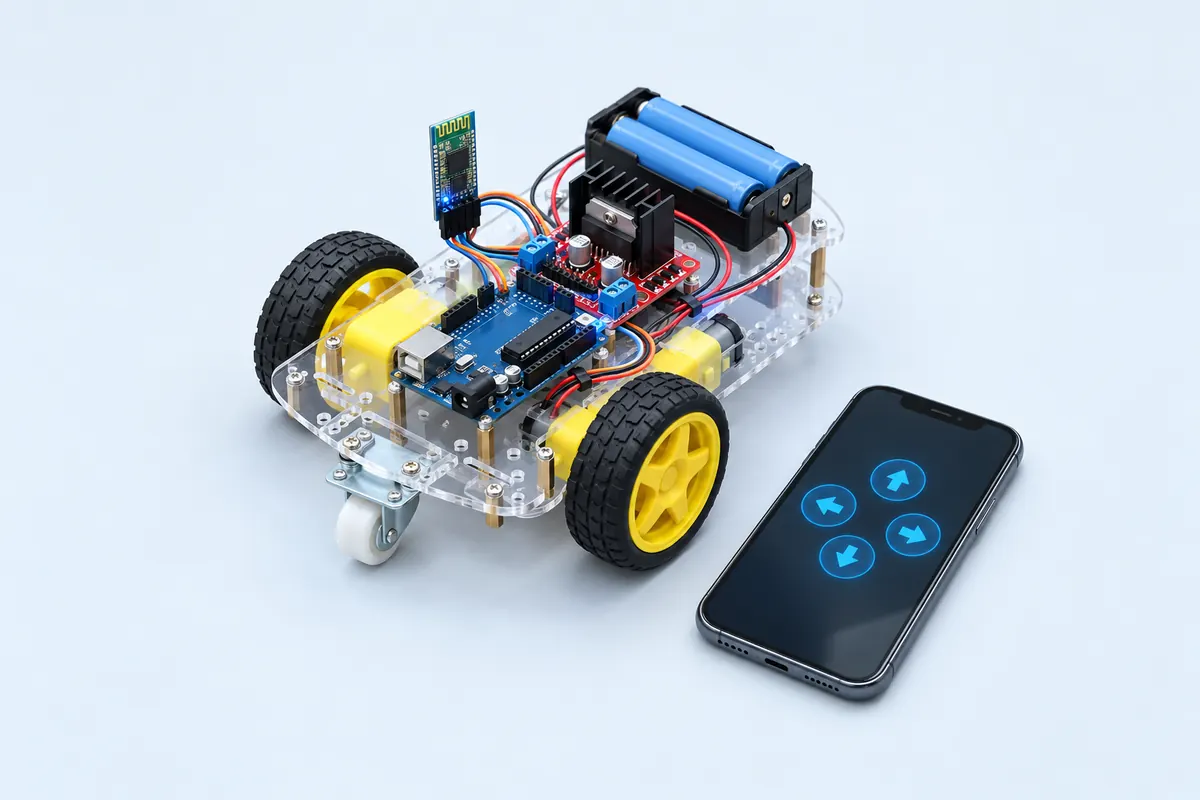
| Arduino Uno R3 (compatible) | 1 | ₹450 | Buy Arduino Uno R3 (compatible) |
| L298N dual motor driver | 1 | ₹150 | Buy L298N dual motor driver |
| 2WD robot chassis kit with 2 BO gear motors and wheels | 1 | ₹450 | Buy 2WD robot chassis kit with 2 BO gear motors and wheels |
| 2× 18650 Li-ion cells + holder with switch (7.4 V) | 1 | ₹350 | Buy 2× 18650 Li-ion cells + holder with switch (7.4 V) |
| Jumper wires | 1 | ₹40 | Buy Jumper wires |
| HC-05 Bluetooth module | 1 | ₹280 | Buy HC-05 Bluetooth module |
| 1 kΩ + 2 kΩ resistors | 1 | ₹4 | Buy 1 kΩ + 2 kΩ resistors |
| Total | ₹1,724 |
Affiliate disclosure: “Buy” links may earn FlashReady a small commission at no extra cost to you. Prices are indicative.
Wiring
| Arduino Uno R3 | Part · pin | Wire | Notes |
|---|---|---|---|
| — | L298N dual H-bridge motor driver · OUT1 | — | To Left motor (+) (not drawn) |
| — | L298N dual H-bridge motor driver · OUT2 | — | To Left motor (−) (not drawn) |
| — | L298N dual H-bridge motor driver · OUT3 | — | To Right motor (+) (not drawn) |
| — | L298N dual H-bridge motor driver · OUT4 | — | To Right motor (−) (not drawn) |
| 5V | HC-05 Bluetooth serial module · VCC | red | |
| GND | HC-05 Bluetooth serial module · GND | black | |
| D10 | HC-05 Bluetooth serial module · TXD | yellow | HC-05 TXD → Uno RX (SoftwareSerial) |
| D11 | HC-05 Bluetooth serial module · RXD | green | Via 1 kΩ / 2 kΩ divider — Uno TX is 5 V; the HC-05 RXD is 3.3 V |
| D5 | L298N dual H-bridge motor driver · ENA | orange | PWM speed, left motor (remove the ENA jumper) |
| A0 | L298N dual H-bridge motor driver · IN1 | yellow | |
| A1 | L298N dual H-bridge motor driver · IN2 | green | |
| D6 | L298N dual H-bridge motor driver · ENB | purple | PWM speed, right motor (remove the ENB jumper) |
| A2 | L298N dual H-bridge motor driver · IN3 | blue | |
| A3 | L298N dual H-bridge motor driver · IN4 | cyan | |
| 5V | L298N dual H-bridge motor driver · 5V | red | L298N’s regulator feeds the Uno’s 5V pin (5V-EN jumper on, battery ≤ 12 V); battery + to the 12V terminal |
| GND | L298N dual H-bridge motor driver · GND | black | Common ground: battery −, L298N and Uno |
| 2× 18650 Li-ion pack (7.4 V) · + | L298N dual H-bridge motor driver · 12V | red | Through the battery holder’s switch. The L298N drops about 2 V, so the motors see ~5.4 V |
| 2× 18650 Li-ion pack (7.4 V) · - | L298N dual H-bridge motor driver · GND | black | Battery −, L298N GND and Uno GND all join here |
Board quirks: The L298N loses about 2 V inside, so a 7.4 V pack gives the motors roughly 5.4 V — that’s normal. Disconnect the HC-05 from D0/D1 if you ever wire it there — it blocks uploads. This build uses SoftwareSerial on D10/D11 so uploads always work. Li-ion 18650 cells can catch fire if shorted or over-discharged: use a holder with a switch, protected cells, a proper Li-ion charger, and never leave the car charging unattended.
Code
// Bluetooth RC car — Arduino Uno + HC-05 + L298N + 2 DC gear motors.
// Drive from an Android "Bluetooth RC car" app that sends F, B, L, R, S and 0–9 for speed.
// HC-05 TXD → D10, HC-05 RXD ← D11 through a 1 kΩ / 2 kΩ divider (HC-05 logic is 3.3 V).
// L298N ENA → D5, IN1 → A0, IN2 → A1, ENB → D6, IN3 → A2, IN4 → A3.
#include <SoftwareSerial.h>

SoftwareSerial bt(10, 11);                     // RX, TX
constexpr uint8_t ENA = 5, IN1 = A0, IN2 = A1;
constexpr uint8_t ENB = 6, IN3 = A2, IN4 = A3;
int speed = 180;
unsigned long lastCommand = 0;

void motor(uint8_t en, uint8_t a, uint8_t b, int s) {
  digitalWrite(a, s >= 0 ? HIGH : LOW);
  digitalWrite(b, s >= 0 ? LOW : HIGH);
  analogWrite(en, abs(s));
}

void drive(int left, int right) {
  motor(ENA, IN1, IN2, left);
  motor(ENB, IN3, IN4, right);
}

void setup() {
  const uint8_t outputs[] = {ENA, IN1, IN2, ENB, IN3, IN4};
  for (uint8_t p : outputs) pinMode(p, OUTPUT);
  drive(0, 0);
  bt.begin(9600);                              // HC-05 default data-mode baud rate
}

void loop() {
  if (bt.available()) {
    char c = bt.read();
    lastCommand = millis();
    if (c >= '0' && c <= '9') speed = map(c - '0', 0, 9, 90, 255);
    switch (c) {
      case 'F': drive(speed, speed); break;
      case 'B': drive(-speed, -speed); break;
      case 'L': drive(-speed / 2, speed); break;
      case 'R': drive(speed, -speed / 2); break;
      case 'S': drive(0, 0); break;
    }
  }
  // Fail-safe: stop if the phone goes quiet (out of range, app closed).
  if (millis() - lastCommand > 1000) drive(0, 0);
}
// Bluetooth RC car — Arduino Uno + HC-05 + L298N + 2 DC gear motors.
// Drive from an Android "Bluetooth RC car" app that sends F, B, L, R, S and 0–9 for speed.
// HC-05 TXD → D10, HC-05 RXD ← D11 through a 1 kΩ / 2 kΩ divider (HC-05 logic is 3.3 V).
// L298N ENA → D5, IN1 → A0, IN2 → A1, ENB → D6, IN3 → A2, IN4 → A3.
#include <SoftwareSerial.h>
SoftwareSerial bt(10, 11); // RX, TX
constexpr uint8_t ENA = 5, IN1 = A0, IN2 = A1;
constexpr uint8_t ENB = 6, IN3 = A2, IN4 = A3;
int speed = 180;
unsigned long lastCommand = 0;
void motor(uint8_t en, uint8_t a, uint8_t b, int s) {
digitalWrite(a, s >= 0 ? HIGH : LOW);
digitalWrite(b, s >= 0 ? LOW : HIGH);
analogWrite(en, abs(s));
}
void drive(int left, int right) {
motor(ENA, IN1, IN2, left);
motor(ENB, IN3, IN4, right);
}
void setup() {
const uint8_t outputs[] = {ENA, IN1, IN2, ENB, IN3, IN4};
for (uint8_t p : outputs) pinMode(p, OUTPUT);
drive(0, 0);
bt.begin(9600); // HC-05 default data-mode baud rate
}
void loop() {
if (bt.available()) {
char c = bt.read();
lastCommand = millis();
if (c >= '0' && c <= '9') speed = map(c - '0', 0, 9, 90, 255);
switch (c) {
case 'F': drive(speed, speed); break;
case 'B': drive(-speed, -speed); break;
case 'L': drive(-speed / 2, speed); break;
case 'R': drive(speed, -speed / 2); break;
case 'S': drive(0, 0); break;
}
}
// Fail-safe: stop if the phone goes quiet (out of range, app closed).
if (millis() - lastCommand > 1000) drive(0, 0);
}Compiled for uno on avr 1.8.8 · 3 Nov 2026
How it works
The HC-05 is a Bluetooth Classic serial module: whatever your phone app sends arrives as characters on its TXD pin. Most “Bluetooth RC car” apps send single letters — F, B, L, R for the arrows, S for stop — and digits 0–9 for speed.
The Uno listens on a SoftwareSerial port (D10/D11) so the hardware serial pins stay free for uploads and debugging. The HC-05 works at 3.3 V logic, so the Uno’s 5 V TX goes through a 1 kΩ / 2 kΩ divider before reaching its RXD.
The L298N contains two H-bridges. IN1/IN2 and IN3/IN4 set each motor’s direction; PWM on ENA and ENB sets its speed. Its on-board regulator also turns the battery into 5 V for the Uno.
A fail-safe stops the motors if no command has arrived for a second — so walking out of range or closing the app never leaves the car racing across the floor.
Troubleshooting
The phone pairs but the car doesn’t move
Pair with PIN 1234 (or 0000), then connect inside the app. The HC-05 LED blinks fast when unconnected and twice every few seconds when connected.
One wheel turns backwards
Swap that motor’s two wires on OUT1/OUT2 (or OUT3/OUT4). No code change needed.
The Uno resets when the motors start
The L298N drops about 2 V and the motors pull a surge on start-up. Use healthy, fully charged cells, keep the 5V-EN jumper fitted, and add a 470 µF capacitor across the Uno’s 5V and GND.
Upgrades
- Add an HC-SR04 so the car refuses to drive into walls.
- Add headlights and a horn controlled from the app.
- Swap to an ESP32 and drive it from a web page instead.