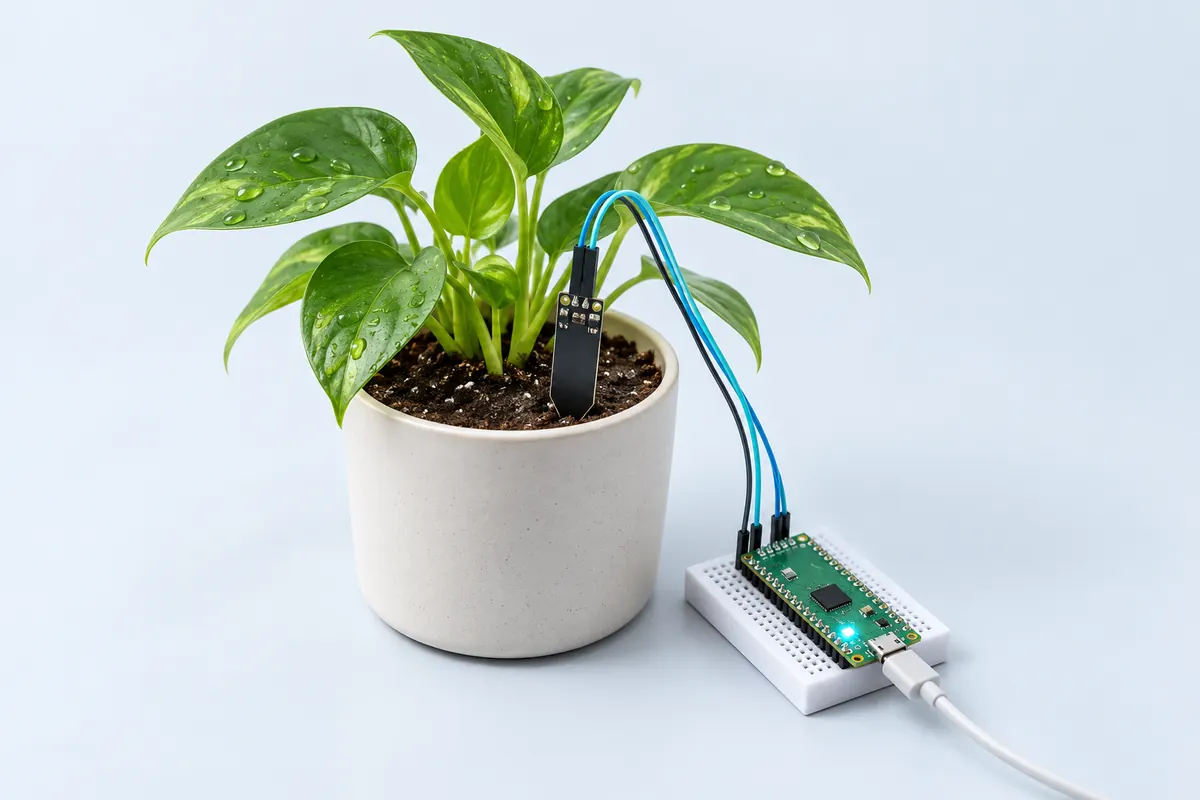
पार्ट्स लिस्ट
| पार्ट | संख्या | लगभग | खरीदें |
|---|---|---|---|
| Raspberry Pi Pico W | 1 | ₹620 | खरीदें Raspberry Pi Pico W |
| Capacitive soil moisture sensor v1.2 | 1 | ₹90 | खरीदें Capacitive soil moisture sensor v1.2 |
| Jumper wires + USB cable | 1 | ₹40 | खरीदें Jumper wires + USB cable |
| कुल | ₹750 |
एफ़िलिएट सूचना: “खरीदें” लिंक से FlashReady को बिना अतिरिक्त लागत के छोटा कमीशन मिल सकता है। कीमतें अनुमानित हैं।
वायरिंग
| Raspberry Pi Pico W | Capacitive soil moisture sensor v1.2 | Wire | Notes |
|---|---|---|---|
| GND | GND | black | |
| 3V3 | VCC | red | 3.3 V से AOUT, ADC की रेंज के अंदर रहता है |
| GP26 | AOUT | green | ADC0, फ़िज़िकल पिन 31 |
बोर्ड की ख़ास बातें: प्रतिशत पर भरोसा करने से पहले कैलिब्रेट करें: सूखी हवा में मिली raw वैल्यू <code>DRY</code> में और पानी के गिलास में मिली वैल्यू <code>WET</code> में डालें। सेंसर को 3V3 से पावर दें, VBUS से नहीं — Pico के ADC पिनों पर 3.3 V से ज़्यादा नहीं आना चाहिए।
कोड
# Soil moisture monitor - Raspberry Pi Pico W (MicroPython).
# Capacitive sensor v1.2: VCC -> 3V3, GND -> GND, AOUT -> GP26 (ADC0).
# Calibrate DRY and WET with your own sensor: note the raw value in air and in a glass of water.
from machine import ADC, Pin, lightsleep
import time
import network
import json

DRY = 52000   # raw reading in dry air      <- calibrate
WET = 21000   # raw reading in water        <- calibrate
ALERT_BELOW = 30          # % - water the plant below this
CHECK_EVERY_MS = 10 * 60 * 1000

WIFI_SSID = "your-wifi"           # optional: leave as-is to skip phone alerts
WIFI_PASS = "your-password"
NTFY_TOPIC = "your-private-topic"  # https://ntfy.sh/<topic> - pick something unguessable

# The FlashReady flasher saves your settings to /settings.json; they win over the lines above.
try:
    with open("/settings.json") as f:
        _s = json.load(f)
except (OSError, ValueError):
    _s = {}
WIFI_SSID = _s.get("wifi_ssid") or WIFI_SSID
WIFI_PASS = _s.get("wifi_pass") or WIFI_PASS
NTFY_TOPIC = _s.get("ntfy_topic") or NTFY_TOPIC
ALERTS = WIFI_SSID != "your-wifi" and NTFY_TOPIC != "your-private-topic"
if not ALERTS:
    print("Phone alerts off - no Wi-Fi name or ntfy topic set. Flash from flashready.in or type them into main.py.")

sensor = ADC(26)
led = Pin("LED", Pin.OUT)


def moisture_percent():
    raw = sum(sensor.read_u16() for _ in range(8)) // 8  # average out noise
    pct = (DRY - raw) * 100 // (DRY - WET)
    return max(0, min(100, pct)), raw


def notify(message):
    if not ALERTS:
        return
    wlan = network.WLAN(network.STA_IF)
    wlan.active(True)
    wlan.connect(WIFI_SSID, WIFI_PASS)
    for _ in range(20):
        if wlan.isconnected():
            break
        time.sleep(0.5)
    if wlan.isconnected():
        try:
            import requests
        except ImportError:
            import urequests as requests
        try:
            requests.post("https://ntfy.sh/" + NTFY_TOPIC, data=message).close()
        except OSError as e:
            print("ntfy failed:", e)
    wlan.active(False)  # radio off again to save power


while True:
    pct, raw = moisture_percent()
    print("Moisture {}% (raw {})".format(pct, raw))
    if pct < ALERT_BELOW:
        led.on()
        notify("Plant needs water: soil moisture {}%".format(pct))
    else:
        led.off()
    lightsleep(CHECK_EVERY_MS)
# Soil moisture monitor - Raspberry Pi Pico W (MicroPython).
# Capacitive sensor v1.2: VCC -> 3V3, GND -> GND, AOUT -> GP26 (ADC0).
# Calibrate DRY and WET with your own sensor: note the raw value in air and in a glass of water.
from machine import ADC, Pin, lightsleep
import time
import network
import json
DRY = 52000 # raw reading in dry air <- calibrate
WET = 21000 # raw reading in water <- calibrate
ALERT_BELOW = 30 # % - water the plant below this
CHECK_EVERY_MS = 10 * 60 * 1000
WIFI_SSID = "your-wifi" # optional: leave as-is to skip phone alerts
WIFI_PASS = "your-password"
NTFY_TOPIC = "your-private-topic" # https://ntfy.sh/<topic> - pick something unguessable
# The FlashReady flasher saves your settings to /settings.json; they win over the lines above.
try:
with open("/settings.json") as f:
_s = json.load(f)
except (OSError, ValueError):
_s = {}
WIFI_SSID = _s.get("wifi_ssid") or WIFI_SSID
WIFI_PASS = _s.get("wifi_pass") or WIFI_PASS
NTFY_TOPIC = _s.get("ntfy_topic") or NTFY_TOPIC
ALERTS = WIFI_SSID != "your-wifi" and NTFY_TOPIC != "your-private-topic"
if not ALERTS:
print("Phone alerts off - no Wi-Fi name or ntfy topic set. Flash from flashready.in or type them into main.py.")
sensor = ADC(26)
led = Pin("LED", Pin.OUT)
def moisture_percent():
raw = sum(sensor.read_u16() for _ in range(8)) // 8 # average out noise
pct = (DRY - raw) * 100 // (DRY - WET)
return max(0, min(100, pct)), raw
def notify(message):
if not ALERTS:
return
wlan = network.WLAN(network.STA_IF)
wlan.active(True)
wlan.connect(WIFI_SSID, WIFI_PASS)
for _ in range(20):
if wlan.isconnected():
break
time.sleep(0.5)
if wlan.isconnected():
try:
import requests
except ImportError:
import urequests as requests
try:
requests.post("https://ntfy.sh/" + NTFY_TOPIC, data=message).close()
except OSError as e:
print("ntfy failed:", e)
wlan.active(False) # radio off again to save power
while True:
pct, raw = moisture_percent()
print("Moisture {}% (raw {})".format(pct, raw))
if pct < ALERT_BELOW:
led.on()
notify("Plant needs water: soil moisture {}%".format(pct))
else:
led.off()
lightsleep(CHECK_EVERY_MS)Compiled for picow on micropython (mpy-cross v1.29.0) · 3 Nov 2026
यह कैसे काम करता है
मिट्टी जितनी गीली होती है, capacitive सेंसर का आउटपुट वोल्टेज उतना कम होता है। Pico W, ADC0 से आठ रीडिंग का औसत लेता है, उसे आपकी सूखी (dry) और गीली (wet) कैलिब्रेशन वैल्यू के बीच मैप करता है, और प्रतिशत प्रिंट करता है।
30 % से नीचे यह बोर्ड की LED जलाता है और — अगर आपने Wi-Fi डिटेल भरी है — ntfy.sh के ज़रिए नोटिफ़िकेशन भेजता है। यह एक मुफ़्त push सर्विस है जिसे आप उसके फ़ोन ऐप से subscribe कर सकते हैं। topic का नाम लंबा और ऐसा रखें जिसे कोई अंदाज़ा न लगा सके: जिसे भी यह नाम पता होगा, वह आपके मैसेज पढ़ सकता है।
जाँचों के बीच Pico, lightsleep() से sleep करता है और Wi-Fi रेडियो बंद रहता है, जिससे लगातार चलने वाले loop के मुक़ाबले काफ़ी बिजली बचती है।
समस्या समाधान
प्रतिशत 0 या 100 के पास अटका रहता है
DRY/WET वैल्यू आपके सेंसर से मेल नहीं खातीं। raw वैल्यू प्रिंट करें और दोबारा कैलिब्रेट करें।
फ़ोन पर नोटिफ़िकेशन नहीं आता
इस पेज के फ़्लैशर में अपनी Wi-Fi डिटेल और ntfy topic डालें (ये Pico पर ही सेव होते हैं, हमें नहीं भेजे जाते) — या उन्हें main.py में लिख दें — और ntfy ऐप में वही topic subscribe करें। Pico W सिर्फ़ 2.4 GHz नेटवर्क से जुड़ता है।
कुछ हफ़्तों बाद रीडिंग खिसकने लगती है
सेंसर के कटे किनारों में नमी घुस रही है। उन्हें नेल पॉलिश या conformal coating से सील कर दें।
आगे क्या करें
- अपने-आप पानी देने के लिए MOSFET मॉड्यूल के ज़रिए एक छोटा 5 V पंप जोड़ें।
- हर घंटे एक बार रीडिंग Google Sheet में लॉग करें।
- बिना तार वाले प्लांटर के लिए दो AA सेल को (Schottky डायोड के ज़रिए) VSYS पर लगाकर चलाएँ।